
Bluenin T30
Bluenin T30 чыныгы зымсыз кулакчындарды колдонуучунун колдонмосу
Модел: T30
Introduction
Thank you for choosing the Bluenin T30 True Wireless Earbuds. These earbuds are designed to provide a superior audio experience with advanced features such as Bluetooth 5.0 connectivity, CVC8.0 noise-canceling microphone, and IPX7 waterproofing, making them ideal for various activities including sports and travel. This manual will guide you through the setup, operation, and maintenance of your new earbuds.
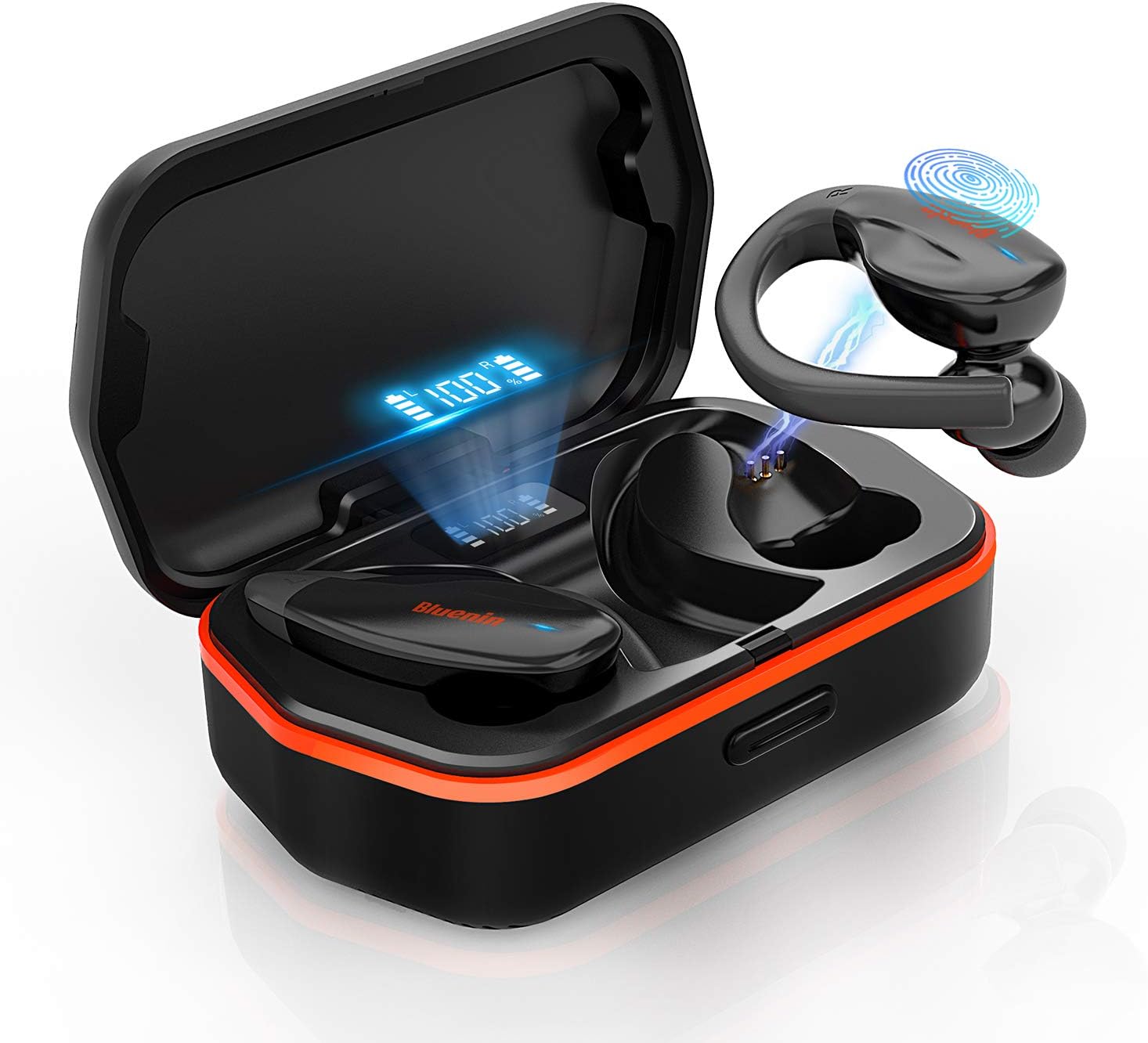
Image: The Bluenin T30 True Wireless Earbuds, showcasing their design and the charging case with a digital battery display.
Жайгашуу
Кутудан чыгаруу жана баштапкы төлөм
Upon receiving your Bluenin T30 earbuds, carefully open the packaging. Inside, you will find the earbuds, the charging case, and a USB charging cable. It is recommended to fully charge the earbuds and the charging case before first use.
Кулакчын тагынуу
The Bluenin T30 earbuds feature an ergonomic anti-fall earhook design for a secure and comfortable fit, especially during active use. Gently insert the eartips into your ears and adjust the earhook to rest comfortably around your ear.

Image: A person demonstrating the secure and comfortable fit of the Bluenin T30 earbuds with their ergonomic anti-fall earhook design.
Бир кадам жупташтыруу
The T30 earbuds utilize Bluetooth 5.0 technology for stable and fast connections. To pair them with your device:
- Түзмөгүңүздүн Bluetooth күйгүзүлгөнүн текшериңиз.
- Эки гарнитураны тең заряддоо кутусунан чыгарыңыз. Алар автоматтык түрдө күйүп, жупташтыруу режимине кирет.
- On your device, search for Bluetooth devices and select "Bluenin T30" from the list.
- Туташтырылгандан кийин, сиз ырастоо сурамын угасыз жана кулакчындар колдонууга даяр болот.

Image: A visual representation of the one-step pairing process, showing the earbuds connecting to a smartphone via Bluetooth.
Иштеп жатат
Touch Controls
The Bluenin T30 earbuds feature sensitive touch controls for easy management of your audio and calls. The touch sensitive area is located on the outer surface of each earbud.
| Акция | Control |
|---|---|
| Көлөм +/- | Specific touch gesture (refer to quick start guide for exact gesture) |
| Ойнотуу / Тыныгуу | Кулакчындарды бир жолу таптаңыз |
| Кийинки / Мурунку трек | Double tap (right for next, left for previous) |
| Чалууга жооп берүү / четке кагуу | Single tap to answer, long press to reject |
| Кубатты күйгүзүү / өчүрүү | Long press or place in/remove from case |

Image: An illustration detailing the various touch control functions available on the Bluenin T30 earbuds for media and call management.
Аудио сапаты жана ызы-чууну жокко чыгаруу
The T30 earbuds deliver premium HiFi sound with deep bass and crystal clear treble. They are equipped with CVC 8.0 Noise Cancellation technology, which helps to reduce ambient noise for clearer calls and a more immersive listening experience.

Image: Highlighting the premium HiFi sound, Bluetooth 5.0, and CVC 8.0 Noise Cancellation features of the Bluenin T30 earbuds.
Техникалык тейлөө
Кулакчындарды жана кутуну кубаттоо
The Bluenin T30 earbuds offer a long-lasting playtime of up to 6 hours on a single charge, with the charging case providing an additional 23 recharges, totaling up to 136 hours of playtime. The charging case also functions as a backup power bank for your personal devices.
- To charge the earbuds, place them back into the charging case. The digital display on the case will show their charging status.
- To charge the case, connect it to a power source using the provided USB cable. The display will indicate the case's battery level.

Image: The Bluenin T30 charging case acting as a power bank, illustrating its long-lasting playtime capabilities and ability to charge other devices.
Сууга туруктуулук (IPX7)
The T30 earbuds are IPX7 waterproof, meaning they are resistant to sweat, water, and rain. This makes them suitable for workouts and outdoor activities. While they can withstand splashes and brief immersion, they are not designed for swimming or prolonged submersion.
- After exposure to sweat or water, ensure the earbuds are dry before placing them back into the charging case to prevent damage to the charging contacts.
- Clean the earbuds regularly with a soft, dry cloth to remove any earwax or debris.

Image: The Bluenin T30 earbuds submerged in water, illustrating their IPX7 waterproof rating, making them resistant to sweat, water, and rain.
Проблемаларды чечүү
Жалпы маселелер жана чечимдер
- Кулакчындар жупташкан жок: Ensure both earbuds are out of the case and fully charged. Turn off and on your device's Bluetooth. If issues persist, try forgetting the device in your Bluetooth settings and re-pairing.
- Бир гана кулакчын иштейт: Эки гарнитураны тең заряддоо кутусуна салып, капкагын жаап, бир нече секунд күтө туруңуз, анан кайра чыгарыңыз. Бул көп учурда аларды кайра шайкештештирет.
- Үн жок: Түзмөгүңүздөгү жана кулакчындардын үнүнүн деңгээлин текшериңиз. Кулакчындар түзмөгүңүзгө туура туташтырылганын текшериңиз.
- Заряддоо маселелери: Clean the charging contacts on both the earbuds and inside the case with a dry cotton swab. Ensure the charging cable is securely connected and the power source is active.
- Үн сапаты начар: Ensure the earbuds are securely fitted in your ears. Check for any debris blocking the speaker mesh. Move closer to your connected device to avoid interference.
Техникалык шарттар
| Өзгөчөлүк | Деталь |
|---|---|
| Модель аты | T30 |
| Бренд | Bluenin |
| Байланыш технологиясы | Зымсыз (Bluetooth 5.0) |
| Форма фактору | Кулак менен кулакка |
| Noise Control | CVC 8.0 ызы-чууну жокко чыгаруу |
| Сууга туруктуулук деңгээли | IPX7 суу өткөрбөйт |
| Башкаруу ыкмасы | тийүү |
| Батареянын иштөө мөөнөтү (наушник) | 6 саатка чейин |
| Жалпы ойноо убактысы (Кеп менен) | 136 саатка чейин |
| Заряддоо кутусунун функциясы | Backup Power Bank |
| Материал | Силикон |
| Продукциянын өлчөмдөрү | 4.72 x 2.36 x 1.97 дюйм |
| Элемент Салмагы | 8.8 унция |
Кепилдик жана колдоо
Bluenin products are designed for reliability and performance. For warranty information, technical support, or service inquiries, please refer to the contact details provided in your product packaging or visit the official Bluenin webсайт. Кепилдик дооматтары үчүн сатып алганыңыздын далилин сактап коюңуз.
Кошумча жардам алуу үчүн, сиз продукт сатылып алынган платформа аркылуу түздөн-түз сатуучу менен байланышсаңыз болот.
Ask a question about this manual
Ask about setup, troubleshooting, compatibility, parts, safety, or missing instructions. Manuals+ will review the question and use this page’s manual context to help answer it.