
Introduction
This manual provides detailed instructions for the setup, operation, and maintenance of your AcuRite Iris 5-in-1 Wireless Weather Station (Model 01536M) and the AcuRite Iris 06003 PRO+ Upgrade for 5-in-1 Weather Sensor (Model 06003M). Please read this manual thoroughly before installation and use to ensure proper functionality and longevity of your devices.
Продукт бүттүview
AcuRite Iris 5-in-1 Wireless Weather Station (Model 01536M)
The AcuRite Iris 5-in-1 Wireless Weather Station provides comprehensive environmental monitoring. It accurately measures indoor and outdoor temperature, humidity, rainfall, wind speed, and wind direction. The system includes a color display unit with a weather ticker for real-time information and connectivity to the My AcuRite app for remote monitoring via smartphone, tablet, or computer. A USB port allows for data storage, tracking, and analysis, with options to share data with communities like Weather Underground.
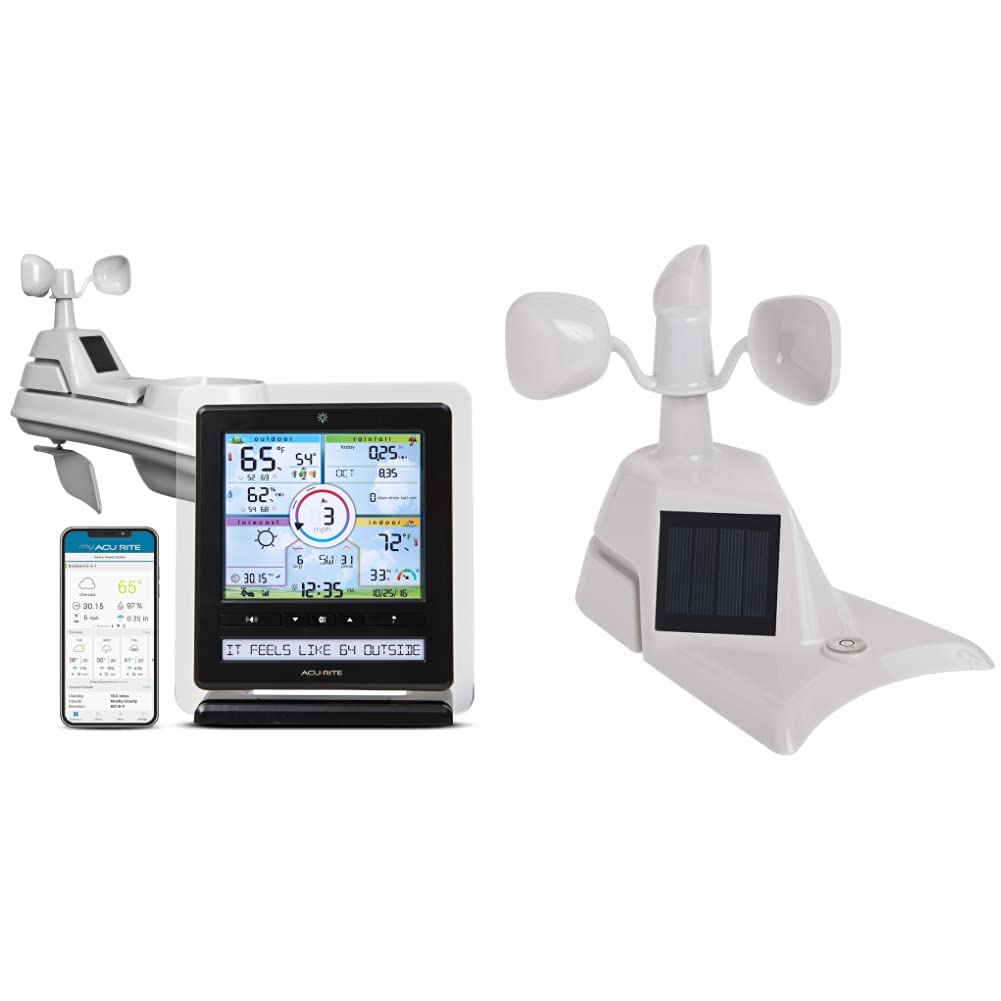
Image: The AcuRite Iris 5-in-1 Wireless Weather Station, showing the outdoor sensor, indoor color display, and the My AcuRite mobile application interface.

Image: Key features of the AcuRite Iris 5-in-1 Weather Station, including indoor/outdoor temperature and humidity, wind speed/direction/rainfall monitoring, visual readouts, and a real-time weather ticker, alongside the mobile app.

Image: The AcuRite Iris 5-in-1 Weather Station display, highlighting its ability to accurately measure indoor and outdoor temperature and humidity, monitor wind speed, direction, and rainfall, provide a visual readout of current weather conditions, and offer a real-time weather ticker.

Image: A close-up of the AcuRite Iris 5-in-1 Weather Station display, illustrating its presentation of weather, humidity, and wind information with trend indicators, barometer readings, future forecasts, and the current date and time.
AcuRite Iris 06003 PRO+ Upgrade for 5-in-1 Weather Sensor (Model 06003M)
The PRO+ Upgrade is designed to enhance the performance of your existing AcuRite 5-in-1 weather sensor. It features dual solar panels to maximize sun exposure and power a solar-powered aspirating fan. This fan improves internal airflow within the sensor, leading to more accurate ambient temperature readings throughout the day. The upgrade is a replacement assembly for the standard solar panel component of the 5-in-1 sensor.

Сүрөт: Жогорку view of the AcuRite 06003 PRO+ Upgrade for the 5-in-1 Weather Sensor, showing the dual solar panels and wind cups.

Сүрөт: каптал view of the AcuRite 06003 PRO+ Upgrade for the 5-in-1 Weather Sensor, highlighting the solar panel and overall design.

Сүрөт: Ички view of the AcuRite 06003 PRO+ Upgrade for the 5-in-1 Weather Sensor, showing the aspirating fan component designed to improve temperature accuracy.
Пакеттин мазмуну
AcuRite Iris 5-in-1 Wireless Weather Station (01536M)
- 5-бирде сырткы сенсор
- Color Display Unit
- Дисплей блогу үчүн кубат адаптери
- Mounting Hardware for Sensor
- Көрсөтмө (бул документ)
AcuRite Iris 06003 PRO+ Upgrade (06003M)
- PRO+ Upgrade Assembly (with dual solar panels and aspirating fan)
- Installation Guide for PRO+ Upgrade
Жайгашуу
1. Install Batteries in 5-in-1 Sensor
- Батарея бөлүмүн 5-in-1 сенсорунун астыңкы бетинен табыңыз.
- Батарея уясынын капкагын алып салыңыз.
- Insert 4 AA alkaline or lithium batteries (not included) according to the polarity markings. Литий батареялары -4°F (-20°C) төмөн температуралар үчүн сунушталат.
- Батарея бөлүкчөсүнүн капкагын бекем орнотуңуз.
2. Install the 5-in-1 Sensor
Proper placement of the 5-in-1 sensor is crucial for accurate readings.
- Жайгашкан жери: Choose an open location at least 5 feet (1.5 meters) off the ground, away from heat sources (e.g., exhaust vents, engines) and reflective surfaces (e.g., large windows, concrete). Ensure clear access to wind and rain.
- Монтаждоо: Use the included mounting hardware to secure the sensor to a post or pole. Ensure the sensor is level for accurate rain collection. The wind cups should be able to spin freely.
3. Install the PRO+ Upgrade (06003M)
This section applies if you are upgrading your existing 5-in-1 sensor with the PRO+ assembly.
- Керектүү куралдар: Чакан Phillips баш бурагыч.
- Remove Existing Assembly: Carefully detach the existing solar panel and fan assembly from your 5-in-1 sensor. This usually involves unscrewing a few small screws. Refer to the PRO+ Upgrade Installation Guide for specific steps.
- Install PRO+ Assembly: Align the PRO+ Upgrade assembly with the mounting points on your 5-in-1 sensor. Secure it in place using the screws. Ensure the aspirating fan is correctly positioned and can rotate freely.
4. Setup the Color Display Unit
- Күйгүзүү: Plug the power adapter into the display unit and then into a standard electrical outlet.
- Баштапкы конфигурация: The display will power on. Follow the on-screen prompts to set the time, date, and measurement units (Fahrenheit/Celsius, mph/kmh, etc.).
- Сенсор туташуу: The display unit will automatically search for and connect to your 5-in-1 sensor. This may take a few minutes. Once connected, outdoor readings will appear on the display.
- My AcuRite App (Optional): Download the My AcuRite app from your device's app store. Follow the in-app instructions to create an account and connect your display unit for remote monitoring. You will need your display unit's Device ID, typically found on a sticker on the back or bottom of the unit.
Операция
Color Display Unit Features
The color display unit provides a wealth of information at a glance:
- Outdoor Conditions: Current temperature, humidity, wind speed, wind direction, and rainfall.
- Үйдүн ичиндеги шарттар: Current indoor temperature and humidity.
- Аба ырайы: A 12 to 24-hour weather forecast based on barometric pressure changes.
- Аба ырайынын көрсөткүчү: Scrolls through real-time weather information and alerts.
- Тарыхый дата: View daily, weekly, or monthly highs and lows for various measurements.
- Ойготкучтар: Set customizable alarms for specific weather conditions (e.g., high wind, low temperature).
My AcuRite App
The My AcuRite app extends the functionality of your weather station:
- Алыстан байкоо: View your weather data from anywhere using your smartphone or tablet.
- Custom Alerts: Receive push notifications or email alerts when conditions exceed your preset ranges.
- Маалыматтар тарыхы: Access detailed historical data and charts.
- Бөлүшүү: Share your weather data with friends, family, or online weather communities like Weather Underground.
USB портунун функциялары
The display unit includes a USB port for connecting to a computer. This allows you to:
- Store and archive weather data.
- Analyze long-term weather trends.
- Export data for use in other applications.
Техникалык тейлөө
5-бирде сенсорду тазалоо
Periodically clean the sensor to ensure accurate readings:
- Жамгыр жыйноочу: Remove any debris (leaves, insects) from the rain collector funnel.
- Wind Cups/Vane: Ensure the wind cups and wind vane rotate freely. Clean any obstructions.
- Сырткы: Жарнама менен сыртын сүртүңүзamp кездеме. Абразивдүү тазалагычтардан алыс болуңуз.
Батареяны алмаштыруу
Replace batteries in the 5-in-1 sensor approximately every 12-24 months, or when the low battery indicator appears on the display unit. Always replace all batteries at once with fresh ones.
Кайра калибрлөө
If you suspect inaccurate readings, refer to the AcuRite support website for instructions on recalibrating specific sensors (e.g., rain gauge, temperature offset).
Проблемаларды чечүү
| Көйгөй | Мүмкүн чечим |
|---|---|
| Тышкы маалыматтар көрсөтүлбөйт |
|
| Туура эмес температура/нымдуулук |
|
| Жаан-чачындын так эмес көлөмү |
|
| Шамалдын ылдамдыгы/багыты так эмес |
|
| My AcuRite app not connecting |
|
Техникалык шарттар
- Бренд: AcuRite
- Моделдер: 01536M (Weather Station), 06003M (PRO+ Upgrade)
- Power Source (5-in-1 Sensor): 4 x AA batteries (not included), Solar Powered (for internal fan/aspirator)
- Power Source (Display Unit): AC кубат адаптери
- Байланыш технологиясы: Wireless (sensor to display), USB Port (display to PC), Wi-Fi (for My AcuRite app, if applicable)
- Температуранын тактыгы: ±1°C (±2°F)
- Дисплей түрү: Түстүү дисплей
- Sensor Technology (PRO+ Upgrade): Aspirating Fan, Dual Solar Panels
- Зымсыз диапазон: 330 фут (100 метр) чейин
Кепилдик жана колдоо
Чектелген Кепилдик
Your AcuRite Iris 5-in-1 Wireless Weather Station and PRO+ Upgrade are covered by a one-year limited warranty from the date of purchase. This warranty covers defects in materials and workmanship. For full warranty details, please refer to the official AcuRite webсайтка же кардарларды колдоо менен байланышыңыз.
Кардарларды колдоо
For technical assistance, troubleshooting, or warranty claims, please visit the official AcuRite support website or contact their customer service department. Contact information can typically be found on the AcuRite webсайтында же баштапкы продукт таңгагында.