
1. Киришүү
The Autopilot APCET2 is a versatile temperature controller designed for both cooling and heating applications. It features automatic day and night set points, detected by a built-in photocell, allowing for precise temperature management. Easy-to-use knobs facilitate setting adjustments, and a Memory-lock feature ensures consistent performance by preventing accidental changes to set points.
Негизги өзгөчөлүктөрү:
- Controls heating or cooling equipment with both day/night set points.
- Includes a 20-foot remote precision temperature sensor.
- Temperature control differential of +/- 3°F.
- Built-in photocell for automatic day/night detection.
- Temperature control range: 50°F–100°F (10°C–38°C).
- Electric power source.
2. Коопсуздук маалыматы
Сураныч, бул аппаратты иштетүүдөн мурун бардык коопсуздук нускамаларын окуп, түшүнүңүз. Бул нускамаларды аткарбоо электр шокуна, өрткө же олуттуу жаракатка алып келиши мүмкүн.
- Үй ичинде гана колдонуу: This device is intended for indoor use in dry locations. Do not expose to water or high humidity.
- Электрдик рейтинг: Ensure the connected device's electrical rating does not exceed the thermostat's maximum load (1800 watts, 15 amps at 120V AC).
- Туура Жерге салуу: Always plug the thermostat into a properly grounded 3-prong outlet.
- Ашыкча жүктөөдөн качыңыз: Do not plug multiple high-power devices into the thermostat using a power strip or adapter.
- Сенсордун жайгашуусу: Position the temperature sensor away from direct heat sources, cold drafts, or direct sunlight to ensure accurate readings.
- Тазалоо: Disconnect power before cleaning. Use a dry cloth; do not use liquid cleaners.
- Балдар жана үй жаныбарлары: Аппаратты балдар жана үй жаныбарлары жетпеген жерде сактаңыз.
3. Продукт бүтүп калдыview
The Autopilot APCET2 thermostat features a user-friendly design with clearly labeled controls and indicators.
Фронт View:
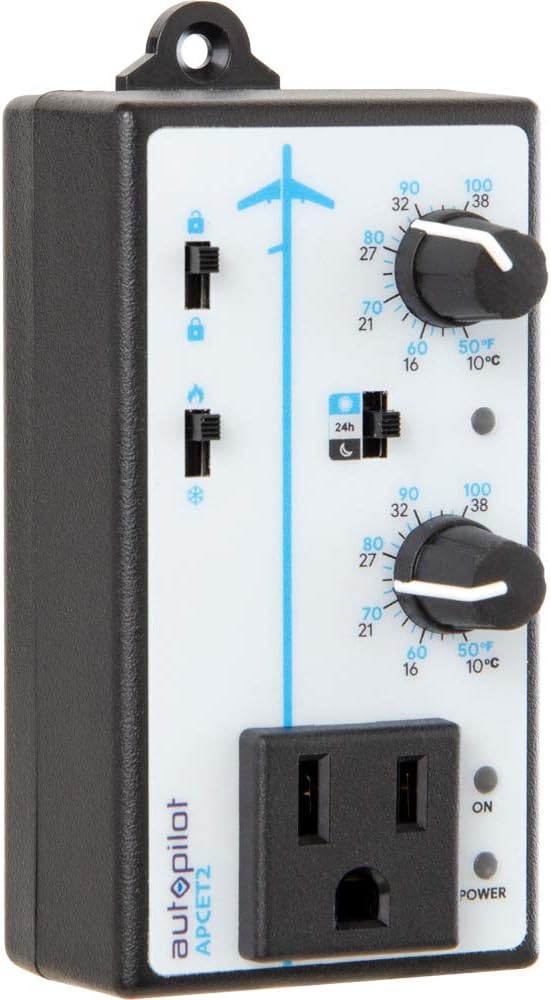
3.1-сүрөт: Фронт view of the Autopilot APCET2 thermostat. This image displays the main control panel, including the two temperature setting knobs, the day/night mode switch, the heating/cooling mode switch, and the integrated power outlet for connecting your device. The "ON" and "POWER" indicator lights are also visible.
- Day/Night Temperature Knobs: Two separate knobs for setting desired temperatures for day and night cycles.
- Day/Night Mode Switch: Toggles between 24-hour operation or automatic day/night detection via photocell.
- Heating/Cooling Mode Switch: Selects whether the thermostat controls a heating or cooling device.
- Интегралдык розетка: Where the controlled device is plugged in.
- Кубаттуулук көрсөткүчү: Illuminates when the unit is receiving power.
- Output Indicator Light: Illuminates when power is being supplied to the connected device.
Артка View:

3.2-сүрөт: Артка view of the Autopilot APCET2 thermostat. This image shows the standard 3-prong power plug for connecting the thermostat to a wall outlet, along with the screws for potential wall mounting.
- Электр сайгычы: Standard 3-prong plug for connecting to a 120V AC wall outlet.
- Монтаждык тешиктер: For optional wall mounting.
Өлчөмдөрү:
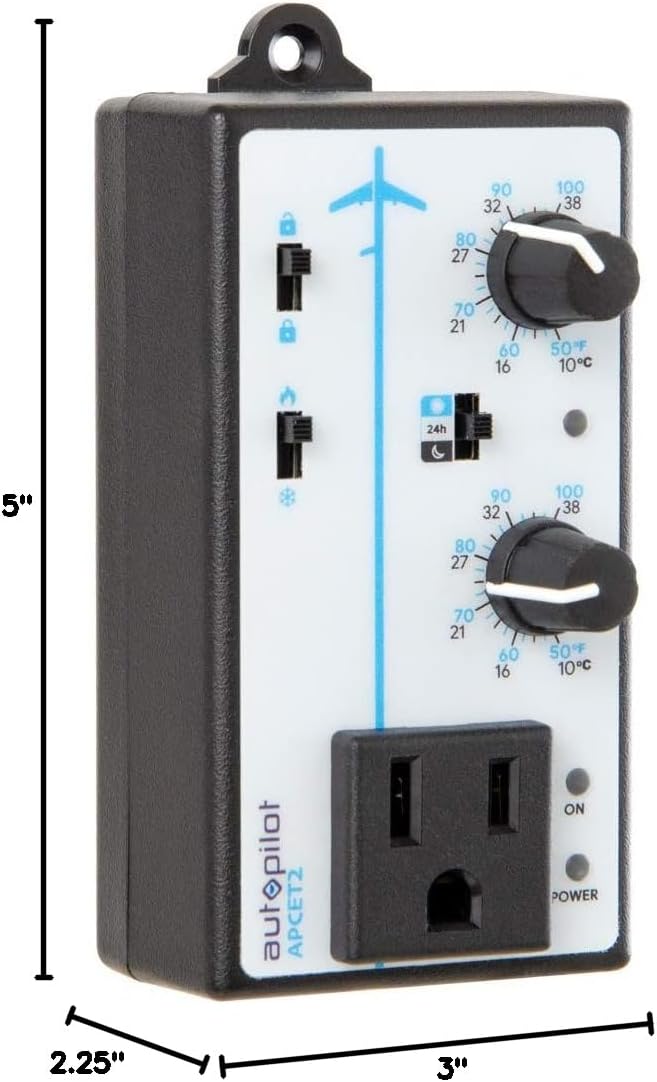
3.3-сүрөт: Dimensions of the Autopilot APCET2 thermostat. The image indicates the device measures approximately 3 inches deep, 2.25 inches wide, and 5 inches high.
4. Орнотуу нускамалары
- Аппаратты таңгактан чыгаруу: Carefully remove the Autopilot APCET2 thermostat and its components from the packaging.
- Connect the Temperature Sensor: Plug the 20-foot remote precision temperature sensor into the designated port on the side of the thermostat. Ensure a secure connection.
- Сенсорду жайгаштырыңыз: Place the temperature sensor in the area where you want to monitor and control the temperature. Avoid placing it in direct sunlight, near heat sources, or in drafts, as this can affect accuracy.
- Plug in the Thermostat: Insert the 3-prong plug of the Autopilot APCET2 thermostat into a standard 120V AC grounded wall outlet. The Power indicator light should illuminate.
- Түзмөгүңүздү туташтыруу: Plug the heating or cooling device you wish to control into the integrated power outlet on the front of the thermostat.
- Алгачкы текшерүү: Ensure all connections are secure before proceeding to operation.
5. Иштөө нускамалары
The Autopilot APCET2 offers flexible temperature control with day and night settings and heating/cooling modes.
5.1 Selecting Operating Mode (Heating or Cooling)
- табыңыз Heating/Cooling Mode Switch on the front panel (typically marked with flame and snowflake icons).
- Которгучту төмөнкүгө жылдырыңыз жалын сөлөкөтү үчүн Жылытуу режими. In this mode, the connected device will turn ON when the temperature drops below the set point and turn OFF when it rises above the set point (considering the +/- 3°F differential).
- Которгучту төмөнкүгө жылдырыңыз снежинка сөлөкөтү үчүн Муздатуу режими. In this mode, the connected device will turn ON when the temperature rises above the set point and turn OFF when it drops below the set point (considering the +/- 3°F differential).
5.2 Setting Day and Night Temperatures
The thermostat allows for distinct day and night temperature settings.
- Day Temperature Setting: колдонуу жогорку туткасы (associated with the sun icon) to set your desired daytime temperature. Rotate the knob clockwise to increase the temperature and counter-clockwise to decrease it. The range is 50°F–100°F (10°C–38°C).
- Night Temperature Setting: колдонуу төмөнкү тутка (associated with the moon icon) to set your desired nighttime temperature. Rotate the knob clockwise to increase the temperature and counter-clockwise to decrease it. The range is 50°F–100°F (10°C–38°C).
5.3 Day/Night Detection Mode
The thermostat can automatically switch between day and night settings using its built-in photocell.
- табыңыз Күндүзгү/түнкү режимдин которгучу (typically marked with a 24h icon and sun/moon icons).
- Которгучту төмөнкүгө жылдырыңыз sun/moon icon үчүн Автоматтык күн/түн аныктоо. The built-in photocell will detect ambient light levels and automatically switch between your set day and night temperatures.
- Которгучту төмөнкүгө жылдырыңыз 24h icon үчүн 24-Hour Operation. In this mode, the thermostat will continuously use the Day Temperature Setting, regardless of light conditions.
5.4 Memory-Lock Feature
The Memory-lock feature prevents accidental changes to your set points.
- үчүн кулпу the settings, slide the small switch next to the padlock icon to the кулпуланган абал. This will prevent the temperature knobs from being accidentally adjusted.
- үчүн кулпусун ачуу the settings, slide the switch to the ачылган позиция.
6. Техникалык тейлөө
Regular maintenance ensures optimal performance and longevity of your Autopilot APCET2 thermostat.
- Тазалоо: Disconnect the thermostat from the power outlet before cleaning. Use a soft, dry cloth to wipe the exterior. Do not use abrasive cleaners, solvents, or immerse the unit in water.
- Сенсорго кам көрүү: Keep the temperature sensor clean and free from dust or debris. Ensure the sensor cable is not pinched or damaged.
- Сактагыч: If storing the device for an extended period, disconnect it from power, clean it, and store it in a cool, dry place.
7. Кыйынчылыктарды
If you encounter issues with your Autopilot APCET2 thermostat, refer to the following common problems and solutions:
| Көйгөй | Мүмкүн себеп | Чечим |
|---|---|---|
| Device not turning ON/OFF at set temperature. | Incorrect mode selected (Heating/Cooling). Temperature differential not met. Thermostat not receiving power. Connected device is faulty or not powered. | Verify the Heating/Cooling switch is in the correct position. Allow for the +/- 3°F temperature differential. Check if the thermostat is securely plugged into a live outlet and the Power indicator is ON. Test the connected device by plugging it directly into a wall outlet. |
| Temperature settings cannot be adjusted. | Memory-lock feature is engaged. | Slide the Memory-lock switch to the unlocked position. |
| Day/Night mode not switching automatically. | Photocell mode not selected. Photocell is obstructed or in constant light/darkness. | Ensure the Day/Night Mode switch is set to the sun/moon icon. Check that the photocell (small sensor on the front) is not covered and is exposed to natural light changes. |
| Температураны туура эмес көрсөткүчтөр. | Temperature sensor improperly placed or damaged. | Relocate the sensor away from direct heat, cold drafts, or sunlight. Inspect the sensor and cable for damage. |
Бул чечимдерди колдонуу аракетинен кийин көйгөй чечилбесе, кардарларды колдоо кызматына кайрылыңыз.
8. Техникалык шарттар
| Бренд | Автопилот |
| Модель аты | Advanced Day & Night Cooling or Heating |
| Модель номери | APCET2 |
| Продукциянын өлчөмдөрү | 3"D x 2.25"W x 5"H |
| Controller Type | Knob & Push Button |
| Өзгөчө өзгөчөлүк | Lockable (Memory-lock) |
| Түс | Кара |
| Өзгөчө колдонуулар | Temperature Control in Grow Rooms, Controlling Heating and Cooling Equipment |
| Температураны көзөмөлдөө түрү | Программалануучу |
| Камтылган компоненттер | 20' remote precision temperature sensor |
| Power Source | Электр |
| Тtage | 120 вольт |
| Ватtage | 1800 ватт |
| Элемент Салмагы | 8.1 унция |
| Температураны көзөмөлдөө диапазону | 50°F–100°F (10°C–38°C) |
| Температура Дифференциал | +/- 3 ° F |
| Дисплей түрү | LCD |
| Арткы жарык | Ооба |
| Монтаж түрү | Дубалга орнотуу |
9. Кепилдик жана Кардарларды колдоо
For warranty information or technical assistance, please contact Autopilot customer support. Refer to the product packaging or the official Autopilot webакыркы байланыш маалыматы үчүн сайт.
When contacting support, please have your product model number (APCET2) and purchase information readily available.