
1. Продукт бүтүп калдыview
The Keychron C2 is a full-size 104-key wired mechanical keyboard designed for both Mac and Windows operating systems. It features an RGB backlight, Gateron G Pro Brown switches, and durable double-shot ABS keycaps, crafted to enhance productivity and provide a comfortable typing experience.
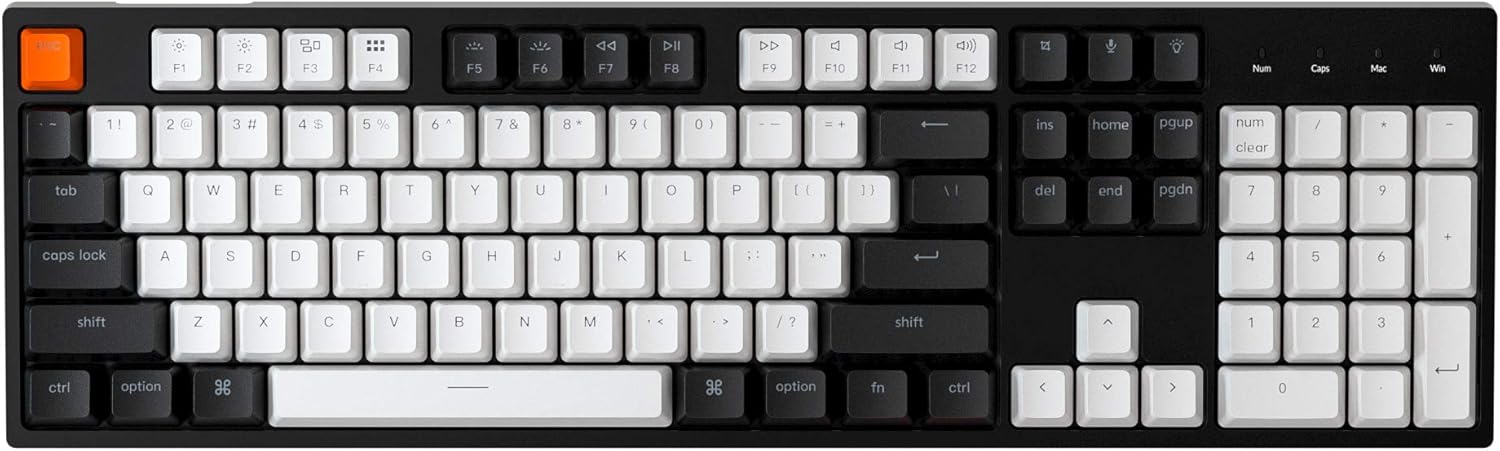
Figure 1.1: Keychron C2 Full Size Mechanical Keyboard
Негизги өзгөчөлүктөрү:
- Full Size 104 Keys: Includes a number pad for maximum productivity.
- Mac & Windows Layout: Optimized for Mac with multimedia and function keys, and compatible with Windows. Extra keycaps for both OS are included.
- Reliable USB Type-C Wired Connection: Ensures stable power supply and uninterrupted use.
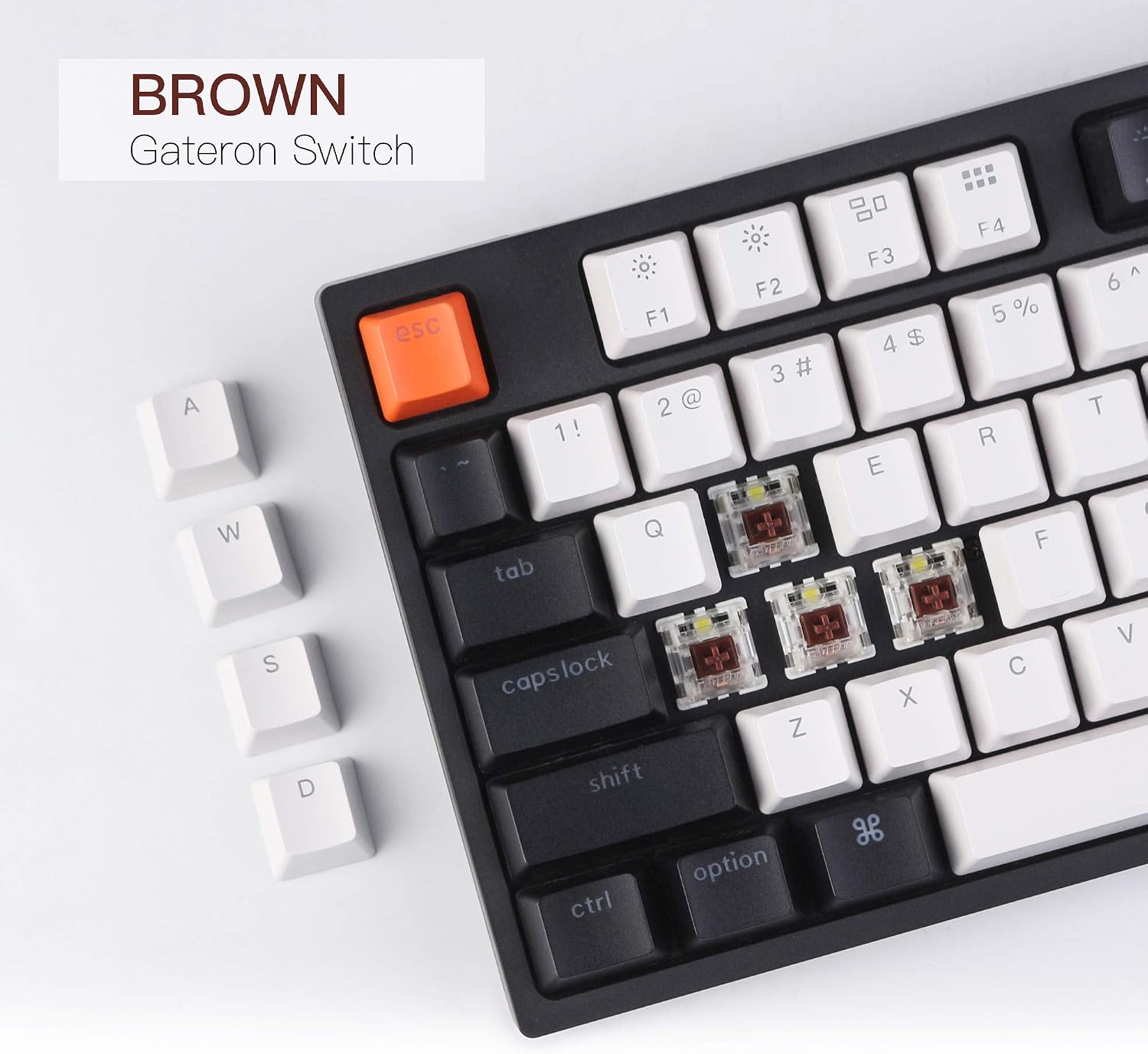
- Durable Gateron G Pro Brown Switches: Offers a tactile typing experience with a 50 million keystroke lifespan.
- Rich RGB Backlight: Features over 15 types of RGB backlight modes with through-legend illumination.
- Эки жолу басылуучу ABS баскычтоп капкактары: Designed for durability and clear backlight shine-through.
- Эргономикалык дизайн: Inclined bottom frame and 2-level adjustable feet provide a comfortable typing angle.
2. Кутуда эмне бар
Upon unboxing your Keychron C2 keyboard, please ensure all the following items are present:
- Keychron C2 Full Size Wired Mechanical Keyboard
- USB Type-C кабели
- Баскыч капкагын тарткыч
- Коммутаторду тартуучу (эгерде ысык алмаштырылуучу версиясы болсо)
- Extra Keycaps for Mac and Windows operating systems
- Колдонуучунун Колдонмосу (бул документ)
3. Орнотуу колдонмосу
3.1 Баскычтопту туташтыруу
- Баскычтоптун арткы бетиндеги USB Type-C портун табыңыз.
- Берилген USB Type-C кабелинин бир учун клавиатурага туташтырыңыз.
- USB Type-C кабелинин экинчи учун компьютериңиздеги жеткиликтүү USB портуна туташтырыңыз.
- Клавиатура сиздин операциялык системаңыз тарабынан автоматтык түрдө таанылат.

Figure 3.1: USB Type-C Wired Connection and OS Toggle Switch
3.2 Operating System (OS) Toggle Switch
The Keychron C2 features an OS toggle switch located on the back of the keyboard, next to the USB-C port. This switch allows you to seamlessly switch between Mac/iOS and Windows/Android modes to ensure proper key mapping and functionality.
- Slide the switch to the 'Mac/iOS' position for Apple devices.
- Slide the switch to the 'Win/Android' position for Windows or Android devices.

Figure 3.2: Keyboard compatibility with Mac and Windows systems
3.3 Баскычтоптун бурчун жөндөө
The keyboard is designed with an inclined bottom frame and two-level adjustable feet to provide a comfortable typing experience. You can adjust the feet to your preferred angle.
3.3-сүрөт: Баскычтоп тарабы view showing 9° inclined bottom frame
4. Иштөө нускамалары
4.1 Key Layout and Indicators
The C2 keyboard features a full 104-key layout with dedicated indicators for Num Lock and Caps Lock. It also includes specific key mappings for both Mac and Windows layouts, with extra keycaps provided for customization.

Figure 4.1: Num Lock, Caps Lock, Mac, and Windows Layout Indicators
4.2 RGB арткы жарыкты башкаруу
The Keychron C2 offers over 15 types of RGB backlight effects. You can cycle through these effects and adjust brightness directly from the keyboard.
- басыңыз Light Bulb key (usually F5 or a dedicated key) to cycle through different RGB lighting modes.
- Колдонуу Fn + F1/F2 (or dedicated brightness keys) to adjust backlight brightness.
- Some models may have additional key combinations for speed or color adjustments; refer to the quick start guide for specific shortcuts.

Figure 4.2: Keyboard with vibrant RGB backlight effects
4.3 Gateron G Pro Brown Switches and Double-Shot ABS Keycaps
The keyboard is equipped with Gateron G Pro Brown switches, known for their tactile feedback and durability. The keycaps are made using a double-shot injection molding process, ensuring legends do not fade and allowing the RGB backlight to shine through clearly.

Figure 4.3: Close-up of Gateron G Pro Brown Switches with keycaps removed

Figure 4.4: Detail of Double-Shot ABS Keycaps
4.4 Расмий продукт Video
Видео 4.1: Бүттүview of the Keychron RGB Mechanical Keyboard's features and design.
5. Техникалык тейлөө
5.1 Баскычтопту тазалоо
Оптималдуу иштешин жана көрүнүшүн сактоо үчүн клавиатураңызды дайыма тазалаңыз:
- Тазалоодон мурун клавиатураны компьютерден ажыратыңыз.
- Баскыч капкактарынын ортосундагы чаңды жана калдыктарды тазалоо үчүн кысылган аба банкасын колдонуңуз.
- Баскыч капкактарын жана клавиатуранын бетин жумшак, бир аз сүртүңүз damp, түксүз кездеме. Ашыкча нымдуулуктан сактаныңыз.
- Өжөр тактар үчүн, кездемеге сүйкөлгөн аз өлчөмдө изопропил спиртин колдонсо болот.
5.2 Keycap and Switch Replacement (if applicable)
The Keychron C2 comes with a keycap puller and, for hot-swappable versions, a switch puller. This allows for easy customization and maintenance of keycaps and switches.
- To remove keycaps: Баскыч капкактарын акырын түз өйдө тартуу үчүн клавиатура тарткычын колдонуңуз.
- Баскычтопторду алмаштыруу үчүн: Align the keycap with the switch stem and press down firmly until it clicks into place.
- To remove switches (hot-swappable models only): Use the switch puller to grip the top and bottom clips of the switch and pull it straight out.
- To install switches (hot-swappable models only): Align the pins of the new switch with the holes on the PCB and press down gently until it seats firmly. Ensure pins are not bent.
6. Кыйынчылыктарды
6.1 Баскычтоп жооп бербейт
- USB Type-C кабелинин клавиатурага жана компьютериңизге бекем туташтырылганын текшериңиз.
- Баскычтопту компьютериңиздин башка USB портуна туташтырууга аракет кылыңыз.
- Verify that the OS toggle switch on the back of the keyboard is set to the correct operating system (Mac/iOS or Win/Android).
- Компьютериңизди өчүрүп күйгүзүңүз.
6.2 Арткы жарык иштебей жатат же туура эмес
- Press the Light Bulb key to cycle through backlight modes and ensure it's not turned off.
- Adjust brightness using the designated function keys (e.g., Fn + F1/F2).
- Баскычтоп USB портунан жетиштүү кубат алып жатканын текшериңиз.
6.3 Function Keys (F1-F12) Not Working Correctly
- Ensure the OS toggle switch is set to the correct operating system.
- On some systems, you may need to press the 'Fn' key in combination with the function key to activate its secondary function (e.g., multimedia controls).
- For Linux users, specific system file edits might be required for full function key compatibility, as noted in some user experiences. Consult Linux community forums for detailed instructions if issues persist.
7. Техникалык шарттар
| Өзгөчөлүк | Деталь |
|---|---|
| Продукциянын өлчөмдөрү | 5.12 x 17.13 x 1.5 дюйм |
| Элемент Салмагы | 1.83 фунт |
| Өндүрүүчү | Keychron |
| Элемент моделинин номери | C2B3 |
| Бренд | Keychron |
| Шайкеш түзмөктөр | PC (Mac, Windows, Android, iOS) |
| Байланыш технологиясы | USB Type-C зымдуу |
| Keyboard Description | Механикалык |
| Сунушталган Колдонуулар | Gaming, Typing, Office, Home |
| Өзгөчө өзгөчөлүк | RGB Backlit, Adjustable Feet |
| Которуу түрү | Gateron G Pro Brown Switch |
| Ачкычтардын саны | 104 |
| Клавиатура материалы | Double-Shot ABS |
| Баскычтоптун арткы жарыгы | RGB (15+ modes) |
8. Кепилдик жана колдоо
Keychron products are designed for durability and performance. For information regarding warranty coverage, technical support, and frequently asked questions, please visit the official Keychron webсайтка же түздөн-түз кардарларды тейлөөгө кайрылыңыз.
Keep your purchase receipt or order number handy for any warranty claims.