
DSD TECH SH-BT04B
DSD TECH SH-BT04B 4 Channel Bluetooth Relay V2 User Manual
Model: SH-BT04B
1. Продукт бүтүп калдыview
The DSD TECH SH-BT04B is a second-generation 4-channel Bluetooth relay module designed for remote control applications. This version introduces enhanced features such as timer functions and security code authentication, providing greater control and security for your projects. It integrates a DSD TECH SH-HC-08 Bluetooth 4.0 BLE module, ensuring broad compatibility with modern mobile devices.
Негизги өзгөчөлүктөр төмөнкүлөрдү камтыйт:
- Built-in Bluetooth 4.0 BLE module for reliable wireless communication.
- Compatibility with iOS (iPhone, iPad) and Android 4.3+ devices.
- Four independent relay channels.
- Flexible power input: DC 5V or 12V.
- Ability to switch both DC (up to 30V) and AC (up to 250V) loads.
- Maximum load capacity of 600W per channel.
- New timer and security code functions for advanced control.

Сүрөт 1: Алдыңкы view of the DSD TECH SH-BT04B Bluetooth Relay Module.
2. Орнотуу жана орнотуу
2.1 Электр энергиясы
The SH-BT04B module can be powered by either a DC 5V or DC 12V source. Connect your power supply to the designated 5V or 12V input terminals on the module. Ensure correct polarity (+ and -) to prevent damage. Маанилүү коопсуздук эскертүүсү: Some units may have incorrect polarity markings on the enclosure. Always refer to the markings directly on the PCB (Printed Circuit Board) for accurate positive and negative connections to avoid damaging the device.
2.2 Wiring the Relays
The module features four independent relays, each with Normally Open (NO), Normally Closed (NC), and Common (COM) terminals. These terminals allow you to connect various electrical loads that you wish to control. The relay only outputs control signals and does not directly output power to the load.
- COM (жалпы): This is the common terminal for the relay switch.
- ЖОК (Негизде ачык): The circuit is open (disconnected) when the relay is de-energized and closes (connects) when the relay is energized.
- NC (Нормалдуу жабык): The circuit is closed (connected) when the relay is de-energized and opens (disconnects) when the relay is energized.
Connect your load circuit to the appropriate COM and NO/NC terminals based on your application's requirements. The maximum load per channel is 600W. Do not exceed this limit to prevent damage to the relay.

Figure 2: Detailed wiring diagram for the DSD TECH SH-BT04B, showing power input, external inputs (IN1-IN4), and relay output terminals (NC, COM, NO).
2.3 External Input Terminals
The module includes external input terminals (IN1, IN2, IN3, IN4, GND) which can be used for triggering relays. Refer to the detailed wiring diagram for connection points. If you encounter issues with external inputs, ensure correct voltage levels (5V high level) and proper grounding.
2.4 Колдонмону орнотуу
To control the SH-BT04B, you need to install the official DSD TECH Switch application on your mobile device.
- Android түзмөктөрү үчүн: Издөө "DSD TECH Switch" in the Google Play Store.
- For iOS devices (iPhone/iPad): Издөө "DSD TECH Switch" in the Apple App Store.
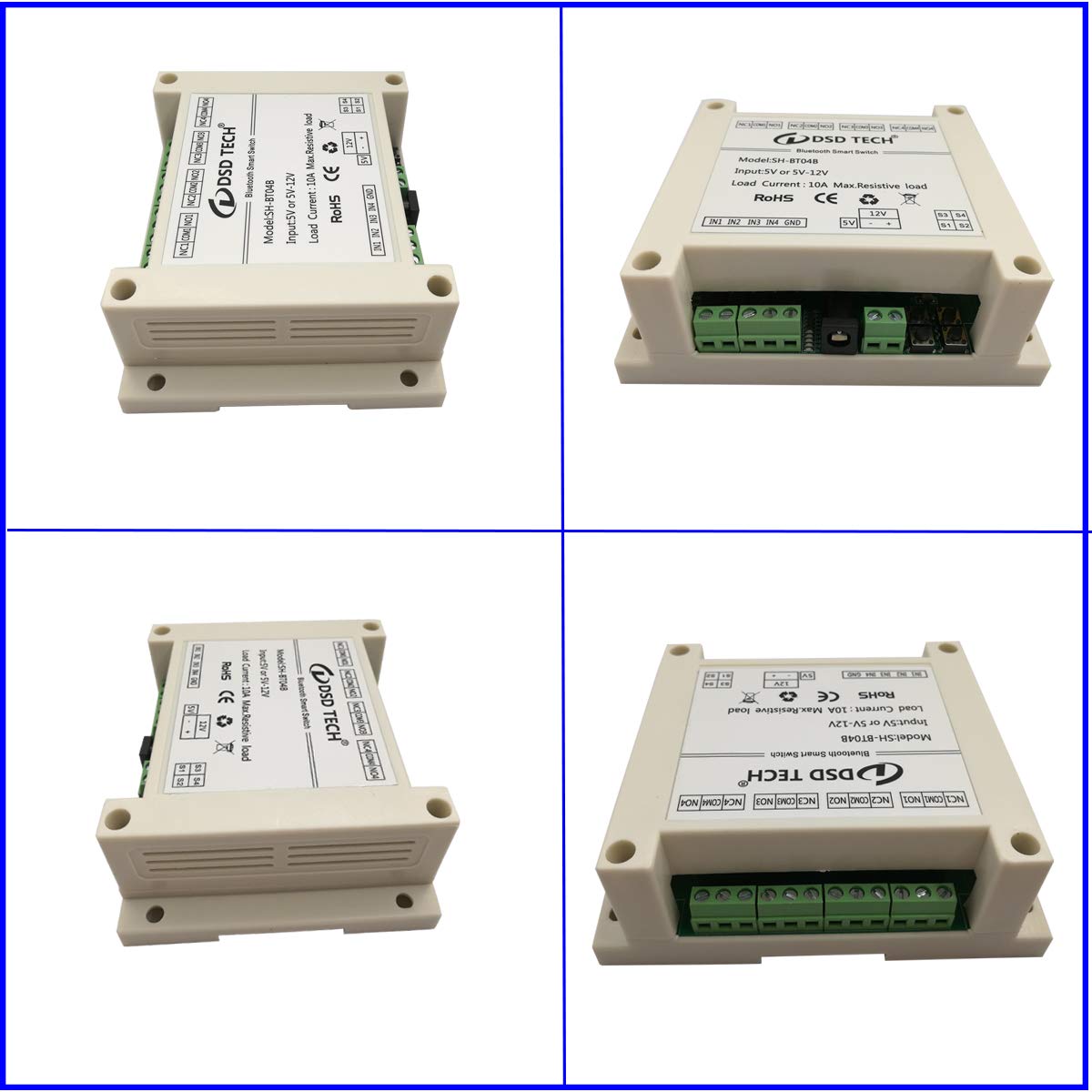
Figure 3: Screenshots of the DSD TECH Switch application interface for Android and iOS, showing device listing and relay control toggles.
3. Иштөө нускамалары
3.1 Bluetooth аркылуу туташуу
- Ensure the SH-BT04B module is powered on.
- Open the "DSD TECH Switch" app on your smartphone.
- The app will scan for available Bluetooth devices. Select your DSD Relay from the list.
- Once connected, the relay status will be displayed as "Online".
3.2 Controlling Relays
Within the app, you will see toggles or buttons corresponding to each of the four relays (Relay1, Relay2, Relay3, Relay4). Simply tap the respective toggle to switch the relay on or off. The app interface will visually indicate the current state of each relay.
3.3 Using Timer Functions
The V2 version of the relay supports timer functions. Access the timer settings within the app to schedule when relays should turn on or off. Note that the timer function may require navigating through multiple screens in the app, and the set time might not be permanently memorized after the relay deactivates, requiring re-setting for repeated use.
3.4 Security Code Authentication
To enhance security, the SH-BT04B supports a security code feature. It is highly recommended to set a security code for your device. After setting a new password, ensure you save it and reboot the device twice for the changes to take effect and for the device to become secure. If the device is not secure, you may experience issues with the app, such as inability to access dropdown menus or control all four switches.
4. Техникалык тейлөө
The DSD TECH SH-BT04B is designed for robust operation with minimal maintenance. To ensure longevity and optimal performance:
- Модулду чаңдан жана таштандыдан таза жана таза кармаңыз.
- Аппаратты экстремалдык температурага же жогорку нымдуулукка дуушар кылуудан алыс болуңуз.
- Бардык зымдардын туташууларынын бекем жана дат баспагандыгын текшериңиз.

Figure 4: Illustrates the process of opening the SH-BT04B enclosure, typically for internal inspection or accessing PCB markings.
5. Кыйынчылыктарды
If you encounter issues with your DSD TECH SH-BT04B, please refer to the following common problems and solutions:
- Device does not power on or function:
Double-check your power supply connections. Ensure the correct voltage (5V or 12V DC) is applied and that the polarity is correct, especially verifying against PCB markings if enclosure markings are unclear. A common issue reported is incorrect polarity markings on the enclosure which can lead to damage if not observed carefully. - Bluetooth байланышы көйгөйлөрү:
Ensure Bluetooth is enabled on your mobile device. Make sure the module is within the 10m control range. Try restarting the app or your mobile device. If the device is not secure (e.g., after changing password), it might not connect properly; ensure you've saved the password and rebooted the device twice. - Relays do not cycle/switch:
Verify that the module is receiving adequate power. Confirm that the load connected to the relay does not exceed the 600W maximum per channel. Ensure your app is properly connected to the module and that the relay commands are being sent. Remember that the relay only outputs control signals and does not directly supply power to the load. - App functionality limitations (e.g., timer not saving, external inputs not working):
While the app provides core functionality, some users have noted limitations or non-intuitive behavior with features like the timer or external inputs. For timer functions, be aware that the set time may not be memorized after the relay deactivates, requiring manual re-setting. For external inputs, ensure correct wiring and signal levels (e.g., 5V high level for triggering). - Physical damage after connecting power:
This is often due to incorrect power supply polarity. Always verify the positive and negative terminals directly on the PCB, as enclosure markings may sometimes be misleading. Connecting with reverse polarity can cause immediate damage to internal components.
If these steps do not resolve your issue, please contact DSD TECH customer support for further assistance.
6. Техникалык шарттар
| Өзгөчөлүк | Спецификация |
|---|---|
| Модель номери | SH-BT04B |
| Bluetooth модулу | DSD TECH SH-HC-08 Bluetooth 4.0 BLE |
| Шайкештик | iOS (iPhone, iPad), Android 4.3 and later |
| Control Distance | Up to 10m (open space environment) |
| Module Operating Voltage (VCC) | DC 5V / 12V |
| DC Control Maximum Voltage | DC 30V |
| AC Switching Maximum Voltage | AC 250V |
| Ар бир каналга максималдуу жүк | 600 Вт |
| Туташтыргыч түрү | Бурама терминалдары |
| Байланыш материалы | Silver |
| Байланыш түрү | Адатта ачык (ЖОК) |
| Монтаж түрү | Surface Mount |
| Продукциянын өлчөмдөрү | 4.5 x 3.55 x 1.55 дюйм |
| Салмагы | 7.05 унция |
| Дата биринчи жеткиликтүү | 10-июль, 2020-жыл |

Figure 5: Dimensions of the DSD TECH SH-BT04B module.
7. Кепилдик жана колдоо
DSD TECH is committed to providing high-quality products and excellent customer service. All DSD TECH branded products come with a comprehensive warranty and dedicated technical support.
- Кепилдик: DSD TECH provides a one-year warranty service from the date of purchase.
- Продукт алмаштыруу: A one-year product replacement service is offered for eligible issues.
- Техникалык колдоо: Lifetime technical support is available for all DSD TECH products. If you have any questions or require assistance, please contact our customer support team. We aim to reply to all inquiries within 1 business day.

Figure 6: DSD TECH SH-BT04B module displayed with a USB cable and a sign indicating warranty and technical support.
Ask a question about this manual
Ask about setup, troubleshooting, compatibility, parts, safety, or missing instructions. Manuals+ will review the question and use this page’s manual context to help answer it.