
Introduction
This manual provides detailed instructions for the installation, operation, maintenance, and troubleshooting of the HP ProDesk 400 G3 MS-7957 motherboard. Please read this manual thoroughly before proceeding with any installation or operation to ensure proper functionality and safety.
Коопсуздук маалыматы
Энелик платага зыян келтирбөө же өзүңүзгө жаракат келтирбөө үчүн ар дайым төмөнкү коопсуздук чараларын сактаңыз:
- Компоненттерди орнотуудан же алып салуудан мурун электр кубатын розеткадан ажыратыңыз.
- Энелик платаны кармоодон мурун статикалык электр тогун разряддоо үчүн антистатикалык билек боосун тагыныңыз же жерге туташтырылган металл нерсеге тез-тез тийип туруңуз.
- Сезимтал компоненттерге тийбеш үчүн, энелик платаны четтеринен кармаңыз.
- Ашыкча ысып кетүүнүн алдын алуу үчүн компьютердин корпусунун ичинде туура желдетүүнү камсыз кылыңыз.
- Motherboard'ду нымдуулуктан жана экстремалдык температурадан алыс кармаңыз.
Продукт бүттүview
The HP ProDesk 400 G3 MS-7957 is a MicroATX motherboard designed for Intel processors with an LGA 1151 socket. It supports DDR4 RAM and features a B250 chipset, offering a reliable foundation for desktop computing.
Негизги өзгөчөлүктөрү
- Compatible CPU Brand: Intel
- Розетка түрү: LGA 1151/Socket H4
- Форма фактору: MicroATX
- I/O туташтыргычтары: Ethernet (RJ-45), USB 2.0, USB 3.0, VGA, DisplayPort, HD Audio Jack
Компоненттин идентификациясы
Familiarize yourself with the layout of the motherboard to facilitate proper installation and connection of components.

1-сүрөт: Бурчтуу view of the HP ProDesk 400 G3 MS-7957 motherboard. This image highlights the CPU socket (LGA 1151), four DDR4 RAM slots, PCIe slots, and various headers for front panel connections and storage devices.
Орнотуу жана орнотуу
Баштоодон мурун
- Компьютериңиздин корпусу MicroATX форма факторуна шайкеш келишин текшериңиз.
- Gather all necessary components: CPU, RAM, CPU cooler, power supply, storage devices, and graphics card (if not using integrated graphics).
- Prepare your workspace by ensuring it is clean, well-lit, and static-free.
Motherboard орнотуу
- Install the CPU into the LGA 1151 socket. Carefully align the CPU with the socket's notch and gently lower it into place. Close the retention arm.
- Процессорго термикалык пастаны сүйкөңүз жана CPU муздаткычын өндүрүүчүнүн көрсөтмөлөрүнө ылайык орнотуңуз.
- Install the DDR4 RAM modules into the designated slots. Ensure they are fully seated until the clips lock into place.
- Mount the motherboard into the computer case using the appropriate standoffs and screws.
- Негизги 24-pin ATX кубат туташтыргычын жана 4-pin же 8-пин CPU электр туташтыргычын кубат булагыңыздан энелик платага туташтырыңыз.
- Install any expansion cards (e.g., graphics card) into the PCIe slots.

2-сүрөт: Жогору жактан ылдый бурчтуу view of the HP ProDesk 400 G3 MS-7957 motherboard. This perspective provides a clear view of the processor socket, memory slots, and the layout of the various internal connectors and components.
Перифериялык түзүлүштөрдү туташтыруу
- Connect SATA storage devices (HDDs/SSDs) to the SATA ports on the motherboard.
- Connect front panel headers (power button, reset button, USB ports, audio jacks) to their respective pins on the motherboard. Refer to your case manual for specific pin assignments.
- Connect external peripherals such as monitor, keyboard, mouse, and Ethernet cable to the rear I/O panel.
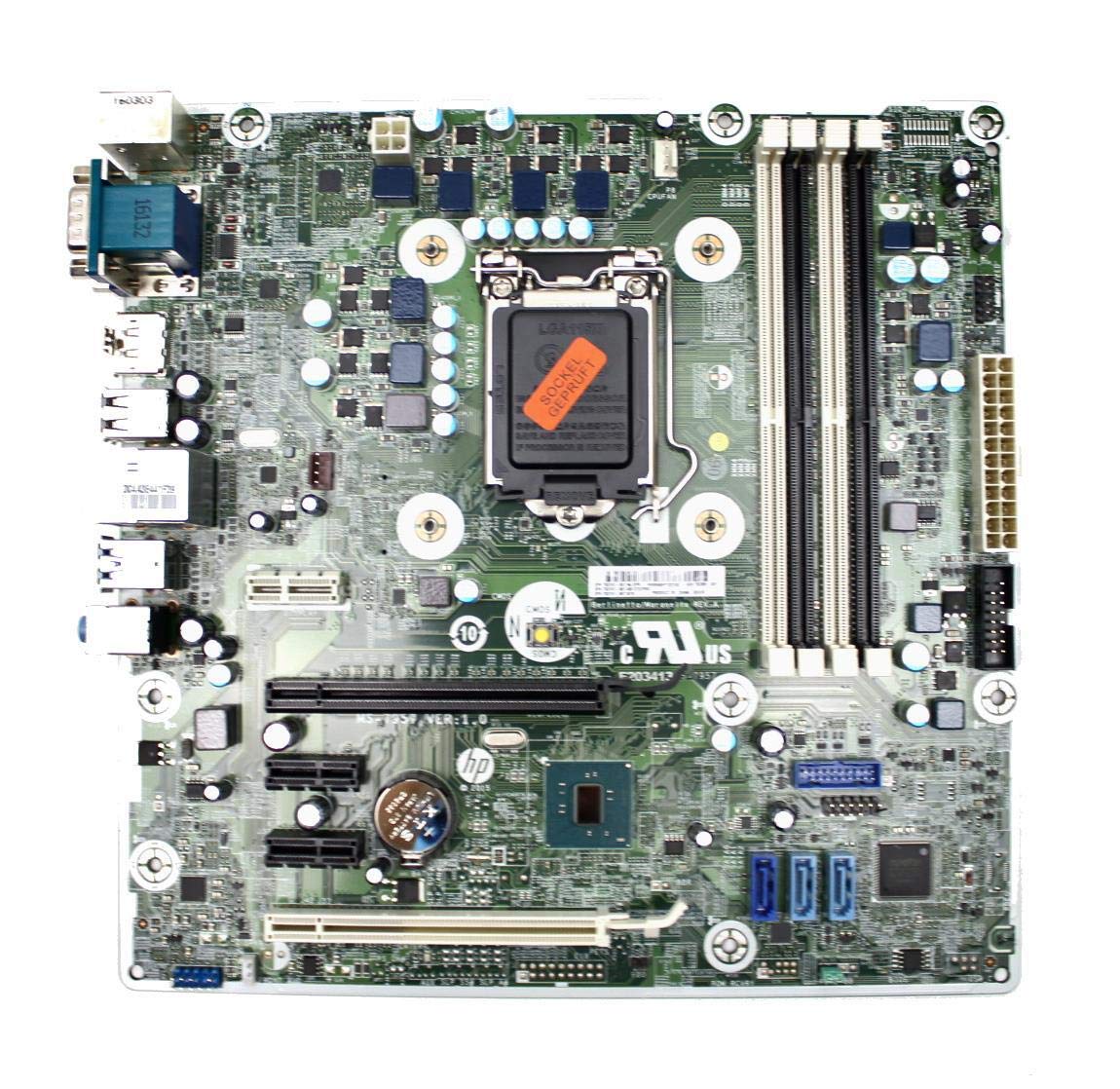
Figure 3: Rear I/O panel of the HP ProDesk 400 G3 MS-7957 motherboard. This image displays the available external connectivity options, including PS/2 ports, serial port, VGA, DisplayPort, USB 2.0, USB 3.0, Ethernet (RJ-45), and HD audio jacks.
Иштөө нускамалары
Баштапкы күйгүзүү
After all components are installed and connected, connect the power cable to the power supply and press the power button on your computer case. The system should initiate the boot process.
BIOS/UEFI конфигурациясы
To access the BIOS/UEFI setup utility, press the designated key (commonly Del, F2, F10, же F12) during the initial boot sequence. Here you can configure boot order, system time, and other hardware settings.
Драйверди орнотуу
After installing your operating system, it is crucial to install the latest drivers for your motherboard's chipset, integrated graphics, audio, and network adapter. These drivers can typically be found on the HP support website or the chipset manufacturer's webсайт.
Техникалык тейлөө
- Тазалоо: Кысылган абаны колдонуп, энелик платадан жана компоненттерден чаңды дайыма тазалап туруңуз. Тазалоодон мурун системанын өчүрүлгөнүн жана розеткадан ажыратылганын текшериңиз.
- BIOS/UEFI жаңыртуулары: Periodically check for BIOS/UEFI updates from HP's official support website. Updates can improve stability, compatibility, and performance. Follow update instructions carefully to avoid system damage.
- Драйвер жаңыртуулары: Keep all system drivers updated to ensure optimal performance and compatibility with new software and hardware.
Проблемаларды чечүү
Бул бөлүм сиз кабылышы мүмкүн болгон жалпы маселелердин чечимдерин камсыз кылат:
- Кубат жок: Check all power connections, including the 24-pin ATX and CPU power cables. Ensure the power supply is switched on and the wall outlet is functional.
- Дисплей жок: Verify that your monitor is connected to the correct video output (VGA or DisplayPort) and is powered on. Reseat the graphics card (if applicable) and RAM modules.
- Системанын туруксуздугу/бузуулар: This could be due to overheating, faulty RAM, or outdated drivers. Check CPU and GPU temperatures, run memory diagnostic tools, and update drivers.
- Перифериялык түзмөк аныкталган жок: Ensure the peripheral is properly connected. Try a different port or update the relevant drivers.
- BIOS/UEFI көйгөйлөрү: If you encounter issues after changing BIOS settings, try resetting the CMOS by removing the CMOS battery for a few minutes or using the clear CMOS jumper (refer to motherboard diagram for location).
Техникалык шарттар
| Өзгөчөлүк | Спецификация |
|---|---|
| Бренд | HP |
| CPU розетка | LGA 1151 |
| Шайкеш түзмөктөр | Иш столунун компьютери |
| RAM технологиясы | DDR4 |
| Шайкеш процессорлор | Intel Core i3-6xxx, Intel Core i5-6xxx, Intel Core i7-6xxx, Intel Core i3-7xxx, Intel Core i5-7xxx, Intel Core i7-7xxx, Intel Core i3-8xxx, Intel Core i5-8xxx, Intel Core i7-8xxx |
| Чипсет түрү | Intel B250 |
| Платформа | Windows |
| Модель аты | MS-7957 |
| CPU модели | Core i3 (Note: Supports i3, i5, i7 as listed above) |
| Негизги электр туташтыргычынын түрү | 24 пин |
| Графикалык карта интерфейси | PCI Express |
| Available Memory Slots | 4 |
| Total SATA Ports | 6 |
| Жалпы USB порттору | 2 (Note: Refers to internal headers, rear I/O has more) |
| Жалпы Ethernet порттору | 1 |
| Total PCIe Ports | 3 |
| Өндүрүүчү | Computer Store Berlin (Reseller/Supplier) |
| Бөлүмдүн номери | 4061435962741 |
| ASIN | B08CS13PTQ |
Кепилдик жана колдоо
Бул продукт менен келет 1 жылдык кепилдик сатып алынган күндөн тартып. Бул кепилдик нормалдуу колдонуудагы материалдардагы жана жасалгадагы кемчиликтерди камтыйт.
For technical support, warranty claims, or further assistance, please contact your point of purchase or refer to the official HP support resources for the ProDesk 400 G3 series.