
1. Киришүү
Сатып алганыңыз үчүн рахматasing the Tengsen M1 MP3 Player. This device is designed to provide a versatile multimedia experience, featuring Bluetooth 5.0 connectivity, a full touch screen, HD video playback, HiFi audio, FM radio, voice recording, e-book functionality, and a pedometer. This manual will guide you through the setup, operation, and maintenance of your new device.
2. Коопсуздук маалыматы
- Аппаратты экстремалдык температурага, түз күндүн нуруна же жогорку нымдуулукка дуушар кылбаңыз.
- Аппаратты түшүрүүдөн же катуу таасирлерден сактаныңыз.
- Аппаратты суудан жана башка суюктуктардан алыс кармаңыз.
- Берилген заряддоо кабелин жана туура келген кубат адаптерин гана колдонуңуз.
- Аппаратты өз алдынча бөлүүгө же оңдоого аракет кылбаңыз. Жардам алуу үчүн кардарларды колдоо бөлүмүнө кайрылыңыз.
- Listen to audio at moderate volumes to prevent hearing damage.
3. Пакеттин мазмуну
Сураныч, пакетте төмөнкү нерселерди текшериңиз:
- Tengsen M1 MP3 Player
- USB заряддоо кабели (Type-C)
- Зымдуу наушниктер
- User Manual

Image: Tengsen M1 MP3 Player with USB cable and wired earphones.
4. Продукт бүтүп калдыview
The Tengsen M1 features a durable metal body and a 4.0-inch full touch screen for intuitive navigation. It includes a built-in speaker and supports various multimedia functions.

Сүрөт: алдыңкы view of the Tengsen M1 MP3 Player.
5. Орнотуу
5.1 Алгачкы заряддоо
Before first use, fully charge the device. Connect the USB charging cable to the player's Type-C port and the other end to a USB power adapter or computer. The battery indicator will show charging status.
5.2 Күйгүзүү/өчүрүү
- Күйгүзүү үчүн: Экран күйгүчө кубат баскычын басып, кармап туруңуз.
- Өчүрүү үчүн: Кубат баскычын басып, кармап туруңуз, андан кийин экранда "Өчүрүү" дегенди тандаңыз.
5.3 Өткөрүп берүү Files
Connect the MP3 player to your computer using the provided USB cable. The device will appear as a removable disk. You can then drag and drop music, video, and e-book files into the respective folders on the player's internal 16GB storage.
5.4 Сактагычты кеңейтүү
The device supports a Micro TF card up to 128GB (not included). Insert the card into the designated slot to expand storage capacity for more files.
6. Иштөө нускамалары
6.1 Негизги навигация
The Tengsen M1 features a full touch screen. Swipe left/right or tap icons to navigate through menus and applications. Use the back arrow icon to return to the previous screen.

Image: The 4.0-inch full touch screen allows for easy operation, similar to a smartphone.
6.2 Музыканы ойнотуу
Tap the 'Music' icon to access your audio library. The player supports MP3, WMA, OGG, APE, FLAC, WAV, AAC-LC, ACELP, and M4A formats. You can create playlists and enjoy high-resolution audio through headphones or the built-in speaker.

Image: The device features a built-in speaker for direct audio playback.
6.3 Bluetooth байланышы
The M1 player features Bluetooth 5.0 for wireless audio. Go to 'Settings' > 'Bluetooth' to enable and pair with your Bluetooth headphones or speakers. Эскертүү: This device cannot connect to mobile phones via Bluetooth.

Image: Bluetooth 5.0 provides a stable wireless connection for audio accessories.
6.4 Видеону ойнотуу
Tap the 'Video' icon to play video files. The player supports high-resolution 720p and 1080p video playback without format conversion. Compatible formats include AVI, MKV, MPG, MPEG, RM, RMVB, VOB, MOV, FLV, ASF, DAT, MP4, and 3GP.
Image: The device supports 1080P HD video playback.
6.5 FM радиосу
Plug in the wired earphones (they act as an antenna) and select the 'Radio' application. Scan for available stations and save your favorites.
6.6 Диктофон
Open the 'Record' application to use the built-in voice recorder. You can record lectures, meetings, or personal notes.
6.7 E-book Reader
Access the 'E-book' application to read text files. Ensure your e-book files are in a compatible format (e.g., TXT) and transferred to the device.
6.8 Педометр
The 'Pedometer' function tracks your steps, making it suitable for sports and fitness activities. Activate it from the main menu to monitor your activity.
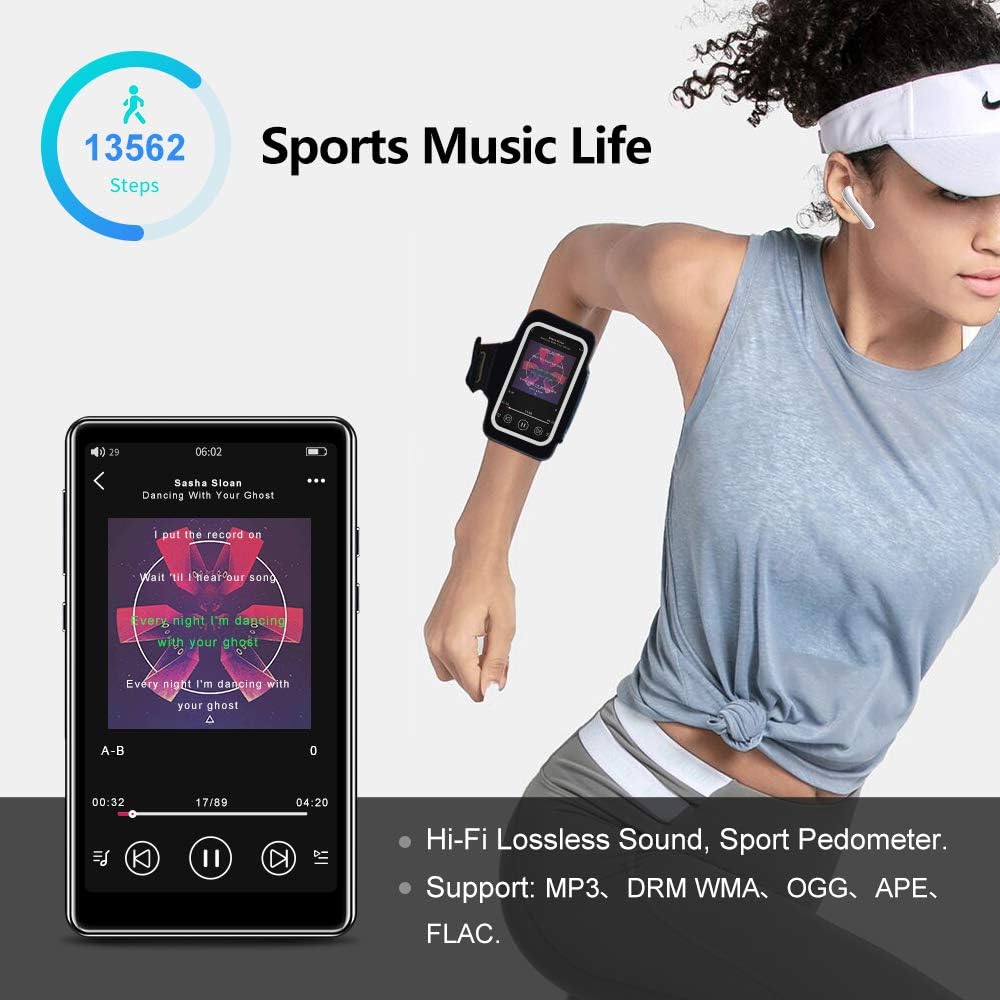
Image: The pedometer function supports tracking steps during sports activities.
7. Техникалык тейлөө
7.1 Аппаратты тазалоо
Use a soft, dry, lint-free cloth to clean the screen and body of the player. Do not use abrasive cleaners or solvents.
7.2 Батареяга кам көрүү
The device has a built-in 1400mAh lithium-ion battery. To prolong battery life, avoid fully discharging it frequently and store the device in a cool, dry place when not in use for extended periods. A full charge provides over 20 hours of music playback or 8+ hours of video playback with wired earphones.

Image: The 1400mAh battery provides extended usage time.
8. Кыйынчылыктарды
- Түзмөк күйбөй жатат: Батарея заряддалганын текшериңиз. Кубат булагына туташып, кайра аракет кылыңыз.
- Bluetooth байланышы көйгөйлөрү: Ensure Bluetooth is enabled on both the player and the accessory. Keep devices within range and try re-pairing.
- Динамиктен үн жок: Check volume settings. Ensure headphones are not plugged in if you intend to use the speaker.
- Fileойнобой жатат: экендигин текшериңиз file формат ойноткуч тарабынан колдоого алынаарын текшериңиз. fileлар бузулган эмес.
- Экран жооп бербейт: Try restarting the device by holding the power button. If the issue persists, contact support.
9. Техникалык шарттар
| Бренд | Тенгсен |
| Модель аты | M1 |
| Ички сактагыч | 16 ГБ |
| Кеңейтүүчү сактагыч | Up to 128 GB (Micro TF card, not included) |
| Bluetooth версиясы | 5.0 |
| Screen Size | 4.0 дюйм |
| Батарея сыйымдуулугу | 1400 мАч литий-ион |
| Аудио форматтары | MP3, WMA, OGG, APE, FLAC, WAV, AAC-LC, ACELP, M4A |
| Видео форматтары | AVI, MKV, MPG, MPEG, RM, RMVB, VOB, MOV, FLV, ASF, DAT, MP4, 3GP (supports 720p, 1080p) |
| Өзгөчөлүктөр | Full Touch Screen, Built-in Speaker, FM Radio, Voice Recorder, E-book, Pedometer |
| Байланыш | Bluetooth, USB Type-C |
10. Кепилдик жана колдоо
This product comes with a standard manufacturer's warranty. Please refer to the warranty card included in your package for specific terms and conditions. For technical support, troubleshooting assistance, or warranty claims, please contact the retailer or manufacturer directly.