
1. Киришүү
The Pro Co WIEMS is a 5.8 GHz wireless in-ear monitoring system designed for audio professionals. This system provides a reliable and convenient method for monitoring audio mixes without the need for physical cables. It includes a transmitter and a beltpack receiver, offering ease of setup and portability.
2. Коопсуздук маалыматы
- Угуу коргоо: Always begin with a low volume setting and gradually increase to a comfortable listening level to prevent hearing damage. Prolonged exposure to high volume levels can cause permanent hearing loss.
- Суу жана ным: Do not expose the device to water, rain, or moisture. This can cause electric shock or damage the unit.
- Кубат булагы: Use only the specified power adapter or charging method for the device. Ensure the power source matches the voltagд талаптар.
- Вентиляция: Эч кандай желдетүүчү тешиктерди жаап албаңыз. Ашыкча ысып кетүүнүн алдын алуу үчүн аппараттын айланасында адекваттуу аба агымын камсыз кылыңыз.
- Тазалоо: Clean the unit only with a dry cloth. Avoid using liquid cleaners or aerosols.
- Тейлөө: Бул продуктту өзүңүз тейлөөгө аракет кылбаңыз. Бардык тейлөөнү квалификациялуу тейлөө кызматкерлерине тапшырыңыз.
3. Пакеттин мазмуну
Төмөндө тизмеленген нерселердин баары пакетиңизге камтылганын текшериңиз:
- WIEMS 5.8 GHz Transmitter
- WIEMS Beltpack Receiver
- USB заряддоо кабели
- Колдонуучунун Колдонмосу (бул документ)
4. Продукт бүтүп калдыview
The Pro Co WIEMS system consists of two main components: the transmitter and the receiver.
4.1 Transmitter
The transmitter unit connects to a line-level audio source and broadcasts the audio signal wirelessly.
4.2 Beltpack Receiver
The beltpack receiver is a portable unit that receives the wireless audio signal from the transmitter. It features a built-in rechargeable battery and an output for connecting earphones.
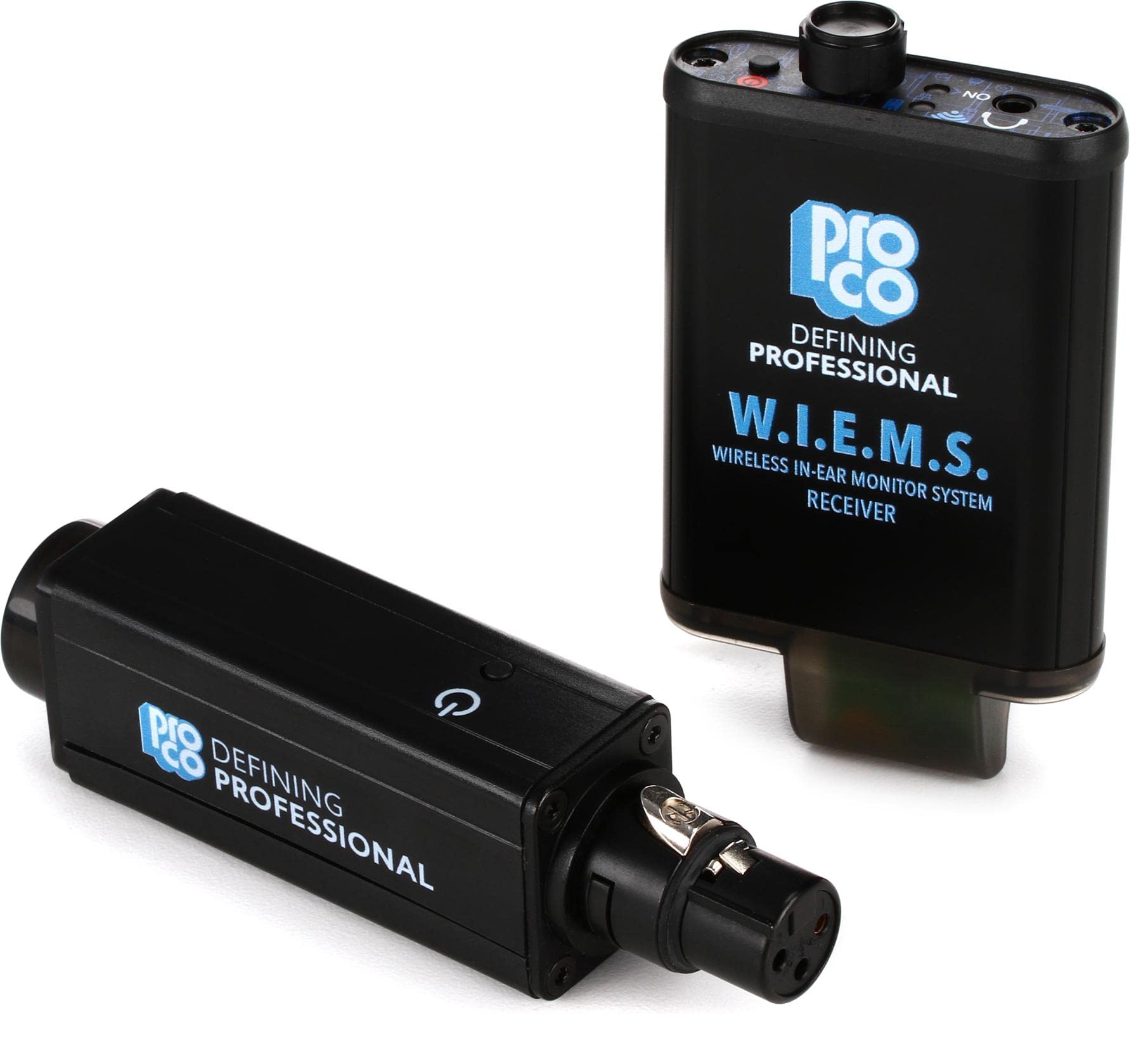
1-сүрөт: Image showing the Pro Co WIEMS Wireless In-Ear Monitoring System, including the transmitter and beltpack receiver. The transmitter is a compact black unit with an antenna, and the receiver is a smaller beltpack device with an earphone jack.
5. Орнотуу
Follow these steps for initial setup of your WIEMS system:
- Алуучуну кубаттоо: Before first use, fully charge the beltpack receiver using the provided USB charging cable. Connect the cable to the receiver's charging port and a standard USB power source. The charging indicator will show the charging status.
- Өткөргүчтү туташтыруу: Plug the transmitter into a line-level audio output from your mixing console or audio interface. Ensure the connection is secure.
- Күйгүзүү: Бергичти да, кабыл алгычты да күйгүзүңүз.
- Жупташтыруу: The units are designed for plug-and-pair operation. They should automatically establish a wireless connection. If pairing does not occur automatically, refer to the troubleshooting section.
- Наушниктерди туташтыруу: Plug your preferred earphones into the 3.5mm output jack on the beltpack receiver.
- Үндү тууралоо: Start with the receiver's volume control at its lowest setting. Gradually increase the volume to a comfortable listening level.
6. Иштөө
Once set up, operating the WIEMS system is straightforward:
- Күйгүзүү/өчүрүү: Use the dedicated power buttons on both the transmitter and receiver to turn them on or off.
- Үндү көзөмөлдөө: Adjust the volume on the beltpack receiver to suit your monitoring needs.
- Батареянын иштөө мөөнөтү: The receiver's built-in rechargeable battery provides up to eight hours of operation on a single charge. Monitor the battery indicator to ensure sufficient power.
- Диапазон: The system operates on a 5.8 GHz frequency. Maintain a clear line of sight between the transmitter and receiver for optimal performance. Obstructions can affect signal quality and range.
7. Техникалык тейлөө
Proper care and maintenance will ensure the longevity of your WIEMS system:
- Тазалоо: Wipe the units with a soft, dry cloth. Do not use abrasive cleaners, solvents, or harsh chemicals.
- Сактагыч: Колдонулбай турган учурда, системаны салкын, кургак жерде, күндүн түз нурунан жана өтө жогорку температурадан алыс сактаңыз.
- Батареяга кам көрүү: For optimal battery life, avoid fully discharging the receiver's battery frequently. If storing for an extended period, charge the battery to approximately 50% every few months.
- Кабелдик башкаруу: Avoid sharp bends or kinks in the USB charging cable to prevent damage.
8. Кыйынчылыктарды
If you encounter issues with your Pro Co WIEMS system, refer to the following common problems and solutions:
| Көйгөй | Мүмкүн себеп | Чечим |
|---|---|---|
| Кабыл алгычтан аудио жок | Receiver or transmitter not powered on; low battery; earphones not connected; volume too low; out of range; pairing issue. | Ensure both units are on and charged. Check earphone connection. Increase receiver volume. Move closer to the transmitter. Re-pair units if necessary. |
| Audio crackling or dropouts | Interference; too far from transmitter; obstructions between units; low battery. | Reduce distance between transmitter and receiver. Ensure clear line of sight. Charge receiver battery. Avoid areas with strong 5.8 GHz interference. |
| Жупташпаган бирдиктер | Units not powered on; interference; faulty unit. | Ensure both units are powered on. Power cycle both units. Try pairing in a different location to rule out interference. If problem persists, contact support. |
| Батареянын иштөө мөөнөтү кыска | Battery degradation; incomplete charging. | Ensure receiver is fully charged. If battery life significantly decreases over time, the battery may need replacement (contact support). |
9. Техникалык шарттар
| Өзгөчөлүк | Деталь |
|---|---|
| Модель номери | WIEMS |
| Зымсыз жыштык | 5.8 ГГц |
| Продукциянын өлчөмдөрү | 9 x 6 x 2 дюйм |
| Элемент Салмагы | 14.1 унция |
| Power Source | Battery Powered (Receiver) |
| Өзгөчө өзгөчөлүк | Жеңил |
| Материал | Engineered Plastic / ABS Plastic |
| Өндүрүүчү | Pro Co |
10. Кепилдик жана колдоо
For warranty information and technical support, please refer to the documentation provided with your purchase or visit the official Pro Co webсайт. Кепилдик дооматтар үчүн сатып алганыңыздын далилин сактаңыз.
If you require assistance beyond the troubleshooting steps provided in this manual, please contact Pro Co customer support.