
1. Киришүү
Сатып алганыңыз үчүн рахматasing the Cuifati YR-Q100 Bluetooth Wall-Mounted Portable CD Player. This versatile device offers multiple playback options including CD, USB, memory card, and Bluetooth connectivity, along with FM radio and alarm clock functions. Its wall-mounted design saves space, while the included stand allows for tabletop use. This manual provides detailed instructions for setup, operation, and maintenance to ensure optimal performance and longevity of your device.
2. Продукциянын өзгөчөлүктөрү
- Көп форматтуу ойнотуу: Supports CD, CD-R, CD-RW, MP3, WMA formats.
- USB/Memory Card Playback: Directly play audio files from USB drives and memory cards.
- Bluetooth байланышы: Wirelessly connect to Bluetooth-enabled devices like smartphones and tablets.
- FM радиосу: Сүйүктүү радиостанцияларыңызды угуу үчүн орнотулган FM тюнер.
- Ойготкучтун функциясы: Use the player as an alarm clock with customizable settings.
- Алыстан башкаруу: Full-function remote for convenient operation from a distance.
- Wall-Mounted & Tabletop Design: Сиздин мейкиндигиңизге ылайыктуу ийкемдүү орнотуу параметрлери.
- AB кайталоо функциясы: Ideal for language learning or repeating specific audio segments.
- Single Cycle/Full Disc Cycle: Playback modes for CDs.

Image: The YR-Q100 CD player shown in a wall-mounted configuration, emphasizing its space-saving design and primary function as a music player.

Image: The CD player in a home setting, with a child studying nearby, demonstrating its utility as a tool for learning, particularly with its A-B repeat function for language study.
3. Пакеттин мазмуну
Сураныч, бардык буюмдар бар экенин жана жакшы абалда экендигин текшерүү үчүн пакетти кылдат текшериңиз:
- YR-Q100 CD Player Unit
- Алыстан башкаруу
- Дубалга орнотуучу плита
- Wall-Mounting Screws and Anchors (6 sets)
- Дасторкон стенд
- USB Power Adapter (US Plug 100-240V)
- USB кубат кабели
- 3.5 мм аудио кабель

Сүрөт: толук view of all items included in the product package, laid out for easy identification.
4. Орнотуу
4.1 Дубалга орнотуу
- Choose a suitable location on a wall, ensuring it is a stable surface and within reach of a power outlet.
- Place the wall-mounting plate against the wall at the desired height and mark the screw holes.
- Drill pilot holes at the marked locations. Insert the plastic anchors into the drilled holes.
- Align the wall-mounting plate with the anchors and secure it to the wall using the provided screws.
- Carefully slide the CD player unit onto the mounted plate until it clicks securely into place.

Image: The screws and wall anchors necessary for securely mounting the CD player to a wall.

Image: The front and rear of the CD player, illustrating the design and the mounting slots on the back for wall installation.
4.2 Tabletop Setup
If you prefer to use the player on a flat surface:
- Unfold the provided tabletop stand.
- Place the CD player unit onto the stand, ensuring it is stable and upright.

Image: The foldable tabletop stand and the USB power adapter, ready for use.
4.3 Кубат туташтыруу
- Connect the USB power cable to the DC 5V input port on the CD player.
- Plug the other end of the USB power cable into the provided USB power adapter.
- Insert the USB power adapter into a standard US wall outlet (100-240V).
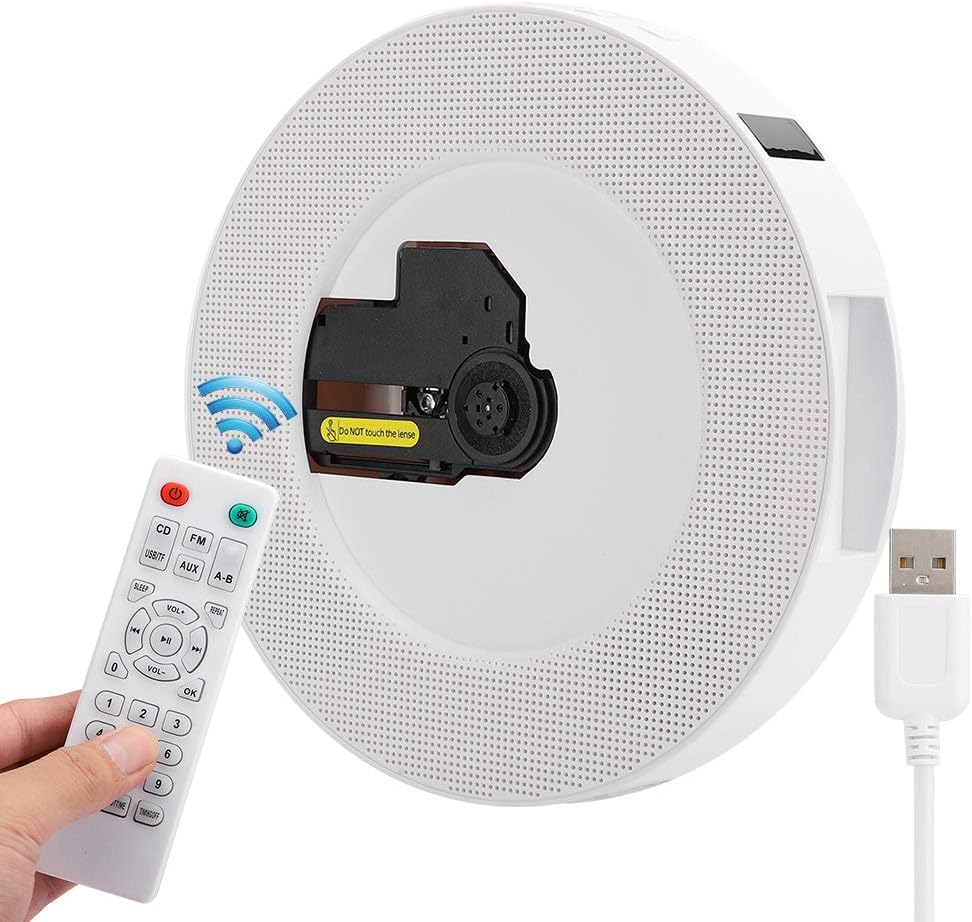
Image: The CD player with its USB power cable connected, demonstrating the power input method.
5. Иштөө нускамалары
5.1 Күйгүзүү/өчүрүү
Press the power button on the unit or the remote control to turn the player on or off.
5.2 CD ойнотуу
- Gently insert a CD into the disc slot until it is fully seated. The player will automatically detect the CD and begin playback.
- Use the 'CD' button on the remote or unit to switch to CD mode if another mode is active.
- Use the Play/Pause, Next/Previous, and Volume buttons on the unit or remote to control playback.

Сүрөт: деталдуу view of the CD drive mechanism, showing the lens and disc area.
5.3 USB/Memory Card Playback
- Insert a USB flash drive into the USB port or a memory card into the TF card slot.
- Press the 'USB/TF' button on the remote to switch to USB/Memory Card mode. The player will automatically detect and play compatible audio files.

Image: A close-up of the side ports, including the USB port, memory card slot, and 3.5mm audio jack.
5.4 Bluetooth байланышы
- Press the 'Bluetooth' button on the remote or the 'MODE' button on the unit until 'Bluetooth' mode is selected. The player will enter pairing mode.
- On your Bluetooth-enabled device (e.g., smartphone), search for available Bluetooth devices and select 'YR-Q100' to connect.
- Once connected, you can play audio from your device through the CD player.
5.5 FM радиосу
- Press the 'FM' button on the remote or the 'MODE' button on the unit until 'FM' mode is selected.
- Жеткиликтүү FM станцияларын авто-скандоо жана сактоо үчүн Ойнотуу/Тыным баскычын басыңыз.
- Сакталган станциялар боюнча чабыттоо үчүн Кийинки/Мурунку баскычтарын колдонуңуз.
5.6 Alarm/Clock Function
- To set the clock, press the 'TIME' button on the remote. Use the number buttons to input the time and 'OK' to confirm.
- To set the alarm, press the 'BOOTTIME' button on the remote. Follow the on-screen prompts or indicator lights to set the alarm time and source.
- The player also supports a countdown timer and time-power-off function, accessible via the 'TIMINGOFF' button on the remote.
5.7 Алыстан башкарууну колдонуу
The remote control provides full functionality for the CD player. Ensure the remote has working batteries and is pointed towards the player's sensor.
- Кубат баскычы: On/Off.
- CD/FM/AUX/USB/Bluetooth: Mode selection buttons.
- VOL +/-: Үндү тууралоо.
- Play/Pause, Next/Previous: Ойнотууну башкаруу.
- КАЙТАЛОО: Cycle through repeat modes (single, all).
- AB: Set A-B repeat points.
- TIME/BOOTTIME/TIMINGOFF: Clock and alarm settings.
- Сан баскычтары: Direct track selection or time input.

Image: The remote control unit, displaying all its buttons for various functions, including mode selection, playback control, and time settings.
5.8 A-B Repeat and Cycle Functions
- AB кайталоо: During playback, press the 'A-B' button once to set point A. Press it again to set point B. The player will then repeatedly play the segment between A and B. Press 'A-B' a third time to cancel.
- Кайталоо режими: Press the 'REPEAT' button to cycle through different repeat modes: repeat one track, repeat all tracks, or random play.

Image: A close-up of the physical buttons on the player unit, including mode, volume, and playback controls.
6. Техникалык тейлөө
- Тазалоо: Ойноткучтун сыртын тазалоо үчүн жумшак, кургак чүпүрөктү колдонуңуз. Суюк тазалоочу каражаттарды же абразивдүү материалдарды колдонбоңуз.
- Дискке кам көрүү: Handle CDs by the edges. Keep them clean and free of scratches. Do not touch the optical lens inside the player.
- Сактагыч: When not in use for extended periods, unplug the player and store it in a cool, dry place.
- Вентиляция: Ensure proper ventilation around the player to prevent overheating. Do not block any ventilation openings.
7. Кыйынчылыктарды
| Көйгөй | Мүмкүн себеп | Чечим |
|---|---|---|
| Оюнчу күйбөйт. | No power connection; faulty adapter/cable. | Ensure power cable is securely connected and adapter is plugged into a working outlet. Try a different USB port or adapter if available. |
| CD ойнобойт. | Disc inserted incorrectly; dirty/scratched disc; wrong mode selected. | Re-insert disc correctly; clean disc; try a different disc; ensure CD mode is selected. |
| Bluetooth туташпай жатат. | Player not in pairing mode; device too far; interference. | Ensure player is in Bluetooth pairing mode; move device closer; restart both devices. |
| Үн жок. | Volume too low; mute activated; incorrect mode. | Increase volume; check if mute is on; ensure correct playback mode is selected. |
| Пульт иштебей жатат. | Batteries low/dead; obstruction; not pointed at sensor. | Replace batteries; remove obstructions; point remote directly at the player's sensor. |
8. Техникалык шарттар
| Өзгөчөлүк | Деталь |
|---|---|
| Модель аты | YR-Q100 (Cuifatixi1y2m5grd) |
| Бренд | Cuifati |
| Байланыш технологиясы | Bluetooth, USB |
| Түс | Кара |
| Элемент Салмагы | 2.01 фунт (болжол менен 0.91 кг) |
| Электр камсыздоо | AC 100-240V, 50/60Hz (US Plug) / DC 5V/2A |
| Номиналдуу кубаттуулук | 8W |
| Продукциянын өлчөмдөрү | Диаметри 215 мм (8.5 дюйм), калыңдыгы 42 мм (1.7 дюйм) |
| Келип чыккан өлкө | Кытай |

Image: Diagram illustrating the physical dimensions of the CD player unit.

Image: The rear panel of the player, displaying the model number, power requirements, and compliance markings.
9. Кепилдик жана колдоо
The Cuifati YR-Q100 CD Player comes with a 90 күндүк кепилдик from the date of purchase. This warranty covers manufacturing defects and issues arising from normal use. It does not cover damage caused by misuse, accidents, unauthorized modifications, or improper installation.
For technical support, warranty claims, or any questions regarding your product, please contact Cuifati customer service through the retailer's platform or the official Cuifati store page.

Image: Official Cuifati warranty information, indicating a 90-day coverage period.