
1. Продукт бүтүп калдыview
The Cello C2220FSDE is a compact 22-inch Full HD LED television designed for versatile use. It features an integrated DVD player and a triple tuner (DVBT2/S2) for comprehensive signal reception. Its sleek design makes it suitable for various environments, including guest rooms, motorhomes, caravans, trucks, or boats.
Key features include HDMI and USB inputs for connecting external devices like game consoles and hard drives. The USB functionality also supports recording live television and playing stored media. This TV can also function as a monitor for laptops or desktop computers.

Сүрөт 1.1: The integrated DVD player allows for direct playback of DVDs without additional devices.

Сүрөт 1.2: Experience clear and detailed images with Full HD 1080p resolution.
2. Орнотуу жана орнотуу
2.1 Кутудан чыгаруу жана Мазмуну
Бардык компоненттерди таңгактан кылдаттык менен алып салыңыз. Төмөнкү нерселердин бар экенин текшериңиз:
- 1 x Cello 22-inch LED TV
- Электр кабели
- Алыстан башкаруу
- Quick Start Guide
- 2 x AAA батареялары
- Телевизордук стенд
2.2 Стендди бекитүү
Place the TV screen face down on a soft, clean surface to prevent scratches. Align the stand with the mounting holes on the bottom of the TV and secure it using the provided screws.
2.3 Connecting Power and Antenna
- Кубат шнурун телевизордун кубат киргизүү булагына, андан кийин розеткага туташтырыңыз.
- Connect your TV aerial cable to the 'TV Aerial' input on the back of the TV.
- For satellite reception, connect a satellite dish cable (not supplied) to the 'DVB-S2' input.

Сүрөт 2.1: Арткы view of the TV showing power, antenna, and other connectivity ports.
2.4 Тышкы түзмөк туташуулары
Сыналгы тышкы түзмөктөрдү туташтыруу үчүн ар кандай портторду сунуш кылат:
- HDMI: Connect high-definition devices such as Blu-ray players, game consoles, or set-top boxes.
- USB: Connect USB storage devices for media playback or recording.
- VGA: Монитор катары колдонуу үчүн компьютерди туташтырыңыз.
- 3.5 мм аудио чыгышы: Тышкы кулакчындарды же динамиктерди туташтырыңыз.

Сүрөт 2.2: Illustration of HDMI and USB ports for connecting various devices.

Сүрөт 2.3: The integrated satellite tuner allows connection to a satellite dish for satellite TV reception.
3. Иштөө нускамалары
3.1 Баштапкы күйгүзүү жана каналды сканерлөө
- AAA батарейкаларын пультка салыңыз.
- Аны күйгүзүү үчүн пульттун же сыналгыдагы кубат баскычын басыңыз.
- Follow the on-screen instructions for initial setup, including language selection and automatic channel scanning for DVB-T2 (terrestrial) and DVB-S2 (satellite) signals.
3.2 Телевизордун негизги функциялары
- Канал тандоо: Use the 'CH+' / 'CH-' buttons or the numeric keypad on the remote control.
- Үндү көзөмөлдөө: Use the 'VOL+' / 'VOL-' buttons.
- Булак тандоо: Press the 'SOURCE' button to switch between inputs (TV, HDMI, USB, DVD).
- Меню навигациясы: Use the 'MENU' button to access settings and navigation arrows to browse.
3.3 Integrated DVD Player Operation
- Ensure the TV is powered on and the input source is set to 'DVD'.
- Gently insert a DVD disc into the slot on the side of the TV, label side facing the mirror side (as indicated on the slot).
- The DVD should load automatically. Use the remote control for playback functions (Play, Pause, Stop, Skip).
3.4 USB Recording and Media Playback
- Медиа ойнотуу: Insert a USB storage device into the USB port. Select 'USB' as the input source. Navigate through your files (сүрөттөр, музыка, видеолор) пультту колдонуу менен.
- USB Recording (PVR): While watching live TV, insert a USB storage device. Press the 'RECORD' button on the remote to start recording. You can also use the 'PAUSE' function for time-shifting live TV.
Видео 3.1: This video demonstrates the physical controls on the TV and the various input/output ports available on the back and side of the unit, including the DVD slot, USB, HDMI, and antenna connections.
4. Техникалык тейлөө
4.1 Телевизорду тазалоо
- Тазалоодон мурун телевизорду розеткадан сууруп алыңыз.
- Экранды жана шкафты сүртүү үчүн жумшак, кургак чүпүрөктү колдонуңуз. өжөр белгилери үчүн, жеңил гampчүпүрөккө суу же жумшак, абразивдүү эмес экран тазалагыч.
- Спирт, бензол, эриткичтерди же башка учуучу заттарды колдонбоңуз, алар экранга зыян келтириши мүмкүн.
4.2 DVD Player Care
- Keep the DVD slot free from dust and debris.
- Only insert clean, undamaged discs.
5. Кыйынчылыктарды
If you encounter issues with your Cello TV, refer to the following common problems and solutions:
| Көйгөй | Мүмкүн себеп | Чечим |
|---|---|---|
| Күч жок | Электр шнуру туташтырылган эмес; розетка бузук | Электр шнурунун туташуусун текшериңиз; башка розетканы колдонуп көрүңүз |
| Сүрөт жок, бирок үн бар | Туура эмес киргизүү булагы тандалды; кабелдик туташуу бузук | Press 'SOURCE' to select correct input; check HDMI/VGA cable connections |
| Үн жок, бирок сүрөт бар | Volume too low or muted; external audio device issue | Increase volume; check mute status; ensure external audio devices are connected correctly |
| Сүрөттүн сапаты начар (телеканалдар) | Weak antenna signal; incorrect antenna connection | Adjust antenna position; check antenna cable connection; perform a channel rescan |
| DVD ойнотулбай жатат | Disc inserted incorrectly; dirty or damaged disc; incorrect source selected | Re-insert disc correctly; clean or replace disc; select 'DVD' source |
| Пульт иштебей жатат | Batteries depleted or inserted incorrectly; obstruction between remote and TV | Replace batteries; ensure correct polarity; remove obstructions; point remote directly at TV sensor |
For further assistance, please refer to the support section or the full instruction manual available online.
6. Техникалык шарттар
Below are the detailed technical specifications for the Cello C2220FSDE 22-inch Full HD LED TV:
| Өзгөчөлүк | Спецификация |
|---|---|
| Screen Size | 22 дюйм (диагоналы 54.6 см) |
| Бренд | виолончель |
| Дисплей технологиясы | LED |
| Резолюция | 1080p (Толук HD, 1920 x 1080 пиксел) |
| Жаңыртуу ылдамдыгы | 60 Гц |
| Өзгөчө өзгөчөлүк | Integrated DVD Player |
| Байланыш технологиясы | HDMI, USB, VGA |
| Аспект катышы | 16:9 |
| Продукциянын өлчөмдөрү (D x W x Y) | 5P x 50.4W x 34.2H см |
| Элемент Салмагы | 2.55 килограмм |
| Контраст катышы | 600:1 |
| Максималдуу жарыктык | 180 NIT Coating |
| HDR колдоо | HDR10 |
| Жооп убактысы | 10 миллисекунд |
| Тюнер түрү | DVB-C, DVB-S2, DVB-T2 |
| Аудио чыгаруу режими | Стерео |
| Speaker Description | 2 x 3 W Pitch Perfect Sound |
| Энергияны керектөө | 21 кВт.саат |
| Тtage | 230 Volts (100-240 V AC 50-60 Hz) |
| VESA тоо стандарты | 100 x 100 мм |
| Модель жылы | 2023 |
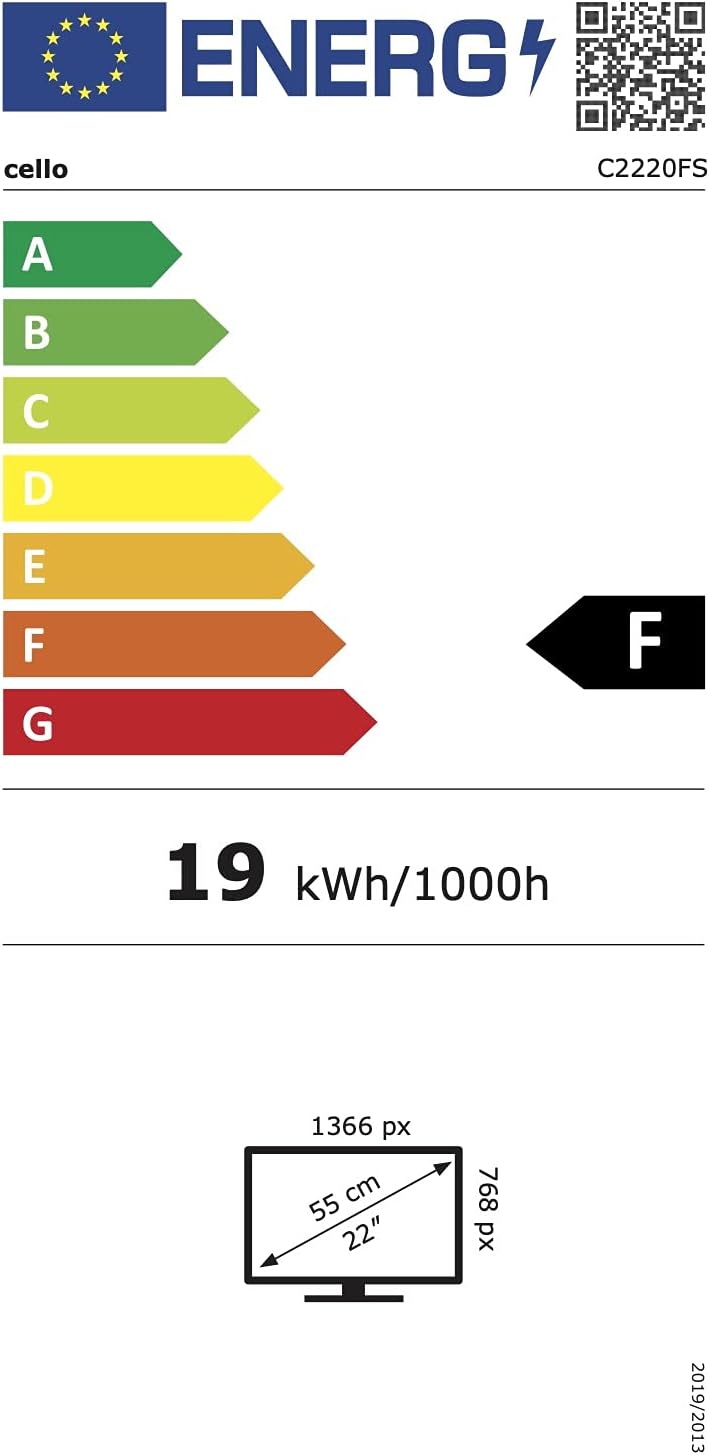
Сүрөт 6.1: Energy efficiency label for the Cello C2220FSDE TV. For more details, visit EPREL маалымат базасы.

Сүрөт 6.2: Detailed product information sheet. For more details, visit EPREL маалымат базасы.
7. Кепилдик жана колдоо
7.1 Кепилдик маалыматы
This Cello TV comes with a 1 жылдык чектелген кепилдик. Кепилдик дооматтары үчүн сатып алганыңыздын далилин сактап коюңуз.
7.2 Кардарларды колдоо
For technical support or customer service, please contact Cello Electronics:
- Webсайт: www.celloelectronics.de
- Электрондук почта: consumersupport@celloelectronics.com
- Телефон: 03334330312
- Дарек: Dovecot Hills, Bishop Auckland, DL14 6XW Durham, United Kingdom
You can also download the full instruction manual for your device in your preferred language from the official Cello webсайт: https://celloelectronics.de/instruction-books/.