
1. Киришүү
This manual provides comprehensive instructions for the installation, operation, maintenance, and troubleshooting of the IBASE Technology MI953F ITX Motherboard. Designed for industrial and embedded applications, the MI953F supports Intel Core i7/i5 processors with a Socket G interface and features the Intel QM57 PCH. It offers robust connectivity including multiple GbE LAN ports, SATA, COM, and various expansion slots.
2. Коопсуздук маалыматы
Please read and follow all safety instructions carefully to prevent damage to the motherboard or injury to yourself. Always disconnect power before handling components. Wear an anti-static wrist strap when installing or removing components to prevent electrostatic discharge (ESD) damage. Do not expose the motherboard to moisture or extreme temperatures. Ensure proper ventilation when the system is in operation.
3. Пакеттин мазмуну
Таңгактагы бардык буюмдардын бар экенин текшериңиз. Эгерде кандайдыр бир буюм жок болсо же бузулуп калса, дароо сатуучуга кайрылыңыз.
- IBASE MI953F ITX Motherboard
- SATA Data Cables (quantity may vary)
- I / O Shield
- Driver CD/USB (may not be included with all packages, drivers available online)
- Ыкчам орнотуу колдонмосу (бул документ толук нускама катары кызмат кылат)
4. Продукт бүтүп калдыview
The IBASE MI953F is a compact Mini-ITX motherboard designed for high-performance embedded applications. It supports Intel Core i7/i5 processors with a Socket G form factor and utilizes the Intel QM57 Platform Controller Hub (PCH). Key features include dual Gigabit Ethernet LAN ports (Intel 82577LM and 82574L), VGA output, four SATA ports, four COM ports, and various expansion options such as PCI, PCI-E(1x), and Mini PCI-E slots.
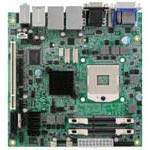
4.1-сүрөт: жогорудан ылдыйга view of the IBASE MI953F ITX Motherboard, showing various components and connectors.
4.1. Key Components and Connectors
- CPU Socket G: For Intel Core i7/i5 processors.
- Intel QM57 PCH: Provides chipset functionalities.
- DIMM Slots: Two slots for DDR3 SO-DIMM memory modules.
- SATA порттору: Four ports for connecting storage devices.
- LAN порттору: Two Gigabit Ethernet ports (82577LM and 82574L).
- VGA порту: Видео чыгаруу үчүн.
- COM порттору: Four serial communication ports.
- Кеңейтүү уячалары: One PCI, one PCI-E(1x), and one Mini PCI-E slot.
- USB порттору: Multiple USB 2.0 ports (internal headers and external).
5. Орнотуу жана орнотуу
5.1. CPU орнотуу
- CPU розеткасынын рычагын этияттык менен ачыңыз.
- Align the CPU with the socket, ensuring the notches match. Do not force the CPU into the socket.
- Процессорду розеткага акырын салыңыз.
- CPUну бекитүү үчүн розетка рычагын жабыңыз.
- CPUга термикалык пастаны сүйкөп, CPU муздаткычын анын көрсөтмөлөрүнө ылайык орнотуңуз.
5.2. Эстутум (RAM) орнотуу
- Locate the two DDR3 SO-DIMM slots.
- DIMM уячасынын эки учундагы клиптерди ачыңыз.
- Эстутум модулундагы оюкту DIMM уячасындагы оюк менен тегиздеңиз.
- Модулду уячага бекем кысып, клиптер ордуна орнотулганга чейин киргизиңиз.
5.3. Сактагыч түзмөктү орнотуу
Connect SATA storage devices (HDDs/SSDs) to the SATA ports on the motherboard using SATA data cables. Ensure the power cable from your power supply is also connected to the storage device.
5.4. Перифериялык байланыштар
- Күч: Connect the ATX power connector from your power supply to the motherboard.
- Дисплей: Connect your monitor to the VGA port.
- Тармак: Connect Ethernet cables to the GbE LAN ports.
- USB: Connect USB devices to the external USB ports or internal headers.
- Кеңейтүү карталары: Install PCI, PCI-E, or Mini PCI-E cards into their respective slots if required.
6. Иштөө нускамалары
6.1. Баштапкы күйгүзүү
After all components are installed and connected, connect the power cord to your power supply and press the power button on your system chassis. The system should initiate the boot process.
6.2. BIOS/UEFI Орнотуу
BIOS/UEFI орнотуунун утилитасына кирүү үчүн, басыңыз DEL or F2 key repeatedly during the initial boot sequence. The BIOS allows you to configure system settings, boot order, and monitor hardware status. Refer to the IBASE website for detailed BIOS documentation specific to your firmware version.
6.3. Драйверди орнотуу
After installing your operating system, install the necessary drivers for the motherboard components. These typically include chipset drivers, graphics drivers, LAN drivers, and audio drivers. Drivers can usually be found on the IBASE official website under the MI953F product page.
7. Техникалык тейлөө
7.1. Тазалоо
Regularly clean dust from the motherboard and system components using compressed air. Ensure the system is powered off and unplugged before cleaning. Avoid using liquid cleaners directly on components.
7.2. Микропрограмманы жаңыртуу
Periodically check the IBASE website for BIOS/UEFI firmware updates. Firmware updates can improve system stability, performance, and compatibility. Follow the update instructions provided by IBASE carefully to avoid damaging the motherboard.
8. Кыйынчылыктарды
| Көйгөй | Мүмкүн себеп | Чечим |
|---|---|---|
| Система күйбөйт | Бош электр байланыштары, туура эмес электр менен жабдуу, туура эмес алдыңкы панелдин зымдары. | Check all power cables. Verify front panel power switch connection. Test with a known good power supply. |
| Дисплей чыгаруу жок | Monitor not connected, faulty RAM, incorrect display output selected, CPU not seated correctly. | Ensure monitor is connected and powered on. Reseat RAM modules. Check display cable. Reseat CPU. |
| Иштетүү системасы жүктөлбөй калды | Incorrect boot order, corrupted OS, faulty storage device. | Check BIOS boot order. Reinstall OS. Test storage device. |
| Тармакка туташуу маселелери | Loose Ethernet cable, missing LAN drivers, incorrect network settings. | Verify Ethernet cable connection. Install/update LAN drivers. Check OS network settings. |
9. Техникалык шарттар
- Бренд: IBASE
- Модел: MI953F
- Чипсеттин түрү: Intel QM57 PCH
- CPU Model Support: Intel Core i7, Core i5 (Socket G)
- Жеткиликтүү эс тутум уячалары: 2 (DDR3 SO-DIMM)
- Графикалык карта интерфейси: PCI Express (1x)
- System Bus Standard Supported: SATA 3
- S/PDIF туташтыргычынын түрү: Оптикалык
- LAN: 2x Gigabit Ethernet (Intel 82577LM, 82574L)
- Видео чыгаруу: VGA
- SATA порттору: 4
- COM порттору: 4
- Кеңейтүү уячалары: 1x PCI, 1x PCI-E(1x), 1x Mini PCI-E
- Өндүрүүчү: IBASE Technology
- UPC: 091128536106
- ASIN: B08DYCBWB1
10. Кепилдик жана колдоо
The IBASE MI953F Motherboard is covered by a manufacturer's warranty. For specific warranty terms and conditions, please refer to the warranty card included with your product or visit the official IBASE Technology website. For technical support, driver downloads, and further assistance, please visit the IBASE Technology support portal or contact their customer service department.
IBASE Technology Official Webсайт: www.ibase.com.tw