
1. Киришүү
О тандаганыңыз үчүн рахматurlife Kids Camera OU-630. This digital camera is designed for children, offering 1080p Full HD video recording, 12MP photo resolution, and a unique 60x macro magnification function for exploring the micro-world. It features a 3.5-inch large screen, various creative filters, games, and music playback. Please read this manual carefully to ensure proper use and maintenance of your camera.
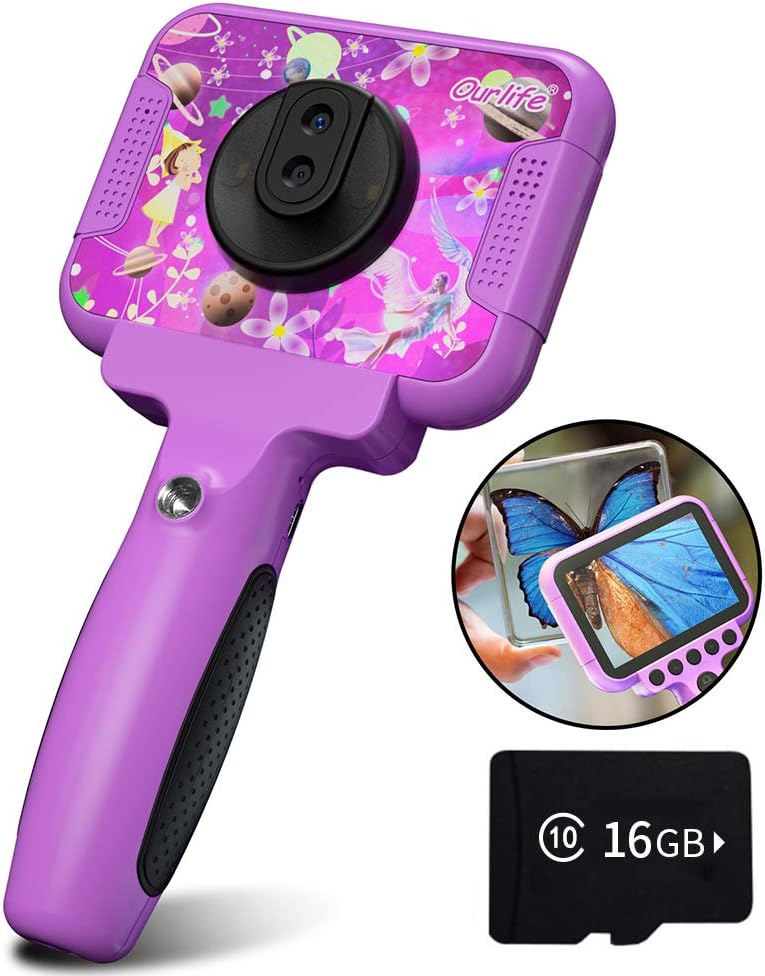
Image 1.1: The Ourlife Kids Camera OU-630, highlighting its design and macro capability.
2. Пакеттин мазмуну
Сураныч, бардык буюмдар бар экенин текшерүү үчүн пакетти текшериңиз:
- Kids Camera x 1
- 16 ГБ TF картасы x 1
- Base Bracket x 1
- USB кубаттоо кабели x 1
- Колдонуучунун колдонмосу x 1
- Neck Lanyard x 1
- Кол боосу x 1

Image 2.1: Contents of the Ourlife Kids Camera OU-630 package.
3. Продукт бүтүп калдыview
Камеранын компоненттери жана башкаруу элементтери менен таанышып алыңыз:
- Дисплей экраны: 3.5-inch color screen for viewing photos, videos, and navigating menus.
- Негизги линза: For standard photography and video.
- Макро линза: Dedicated lens for 60x magnification.
- Башкаруу баскычтары: M (Menu), Up, OK, Down, Power, Shutter/LED.
- туткасы: Ergonomically designed for child-friendly grip.
- USB порт: Заряддоо жана маалыматтарды өткөрүү үчүн.
- TF карта уячасы: Эстутум картасын киргизүү үчүн.

Image 3.1: Key features and specifications of the Ourlife Kids Camera OU-630.
Баскычтын функцияларынын таблицасы
| баскыч | Камера режими | Жазуу режими | Музыка режими | Оюн режими | Ойнотуу режими |
|---|---|---|---|---|---|
| M | Менюга кайтуу | ||||
| ▲ | Change filters/Frames Long press: Zoom in | Change filters/Frames | Мурунку ыр | Солго жылдыруу | Previous photo |
| OK | Long press: Open/Close LED light | OK | Choose music/story | OK | Ойнотуу / Тыныгуу |
| ▼ | Change filters/Frames Long press: Zoom out | Change filters/Frames | Кийинки ыр | Оңго жылдырыңыз | Кийинки сүрөт |
| ⏻ | Switch to Splicing mode | Менюга кайтуу | NULL | NULL | Жок кылуу |
| ◎ | Сүрөткө тартуу | Менюга кайтуу | NULL | NULL | NULL |
Image 3.2: Detailed functions of each button across different modes.
4. Орнотуу
4.1. Камераны заряддоо
Before first use, fully charge the camera. Connect the included USB charging cable to the camera's USB port and to a compatible USB power source (e.g., computer, wall adapter). The charging indicator light will show the charging status. A full charge provides approximately 3 hours of use.
4.2. TF картасын салуу
The camera requires a TF (MicroSD) card to store photos and videos. A 16GB TF card is included. Locate the TF card slot on the side of the camera. Gently insert the TF card with the metal contacts facing down until it clicks into place. To remove, push the card in again until it springs out.
5. Иштөө нускамалары
5.1. Күйгүзүү/өчүрүү
- Күйгүзүү үчүн, басып, кармап туруңуз Power button (⏻) экран күйгүчө.
- Өчүрүү үчүн, басып туруңуз Power button (⏻) экран өчүп калганга чейин.
5.2. Меню навигациясы
колдонуу Өйдө (▲) жана Төмөн (▼) Меню параметрлери аркылуу өтүү үчүн баскычтарды басыңыз. OK баскычы to confirm a selection. Press the M (Меню) баскычы to return to the previous menu or the main menu.
5.3. Сүрөт тартуу
- Негизги менюдан тандаңыз Камера сүрөтчөсү жана басыңыз OK.
- Экранды колдонуп кадрга түшүрүңүз.
- басыңыз Shutter button (◎) сүрөткө тартуу.
- колдонуу Өйдө (▲) жана Төмөн (▼) buttons to change filters or frames. Long press Өйдө (▲) чоңойтуу үчүн, көпкө басуу Төмөн (▼) кичирейтүү үчүн.
5.4. Видеолорду жаздыруу
- Негизги менюдан тандаңыз Видео сүрөтчөсү жана басыңыз OK.
- басыңыз Shutter button (◎) жаздыруу үчүн.
- басыңыз Shutter button (◎) жазууну токтотуу үчүн дагы.
- колдонуу Өйдө (▲) жана Төмөн (▼) buttons to change filters or frames during recording.
5.5. Макрофункция
The camera features a dedicated macro lens for 60x magnification, ideal for observing small objects. The optimal focal length for macro photography is 20-40mm.
- To switch between the main lens and macro lens, long press the Shutter button (◎).
- When in macro mode, position the camera close to the subject (20-40mm distance).
- Use the included base bracket for stability during macro shots to prevent hand shake.
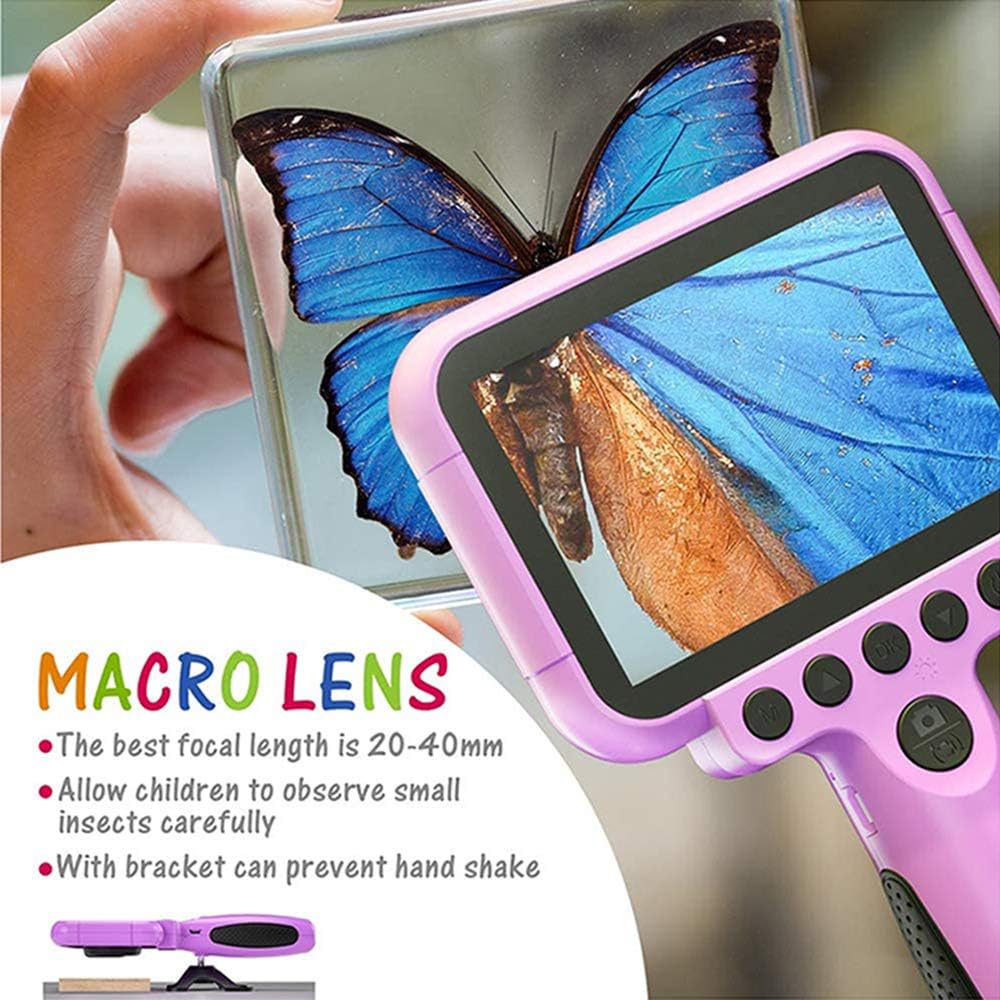
Image 5.1: Demonstrating the macro lens function for detailed observation.

Image 5.2: Switching between HD and Macro lenses.
5.6. Patchwork Mode (Splicing Mode)
This mode allows you to combine two separate photos into one. It includes various border patterns.
- In Camera Mode, press the Power button (⏻) to switch to Splicing (Patchwork) mode.
- Follow the on-screen prompts to take two photos that will be merged.
- Select from 9 available border patterns.

Image 5.3: Using the Patchwork Mode to combine images.
5.7. Музыка режими
The camera supports MP3 music playback. Store your favorite music files on the TF card. From the main menu, select the Музыка сөлөкөтү жана басыңыз OK. колдонуу Өйдө (▲) жана Төмөн (▼) buttons to select songs, and OK ойнотуу/тыныгуу.
5.8. Оюндар
The camera includes pre-installed games for entertainment. From the main menu, select the Game icon жана басыңыз OK. Use the navigation buttons to play.
5.9. Ойнотуу режими
үчүн view your captured photos and videos, select the Photos/Video Playback icon негизги менюдан жана басыңыз OK. колдонуу Өйдө (▲) жана Төмөн (▼) buttons to browse, and OK to play videos or view photos. To delete a file, басыңыз Power button (⏻) while viewаны иштетүү.
5.10. Орнотуулар
Access camera settings by selecting the Орнотуулар сөлөкөтү from the main menu. Here you can adjust various parameters such as date/time, language, resolution, and more.
6. Техникалык тейлөө
- Камераны таза кармоо үчүн аны жумшак, кургак чүпүрөк менен сүртүңүз.
- Камераны өтө жогорку температурага, түз күн нуруна же нымдуулукка дуушар кылбаңыз.
- Камераны өз алдынча бөлүүгө же оңдоого аракет кылбаңыз.
- Ensure the TF card is inserted correctly to prevent data loss.
- Charge the camera regularly to maintain battery health.
7. Кыйынчылыктарды
- Камера күйбөй жатат: Батарея заряддалганын текшериңиз. Кубат булагына туташып, кайра аракет кылыңыз.
- Сүрөткө/видеого тартууга болбойт: Check if a TF card is inserted and if it has sufficient storage space.
- Сүрөттүн сапаты начар: Ensure the lens is clean. Check lighting conditions. For macro shots, ensure correct focal distance (20-40mm).
- Камера тоңуп калат: Press and hold the Power button to force a restart.
- TF card error: Reinsert the TF card. If the issue persists, try formatting the card (this will erase all data) or use a different TF card.
8. Техникалык шарттар
| Өзгөчөлүк | Деталь |
|---|---|
| Модель номери | ОУ-630 |
| Натыйжалуу дагы эле чечим | 12 депутат |
| Video Resolution | 1080p |
| Screen Size | 3.5 дюйм |
| Image Stabilization | Санарип |
| Линзанын түрү | Macro (60x zoom) |
| Батарея түрү | 1 Литий Полимер (кошулган) |
| Байланыш технологиясы | USB |
| Колдоого алынган медиа түрү | SD карта |
| Атуу режимдери | Loop recording, Continuous shooting, Timed photo, Macro photography, Filter photos |
| Элементтин өлчөмдөрү (D x W x Y) | 3.94"D x 7.28"W x 0.79"H |
9. Кепилдик жана колдоо
Бул Оurlife Kids Camera OU-630 comes with a 12 айлык кепилдик from the date of purchase. This warranty covers manufacturing defects and workmanship. It does not cover damage caused by misuse, accidents, unauthorized repairs, or normal wear and tear.
For technical support, warranty claims, or any questions regarding your product, please contact Ourlife customer service. Refer to the contact information provided on the product packaging or the official Ourlэгерде webсайт.