
Wellue BP2A
Wellue Bluetooth Blood Pressure Monitor BP2A User Manual
Model: BP2A | Brand: Wellue
1. Киришүү
This manual provides essential instructions for the safe and effective use of your Wellue Bluetooth Blood Pressure Monitor BP2A. This device is designed for home use to measure systolic blood pressure (SYS), diastolic blood pressure (DIA), mean arterial pressure (MAP), pulse rate, and pulse pressure. It also features an ECG function for additional heart health monitoring. Please read this manual thoroughly before first use and retain it for future reference.
2. Коопсуздук боюнча маанилүү маалымат
- Consult your physician before using this device for any medical condition. Self-diagnosis and treatment based on measurements can be dangerous.
- This device is intended for adult home use only. It is not intended for use on infants, children, or pregnant women.
- Do not use this device in conjunction with high-frequency surgical equipment.
- Аппаратты балдар жана үй жаныбарлары жетпеген жерде сактаңыз.
- Аппаратты ажыратпаңыз же оңдоого аракет кылбаңыз. Бардык тейлөөлөрдү квалификациялуу кызматкерлерге тапшырыңыз.
- Avoid strong electromagnetic fields during use, as they may interfere with the device's operation.
- Диеталык кошулмаларга байланыштуу билдирүүлөр FDA тарабынан бааланган эмес жана диагноз коюу, дарылоо, айыктыруу же кандайдыр бир ооруну же ден соолуктун абалын алдын алуу үчүн арналган эмес.
3. Пакеттин мазмуну
Пакетти ачканда бардык буюмдардын бар экендигин текшериңиз:
- Wellue Bluetooth Blood Pressure Monitor BP2A (integrated with cuff)
- USB заряддоо кабели
- User Manual
4. Түзмөк бүттүview
The Wellue BP2A monitor features a compact, one-piece design for ease of use and portability. It includes an integrated arm cuff, a digital display, and control buttons.

Figure 4.1: Wellue BP2A Blood Pressure Monitor and ViHealth App Interface.

Figure 4.2: Key features of the Wellue BP2A monitor, including Bluetooth connectivity, FDA clearance, rechargeable battery, and built-in memory for 50 readings.
5. Орнотуу
5.1 Аппаратты заряддоо
Before initial use, fully charge the device using the provided USB cable. Connect the cable to the monitor's charging port and a standard USB power adapter (not included). A full charge can provide power for up to 300 measurements.
5.2 Installing the ViHealth App
The Wellue BP2A works with the free ViHealth app, available for iOS and Android devices. Издөө "ViHealth" in your device's app store and install it.

Figure 5.1: The ViHealth app for Android and iOS, used to track blood pressure and heart measurements.
5.3 Bluetooth жупташтыруу
Ensure Bluetooth is enabled on your smartphone. Open the ViHealth app. Turn on the Wellue BP2A monitor. The device should automatically connect to the app. Follow any on-screen prompts within the app to complete the pairing process.
6. Иштөө нускамалары
6.1 Манжетті туура жайгаштыруу
Accurate measurement depends on correct cuff placement. Ensure the cuff is placed directly on your bare upper arm, 1-2 cm above the elbow joint. The air tube (if applicable, though this is a one-piece design, the sensor area should be aligned) should be positioned over the brachial artery. The cuff should fit snugly but not too tightly. Refer to the diagram below for guidance.

Figure 6.1: Correct cuff placement for accurate blood pressure measurement.
6.2 Кан басымын өлчөө
- Аркаңызды көтөрүп, бутуңузду полго тегиз кылып ыңгайлуу отуруңуз. Манжета жүрөк деңгээлинде болушу үчүн колуңузду столдун үстүнө коюңуз.
- Ensure the device is powered on and, if desired, connected to the ViHealth app.
- басыңыз Start/Stop button on the device. The cuff will begin to inflate.
- Өлчөө учурунда кыймылсыз жана унчукпаңыз.
- Once complete, your blood pressure readings (SYS, DIA, MAP, Pulse Rate, Pulse Pressure) will be displayed on the device screen and automatically uploaded to the ViHealth app if connected.

Figure 6.2: User taking a blood pressure measurement with the Wellue BP2A monitor.
6.3 Taking an ECG Measurement
The device also supports ECG measurements. To take an ECG:
- Ensure the device is powered on and connected to the ViHealth app.
- Hold the device with both hands, placing your thumbs on the designated electrodes (usually the metal strips on the sides or top of the device).
- Remain still and relaxed for the duration of the measurement (typically 30 seconds).
- The ECG waveform and heart rate will be displayed on the device and recorded in the app.
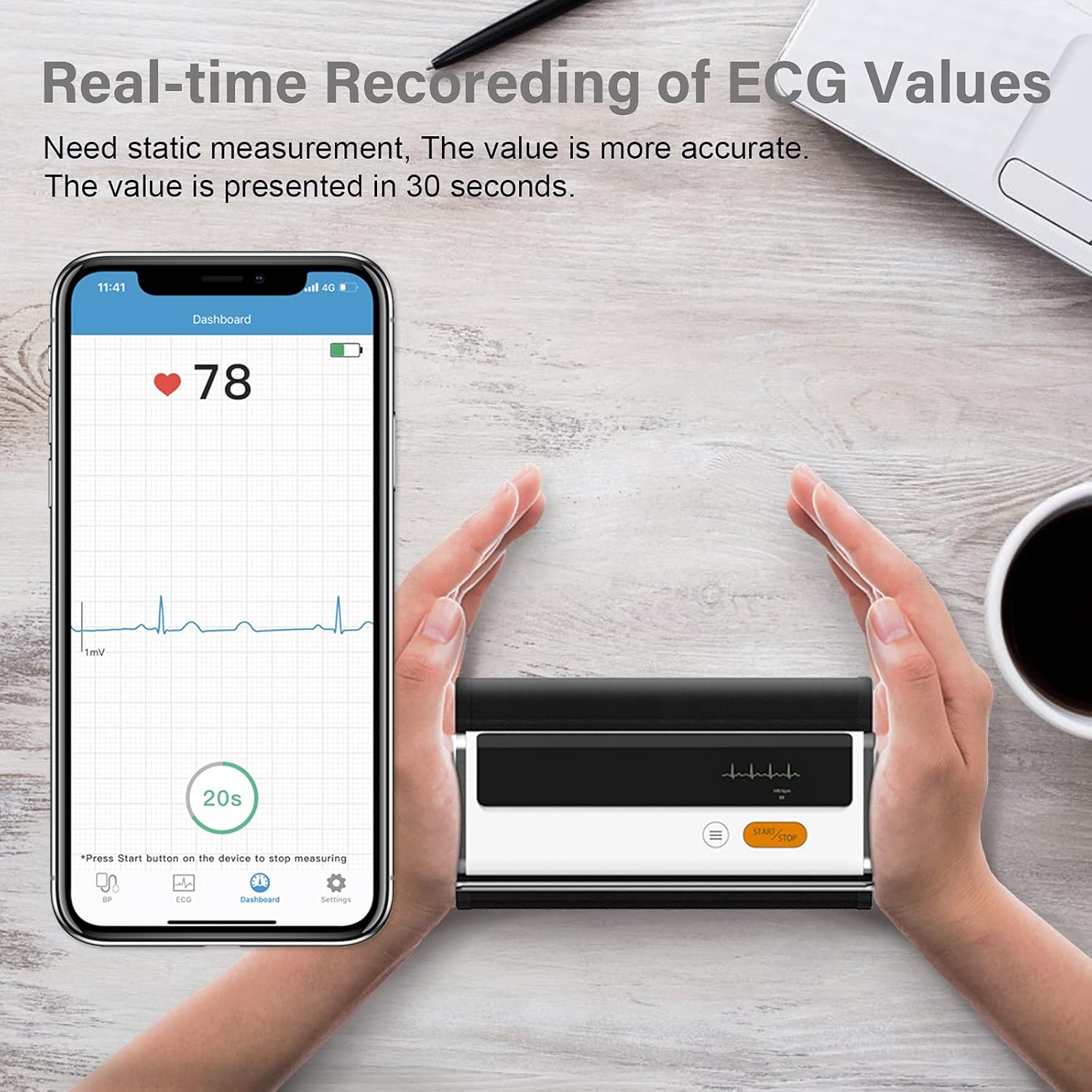
Figure 6.3: Real-time recording of ECG values using the Wellue BP2A monitor.
6.4 Using the ViHealth App for Data Management
The ViHealth app allows you to:
- View real-time readings during measurement.
- Access historical data and trends for multiple users.
- Generate and share PDF/CSV reports with healthcare providers.
- Track both blood pressure and ECG data in one place.
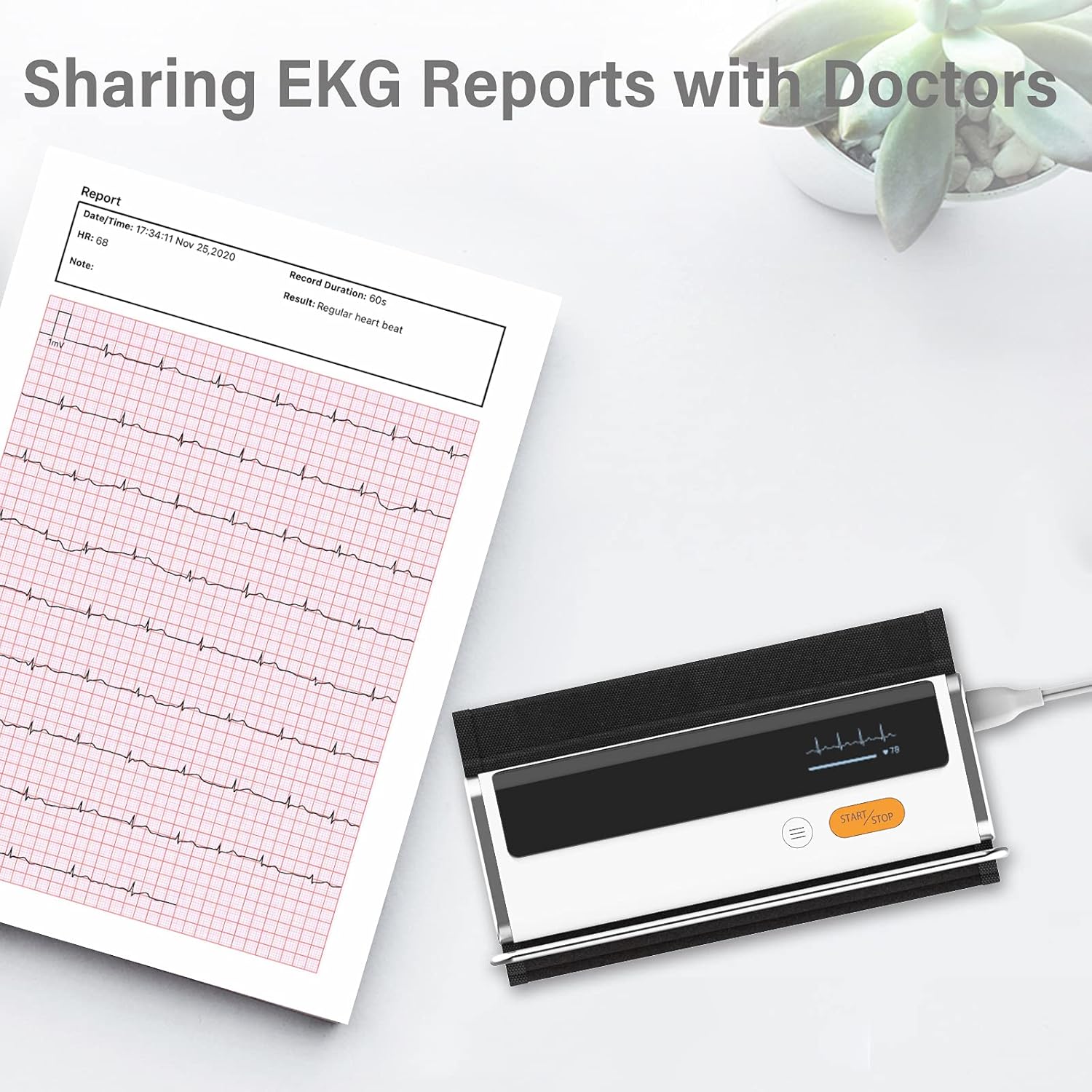
Figure 6.4: Sharing EKG reports generated by the ViHealth app.
Video 6.1: Demonstration of the Wellue blood pressure monitor's features and its integration with the ViHealth app for real-time readings and data sharing.
7. Техникалык тейлөө
7.1 Тазалоо
Wipe the device and cuff with a soft, dry cloth. If necessary, use a cloth lightly dampened with water or a mild disinfectant. Do not immerse the device in water or use abrasive cleaners.
7.2 Сактоо
Түзмөктү салкын, кургак жерде, түз күн нурунан жана өтө жогорку температурадан алыс сактаңыз. Колдонулбаган учурда аны баштапкы таңгагында же коргоочу капта сактаңыз.
7.3 Батареяга кам көрүү
To prolong battery life, charge the device regularly, even if not used frequently. Avoid fully discharging the battery for extended periods.
8. Кыйынчылыктарды
| Көйгөй | Мүмкүн себеп | Чечим |
|---|---|---|
| Түзмөк күйбөйт | Батарея аз | USB кабели аркылуу аппаратты заряддаңыз. |
| Колдонмого туташуу мүмкүн эмес | Bluetooth off, app not open, device not in pairing mode | Ensure Bluetooth is on, open ViHealth app, restart device. |
| Так эмес окуулар | Incorrect cuff placement, movement during measurement, speaking during measurement | Re-position cuff correctly, remain still and silent during measurement. |
| Манжет үйлөнбөйт | Cuff not properly attached, air leak | Check cuff connection, ensure no leaks. |
9. Техникалык шарттар
- Модель аты: Armfit Plus
- Модель номери: BP2A
- Бренд: Wellue
- Манжеттин көлөмү: 8.7-16.5 дюйм (22-42 см)
- Кубат булагы: Батарея менен иштейт (1 литий-иондук батарейка, камтылган)
- Дисплей түрү: Санарип
- Продукциянын өлчөмдөрү: 5.9"L x 1.9"W x 1.18"Mh
- Салмагы: Болжол менен 15.84 унция
- Байланыш: Bluetooth
- Эстутум: Built-in memory for 50 sets of readings
10. Кепилдик жана колдоо
For warranty information and technical support, please refer to the official Wellue webсайтка же түздөн-түз кардарларды тейлөөгө кайрылыңыз. Сатып алуу квитанциясын кепилдик дооматтары үчүн сатып алуунун далили катары сактаңыз.
Ask a question about this manual
Ask about setup, troubleshooting, compatibility, parts, safety, or missing instructions. Manuals+ will review the question and use this page’s manual context to help answer it.