
HUMAX R8716
Humax Digital HD Fox R8716 Satellite Receiver User Manual
1. Киришүү
This manual provides essential information for the setup, operation, and maintenance of your Humax Digital HD Fox R8716 satellite receiver. Please read these instructions carefully before using the device to ensure proper functionality and to maximize your viewтажрыйбасы.

The Humax HD Fox digital satellite receiver, shown with its accompanying remote control, designed for high-definition television reception.
The Humax HD Fox R8716 is a DVB-S2 satellite receiver capable of receiving free-to-air satellite programs in high definition (up to 1080i/1080p). It features a pre-installed channel list for quick setup and offers versatile connectivity options, including HDMI and Scart, to support both modern and older television sets. The device also includes a 12V power input, making it suitable for mobile use, such as in campчөйрөлөр.
2. Пакеттин мазмуну
Сиздин пакетиңизде төмөнкү нерселердин бардыгы камтылганын текшериңиз:
- Humax HD Fox R8716 Satellite Receiver
- Алыстан башкаруу
- AAA батареялары (2x)
- Кубаттуу адаптер (12V)
- Колдонуучунун колдонмосу (англисче)

An illustration of the items included in the package: the Humax HD Fox satellite receiver, its remote control, and the power adapter.
3. Орнотуу
3.1 Кабыл алгычты туташтыруу
Follow these steps to connect your satellite receiver to your television and satellite dish:
- Спутниктик байланыш: Connect the satellite cable from your dish to the 'LNB IN' port on the rear of the receiver.
- Видео/Аудио туташуусу:
- For HD TVs: Connect an HDMI cable from the 'HDMI OUT' port on the receiver to an available HDMI input on your TV.
- For older TVs: Connect a Scart cable from the 'SCART' port on the receiver to the Scart input on your TV.
- Кубат туташуу: Connect the provided 12V power adapter to the '12V DC' input on the receiver and then plug the adapter into a power outlet.
- USB туташуу (кошумча): If you plan to use PVR functions, connect a USB storage device to the 'USB' port on the front panel.

Деталдаштырылган view of the rear panel connections, including satellite input, HDMI output, optical audio output, Scart port for older TVs, and the 12V DC power input.
3.2 Биринчи жолу орнотуу
Upon first power-on, the receiver will guide you through an initial setup process. The Humax HD Fox R8716 comes with a pre-installed channel list for Astra satellites, allowing for immediate use without a lengthy channel scan. If you are connecting to a different satellite or wish to perform a new scan, follow the on-screen prompts to access the installation menu and initiate a channel search.

The Humax HD Fox receiver positioned with a satellite dish in the background, illustrating its primary function for receiving satellite television signals.
Note: The transition from SD to HD broadcasting is ongoing. Modern HD-capable receivers like the Humax HD Fox R8716 are designed to continue receiving public-service programs after the SD shutdown, which is scheduled for January 7, 2025.

This image highlights the SD shutdown on January 7, 2025, and confirms that modern HD-capable receivers will continue to receive public-service programs.
4. Кабылдагычты иштетүү
4.1 Негизги функциялар
- Күйгүзүү/өчүрүү: басыңыз КҮЧ button on the remote control or the front panel to turn the receiver on or off.
- Канал тандоо: колдонуу CH+ / CH- buttons to navigate through channels. Alternatively, enter the channel number directly using the numeric keypad.
- Үндү көзөмөлдөө: Үнүн колдонуп, үнүн жөндөңүз VOL + / VOL- баскычтар.
- Менюга кирүү: басыңыз МЕНЮ button to access the main menu for settings and features.
4.2 Алыстан башкаруу функциялары
The remote control provides full access to all receiver functions. Familiarize yourself with the button layout:

The remote control for the Humax HD Fox receiver, featuring buttons for power, channel selection, volume control, menu navigation, and other functions.
- Сандык баскычтоп (0-9): Түздөн-түз каналга кирүү.
- OK баскычы: Confirms selections in menus and displays channel information.
- Жебе баскычтары: Navigate through menus and channel lists.
- ЧЫГУУ баскычы: Менюдан чыгат же мурунку экранга кайтат.
- INFO баскычы: Программа жөнүндө маалыматты көрсөтөт.
- EPG баскычы: Электрондук программалык колдонмону колдонот.
- Түс баскычтары (кызыл, жашыл, сары, көк): Used for specific functions as indicated on-screen.
4.3 PVR Ready Functionality
The Humax HD Fox R8716 is PVR Ready. This means you can record television programs by connecting an external USB storage device (e.g., a USB hard drive or flash drive) to the USB port on the front panel. Once connected, you can typically schedule recordings via the EPG or initiate instant recordings. Refer to the on-screen menu for detailed PVR setup and operation instructions.
4.4 Аудио чыгаруу
The receiver supports Dolby Digital audio output, providing enhanced sound quality. Ensure your audio system or television is configured to receive and process Dolby Digital signals for optimal audio experience.

The satellite receiver includes a pre-installed channel list and Dolby Digital audio output for an enhanced viewтажрыйбасы.
5. Техникалык тейлөө
To ensure the longevity and optimal performance of your Humax HD Fox R8716 receiver, follow these simple maintenance guidelines:
- Тазалоо: Use a soft, dry cloth to clean the exterior of the receiver. Do not use liquid cleaners, aerosols, or abrasive materials, as these can damage the finish or internal components.
- Вентиляция: Ensure the receiver is placed in a well-ventilated area. Do not block the ventilation openings on the device, as this can lead to overheating.
- Өчүрүү: If the receiver will not be used for an extended period, it is advisable to unplug it from the power outlet.
6. Кыйынчылыктарды
Эгер ресивериңизде көйгөйлөргө туш болсоңуз, төмөнкү жалпы көйгөйлөрдү жана чечимдерди караңыз:
| Көйгөй | Мүмкүн себеп | Чечим |
|---|---|---|
| Сүрөт же үн жок | Loose cable connections, incorrect input selected on TV, receiver not powered on. | Check all cable connections (satellite, HDMI/Scart, power). Ensure your TV is set to the correct input source (e.g., HDMI 1, AV). Press the power button on the receiver or remote. |
| "Сигнал жок" билдирүүсү | Satellite dish misalignment, LNB issue, satellite cable disconnected. | Check the satellite cable connection to the receiver. Ensure the satellite dish is correctly aligned. If the problem persists, contact a qualified technician. |
| Пульт иштебей жатат | Dead batteries, obstruction, remote not pointed at receiver. | Replace the batteries in the remote control. Ensure there are no obstructions between the remote and the receiver. Point the remote directly at the receiver's front panel. |
| Channels missing or scrambled | Outdated channel list, satellite signal issues. | Perform a new channel scan through the receiver's menu. Check satellite signal strength and quality in the settings. |
If these solutions do not resolve the issue, please contact Humax customer support for further assistance.
7. Техникалык шарттар
Technical specifications for the Humax Digital HD Fox R8716 satellite receiver:
| Өзгөчөлүк | Деталь |
|---|---|
| Модель номери | R8716 |
| Бренд | HUMAX |
| Түс | Кара |
| Өлчөмдөр (D x W x H) | 9.6 см х 15 см х 3.6 см |
| Салмагы | 374 грамм |
| Байланыш технологиясы | HDMI, Scart |
| Жалпы HDMI порттору | 1 |
| Жалпы USB порттору | 1 |
| Аудио чыгаруу режими | Digital Dolby |
| Колдоого алынган аудио формат | Dolby Digital |
| Шайкеш түзмөктөр | Телевидение |
| Электр камсыздоо | 12V DC (suitable for camping) |
| PVR функциясы | PVR Ready (requires external USB storage) |
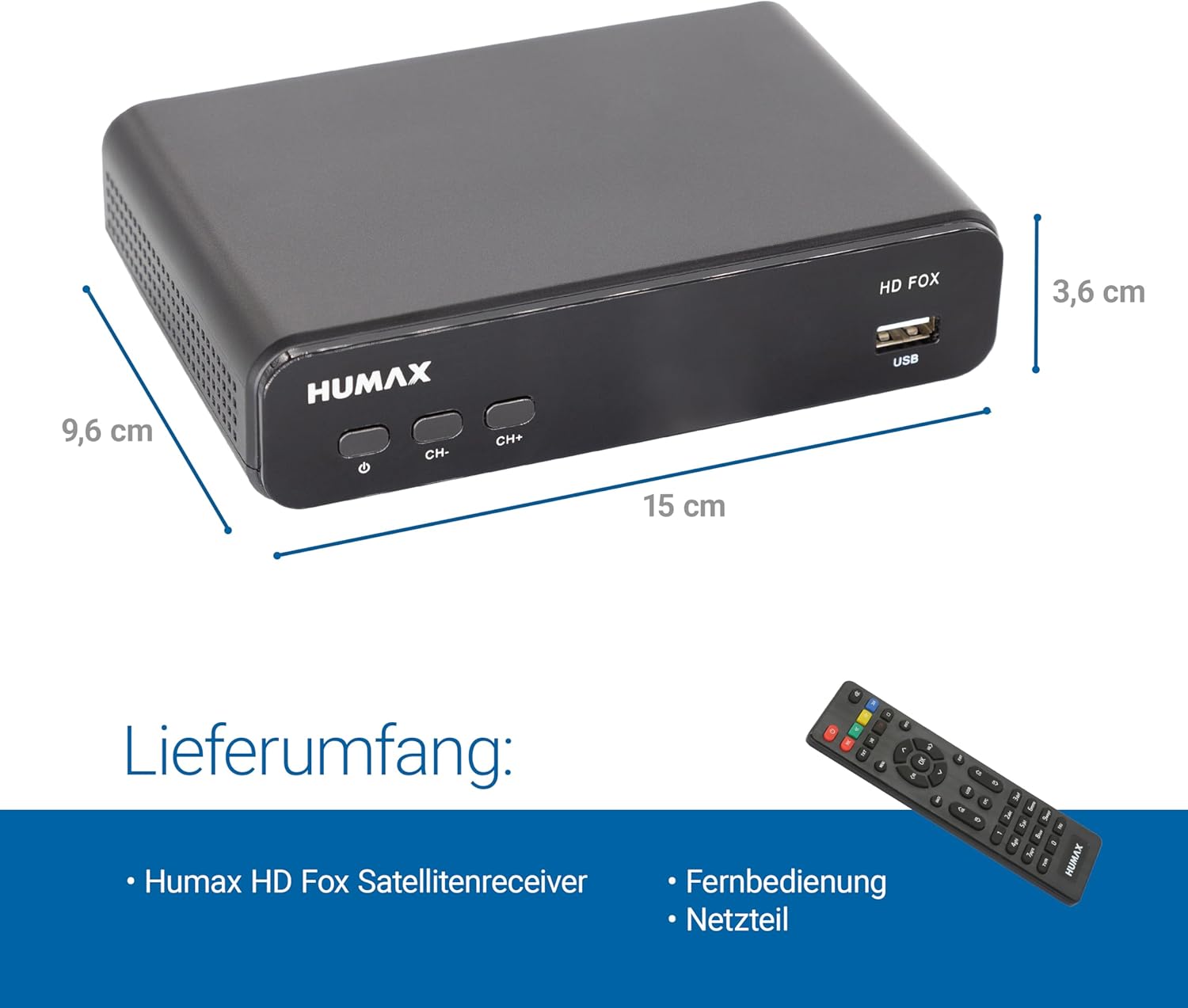
The Humax HD Fox receiver displaying its compact dimensions, measuring 9.6 cm in depth, 15 cm in width, and 3.6 cm in height.
8. Кепилдик жана колдоо
For warranty information, please refer to the documentation provided at the time of purchase or visit the official Humax website. If you require technical support or have questions not covered in this manual, please contact Humax customer service through their official channels.
Ask a question about this manual
Ask about setup, troubleshooting, compatibility, parts, safety, or missing instructions. Manuals+ will review the question and use this page’s manual context to help answer it.