
1. Продукт бүтүп калдыview
The Victrix Gambit Gaming Headset offers both wireless and wired connectivity for versatile use with Xbox One, Xbox Series X|S, and PC. Designed for competitive gaming, it features Dolby Atmos surround sound, 50mm HD speaker drivers, and a bi-directional noise-canceling microphone.

Image 1.1: The Victrix Gambit Gaming Headset, showcasing its sleek black design and over-ear cups.

Image 1.2: The Victrix Gambit headset highlighting its dual wireless and wired modes for home and tournament play.
2. Орнотуу нускамалары
2.1 Пакеттин мазмуну
- Victrix Gambit оюн гарнитурасы
- Зымсыз USB Dongle
- 3.5 мм аудио кабель, линия ичиндеги башкаруу элементтери менен
- USB заряддоо кабели
- Колдонуучунун Колдонмосу (бул документ)
2.2 Гарнитураны заряддоо
Before initial use, fully charge the headset. Connect the USB charging cable to the headset's charging port and to a powered USB port (e.g., console, PC, or USB wall adapter). The LED indicator will show charging status.
2.3 Wireless Connection (Xbox/PC)
- Insert the wireless USB dongle into an available USB port on your Xbox console or PC.
- Гарнитураны күйгүзүү үчүн, LED индикатору күйгөнгө чейин Кубат баскычын басып, кармап туруңуз.
- The headset and dongle should automatically pair. A solid LED on both indicates a successful connection.
- If pairing does not occur automatically, press the pairing button on the USB dongle, then press and hold the Power/Pairing button on the headset until the LED flashes rapidly, then becomes solid.
2.4 Wired Connection (3.5mm)
For wired use or tournament play, connect the supplied 3.5mm audio cable from the headset's 3.5mm port to your controller or device's audio jack. The headset will automatically switch to wired mode.
3. Гарнитураны иштетүү
3.1 Күйгүзүү/өчүрүү
- Күйгүзүү: Press and hold the Power button on the headset until the LED illuminates.
- Өчүрүү: Press and hold the Power button until the LED turns off.
3.2 Volume and Audio Controls
The headset features on-ear controls for convenient audio adjustments.

Image 3.1: Close-up of the headset's right earcup, showing the power button, mode switch, and game/chat balance dial.
- Негизги том: Use the volume dial on the earcup to adjust the overall audio level.
- Оюн/чат балансы: Use the dedicated dial to balance game audio and chat volume.
- Режим которуу: Toggle between different audio modes or profiles if available (refer to specific software for customization).
3.3 Микрофонду колдонуу
The bi-directional noise-canceling microphone ensures clear communication.

Image 3.2: The flexible boom microphone of the Victrix Gambit headset, designed for clear voice capture.
- Үнсүзгө которуу: Flip the microphone boom arm upwards to mute the microphone. Flip it down to unmute.
- Микрофонду көзөмөлдөө: The headset may offer a three-stage mic monitor. Adjust this feature through the headset's companion software on PC or console settings to hear your own voice feedback.
3.4 Dolby Atmos Integration
The headset includes integrated Dolby Atmos for immersive surround sound. A lifetime subscription is included. Ensure Dolby Atmos is enabled in your console or PC audio settings for the best experience.
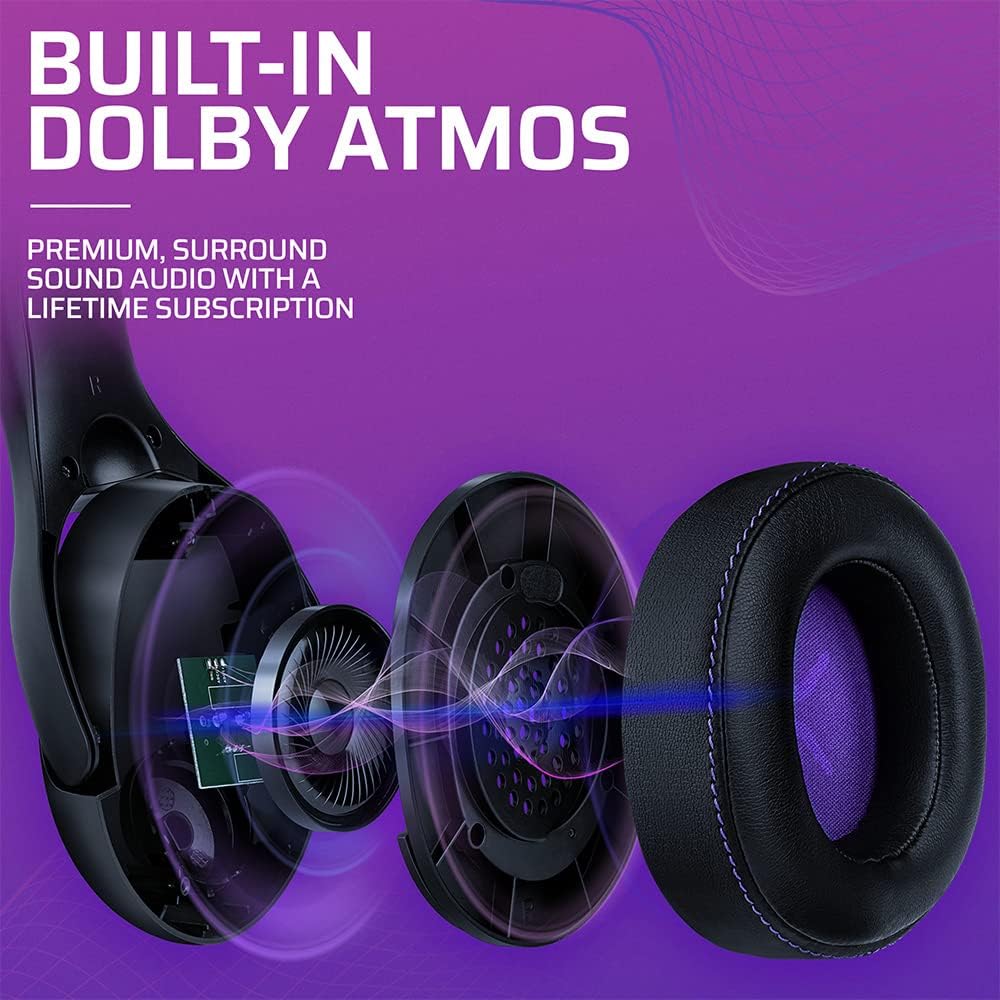
Сүрөт 3.3: Жарылып кеткен view of the Victrix Gambit earcup, illustrating the 50mm speaker drivers and the audio waves representing Dolby Atmos sound.
4. Техникалык тейлөө
4.1 Тазалоо
- Гарнитуранын беттерин тазалоо үчүн жумшак, кургак чүпүрөктү колдонуңуз.
- Кулакчындар үчүн жарнама менен акырын сүртүңүзamp зарыл болсо, кездеме жана жумшак самын эритмесин колдонуп, андан кийин жакшылап кургатыңыз. Ашыкча нымдуулуктан алыс болуңуз.
- Катуу химиялык заттарды же абразивдүү тазалоочу каражаттарды колдонбоңуз.
4.2 Сактоо
Гарнитураны салкын, кургак жерде, күн нуру түз тийбеген жана өтө жогорку температурадан алыс сактаңыз. Бузуп албоо үчүн, гарнитурага оор нерселерди койбоңуз.
4.3 Батареяга кам көрүү
Батареянын иштөө мөөнөтүн узартуу үчүн, гарнитуранын тез-тез толук зарядын жоготпоңуз. Гарнитураны көпкө чейин колдонулбаса дагы, аны үзгүлтүксүз кубаттап туруңуз.
5. Кыйынчылыктарды
5.1 Аудио жок
- Ensure the headset is powered on and properly paired (for wireless) or connected (for wired).
- Check the volume levels on the headset, your console/PC, and the game/application.
- Система жөндөөлөрүндө туура аудио чыгаруу түзмөгү тандалганын текшериңиз.
- For wireless, try re-pairing the headset with the USB dongle.
5.2 Микрофон иштебейт
- Микрофондун үнү өчүрүлгөнүн (ылдыйлатылганын) текшериңиз.
- Check microphone input settings on your console/PC and in-game chat settings.
- Система жөндөөлөрүндө туура микрофон киргизүү түзмөгү тандалганын текшериңиз.
- Мүмкүн болсо, микрофонду башка колдонмо же түзмөк менен сынап көрүңүз.
5.3 Байланыш маселелери
- Зымсыз: Ensure the USB dongle is securely plugged in. Try a different USB port. Move closer to the dongle to rule out range issues.
- текст: Ensure the 3.5mm cable is fully inserted into both the headset and the device. Try a different 3.5mm cable if available.
5.4 Гарнитура заряддалбай жатат
- Ensure the USB charging cable is securely connected to both the headset and a powered USB port.
- Башка USB портун же кубаттоо кабелин колдонуп көрүңүз.
- Кубат булагы активдүү экенин текшериңиз.
6. Техникалык шарттар
| Модель номери | 049-003-НА |
| Байланыш | Wireless (USB Dongle, up to 12.19 meters range), Wired (3.5mm audio cable) |
| Динамик айдоочулар | 50мм HD |
| Аудио технологиясы | Dolby Atmos (lifetime subscription included) |
| Микрофон | Bi-directional, Noise-Canceling, Flip-to-Mute |
| Батарея | 1 Литий-ион (кошулган) |
| Өлчөмдөрү (L x W x Y) | 1 x 260.4 x 215.9 см |
| Салмагы | 610 грамм |
| Шайкештик | Microsoft Xbox One, Xbox Series X|S, PC |
7. Кепилдик маалыматы
Кепилдик боюнча толук маалымат алуу үчүн, расмий PDPге кайрылыңыз webсайтына же өнүмүңүздүн таңгагына кирген кепилдик картасына кайрылыңыз. Кепилдик шарттары жана эрежелери аймакка жараша өзгөрүшү мүмкүн.
8. Кардарларды колдоо кызматы
If you encounter any issues or have questions not covered in this manual, please contact PDP customer support. Visit the official PDP website for support contact details, FAQs, and additional resources.