
1. Киришүү
Сатып алганыңыз үчүн рахматasing the YESIDO YSP03 Sports Bluetooth In-Ear Earphones. This manual provides essential information for the safe and efficient use of your new earphones. Please read it thoroughly before use and retain it for future reference.
2. Коопсуздук маалыматы
- Do not expose the earphones to extreme temperatures, humidity, or corrosive environments.
- Avoid dropping, impacting, or bending the earphones.
- Кулакчындарды бөлүктөргө бөлбөңүз же өзгөртпөңүз. Бул кепилдикти жокко чыгарып, зыян келтириши мүмкүн.
- Keep the earphones away from children and pets.
- Берилген заряддоо кабелин же тастыкталган эквивалентти гана колдонуңуз.
- Угуу жөндөмүнө зыян келтирбөө үчүн орточо үн деңгээлинде угуңуз.
- Do not use the earphones while driving or in situations where you need to be aware of your surroundings.
3. Пакеттин мазмуну
Сураныч, пакетте төмөнкү нерселерди текшериңиз:
- YESIDO YSP03 Sports Bluetooth In-Ear Earphones
- USB заряддоо кабели
- User Manual
- Ear tips (various sizes, typically)
4. Продукт бүтүп калдыview
The YESIDO YSP03 earphones feature an in-ear design with a control unit for easy operation. They support Bluetooth wireless connectivity and also offer direct music playback via an SD card.
Control Unit and Ports
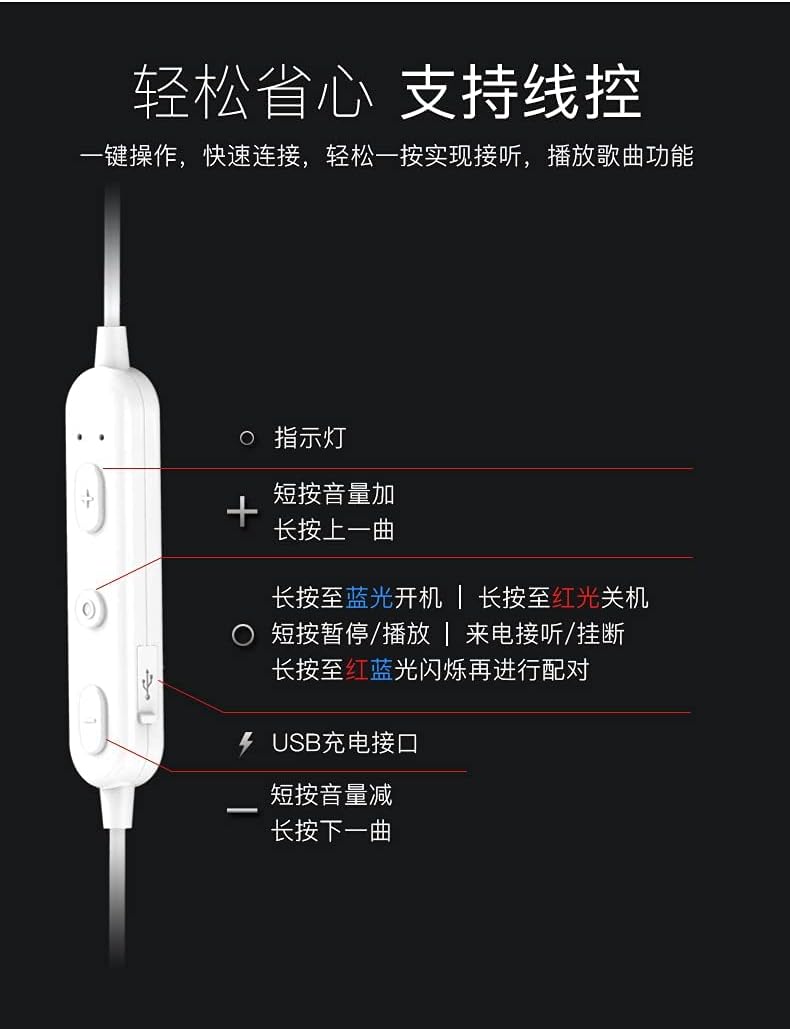
Сүрөт: Деталдаштырылган view of the earphone control unit, showing the indicator light, volume/track buttons, multi-function button, and USB charging port.
- Индикатор жарыгы: Абалды көрсөтөт (кубат, жупташтыруу, кубаттоо).
- '+' баскычы: Short press for Volume Up; Long press for Previous Track.
- Көп функциялуу баскыч (борбордо): Long press for Power On (blue light) / Power Off (red light); Short press for Play/Pause or Answer/Hang up calls; Long press until red and blue lights flash for Pairing Mode.
- '-' баскычы: Short press for Volume Down; Long press for Next Track.
- USB кубаттоо порту: Заряддоо кабелин туташтыруу үчүн.
SD карта уячасы
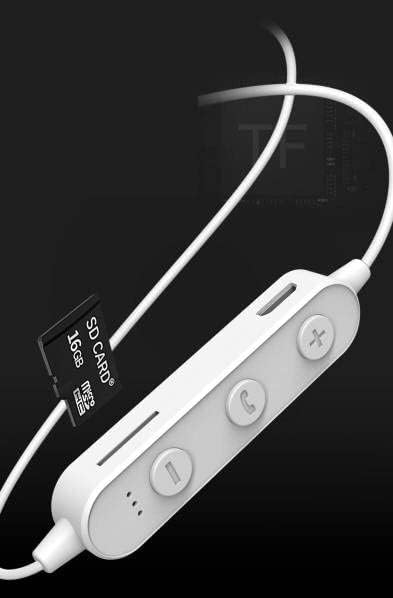
Сүрөт: Close-up of the control unit showing the SD card slot, indicating direct music playback without a phone. A 64GB card can store approximately 15,000 songs.
The earphones feature an integrated SD card slot, allowing you to play music directly from a memory card without needing a connected device. This is ideal for sports or activities where carrying a phone is inconvenient.
5. Орнотуу
5.1 Наушниктерди заряддоо
- Connect the USB charging cable to the USB charging port on the earphone control unit.
- USB кабелинин экинчи учун USB кубат адаптерине (кошумча эмес) же компьютердин USB портуна туташтырыңыз.
- The indicator light will typically show a red light during charging and turn off or change color when fully charged.
- Толук кубаттоо үчүн болжол менен 1-2 саат күтүңүз.
5.2 Bluetooth жупташтыруу
- Наушниктердин өчүрүлгөнүн текшериңиз.
- Press and hold the Multi-function Button (center button) for approximately 5-7 seconds until the indicator light flashes red and blue alternately. This indicates pairing mode.
- On your mobile phone or Bluetooth-enabled device, go to the Bluetooth settings and turn on Bluetooth.
- Издөө available devices. You should see "YESIDO YSP03" or a similar name in the list.
- Select "YESIDO YSP03" to connect. Once successfully paired, the indicator light will typically flash blue slowly or turn off.
- Эгер сырсөз суралса, "0000" киргизиңиз.
5.3 SD картаны салуу
- Башкаруу блогундагы SD карта уячасын табыңыз.
- Gently insert a formatted Micro SD card (TF card) with the metal contacts facing down until it clicks into place.
- The earphones will automatically detect the card and switch to SD card playback mode if no Bluetooth device is connected or if Bluetooth is disconnected.
6. Иштөө нускамалары
6.1 Күйгүзүү/өчүрүү
- Күйгүзүү: Press and hold the Multi-function Button until the blue indicator light appears.
- Өчүрүү: Press and hold the Multi-function Button until the red indicator light appears.
6.2 Музыканы ойнотуу (Bluetooth режими)
- Ойнотуу/тындыруу: Көп функциялуу баскычты кыска басыңыз.
- Көлөмү: Short press the '+' Button.
- Үнүн азайтуу: Short press the '-' Button.
- Кийинки трек: '-' баскычын көпкө басыңыз.
- Мурунку трек: '+' баскычын көпкө басып туруңуз.
6.3 Чалууларды башкаруу
- Чалууга жооп берүү/аяктоо: Short press the Multi-function Button when an incoming call is received.
- Чакырууну четке кагуу: Long press the Multi-function Button when an incoming call is received.
- Акыркы номерди кайра терүү: Көп функциялуу баскычты эки жолу басыңыз.
6.4 SD Card Playback
- Once an SD card is inserted and detected, the earphones will automatically begin playing music from the card.
- The same controls for Play/Pause, Volume, Next/Previous Track apply as in Bluetooth mode.
7. Техникалык тейлөө
- Тазалоо: Use a soft, dry cloth to clean the earphones. Do not use harsh chemicals or abrasive materials.
- Сактагыч: Наушниктерди салкын, кургак жерде, күндүн тике тийген нурунан жана экстремалдык температурадан алыс сактаңыз.
- Батареяга кам көрүү: To prolong battery life, charge the earphones regularly, even if not in frequent use. Avoid fully discharging the battery for extended periods.
8. Кыйынчылыктарды
| Көйгөй | Чечим |
|---|---|
| Earphones won't power on. | Ensure the earphones are fully charged. Press and hold the Multi-function Button for a longer duration. |
| Түзмөк менен жупташтыруу мүмкүн эмес. | Ensure earphones are in pairing mode (red and blue flashing light). Turn off and on Bluetooth on your device. Move closer to the earphones. Forget the device in your phone's Bluetooth settings and try pairing again. |
| Үн жок. | Check volume levels on both earphones and your connected device. Ensure earphones are properly connected via Bluetooth or that the SD card is inserted correctly and contains playable files. |
| SD card not playing. | Ensure the SD card is inserted correctly and contains compatible audio files (e.g., MP3). Try re-inserting the card. Ensure no Bluetooth device is actively connected, as SD card playback might be prioritized when Bluetooth is disconnected. |
| Үн сапаты начар. | Ensure there are no obstructions between the earphones and your device. Move closer to your device. Try a different audio source or file. |
9. Техникалык шарттар
| Өзгөчөлүк | Деталь |
|---|---|
| Бренд | YESIDO |
| Модель номери | YSP03 |
| Түс | Ак |
| Кулак жайгаштыруу | In-Ear |
| Байланыш технологиясы | Зымсыз (Bluetooth) |
| Noise Control | Жок |
| Шайкеш түзмөктөр | Мобилдик телефондор |
| Продукт үчүн атайын колдонуу | Спорт |
| Кабель өзгөчөлүгү | Кабелсиз |
| Сууга туруктуулук деңгээли | Сууга чыдамдуу эмес |
| Башкаруу түрү | Үн менен башкаруу |
| Башкаруу ыкмасы | App (Voice Control implies app integration for some functions) |
Батареянын иштеши

Сүрөт: Visual representation of battery performance metrics for the YESIDO YSP03 earphones.
- Музыка ойнотуу убактысы: Болжол менен 9 саат
- Headphone Standby Time: Болжол менен 120 саат
- Чалуунун узактыгы: Болжол менен 7.5 саат
*Note: These data are obtained from YESIDO laboratory tests, and slight deviations may occur due to changes in objective environment and usage patterns.
10. Кепилдик жана колдоо
10.1 Кепилдик маалыматы
This product is provided without an explicit warranty. Please refer to your retailer's return policy for any issues within the applicable return period.
10.2 Кардарларды колдоо
For further assistance or inquiries, please contact the retailer where you purchased the product. You may also visit the official YESIDO website for general product information and potential support resources.