
Introduction
This manual provides detailed instructions for the installation, operation, and maintenance of your Walfront HY08AC-2 Wi-Fi Programmable Thermostat. This intelligent central climate thermostat is designed for precise temperature control in heating, air conditioning, and ventilation systems, excluding electric baseboards. Its high-reliability microcomputer ensures anti-interference performance, and the Wi-Fi capability allows for convenient remote access via smartphone or computer.
The thermostat features an intuitive LCD display that shows ambient temperature, heating or cooling status, fan speed, and time. Constructed from high-quality fireproof ABS material, it is designed for durability and reliable performance.
Пакеттин мазмуну
Пакетте бардык буюмдар бар экенин текшериңиз:
- 1 x Walfront HY08AC-2 Thermostat Unit
- 2 x Монтаждоо бурамалар
- 1 х Колдонуучунун колдонмосу (бул документ)
Продукт бүттүview
The Walfront HY08AC-2 thermostat features a clear LCD display and easy-to-use buttons for controlling your climate system. Below are images illustrating the thermostat's components and design.

1-сүрөт: Фронт view of the Walfront HY08AC-2 Thermostat, showing the LCD screen displaying temperature, time, and mode, along with the power, set, fan, and arrow buttons below.
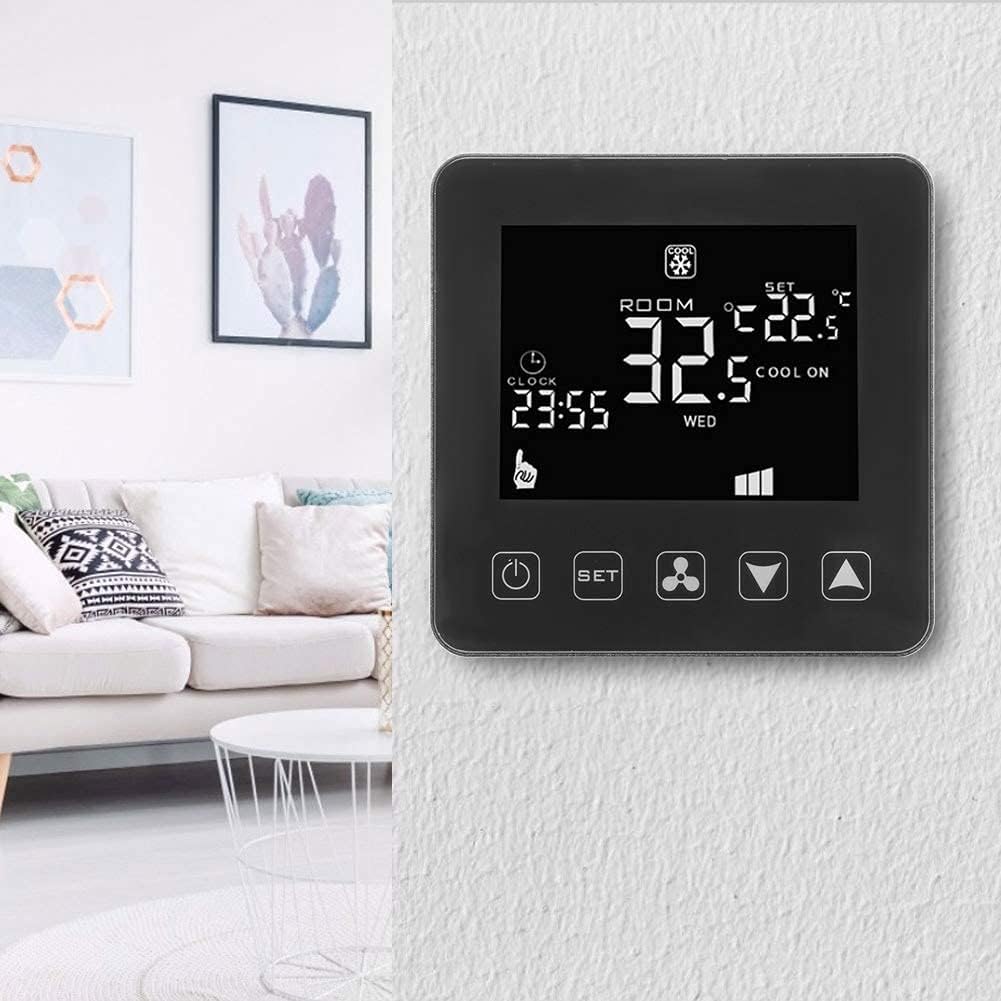
2-сүрөт: The Walfront HY08AC-2 Thermostat installed on a wall, demonstrating its compact and modern appearance within a home environment.

3-сүрөт: Арткы view of the thermostat's base plate, highlighting the clearly labeled wiring terminals for electrical connections.

4-сүрөт: А жарылды view of the thermostat, separating the main display unit from its wall-mounted base, illustrating the two primary components.
Орнотуу жана орнотуу
Proper installation is crucial for the thermostat's optimal performance. It is recommended that installation be performed by a qualified electrician.
1. Физикалык орнотуу
- Өчүрүү: Before beginning installation, ensure that the main power supply to your HVAC system is turned off at the circuit breaker to prevent electrical shock.
- Монтаждоо жери: Choose a central location on an interior wall, away from direct sunlight, drafts, or heat sources that could affect temperature readings.
- Separate Base Plate: Gently separate the front display unit from the back mounting plate.
- Зымдар: Connect the electrical wires from your HVAC system to the corresponding terminals on the back mounting plate. Refer to Figure 3 for terminal layout. Ensure all connections are secure. The thermostat operates on AC 200-240V.
- Монтаждоо: Secure the back mounting plate to the wall using the provided screws.
- Термостатты тиркөө: Carefully reattach the front display unit to the mounted back plate, ensuring it clicks securely into place.
- Күйгүзүү: Restore power to your HVAC system at the circuit breaker. The thermostat display should illuminate.
2. Баштапкы орнотуу жана Wi-Fi туташуусу
After powering on, the thermostat will be ready for initial configuration and Wi-Fi connection for remote control.
- Колдонмону жүктөп алуу: For smartphone control, download the "Tuya Smart" app.
- For Android devices, search "Tuya Smart" on Google Play Store.
- For iOS devices, search "Tuya Smart" on the Apple App Store.
- Катталуу/Кирүү: Колдонмону ачып, жаңы каттоо эсебин каттаңыз же сизде мурунтан эле бар болсо кириңиз.
- Түзмөк кошуу: Follow the in-app instructions to add your new thermostat. This typically involves putting the thermostat into pairing mode (refer to the thermostat's on-screen prompts or a quick press of the Wi-Fi button if available) and connecting it to your home Wi-Fi network.
- Орнотууларды конфигурациялоо: Once connected, you can configure various settings through the app, including time, temperature units, and programming schedules.
Иштөө нускамалары
The Walfront HY08AC-2 thermostat offers both manual and smart control options.
Manual Operation (Thermostat Buttons)
- Кубат баскычы (ⓘ): Press to turn the thermostat ON or OFF.
- Set Button (SET): Press to cycle through different modes (e.g., Heating, Cooling, Fan Only) or to enter programming settings.
- Вентилятор баскычы (⚙): Controls the fan speed or mode (e.g., Auto, Low, Medium, High).
- Өйдө/төмөн жебелер (▼ / ▲): Adjust the desired temperature setting or navigate through menu options.
LCD дисплей маалыматы
LCD дисплей реалдуу убакыт режиминде маалымат берет:
- БӨЛМӨНҮН ТЕМПЕРАТУРАСЫ: Учурдагы айлана-чөйрөнүн температурасын көрсөтөт.
- Температураны коюу: Керектүү температура жөндөөсүн көрсөтөт.
- Режим көрсөткүчү: Icons for Heating (e.g., flame), Cooling (e.g., snowflake), or Fan Only.
- Саат: Учурдагы убакытты көрсөтөт.
- Wi-Fi абалы: An icon indicating Wi-Fi connection status.
- желдеткич ылдамдыгы: Учурдагы желдеткич ылдамдыгынын жөндөөсүн көрсөтөт.
Smart Control (Tuya Smart App)
Tuya Smart тиркемесине туташкандан кийин, сиз төмөнкүлөрдү жасай аласыз:
- Remotely adjust temperature settings from anywhere.
- Change operating modes (Heating/Cooling/Fan).
- Set and manage programmable schedules for energy efficiency.
- Monitor current room temperature and system status.
- Эскертмелерди жана эскертүүлөрдү алыңыз.
Техникалык тейлөө
The Walfront HY08AC-2 thermostat requires minimal maintenance to ensure long-term performance.
- Тазалоо: Periodically wipe the thermostat's surface with a soft, dry cloth. Do not use abrasive cleaners, solvents, or chemical sprays, as these can damage the display or casing.
- Тоскоолдуктарды болтурбоо: Ensure that the thermostat's vents (if any) are not blocked by furniture, curtains, or other objects, as this can affect accurate temperature readings.
- Программалык камсыздоо жаңыртуулары: Keep the Tuya Smart app updated to the latest version to ensure optimal performance and access to new features. Firmware updates for the thermostat may also be available through the app.
Проблемаларды чечүү
If you encounter issues with your Walfront HY08AC-2 thermostat, refer to the following common problems and solutions:
| Көйгөй | Мүмкүн себеп | Чечим |
|---|---|---|
| Термостаттын дисплейи бош. | Электр энергиясы жок. | Check the circuit breaker for your HVAC system. Ensure the thermostat is properly wired and connected to a 200-240V AC supply. |
| Wi-Fi'га туташпай жатат. | Incorrect Wi-Fi password, weak signal, or thermostat not in pairing mode. | Verify your Wi-Fi password. Ensure the thermostat is within range of your Wi-Fi router. Put the thermostat into Wi-Fi pairing mode as per app instructions. Restart your router if necessary. |
| Температураны окуу туура эмес көрүнөт. | Thermostat location affected by external factors (direct sunlight, drafts, heat sources). | Ensure the thermostat is not exposed to direct sunlight, drafts from windows/doors, or heat from appliances. Relocate if necessary. |
| HVAC системасы термостатка жооп бербей жатат. | Incorrect wiring, system fault, or thermostat mode setting. | Double-check wiring connections. Ensure the thermostat is set to the correct mode (Heating/Cooling). If the issue persists, consult a qualified HVAC technician. |
Техникалык шарттар
Detailed technical specifications for the Walfront HY08AC-2 Thermostat:
| Продукт түрү | Wi-Fi программалуу термостат |
| Модель номери | HY08AC-2 (Walfront28tgsh7n5f) |
| Бренд | Walfront |
| Материал | Отко чыдамдуу ABS |
| Operating Voltage | AC 200-240V |
| Жүктөө агымы | 3A |
| IP рейтинги | IP20 |
| Тактык | ± 0.5 °C |
| Температураны көрсөтүү диапазону | 0 - 70 °C |
| Орнотуу диапазону | 5 °C - 35 °C |
| Сенсор | NTC (10K) 1 % |
| Иштөө чөйрөсү | -10…60°С |
| Элемент Салмагы | Болжол менен 235 г |
| Controller Type | iOS, Android (via Tuya Smart App) |
Колдоо маалыматы
For further assistance or technical support, please refer to the following resources:
- Tuya Smart тиркемеси: The primary source for managing your thermostat and accessing smart features. Ensure your app is always updated.
- Онлайн ресурстар: Check the Walfront brand store on Amazon or the Tuya Smart app's help section for FAQs and additional support documentation.
- Кесиптик жардам: For complex installation or system issues, it is recommended to contact a qualified HVAC professional.
Note: No specific warranty information was provided with this product. Please refer to your purchase documentation for any applicable warranty details.