
Suntek HC-801LTE
Suntek HC-800LTE 4G жол камерасынын колдонуучу колдонмосу
Модель: HC-801LTE
Introduction
Бул колдонуучу колдонмосунда Suntek HC-800LTE 4G Trail камераңызды орнотуу, иштетүү, техникалык тейлөө жана мүчүлүштүктөрдү оңдоо боюнча кеңири көрсөтмөлөр берилген. Түзмөктүн туура иштешин жана узак мөөнөттүү иштешин камсыз кылуу үчүн аны колдонуудан мурун бул колдонмону кунт коюп окуп чыгыңыз.
Пакеттин мазмуну
Пакетти ачкандан кийин, төмөнкү нерселердин бардыгы камтылганын текшериңиз:
- 1 x HC-801LTE аңчылык камерасы
- 1 Антеннаны х
- 1 x USB кабели
- 1 x Бекитүүчү боо
- 1 x Басылган колдонуучу колдонмосу (англисче)
- 1 x Колдонуучунун колдонмосу менен мини-CD (немис, англис, француз, италия, испан)
Эскертүү: SIM карта жана AA батарейкалары комплектке кирбейт жана аларды өзүнчө сатып алуу керек.

Сүрөт: HC-800LTE камерасын, анын антеннасын, USB кабелин жана бекитүүчү боону көрсөткөн толук таңгактын мазмуну.
Жайгашуу
1. Батареяны орнотуу
HC-800LTE камерасы иштеши үчүн 8 x 1.5V AA батарейкаларын талап кылат (кошулмага кирбейт). Же болбосо, аны 6V тышкы кубат булагы менен кубаттоого болот.
- Камераны ачыңыз casing каптал клипсаларды чечүү менен.
- Батарея бөлүкчөсүн табыңыз.
- Бөлүмдүн ичинде көрсөтүлгөндөй туура полярдуулукту (+/-) камсыз кылып, 8 AA батарейкасын салыңыз.
- Батарея уясынын капкагын бекем жабыңыз.
2. SIM картаны жана Micro SD картаны орнотуу
Сүрөттөрдү жана видеолорду сактоо үчүн Micro SD картасы (64 ГБ чейин, комплектке кирбейт) талап кылынат. MMS/SMTP аркылуу сүрөттөрдү/видеолорду жөнөтүү сыяктуу 4G/3G/2G тармак функциялары үчүн SIM карта (комплектке кирбейт) талап кылынат.
- C камерасы мененasing ачып, Micro SD карта уячасын жана SIM карта уячасын табыңыз.
- Micro SD картаны атайын уячасына ал ордуна чыкылдаганча салыңыз.
- SIM картаны туура багытын камсыз кылып, анын атайын уячасына салыңыз.
- Камераны жабуу casing жана каптал клиптерди бекитиңиз.

Сүрөт: Камеранын ички жайгашуусу, анда 8 AA батарейка үчүн батарея бөлүмү жана Micro SD карта үчүн уяча көрсөтүлгөн.
3. Антенна тиркемеси
Берилген 4G антеннасын камеранын жогору жагында жайгашкан антенна портуна бекитиңиз. Аны манжаңыз менен бекемделгенче саат жебеси боюнча бурап бекитиңиз.

Сүрөт: Suntek HC-800LTE камерасы, анын 4G антеннасы үстү жагына туура бекитилген.
4. Камераны орнотуу
Камераны кошо берилген бекитүүчү боону колдонуп же астыңкы жагындагы таяныч туткасынын порту аркылуу штативдүү мык (кошулмада жок) менен орнотсо болот.
- Бекитүүчү боону камеранын арткы жагындагы атайын уячалардан өткөрүңүз.
- Камераны каалаган бийиктикте жана бурчта даракка же мамыга бекитиңиз.
- Камеранын туруктуу жана так экенине ынаныңыз view сиз көзөмөлдөгүңүз келген аймак.
Иштөө нускамалары
Камера компоненттери бүттүview

Сүрөт: Түстүү дисплей экраны, орнотуу баскычтары, режим которгучу, USB порту, Micro SD карта уячасы, 8AA батареялар үчүн кампа, тышкы кубат порту жана стенд туткасынын порту сыяктуу камеранын ар кандай компоненттерин көрсөткөн деталдуу диаграмма.
- Түстүү дисплей экраны: үчүн viewорнотуулар, жаздырылган медиа жана түз эфир.
- Орнотуу баскычтары: Навигация жана тандоо баскычтары (Меню, Кайталоо, Жогору, Төмөн, Сол, Оң, Макул, Кадр).
- Режим которуу: ӨЧҮРҮҮ, ОРНОТУУ жана КҮЙГҮЗҮҮ режимдеринин ортосунда которулуу үчүн.
- USB порт: Компьютерге туташуу үчүн.
- Микро SD карта слоту: Эстутум картасын киргизүү үчүн.
- Тышкы кубат порту: Тышкы 6V кубат булагын туташтыруу үчүн.
- Тирөөч туткасынын порту: Штативди орнотуу үчүн.
Негизги операция
- Күйгүзүү: Менюга кирүү жана жөндөөлөрдү конфигурациялоо үчүн режим которгучун "ОРНОТУУ" абалына которуңуз.
- Орнотууларды конфигурациялоо: Менюну карап чыгуу үчүн орнотуу баскычтарын колдонуңуз. Сүрөттүн чечилиши (24MP/20MP/16MP), видеонун чечилиши (1080P/720P/VGA), иштетүү аралыгы, ар бир аныктоодо сүрөттөрдүн саны (1/3/6/9), убакыттын тездеши жана сырсөз менен коргоо сыяктуу параметрлерди тууралаңыз.
- Камераны иштетүү: Жөндөөлөр конфигурациялангандан кийин, режим которгучун "КҮЙҮК" абалына коюңуз. Камера көзөмөлдөө режимине кирип, PIR сенсорунун аныктоосуна жараша сүрөткө тарта баштайт.
Сүрөт жана видео тартуу
HC-800LTE 0.3 секунддук триггер ылдамдыгына жана кеңири аныктоо үчүн 120 градустук PIR сенсоруна ээ. Ал жарык аз шарттарда да жогорку сапаттагы сүрөттөрдү жана видеолорду тартат.
- Сүрөттүн чечилиши: 24MP, 20MP же 16MP тандаса болот.
- Видеонун чечилиши: 1080P, 720P же VGA.
- Триггер ылдамдыгы: Болжол менен 0.3 секунд.
- PIR аныктоо расстояние: 65 фут (20 метр) чейин.
- Түнкү көрүнүш: 42 көрүнбөгөн кара инфракызыл жарык диоддору менен жабдылган, алар 20 метрге чейин көрүнгөн жаркылдоосуз жарыктандырууну камсыз кылат.
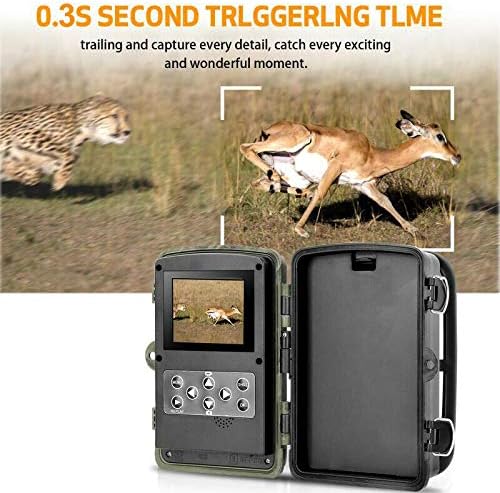
Сүрөт: Бул визуалдык көрүнүш камеранын 0.3 секунддук тез ишке киргизүү убактысын баса белгилейт, көрсөтөтasinтез кыймылдаган жапайы жаныбарларды натыйжалуу кармоо жөндөмү.
4G байланышы жана алыстан башкаруу функциялары
Камера 4G/3G/2G тармактарын колдойт, бул тартылган медианы алыстан өткөрүп берүүгө мүмкүндүк берет.
- MMS/SMTP жөнөтүү: Камераны сүрөттөрдү жана видеолорду MMS аркылуу 4 телефон номерине же SMTP аркылуу 4 электрондук почта дарегине жөнөтүү үчүн конфигурациялаңыз.
- SMS аркылуу алыстан башкаруу: SMS буйруктары аркылуу камеранын айрым функцияларын алыстан башкарыңыз.
- GPRS функциясы: MMC аркылуу электрондук почта жөнөтүүнү иштетет.
Атайын функциялар
Камера ар тараптуу мониторинг жүргүзүү үчүн ар кандай өркүндөтүлгөн функцияларды камтыйт:
- Бир нече жаздыруу: Ар бир триггер үчүн бир нече сүрөт тартыңыз.
- Интервалдык атуу: Сүрөткө тартуу үчүн белгилүү бир убакыт аралыгын коюңуз.
- Убакыттын өтүшү: Убакыттын өтүшү менен тартылган сүрөттөрдү түзүү үчүн узак убакыт бою тартыңыз.
- Таймер: Камеранын иштөө убактысын так белгилеңиз.
- Сырсөздү коргоо: Камераңыздын жөндөөлөрүн сандык PIN менен коопсуздандырыңыз.
- Timestamp: Тартылган медиага датаны жана убакытты басуу.
- Батареянын азайышы: Батареянын деңгээли төмөн болгондо эскертмелерди алыңыз.
- Жергиликтүү жаздыруу: Бардык тартылган медиа файлдар Micro SD картасында сакталат.
Техникалык тейлөө
Тазалоо
Үзгүлтүксүз тазалоо оптималдуу иштөөнү жана сүрөттүн сапатын сактоого жардам берет.
- Камера линзасын жана PIR сенсорлорун жумшак, мамыксыз чүпүрөк менен акырын сүртүңүз.
- Абразивдүү тазалагычтарды же эриткичтерди колдонбоңуз.
- Камеранын c экенине ынаныңызasing IP66 суу өткөрбөөчүлүк рейтингин сактоо үчүн кирден, чаңдан жана таштандылардан, айрыкча пломбалардын айланасынан тазаланган.
Батареяны алмаштыруу
Батарея аз калганы тууралуу сигнализация иштегенде же иштөөсү начарлаганда, бардык 8 AA батареясын алмаштырыңыз. Ар дайым жаңы, жогорку сапаттагы батареяларды колдонуңуз.
SD картаны башкаруу
Micro SD картанын сактоо сыйымдуулугун мезгил-мезгили менен текшерип туруңуз. Биринчи жолу колдонуудан мурун жана өткөрүп бергенден кийин SD картаны камеранын меню жөндөөлөрүнөн форматтоо сунушталат. fileОптималдуу иштөөнү камсыз кылуу жана маалыматтардын бузулушунун алдын алуу үчүн компьютерге туташтырыңыз.
Проблемаларды чечүү
Эгерде сиз HC-800LTE камераңыз менен көйгөйлөргө туш болсоңуз, төмөнкү кеңири таралган көйгөйлөрдү жана чечимдерди караңыз:
| Көйгөй | Мүмкүн себеп | Чечим |
|---|---|---|
| Камера күйбөйт | Батареялар аз же түгөндү; батареянын туура эмес поляризациясы; тышкы кубат көйгөйү. | Полярдуулукту туура текшерип, бардык 8 AA батарейкасын жаңыларына алмаштырыңыз. Эгерде колдонулса, тышкы электр туташуусун текшериңиз. |
| Эч кандай сүрөт/видео тартылган жок | SD карта толуп калган же бузулган; PIR сенсору бөгөттөлгөн же сезгичтиги өтө төмөн; ишке киргизүү аралыгы туура эмес коюлган. | Micro SD картаны форматтаңыз же алмаштырыңыз. PIR сезгичтигин тууралаңыз. Триггер аралыгынын жөндөөлөрүн текшериңиз. PIR сенсорунун алдында эч кандай тоскоолдуктар жок экенин текшериңиз. |
| Байланыш көйгөйлөрү (MMS/Электрондук почта) | SIM-карта жок же туура эмес орнотулган; тармактын камтуусу начар; APN/SMTP жөндөөлөрү туура эмес. | SIM карта туура салынганын жана иштетилгенин текшериңиз. Тармак сигналынын күчүн текшериңиз. Камера менюсунан APN, SMTP жана алуучу жөндөөлөрүн текшериңиз. |
| Сүрөт/видео сапаты начар | Кир линза; жарык аз шарттар; чечилиш жөндөөлөрү туура эмес. | Камера линзасын тазалаңыз. Жетиштүү жарыкты камсыз кылыңыз же түнкү көрүү режимин колдонуңуз. Сүрөттүн/видеонун чечилиш жөндөөлөрүн жогорку сапатка тууралаңыз. |
| Сүрөттөрдү SD картага сактоодо көйгөйлөр | SD картанын уячасы бузулган; SD карта шайкеш келбейт же бузук. | Башка, жакшы белгилүү Micro SD картасын колдонуп көрүңүз. Карта туура жана толук салынганын текшериңиз. |
Техникалык шарттар
| Өзгөчөлүк | Деталь |
|---|---|
| Бренд | Сунтек |
| Модель номери | HC-801LTE |
| Сүрөт сенсору | 5 мегапикселдүү түстүү CMOS |
| Сүрөттүн чечилиши | 24MP / 20MP / 16MP (тандалышы мүмкүн) |
| Video Resolution | 1080P / 720P / VGA |
| Триггер ылдамдыгы | 0.3 секунд |
| PIR аныктоо бурчу | 120 градус |
| PIR аныктоо расстояние | 65 фут (20 метр) |
| Түнкү көрүү диапазону | 65 фут (20 метр), 42 көрүнбөгөн кара инфракызыл светодиоддор менен |
| Эс | 64 ГБ чейин Micro SD карта (киргизилген эмес) |
| Экранды көрсөтүү | 2.0 дюймдук TFT |
| Байланыш | 4G / 3G / 2G GSM / MMS / SMTP / SMS (зымдуу, зымсыз) |
| Электр камсыздоо | 8 x AA батарейкалары (кошулган эмес) же 6V тышкы туруктуу ток |
| Тtage | 9 вольт |
| Күтүү убактысы | 6 айга чейин |
| Сууга туруктуулук деңгээли | IP66 (Суу өткөрбөйт) |
| Өлчөмдөрү (L x W x Y) | 13.5 x 9 x 8.6 см |
| Салмагы | 540 грамм |
| Сунушталган Колдонуулар | Оюн жана жол, Коопсуздук |
| Өзгөчөлүктөр | Жергиликтүү жаздыруу, Бир нече жаздыруу, Интервал, Убакыт аралыгы, Таймер, Сырсөз менен коргоо, Убакыт чегиamp, Батарея аз калганда ойготкуч |
Кепилдик жана колдоо
Кепилдик маалымат
Suntek HC-800LTE камерасы үчүн кепилдиктин так чоо-жайы бул колдонмодо берилген эмес. Сатып алуу учурунда сатуучуңуз берген кепилдик маалыматын караңыз же кепилдиктин шарттары жана эрежелери үчүн түздөн-түз Suntek компаниясына кайрылыңыз.
Кардарларды колдоо
Көбүрөөк жардам же техникалык колдоо алуу үчүн, тиркелген Mini CDде берилген толук колдонуучу колдонмосун караңыз. Эгерде сизге кошумча колдоо керек болсо, Suntek кардарларды тейлөө кызматына алардын расмий өкүлү аркылуу кайрылыңыз. webсайт же продукт документациясында берилген байланыш маалыматы.
Ask a question about this manual
Ask about setup, troubleshooting, compatibility, parts, safety, or missing instructions. Manuals+ will review the question and use this page’s manual context to help answer it.