
1. Киришүү
This manual provides detailed instructions for the installation, operation, and maintenance of the TSL LTS CMIP8342W-M Platinum Network Mini Bullet IP Camera. Please read this manual thoroughly before using the product to ensure proper setup and optimal performance. Keep this manual for future reference.
2. Продукт бүтүп калдыview
The TSL LTS CMIP8342W-M is a 4MP High Definition Network Mini Bullet IP Camera designed for robust surveillance. It offers clear imaging up to 2560x1520 at 30 frames per second with a 4mm fixed lens. Key features include True WDR 120dB for balanced images in varying light conditions, Matrix IR 2.0 for night vision up to 100 feet, and support for H.265/H.264 video compression. The camera is WEATHERPROOF IP67 rated, making it suitable for both indoor and outdoor use, and includes a MicroSD slot for local storage up to 128GB. It supports both DC 12V and Power over Ethernet (PoE) for flexible power options. Advanced Video Content Analytics (VCA) features such as Line Crossing, Intrusion Detection, and Face Detection enhance its surveillance capabilities.
- Чечим: 4MP - Image Sensor 1/3” sensor - True WDR 120dB
- Объектив: 4mm @F1.6: horizontal FOV: 83°, vertical FOV: 45°, diagonal FOV: 99°
- Видео кысуу: Main stream: H.265/H.264; Sub-stream: H.265/H.264/MJPEG; Third stream: H.265/H.264
- Кадр ылдамдыгы: 60Hz: 15fps (2048 x 1536), 30fps (1920 × 1080), 30fps (1280 x 720); 50Hz: 12.5fps (2048 x 1536), 25fps (1920 × 1080), 25fps (1280 x 720)
- Макс. Чечим: 2688 × 1520 - WEATHERPROOF IP67
3. Коопсуздук маалыматы
- электр менен жабдууну камсыз кылуу voltage is correct before connecting the camera.
- Камераны өтө жогорку температурага, нымдуулукка же коррозиялуу чөйрөлөргө дуушар кылбаңыз.
- Avoid pointing the camera lens directly at strong light sources for extended periods.
- Handle the camera with care. Do not drop or subject it to strong physical shocks.
- Өндүрүүчүлөр көрсөткөн аксессуарларды гана колдонуңуз.
- Орнотуу жана тейлөө квалификациялуу кызматкерлер тарабынан аткарылышы керек.
4. Пакеттин мазмуну
Пакетти ачканда бардык буюмдар бар экенин жана жакшы абалда экендигин текшериңиз:
- TSL LTS CMIP8342W-M IP Camera
- Монтаждоо бурамалар жана дубал сайгычтар
- Waterproof Connector for Ethernet Cable
- Quick Start Guide
- Drill Template (if applicable)
Note: A power adapter (DC 12V) may be sold separately or included depending on the specific package. An Ethernet cable is required for network connection.
5. Орнотуу
5.1 Физикалык орнотуу
- Монтаждоо ордун тандаңыз: Каалаган талааны камтыган жерди тандаңыз view and is within range of power and network connections. Ensure the surface is strong enough to support the camera.
- Камераны орнотуу: Use the provided drill template to mark and drill holes. Secure the camera base to the wall or ceiling using the mounting screws and wall plugs.
- Камеранын бурчун тууралоо: Loosen the adjustment screws on the camera body to position the lens for optimal coverage. Tighten the screws once the desired angle is achieved.
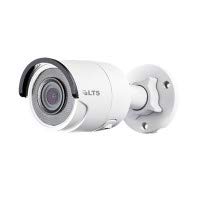
Сүрөт 5.1: Алдыңкы view of the TSL LTS CMIP8342W-M Platinum Network Mini Bullet IP Camera, showing the lens and IR illuminators.
5.2 Электр энергиясы жана тармакка туташуу
- Кубат туташуу:
- PoE (Power over Ethernet): If using a PoE-enabled switch or NVR, connect an Ethernet cable from the camera's RJ45 port directly to the PoE port. No separate power adapter is needed.
- DC 12V кубаттуулугу: If not using PoE, connect a 12V DC power adapter (not included) to the camera's power input port.
- Тармак туташуусу: Connect an Ethernet cable from the camera's RJ45 port to your network switch or router. Use the waterproof connector for outdoor installations to protect the RJ45 connection.
- MicroSD картасын орнотуу (кошумча): If local storage is desired, carefully open the MicroSD card slot cover (refer to the camera diagram in the quick start guide) and insert a MicroSD card (up to 128GB) with the contacts facing down. Close the cover securely.
5.2-сүрөт: Каптал view of the TSL LTS CMIP8342W-M Platinum Network Mini Bullet IP Camera, illustrating the mounting bracket and cable connections.
5.3 Баштапкы конфигурация
- Камераны табыңыз: Use the manufacturer's IP camera search tool (e.g., SADP Tool) on a computer connected to the same network to find the camera's IP address.
- Камераны иштетүү: For first-time use, you may need to activate the camera by setting a strong password.
- Мүмкүнчүлүк Web Интерфейс: ачуу а web browser and enter the camera's IP address. Log in with the newly set password.
- Тармак орнотуулары: Configure network settings (e.g., static IP, DHCP) as needed for your network environment.
- Дата жана убакыт: Set the correct date and time, preferably using NTP (Network Time Protocol) for synchronization.
6. Иштөө
6.1 Live View жана Жаздыруу
Once configured, access the camera's live view аркылуу web interface, a compatible NVR, or a mobile application. From the live view, сенин колуңдан келет:
- Monitor real-time video feed.
- Manually start/stop recordings.
- Take snapshots.
- Adjust image parameters (brightness, contrast, saturation).
6.2 Өркүндөтүлгөн функциялар
- True WDR 120dB: Enable Wide Dynamic Range in settings to improve image clarity in scenes with both very bright and very dark areas.
- Matrix IR 2.0: The camera automatically activates its infrared illuminators in low-light conditions for night vision.
- Кыймылды аныктоо: Configure motion detection zones and sensitivity. Set up actions such as recording, sending notifications, or triggering alarms upon detection.
- VCA (Video Content Analytics): Utilize Line Crossing Detection, Intrusion Detection, and Face Detection features by defining specific rules and areas in the camera's settings.
- SD карта жаздыруу: Configure continuous, scheduled, or event-triggered recording to the installed MicroSD card.
7. Техникалык тейлөө
- Тазалоо: Regularly clean the camera lens with a soft, dry cloth. For stubborn dirt, use a mild lens cleaning solution. Do not use harsh chemicals.
- Программалык камсыздоонун жаңыртуулары: Өндүрүүчүнү текшериңиз website periodically for firmware updates. Updating firmware can improve performance, add new features, and fix bugs. Follow the provided instructions carefully during the update process.
- Сактагычты башкаруу: If using a MicroSD card, regularly back up important recordings and format the card periodically to maintain optimal performance.
- Кабелдик текшерүү: Periodically inspect all cables and connections for wear, damage, or corrosion, especially in outdoor installations.
8. Кыйынчылыктарды
| Көйгөй | Мүмкүн себеп | Чечим |
|---|---|---|
| Камерага электр кубаты жок | Loose power connection, faulty power adapter/PoE switch, power outage. | Check all power connections. Verify power adapter/PoE switch is functioning. Restore power. |
| Экранда сүрөт жок | Network connection issue, incorrect IP address, camera not activated, software/browser issue. | Verify network cable is connected. Check camera's IP address. Ensure camera is activated and logged in. Try a different browser or client software. |
| Сүрөттүн сапаты начар | Dirty lens, incorrect focus, low bandwidth, improper settings (WDR, exposure). | Clean the lens. Adjust focus if applicable. Check network bandwidth. Adjust image settings in the web интерфейс. |
| Камерага тармак аркылуу кирүү мүмкүн эмес | Incorrect IP address, network configuration mismatch, firewall blocking. | Use the discovery tool to find the correct IP. Ensure camera and computer are on the same subnet. Check firewall settings on your computer or router. |
| SD карта жаздырылбай жатат | SD card full, faulty SD card, incorrect recording schedule, SD card not formatted. | Check SD card status in settings. Replace faulty card. Verify recording schedule. Format the SD card via the camera's web интерфейс. |
9. Техникалык шарттар
| Өзгөчөлүк | Спецификация |
|---|---|
| Модель номери | CMIP8342W-M |
| Видео тартуунун резолюциясы | 4 депутат |
| Натыйжалуу дагы эле чечим | 4 депутат |
| Объектив | 4 мм @F1.6 |
| Frame Rate | 30 fps (max) |
| Түнкү көрүү диапазону | 100 Фут |
| Төмөн жарык технологиясы | Түнкү түс |
| Чыныгы WDR | 120дБ |
| Видеону кысуу | H.265, H.265+, H.264, H.264+, MJPEG |
| MicroSD Slot | 128 ГБ чейин |
| Электр камсыздоо | DC 12V, PoE |
| Эл аралык коргоо рейтинги | IP67 |
| Монтаж түрү | Дубалга орнотуу |
| Форма фактору | Ок |
| Байланыш технологиясы | Зымдуу (Ethernet) |
| Ички/тышкы колдонуу | Ички, сырткы |
| Эскертүү түрү | Motion Only (VCA: Line Crossing, Intrusion Detection, Face Detection) |
10. Кепилдик жана колдоо
For warranty information and technical support, please refer to the official TSL webсайтка же ыйгарым укуктуу дилериңизге кайрылыңыз. Сатып алуу квитанциясын кепилдик дооматтары үчүн сатып алуунун далили катары сактаңыз.
Өндүрүүчү: LTS
Бренд: TSL