
Cuifati Cuifatix46an5kvtz-01
Mini LED Projector User Manual
Model: Cuifatix46an5kvtz-01 | Brand: Cuifati
Introduction
This Mini LED Projector is designed for versatile use in outdoor recreation, entertainment venues, and home theaters. Its compact and portable design allows for easy transport, enabling you to enjoy movies, videos, and games in various dark environments, whether at home, in a courtyard, or during travel and camping. It supports multiple input interfaces including HDMI, AV, VGA, USB, and SD Card, facilitating easy connection to a wide range of devices for high-definition image and video display. With support for up to 1080P HD displaying, you can experience clear and vibrant content anytime, anywhere.

Image: The Cuifati Mini LED Projector in use, projecting a vibrant movie scene onto a screen, with a remote control held by a hand in the foreground. This illustrates the projector's primary function and portability.
Пакеттин мазмуну
Төмөндө тизмеленген нерселердин баары пакетиңизге камтылганын текшериңиз. Эгерде кандайдыр бир нерселер жок болсо же бузулса, кардарларды колдоо менен байланышыңыз.
- 1 x Mini LED Projector
- 1 x Remote Control (Батареялар камтылган эмес)
- 1 x Power Adapter (US/EU/UK/EU - specific to region)
- 1 х AV Cable
- 1 x User Manual

Image: A flat lay of the Cuifati Mini LED Projector and its accessories, including the projector unit, remote control, power adapter, and AV cable, laid out on a white surface. This visually confirms the items expected in the product package.
Video: An unboxing video demonstrating the contents of the Mini LED Projector package. It shows the projector, remote control, power adapter, and AV cable being removed from the box, providing a clear visual guide to what is included.
Продукт бүттүview жана өзгөчөлүктөрү
The Cuifati Mini LED Projector is engineered for optimal performance and user convenience. Key features include:
- Long-Life LED Light Source: Utilizes a 30,000-hour LED light source, which is harmless, radiation-free, and environmentally friendly.
- Жогорку сапаттагы дисплей: Supports 720P and 1080P HD display, delivering clear and natural images and videos on a large screen.
- Жогорку жарыктык: 1500 lumens brightness ensures stunning true color presentations with rich color and detail.
- Multiple Input Interfaces: Equipped with HDMI, USB, AV, VGA, and 3.5mm Earphone Port for broad compatibility.
- Жөнгө салынуучу Viewтажрыйбасы: Manual focusing and adjustable aspect ratio (4:3) with a projection distance of 1.0-2.8 meters.
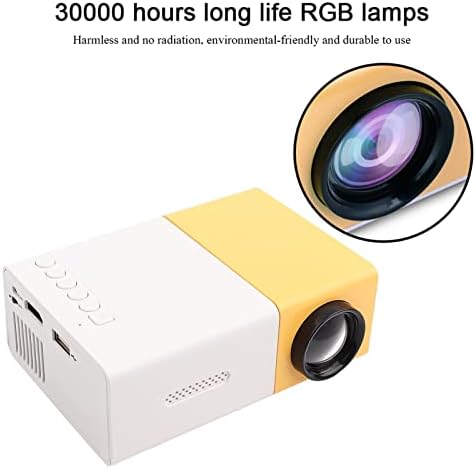
Сүрөт: жакын план view of the Mini LED Projector, emphasizing its lens and the text "30000 hours long life RGB lamps," indicating the durability and eco-friendliness of its light source.

Image: The Mini LED Projector shown with an overlay indicating "Support 1080P HD Displaying," illustrating its capability to project high-definition content for a clear viewтажрыйбасы.

Image: A split image demonstrating the "1500lm High Brightness" of the projector, comparing a scene with common lumen to the brighter, more vibrant output of 1500 lumens, highlighting improved visual quality.
Жайгашуу
Follow these steps to set up your Mini LED Projector:
- Жайгашкан жери: Place the projector on a stable, flat surface. Ensure there is adequate ventilation around the unit.
- Кубат туташуу: Connect the power adapter to the projector's DC12V-1.5A input port and then plug it into a power outlet.
- Түзмөктөрдү туташтыруу:
- HDMI: Use an HDMI cable to connect your device (e.g., laptop, TV box, game console) to the projector's HDMI port.
- OF: Use the provided AV cable to connect devices with AV output to the projector's AV port.
- VGA: Connect devices with VGA output (e.g., desktop PC) to the projector's VGA port.
- USB: Медиа файлдарды ойнотуу үчүн USB дискти USB портуна салыңыз fileтүздөн-түз с.
- Микро SD: Медиа файлдарды ойнотуу үчүн Micro SD уячасына Micro SD картаны салыңыз files.
- Аудио чыгаруу: Connect external speakers or headphones to the 3.5mm Earphone Port for enhanced audio.
- Күйгүзүү: Түзмөктү күйгүзүү үчүн проектордогу же алыстан башкаруу пультундагы кубат баскычын басыңыз.

Image: A circular diagram illustrating the various input interfaces of the Mini LED Projector, including HDMI, AV, USB, and Micro SD, and the types of devices they can connect to, such as laptops, game consoles, and TV boxes.
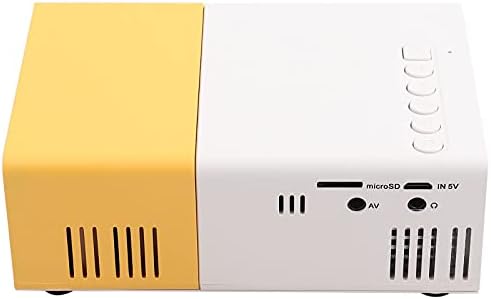
Сүрөт: деталдуу view of the back panel of the Mini LED Projector, clearly showing all available input ports including USB, Micro SD, AV, and the 3.5mm earphone jack, essential for understanding connectivity options.
Иштөө нускамалары
Once the projector is powered on and a device is connected, you can begin operating it:
- Булак тандоо: Use the "Source" button on the remote control or the projector's control panel to select the correct input source (HDMI, AV, VGA, USB, Micro SD).
- Фокусту тууралоо: Проекцияланган сүрөт даана жана курч болгонго чейин проектордун линзасындагы фокустук шакекчени айландырыңыз.
- Үндү көзөмөлдөө: Adjust the volume using the remote control or the projector's built-in controls.
- Media Playback (USB/Micro SD):
- Папкалар аркылуу чабыттоо жана files using the remote control's arrow keys.
- Select the desired audio, video, or image file ойноо.
- Supported formats include:
- Audio: MP3, WMA, OGG, AAG, FLAC, APE, WAV
- Image: JPEG, BMP, PNG
- Video: Supports Full Format Files
- Текст: TXT
- Аспект катышы: The projector supports a 4:3 aspect ratio. Adjust your source device settings if necessary for optimal display.
Техникалык шарттар
| Өзгөчөлүк | Деталь |
|---|---|
| Бренд | Cuifati |
| Модель номери | Cuifatix46an5kvtz-01 |
| Жарык булагы | LED, 30,000 hours life |
| Native Resolution | 320 x 240 пиксель |
| Колдоо резолюциясы | 720P, 1080P |
| Жарыктык | 1500лм |
| Контраст катышы | 2800:1 |
| Фокустоо режими | Кол менен фокустоо |
| Көрсөтүлүүчү Түстөр | 1.67M |
| Аспект катышы | 4:3 |
| Проекциялык аралык | 1.0-2.8м |
| Проекциялык экрандын өлчөмү | 10-60 дюйм |
| Киргизүү күчү | DC12V-1.5A |
| Өлчөмдөр | Болжол менен 127 x 81.5 x 48.5 мм / 5 x 3.2 x 1.9 дюйм |
| Салмагы | 500г / 15.5 унция |
| Байланыш технологиясы | VGA, USB, HDMI |
| Өзгөчөлүктөр | Built-In Speaker, Lightweight, Built-In Media Player |
Техникалык тейлөө
Проекторуңуздун узак мөөнөттүү иштешин жана оптималдуу иштешин туура тейлөө камсыз кылат:
- Линзаны тазалоо: Оптикалык линзалар үчүн атайын иштелип чыккан жумшак, мамыксыз чүпүрөктү колдонуңуз. Абразивдүү тазалоочу каражаттарды же линзаны чийип салуучу чүпүрөктөрдү колдонбоңуз.
- Тышкы тазалоо: Проектордун сыртын жумшак, кургак чүпүрөк менен сүртүңүз. Өтө кир болсо, бир аз сүртүңүз.amp чүпүрөктү колдонсо болот, бирок аппаратка ным кирбеши керек.
- Вентиляция: Ensure the ventilation vents are clear of dust and obstructions to prevent overheating. Do not block the vents during operation.
- Сактагыч: Узак мөөнөткө пайдаланылбаганда, проекторду салкын, кургак жерде, тике күн нурунан жана экстремалдык температурадан алыс сактаңыз.
- Туура өчүрүү: Проекторду ар дайым атайын кубат баскычы менен өчүрүп, розеткадан ажыратуудан же жылдыруудан мурун муздаганга мүмкүнчүлүк бериңиз.
Проблемаларды чечүү
Проекторуңузда көйгөйлөргө туш болсоңуз, төмөнкү жалпы көйгөйлөрдү жана чечимдерди караңыз:
| Көйгөй | Мүмкүн болгон себеп / Чечим |
|---|---|
| Сүрөт чагылдырылган жок |
|
| Сүрөт бүдөмүк |
|
| Үн жок |
|
| Пульт иштебей жатат |
|
| Проектор ысып, өчүп калат |
|
Кепилдик жана колдоо
The Cuifati Mini LED Projector comes with a 90-day exchange warranty. For any product issues or support inquiries, please contact Cuifati customer service.

Image: The Cuifati brand logo, which may be used for identification and support contact.

Image: Text stating "CUIFATI 90-day warranty," confirming the warranty period for the product.
For further assistance, please visit the official Cuifati store on Amazon: Куифати дүкөнү
Ask a question about this manual
Ask about setup, troubleshooting, compatibility, parts, safety, or missing instructions. Manuals+ will review the question and use this page’s manual context to help answer it.