
1. Киришүү
This manual provides comprehensive instructions for the operation and maintenance of the POMIACAM IPC-5200 Plus CCTV Tester. This device is designed for professional use in the installation and maintenance of security camera systems, offering a wide range of testing functionalities for various camera types and network infrastructure.

Figure 1: POMIACAM IPC-5200 Plus CCTV Tester and Wire Receiver.
2. Продукт бүтүп калдыview
2.1 Негизги өзгөчөлүктөрү
- IP Discovery: Automatically scans network segments for IP cameras and adjusts the tester's IP address for seamless connectivity.
- Multi-format Camera Testing: Supports 8MP CVI, TVI, AHD, SDI, and CVBS analog cameras.
- Жогорку чечим дисплей: Features a 5-inch 1080P IPS touch screen for clear video display.
- Медиа ойноткуч: Capable of displaying genuine resolution IP camera images and playing 4K H.264/H.265 video files and MKV/MP4 media.
- Versatile Interfaces: Includes VGA and HDMI input for connecting to NVR/DVR systems as a display monitor.
- Advanced Cable Testing: Performs UTP cable tests, RJ45 TDR cable tests, and includes a cable tracer for network, BNC, and shielded cables.
- PTZ башкаруу: Supports Pan/Tilt/Zoom control for compatible cameras.
- Snapshot and Recording: Allows for image snapshots, video recording, and playback.
2.2 Түзмөктүн жайгашуусу жана порттору
Familiarize yourself with the various ports and controls on the IPC-5200 Plus tester.

2-сүрөт: үстү жана асты views of the IPC-5200 Plus showing power input, RS485, audio in, UTP/SCAN, VGA, ON/OFF button, SD card slot, DC12V/3A out, LAN, HDMI in, SDI, and AHD TVI CVI test ports.
3. Пакеттин мазмуну
Төмөндө тизмеленген нерселердин баары пакетиңизге камтылганын текшериңиз:

Figure 3: Contents of the IPC-5200 Plus package.
- POMIACAM IPC-5200 Plus CCTV Tester
- Аспап сумкасы
- Видео кабель
- Аудио тест кабели
- RS485 control cable
- Кубат чыгаруу кабели
- Коопсуздук шнуры
- Заряддагыч
- Cable tester (wire receiver)
4. Орнотуу
4.1 Аппаратты заряддоо
Before initial use, fully charge the IPC-5200 Plus using the provided charger. Connect the charger to the DC12V/VIN port on the tester and plug it into a power outlet. The charging indicator will show the charging status.
4.2 Күйгүзүү/өчүрүү
- Күйгүзүү үчүн: Press and hold the ON/OFF button located on the side of the device until the screen illuminates.
- Өчүрүү үчүн: Press and hold the ON/OFF button until a power-off prompt appears on the screen, then confirm.
5. Иштөө нускамалары
5.1 Интерфейсте навигация
The IPC-5200 Plus features a 5-inch IPS touch screen. Navigate through menus and functions by tapping icons and swiping as you would on a smartphone.
5.2 IP Discovery
This function allows the tester to automatically scan for IP cameras on a network segment and adjust its own IP address to match the camera's segment for easy access.
- From the main menu, select the 'IP Discovery' or 'IP Test pro' icon.
- The tester will automatically scan the network.
- It can also auto-modify the tester's IP to the same network segment as the scanned camera's IP.

Figure 4: IP Discovery interface showing local IP, discovery IP, and scan options.
5.3 Camera Testing (Analog, HD Coaxial, IP)
The tester supports a wide range of camera types:
- CVBS Analog Cameras: Connect the analog camera to the CVBS input port.
- HD Coaxial Cameras (CVI, TVI, AHD, SDI): Connect these cameras to their respective input ports. The tester supports up to 8MP resolution for CVI, TVI, AHD, and SDI.
- IP камералар: Connect via LAN. The tester supports 4K H.264/H.265 IP cameras and ONVIF protocols.
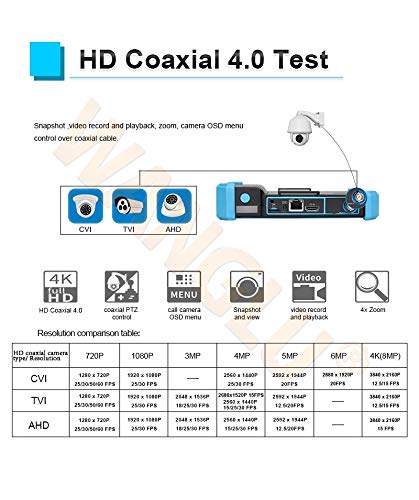
Figure 5: HD Coaxial 4.0 Test features including CVI, TVI, AHD support, PTZ control, OSD menu, snapshot, video record, and 4x zoom. A resolution comparison table is also shown.

Figure 6: Rapid ONVIF interface for 4K camera testing and OSD menu modification.
5.4 VGA and HDMI Input
The IPC-5200 Plus can function as a display monitor for NVRs or DVRs via its VGA and HDMI input ports.
- Connect the NVR/DVR's VGA or HDMI output to the corresponding input port on the tester.
- Select the appropriate input source on the tester's menu to display the NVR/DVR feed.
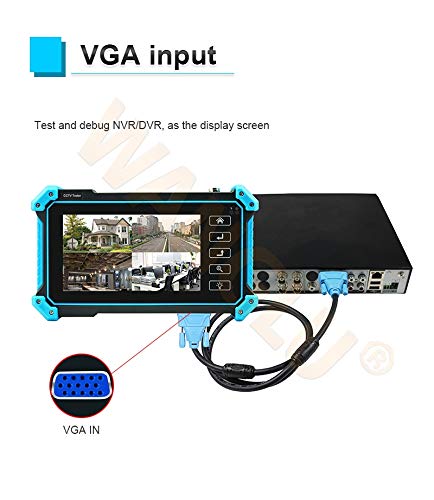
Figure 7: Using the tester as a display for an NVR/DVR via VGA input.
5.5 Cable Testing Functions
The tester provides comprehensive cable testing capabilities:
- UTP Cable Test: Tests sequence and continuity for UTP, BNC, telephone, and shielded cables. It can save testing reports and detect near-end, mid-end, and far-end fault points of RJ45 cable connectors.
- RJ45 TDR Cable Test: Measures cable pair status, length, attenuation, reflectivity, impedance, and skew. Measurement range up to 180m.
- Cable Tracer: Use the included wire receiver to search for network, BNC, and shielded cables, effectively rejecting noise and false signals.

Figure 8: Advanced UTP cable test interface showing cable sequence and connection diagram.

Figure 9: RJ45 TDR cable test in progress, displaying cable pair status and quality.
5.6 PTZ Control, Snapshot, and Recording
- PTZ башкаруу: Access PTZ controls from the camera test interface to adjust camera pan, tilt, and zoom functions.
- Сүрөт: Capture still images from the live video feed.
- Видео жаздыруу жана ойнотуу: Record video streams and play them back directly on the device.
6. Техникалык тейлөө
6.1 Тазалоо
Аппаратты тазалоо үчүн жумшак, кургак чүпүрөктү колдонуңуз. өжөр кир үчүн, бир аз гamp cloth can be used. Avoid abrasive cleaners or solvents that may damage the screen or casing.
6.2 Батареяга кам көрүү
- Батареянын иштөө мөөнөтүн узартуу үчүн, бат-баттан батарейканы толук зарядсыздандырбаңыз.
- Аппаратты узак убакыт бою колдонбогондо салкын, кургак жерде сактаңыз.
- Эгер түзмөк көпкө сакталса, анын терең разряддалышын алдын алуу үчүн мезгил-мезгили менен кубаттап туруңуз.
7. Кыйынчылыктарды
7.1 Түзмөк күйбөй жатат
- Батарея заряддалганын текшериңиз. Заряддагычты туташтырыңыз жана кайра күйгүзүүгө аракет кылыңыз.
- Кубат баскычынын туура басылганын жана кармалып турганын текшериңиз.
7.2 IP Camera Not Found During IP Discovery
- Confirm the IP camera is powered on and properly connected to the network.
- Ensure the network cable is functional using the cable test feature.
- Check if the camera and tester are on the same physical network segment. The IP Discovery feature should auto-adjust, but manual verification may be needed.
- Verify the camera's IP address and subnet mask if known, and compare with the tester's settings.
7.3 No Video Display from Camera
- Check all cable connections (BNC, LAN, etc.) for secure fit.
- Камера күйгүзүлүп, туура иштеп жатканын текшериңиз.
- Verify the correct input mode is selected on the tester (e.g., CVI, TVI, AHD, SDI, CVBS, IP).
- For IP cameras, confirm successful IP discovery and login credentials if required.
7.4 Cable Test Errors
- Ensure the cable is properly terminated and connected to the tester.
- For UTP tests, ensure the remote kit is correctly attached to the other end of the cable.
- Кабелдин көрүнгөн бузулууларын текшериңиз.
8. Техникалык шарттар
| Өзгөчөлүк | Спецификация |
|---|---|
| Модель номери | POMIACAM IPC5200C plus |
| Дисплей | 5-inch IPS Touch Screen, 1920x1080 Resolution |
| Камераны колдоо | 8MP CVI, TVI, AHD, SDI, CVBS, IP (4K H.264/H.265) |
| Видео киргизүү | VGA, HDMI, BNC (CVI/TVI/AHD/SDI/CVBS) |
| Тармак өзгөчөлүктөрү | IP Discovery, ONVIF, LAN, Built-in WiFi |
| Cable Testing | UTP Cable Test, RJ45 TDR Cable Test, Cable Tracer |
| Power Source | Батарея менен иштейт (1 литий-иондук батарейка камтылган) |
| Өлчөмдөр | 10.2 x 5.79 x 4.17 дюйм |
| Салмагы | 2.64 фунт |

Figure 10: Connectivity diagram illustrating the versatile integration of the IPC-5200 Plus with different camera types (IP, TVI, CVI, AHD, CVBS, SDI) and network devices (NVR/DVR, Switch, WiFi).
9. Кепилдик жана колдоо
For warranty information and technical support, please refer to the contact details provided with your purchase or visit the official POMIACAM webсайт. Сатып алуу квитанциясын кепилдик дооматтары үчүн сатып алуунун далили катары сактаңыз.