
1. Киришүү
Thank you for choosing Senso Wireless Earbuds. These True Wireless Stereo (TWS) earphones are designed for an active lifestyle, featuring a secure fit, high-quality audio, and sweatproof construction. This manual will guide you through the setup, operation, and maintenance of your new earbuds.
2. Кутуда эмне бар
- Senso Wireless Earbuds (Left and Right)
- Портативдик кубаттоочу куту
- USB заряддоо кабели
- Колдонуучунун колдонмосу
- Кулак учтарынын бир нече өлчөмү
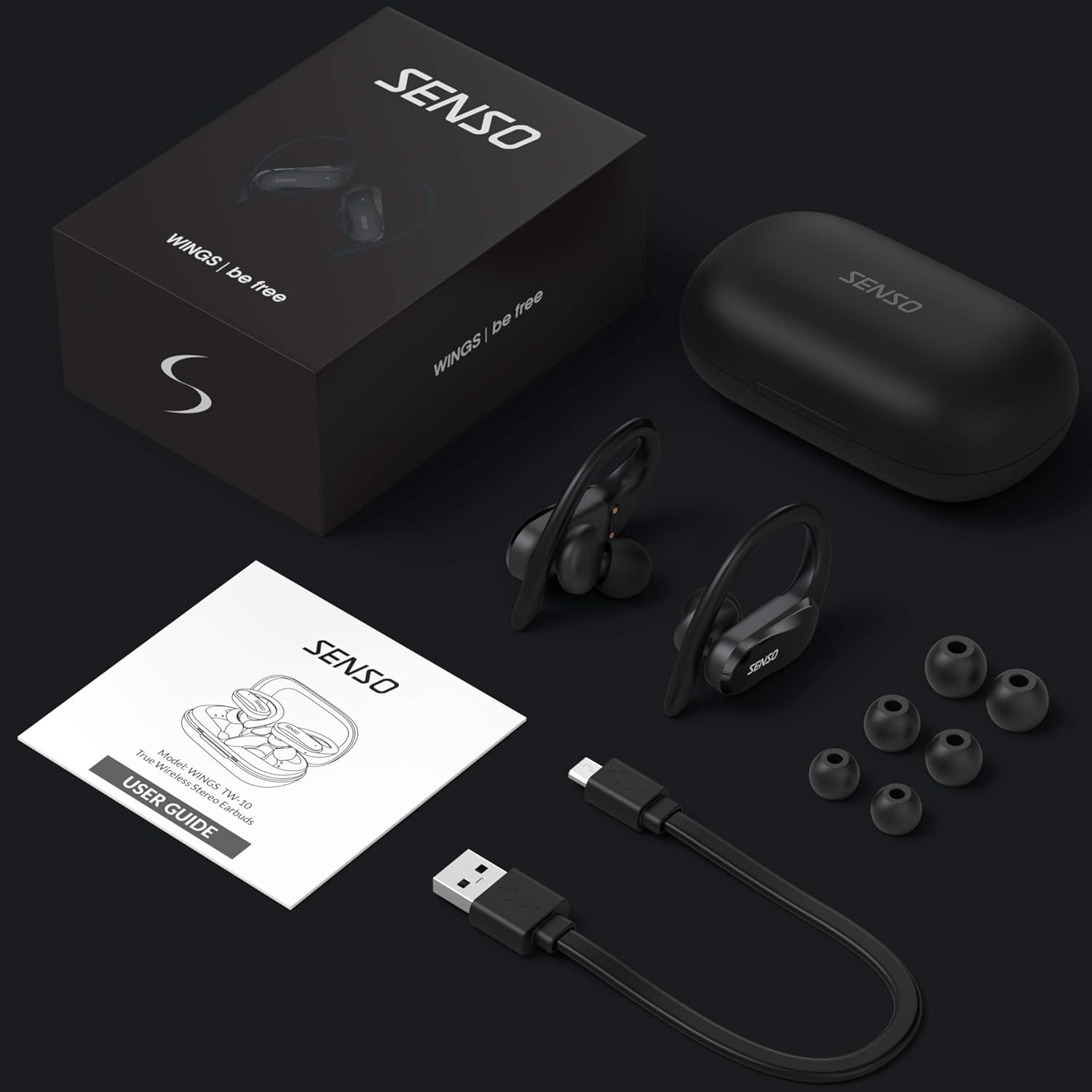
Image: The Senso Wireless Earbuds packaging, displaying the earbuds, charging case, user guide, USB charging cable, and various ear tip sizes.
3. Продукт бүтүп калдыview
The Senso Wings TW10 earbuds are designed for comfort and performance, featuring advanced audio technology and a durable build.

Сүрөт: жарылган view of the earbud, illustrating the 13mm dynamic driver responsible for delivering premium sound quality with intense bass and dynamic range.

Сүрөт: деталдуу view of the earbud's internal circuitry, emphasizing the Bluetooth 5.0 chipset and CVC 8.0 Noise Cancellation Technology for stable connection and clear audio.

Image: Two scenarios demonstrating the earbuds' versatility: one earbud in use for mono mode (e.g., driving) and both earbuds for dual mode (e.g., binaural calls).

Image: The earbuds are shown resisting water splashes, indicating their IPX6 waterproof rating, suitable for sweat, water, and rain.
4. Орнотуу
4.1 Кулакчындарды жана кутучаны заряддоо
Before first use, fully charge the earbuds and the charging case. Place the earbuds into the charging case. Connect the USB charging cable to the case and a power source. The indicator lights on the case will show the charging status.
4.2 Баштапкы жупташтыруу
- Кулакчындарыңыздын кубатталганын текшериңиз.
- Заряддоо кутучасын ачыңыз. Кулакчындар автоматтык түрдө күйүп, жупташтыруу режимине өтөт.
- Түзмөгүңүздө (смартфон, планшет ж.б.) Bluetooth иштетиңиз.
- Издөө available Bluetooth devices and select "SENSO Wings TW10" from the list.
- Once connected, you will hear an audio prompt, and the earbud indicator lights will change.

Image: The earbuds are shown connecting to a smartphone, demonstrating the simple and fast pairing process upon removal from the charging case.
Video: An official product video demonstrating the features and setup of the Senso WINGS Ultra Durable Premium Audio Wireless Earbuds.
5. Иштөө нускамалары
5.1 Кулакчындарды тагынуу
Place the earbuds in your ears and adjust the ear hooks for a secure and comfortable fit. The 60-degree twist lock system ensures they stay in place during physical activity.

Image: A user demonstrating the secure fit of the earbuds with the 60-degree twist lock system, ideal for sports and exercise.
5.2 Негизги башкаруу каражаттары
The earbuds feature touch-sensitive controls for media playback and call management. Refer to the detailed user guide included in the box for specific touch commands for functions such as play/pause, skip track, answer/end call, and voice assistant activation.
5.3 Mono or Dual Mode
You can use either earbud independently (mono mode) or both together (dual mode) for a stereo audio experience. This flexibility allows for awareness of your surroundings when needed.
5.4 Чакыруу функциялары
Each earbud is equipped with a microphone, enabling binaural calls for clear communication. Use the touch controls to answer, end, or reject calls.
6. Техникалык тейлөө
6.1 Тазалоо
- Кулакчындарды жана заряддоо кутусун жумшак, кургак, түксүз чүпүрөк менен дайыма тазалап туруңуз.
- Кулагынын учтарын алып салып, жумшак самын жана суу менен тазалаңыз, анан кайра кийер алдында жакшылап кургатып алыңыз.
- Абразивдүү тазалагычтарды же эриткичтерди колдонуудан алыс болуңуз.
6.2 Сактоо
- Кулакчындарды коргоо жана кубаттоо үчүн колдонулбаган учурда кубаттоо кутучасында сактаңыз.
- Түзмөктү салкын, кургак жерде, өтө жогорку температурадан жана түз күн нурунан алыс сактаңыз.
7. Кыйынчылыктарды
7.1 Жупташтыруу маселелери
- Эки кулакчындын тең кубатталганын текшериңиз.
- Түзмөгүңүздөгү Bluetooth'ду өчүрүп, кайра күйгүзүңүз.
- Forget the device from your Bluetooth list and attempt to pair again.
- If only one earbud connects, try resetting the earbuds (refer to the full user guide for specific reset instructions).
7.2 Үн жок же үнү төмөн
- Түзмөгүңүздөгү жана гарнитураңыздагы үн деңгээлин текшериңиз.
- Кулакчындар кулагыңызга туура орноштурулганын текшериңиз.
- Кулакчындардын динамиктеринен жана кулакчындардын учунан ар кандай таштандыларды тазалаңыз.
7.3 Заряддоо көйгөйлөрү
- Заряддоо кабели корпуска да, кубат булагына да туташтырылганын текшериңиз.
- Кулакчындардагы жана корпустун ичиндеги заряддоо контакттары таза жана тоскоолдуксуз экенин текшериңиз.
- Башка заряддоо кабелин же кубат адаптерин колдонуп көрүңүз.
8. Техникалык шарттар
| Өзгөчөлүк | Деталь |
|---|---|
| Модель аты | Wings TW10 |
| Байланыш технологиясы | Bluetooth 5.0, зымсыз |
| Зымсыз байланыш технологиясы | Bluetooth |
| Noise Control | Активдүү ызы-чууну жокко чыгаруу |
| Сууга туруктуулук деңгээли | Суу өткөрбөйт (IPX6) |
| Батареянын иштөө мөөнөтү (наушник) | 8 саат |
| Жалпы ойноо убактысы (Кеп менен) | 30 саатка чейин |
| Аудио драйверинин өлчөмү | 10 миллиметр |
| Импеданс | 32 Ом |
| Башкаруу түрү | Медиа көзөмөл |
| Башкаруу ыкмасы | Алыстан |
| Кулак жайгаштыруу | Кулакта |
| Форма фактору | Кулакта |
| Материал | Силикон |
| Элемент Салмагы | 7 унция |

Image: The earbuds and charging case illustrating the extended playtime: 6 hours for the earbuds and up to 30 hours total with the portable charging case.
9. Кепилдик жана колдоо
Senso offers a standard warranty for its products. Additionally, you may be eligible for an extended warranty.
9.1 Кепилдик
To convert to a two-year extended warranty, visit www.sensoshop.com/warranty. This must be claimed within 7 days of receiving your product.
9.2 Кардарларды колдоо
For any product-related issues or inquiries, please contact Senso customer support. Details can be found on the warranty card included in your product packaging or on the official Senso webсайт.