1. Киришүү
The GTMEDIA V7S2X is a high-definition digital satellite TV receiver designed for Free-to-Air (FTA) satellite broadcasts. It supports DVB-S/S2/S2X standards, H.264 video decoding, and delivers full HD 1080p resolution. This receiver offers features such as USB Wi-Fi antenna support for network sharing, PVR readiness, and compatibility with various satellite systems. This manual provides detailed instructions for setting up, operating, and maintaining your device.
2. Пакеттин мазмуну
Төмөндө тизмеленген нерселердин баары пакетиңизге камтылганын текшериңиз. Эгерде кандайдыр бир буюмдар жок же бузулуп калса, сатуучуга кайрылыңыз.
- 1x GTMEDIA V7S2X Satellite Receiver
- 1x USB WiFi Antenna
- 1x IR Алыстан башкаруу
- 1x HDMI кабели
- 1x Power адаптер
- 1x Колдонуучунун колдонмосу
- 1x Product Warranty Card

Image: Contents of the GTMEDIA V7S2X package, showing the receiver, remote control, USB WiFi antenna, HDMI cable, power adapter, user manual, and warranty card.
3. Продукт бүтүп калдыview
3.1 алдыңкы панели
The front panel features the GTMEDIA logo, the model number V7S2X, a digital display, and a USB port for connecting the USB WiFi antenna or other USB devices.

Сүрөт: алдыңкы view of the GTMEDIA V7S2X receiver, highlighting the digital display and the front USB port.
3.2 Арткы панелдин туташуулары
The rear panel provides all necessary ports for connecting the receiver to your satellite dish and television.
- LNB IN: Connects to your satellite dish LNB.
- HD OUT: HDMI output for connecting to an HD television.
- CVBS (Yellow): Композиттик видео чыгаруу.
- L (White): Left audio output.
- R (Кызыл): Right audio output.
- USB: Additional USB port for external storage or USB WiFi antenna.
- DC 12V: Кошулган адаптер үчүн кубат киргизүү.
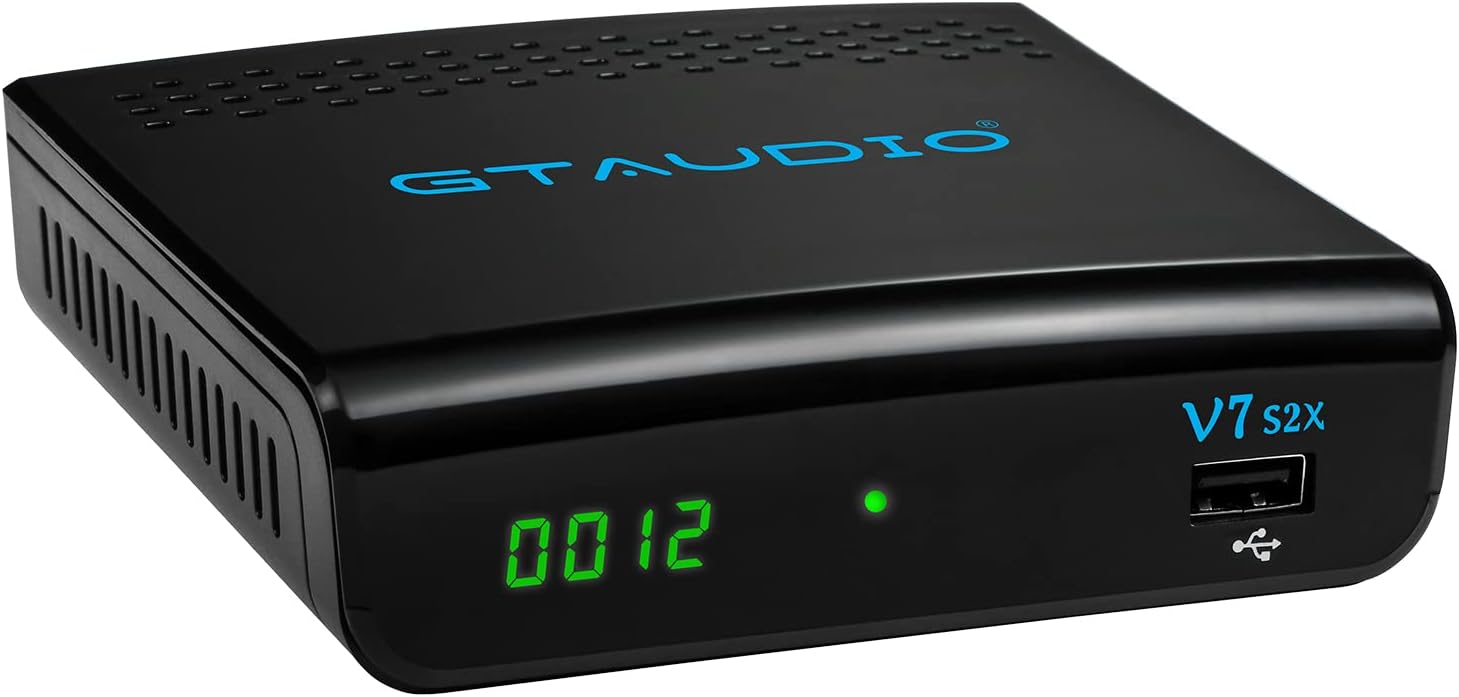
Image: Rear panel of the GTMEDIA V7S2X receiver, detailing all input and output ports for satellite, video, audio, USB, and power connections.
3.3 Алыстан башкаруу
Алыстан башкаруу пульту кабыл алгычтын функцияларын толук башкарууга жана башкарууга мүмкүндүк берет. Оптималдуу колдонуу үчүн баскычтын жайгашуусу менен таанышып алыңыз.

Image: The remote control for the GTMEDIA V7S2X, showing power, number, navigation, volume, channel, and media control buttons.
4. Орнотуу колдонмосу
Follow these steps for initial setup of your GTMEDIA V7S2X receiver.
- Спутник кабелин туташтырыңыз: Connect the LNB cable from your satellite dish to the 'LNB IN' port on the receiver.
- Сыналгыга туташуу: Use the provided HDMI cable to connect the 'HD OUT' port on the receiver to an HDMI input on your television. Alternatively, use AV cables (CVBS, L, R) for older TVs.
- Туташуу кубаты: Plug the power adapter into the 'DC 12V' port on the receiver, then plug the adapter into a power outlet. The receiver will power on and display 'boot'.
- Баштапкы конфигурация:
- Turn on your TV and select the correct HDMI/AV input.
- The receiver will boot up. Use the remote control to navigate the on-screen menu.
- барыңыз ОРНОТУУ > Спутник тизмеси. Select your satellite (e.g., Galaxy 19, Astra 19.2E).
- Configure LNB Frequency, DiSEqC settings, and LNB Power as required for your satellite setup.
- Аткаруу Скандоо (Blind Scan or Auto Scan) to find available channels.
- Network Setup (Optional): If using the USB WiFi antenna, insert it into a USB port. Go to ТАРМАК > Network Config > WiFi зымсыз тармакка туташуу үчүн.
Video: A visual guide demonstrating the initial connection of the GTMEDIA V7S2X receiver, including power-on sequence, and basic menu navigation for channel installation and network configuration.
5. Иштөө нускамалары
5.1 Каналды башкаруу
- Телеканалдардын тизмеси: басыңыз КАНАЛ пульттагы баскычты view the list of TV channels.
- Favorite Groups: Organize channels into up to 16 different favorite groups for quick access.
- Каналды түзөтүү: Access the channel editing function to move, lock, skip, delete, or rename channels. Parental control is also available.
5.2 Программаны жаздыруу (PVR)
The GTMEDIA V7S2X supports PVR (Personal Video Recorder) functionality when an external USB storage device (FAT/FAT32/NTFS format) is connected.
- Ыкчам жаздыруу: басыңыз Жаздыруу button on the remote to start recording the current program.
- Пландаштырылган жаздыруу: колдонуу Таймер орнотуу feature to schedule recordings for future programs.
- Ойнотуу: Access recorded content via the МЕДИА меню.
5.3 Мультимедиа ойнотуу
Connect a USB storage device to play various media files.
- дегенге өтүңүз МЕДИА меню.
- Тандоо Музыка, Сүрөт, же Кино to browse and play your files.
5.4 Онлайн функциялар
With a connected USB WiFi antenna and internet access, you can use online applications.
- Мүмкүнчүлүк Online Movie App (e.g., YouTube) through the ТАРМАК меню.
6. Техникалык тейлөө
- Тазалоо: Use a soft, dry cloth to clean the receiver. Do not use liquid or aerosol cleaners.
- Вентиляция: Ensure the receiver has adequate ventilation. Do not block ventilation openings.
- Өчүрүү: Эгерде түзмөк көпкө чейин колдонулбаса, кубат адаптерин розеткадан сууруп коюңуз.
7. Кыйынчылыктарды
- Кубат жок:
- Кубат адаптери кабыл алгычка жана розеткага бекем туташтырылганын текшериңиз.
- Электр розеткасынын иштешин текшериңиз.
- Сигнал жок:
- Verify the LNB cable is properly connected to the 'LNB IN' port.
- Спутник антеннаңыздын туурасын текшериңиз.
- Confirm LNB settings (frequency, DiSEqC) in the ОРНОТУУ menu are correct for your satellite.
- Телевизордо сүрөт/үн жок:
- Ensure the HDMI or AV cables are securely connected to both the receiver and the TV.
- Select the correct input source on your TV (e.g., HDMI 1, AV).
- Check the TV's volume and mute settings.
- Алыстан башкаруу иштебейт:
- Пульттагы батарейкаларды алмаштырыңыз.
- Пульт менен ресивердин IR сенсорунун ортосунда эч кандай тоскоолдуктар жок экенин текшериңиз.
8. Техникалык шарттар
| Өзгөчөлүк | Спецификация |
|---|---|
| Модел | V7S2X |
| CPU | 770MHz кош ядролуу |
| Flash Memory | 64MB Элиза Flash |
| DDR2 эс тутуму | 512M RAM |
| DVB стандарты | DVB-S/S2/S2X, AVS+, VCM/ACM/Multi-stream/T2MI |
| Видеону чечмелөө | 1080P main profile@level 4.1 and main10 profile@L4.1, High tier |
| Аудио чечмелөө | MPEG-1/2 катмар 1/2/3, MPEG-2/4 LC-AAC, MPEG-4 HE-AAC, Dolby AC3/AC3+, DRA CH/5.1CH |
| Аспект катышы | Auto, 16:9 Pillar box, 4:3 Pan & Scan, 4:3 Letter Box |
| Каналдар | 5000+ TV and Radio programmable |
| OSD тили | Multi-language support (English, Spanish, French, Russian, Portuguese, Polish, Indonesian, Arabic, Turkish, German, Italian, Persian, Thai) |
| Байланыш | HDMI, USB, LNB IN, CVBS, L/R Audio, DC 12V |
| Өлчөмдөр | 12 x 10.5 x 3.3 см |
| Салмагы | 491 г |
| Power Input | 120 вольт (AC) |
9. Кепилдик жана колдоо
The GTMEDIA V7S2X comes with a 1-year warranty. Please refer to the included Product Warranty Card for detailed terms and conditions.
For technical support or further inquiries, please visit the official GTMEDIA website or contact customer service through the channels provided on your warranty card or the product packaging.