
1. Киришүү
Thank you for choosing the EarFun Air Pro Wireless Earbuds. This manual provides detailed instructions for setting up, operating, and maintaining your earbuds to ensure optimal performance and longevity. Please read this manual thoroughly before use and retain it for future reference.
2. Пакеттин мазмуну
Төмөндө тизмеленген нерселердин баары пакетиңизде бар экенин текшериңиз:
- EarFun Air Pro Wireless Earbuds
- Заряддоо кутусу
- USB-C заряддоо кабели
- Наушниктер (ар кандай өлчөмдөгү)
- Колдонуучунун Колдонмосу (бул документ)
3. Продукт бүтүп калдыview
Familiarize yourself with the components of your EarFun Air Pro earbuds and charging case.

Сүрөт 3.1: EarFun Air Pro Wireless Earbuds and their charging case. The earbuds are black with a metallic accent, and the charging case is a sleek black oval shape with the EarFun logo.
3.1 Кулакчындын компоненттери
- Сенсордук башкаруу аймагы: Ойнотууну, чалууларды жана режимдерди башкаруу үчүн.
- Микрофондор: Multiple microphones for active noise cancellation and clear calls.
- Кулак учу: Silicone tips for comfort and passive noise isolation.
- Заряддоо байланыштары: Located at the bottom of each earbud.
3.2 Кубаттоочу кутучанын компоненттери
- Кулакчын уячалары: Magnetic slots for securing and charging earbuds.
- Заряддоо көрсөткүчү: кубаттоо абалын көрсөтүүчү LED жарык.
- USB-C порту: Ишти заряддоо үчүн.
4. Орнотуу
4.1 Алгачкы заряддоо
- Remove the protective film from the charging contacts on both earbuds.
- Кулакчындарды заряддоо кутусуна салыңыз.
- USB-C кабелин корпустагы кубаттоо портуна жана кубат булагына туташтырыңыз.
- Allow approximately 1.5 hours for a full charge of the earbuds and case. The indicator light on the case will show charging status.
4.2 Түзмөк менен жупташтыруу
- Кулакчындар толук заряддалганын текшериңиз.
- Заряддоо кутучасын ачыңыз. Кулакчындар автоматтык түрдө жупташтыруу режимине кирет, бул кулакчындардын бириндеги жаркыраган LED менен көрсөтүлөт.
- Түзмөгүңүздө (смартфон, планшет ж.б.) Bluetooth иштетиңиз.
- Издөө "EarFun Air Pro" in the list of available Bluetooth devices and select it to connect.
- Туташкандан кийин үн билдирүүсү ийгиликтүү жупташтырууну ырастайт.
Note: The earbuds will automatically reconnect to the last paired device when removed from the case, if Bluetooth is enabled on the device.
4.3 Кулак учтарын тандоо
Choosing the correct ear tip size is crucial for comfort, sound quality, and effective noise cancellation. Experiment with the included ear tips to find the best fit for your ears. A good seal will provide better bass response and noise isolation.
5. Иштөө нускамалары
5.1 Сенсордук башкаруу
The EarFun Air Pro earbuds feature intuitive touch controls on the outer surface of each earbud.

Сүрөт 5.1: A person demonstrating the use of touch controls on the EarFun Air Pro earbuds. The image highlights the tap control functionality for changing modes or managing music.
| Акция | Функция |
|---|---|
| Бир таптоо (Сол/Оң) | Музыка ойнотуу/тындыруу, Чалууга жооп берүү/аяктоо |
| Эки жолу таптаңыз (оңго) | Кийинки трек |
| Эки жолу таптаңыз (солго) | Мурунку трек |
| Үч жолу таптап (солго) | Cycle ANC/Transparency/Normal Mode |
| Үч жолу таптап (оңго) | Үн жардамчысын жандырыңыз |
| Басып кармап туруңуз (Сол/Оң) | Чакырууну четке кагуу |
5.2 Активдүү ызы-чууну жокко чыгаруу (ANC) жана ачыктык режими
The EarFun Air Pro features QuietSmart Technology for active noise cancellation up to 38dB, and a Transparency Mode.
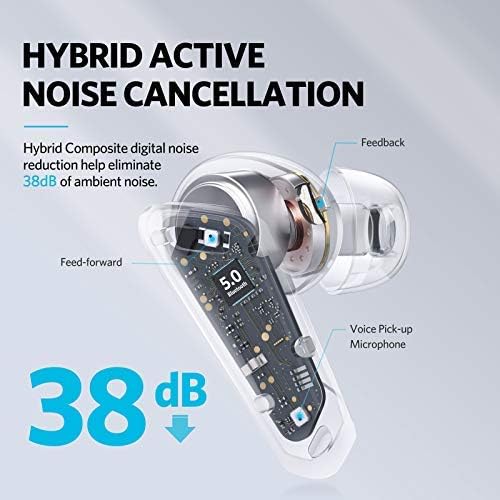
Сүрөт 5.2: A cutaway diagram of an earbud illustrating the components involved in Hybrid Active Noise Cancellation, showing feed-forward and feedback microphones, and a voice pick-up microphone, indicating a noise reduction of 38dB.
- ANC режими: Reduces ambient noise, ideal for noisy environments.
- Ачыктык режими: Аудиону угуп жатып, айланаңыздагы нерселерди угууга мүмкүндүк берет, кырдаалды жакшыртат.
- Кадимки режим: ызы-чууну жокко чыгаруу же ачыктык жок стандарттуу аудио ойнотуу.
Cycle through these modes by triple-tapping the left earbud.
5.3 Бир кулакчын режими
Either earbud can be used independently. Simply remove one earbud from the case and leave the other in, or place one back into the case during use. The active earbud will automatically switch to mono mode.

Сүрөт 5.3: A person relaxing on a couch, listening to music with only one EarFun Air Pro earbud in their ear, demonstrating the single-ear listening feature.
5.4 Кулактын ичине кирип кеткенин аныктоо
The earbuds feature in-ear detection. Removing an earbud from your ear will automatically pause playback, and reinserting it will resume playback.

Сүрөт 5.4: A man holding one EarFun Air Pro earbud after removing it from his ear, while the other remains in his ear, illustrating the in-ear detection technology that pauses music when an earbud is removed.
5.5 Чалууларды кабыл алуу жана кабыл алуу
The EarFun Air Pro earbuds utilize 6-microphone Environment Noise Cancellation (ENC) technology for clear calls.

Сүрөт 5.5: A woman smiling and holding a smartphone to her chest while wearing EarFun Air Pro earbuds, illustrating the 6-mic noise cancellation feature for calls, with a graphic showing noise reduction.
- Чалууга жооп берүү/аяктоо: Кулакчындарды бир жолу таптаңыз.
- Чакырууну четке кагуу: Кулакчындардын бирин басып, кармап туруңуз.
6. Техникалык тейлөө
6.1 Тазалоо
- Кулакчындарды, кулакчындардын учтарын жана кубаттоочу контакттарды жумшак, кургак, мамыксыз чүпүрөк менен үзгүлтүксүз тазалап туруңуз.
- Зарыл болсо, кулактын учун алып салып, жумшак самын жана суу менен тазалаңыз, кайра орнотуудан мурун толугу менен кургаганын текшериңиз.
- Катуу химиялык заттарды же абразивдүү материалдарды колдонуудан алыс болуңуз.
6.2 Сактоо
- Колдонулбай турганда, кулакчындарды коргоо жана кубаттоо үчүн аларды кубаттоо кутучасында сактаңыз.
- Салкын, кургак жерде, экстремалдык температурадан жана түз күндүн нурунан алыс сактаңыз.
6.3 Сууга туруктуулук
The EarFun Air Pro earbuds are IPX5 water-resistant, meaning they can withstand sweat and light splashes. They are not designed for swimming or submersion in water. Ensure earbuds are dry before placing them back in the charging case.
7. Кыйынчылыктарды
| Көйгөй | Мүмкүн чечим |
|---|---|
| Кулакчындар жупташкан жок |
|
| Бир кулактын үнү чыкпайт |
|
| Poor sound quality/weak bass |
|
| Кулакчындар заряддалбай жатат |
|
8. Техникалык шарттар
| Өзгөчөлүк | Деталь |
|---|---|
| Модел | TW302 |
| Bluetooth версиясы | 5.0 |
| Байланыш технологиясы | Bluetooth |
| Активдүү ызы-чууну жокко чыгаруу | Up to 38dB (QuietSmart Technology) |
| Микрофондор | 6-Mic ENC for calls |
| Айдоочулар | Dual 10mm Composite Dynamic Drivers |
| Ойнотуу убактысы (наушник) | Up to 9 hours (Normal Mode), 7 hours (ANC Mode) |
| Case менен жалпы ойноо убактысы | 32 саатка чейин |
| Заряддоо убактысы | Болжол менен 1.5 саат (наушник жана корпус) |
| Заряддоо порту | USB-C |
| Суу каршылык | IPX5 (Sweat & Water Resistant) |
| Башкаруу түрү | Touch Control |
| Өзгөчөлүктөр | In-ear Infrared Detection, Transparency Mode, Single Earbud Mode, Voice Assistant Activation |
| Максималдуу операциялык аралык | 15 метр |
| Элемент Салмагы | 53 грамм |
9. Кепилдик жана колдоо
EarFun products are designed and manufactured to the highest quality standards. For detailed warranty information, product registration, or technical support, please visit the official EarFun webсайтка же түздөн-түз кардарларды тейлөөгө кайрылыңыз. Сатып алуу квитанциясын кепилдик дооматтары үчүн сатып алуунун далили катары сактаңыз.
Официалдуу Webсайт: www.myearfun.com