
Introduction
The CyberpowerPC Spectre 01 is a wired adjustable stereo gaming headset designed for comfort and high-quality audio. This manual provides essential information for setting up, operating, maintaining, and troubleshooting your headset to ensure an optimal gaming and audio experience across various platforms.
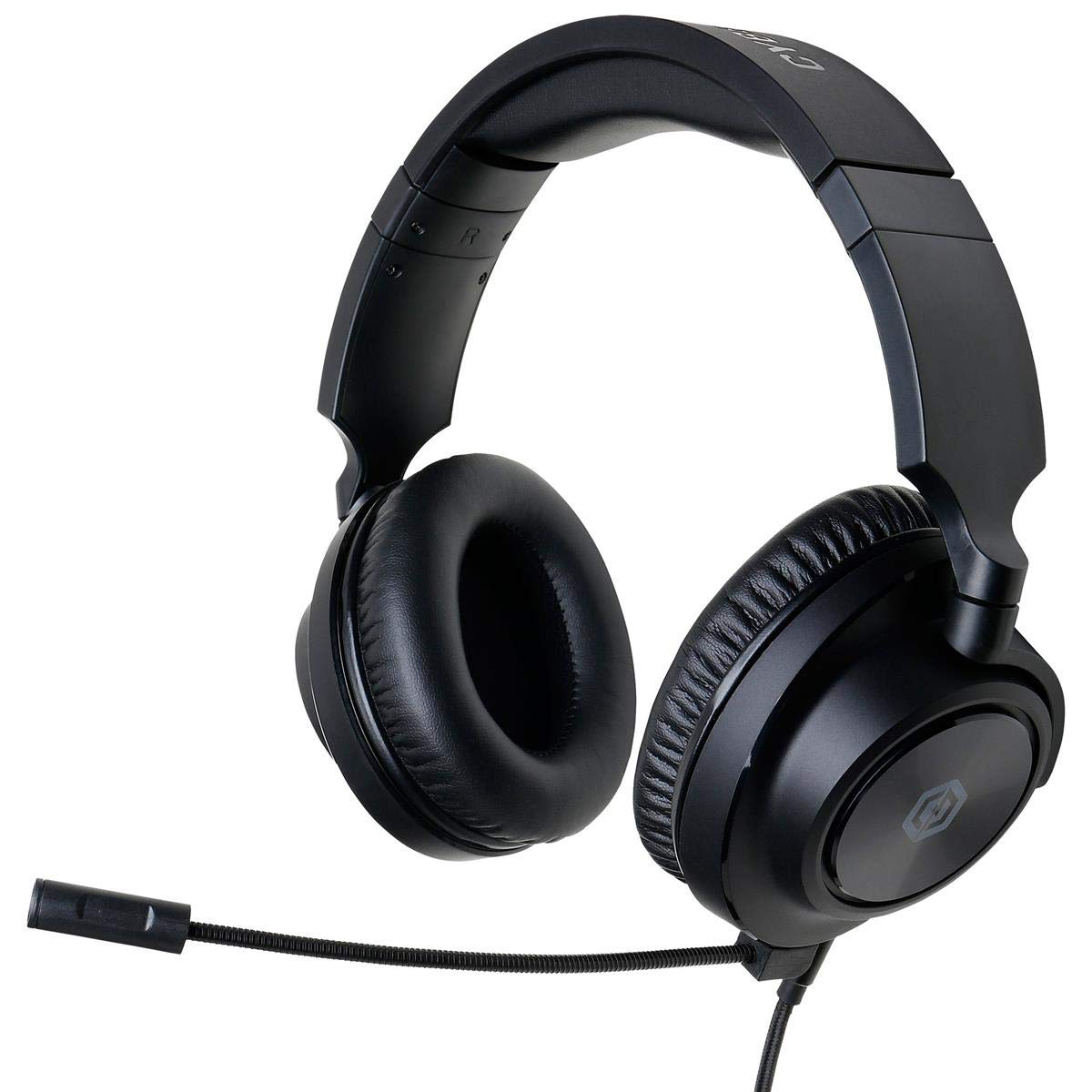
Figure 1: CyberpowerPC Spectre 01 Gaming Headset
Пакеттин мазмуну
Пакетиңизде бардык буюмдар бар экенин текшериңиз:
- Spectre Gaming Headset
- Аудио кабель
- Алынуучу микрофон
- PC Splitter (Y-cable)
- Quick Start Guide
Жайгашуу
1. Микрофонду тиркөө
Locate the microphone input port on the left earcup. Align the microphone's connector with the port and gently push until it clicks into place. Ensure it is securely attached for proper function.
2. Гарнитураны туташтыруу
The Spectre 01 headset uses a standard 3.5mm jack for audio and microphone connectivity.
- For devices with a single 3.5mm combo jack (e.g., most laptops, PS4, Xbox One, Switch, mobile phones): Plug the headset's 3.5mm audio cable directly into the device's audio port.
- For devices with separate audio and microphone jacks (e.g., most desktop PCs): Use the included PC splitter. Connect the headset's 3.5mm cable to the female end of the splitter. Then, plug the green-tipped male connector of the splitter into your computer's audio output jack (usually green), and the pink-tipped male connector into your computer's microphone input jack (usually pink).
3. Ыңгайлуулук үчүн тууралоо
The headset features an adjustable headband and flexible earcups. Extend or retract the headband to fit your head size. The earcups can pivot and tilt to conform to your ear shape, reducing pressure during extended use.

Figure 2: Headset Adjustments for Optimal Fit
Иштөө нускамалары
1. Аудио башкаруу
The headset features inline audio controls on the cable. Use the volume wheel to adjust the listening volume. A microphone mute switch is also present, allowing you to quickly toggle your microphone on or off.
2. Микрофонду колдонуу
Position the flexible boom microphone close to your mouth for clear voice capture. Ensure the microphone is not muted via the inline control or your device's settings.
3. Platform Compatibility
The Spectre 01 headset is compatible with a wide range of devices:
- PC/Mac: Connect using the 3.5mm jack, utilizing the PC splitter for separate audio/mic ports if necessary.
- PlayStation 4 (PS4): Plug directly into the controller's 3.5mm port. Adjust audio settings in the PS4 system menu.
- Xbox One: Plug directly into the controller's 3.5mm port. An Xbox One Stereo Headset Adapter (sold separately) may be required for older controllers without a 3.5mm jack.
- Nintendo Switch: Plug directly into the console's 3.5mm port.
- Мобилдик түзмөктөр: Plug directly into the 3.5mm audio jack of your smartphone or tablet.

Figure 3: Earcup Flexibility for Enhanced Comfort
Техникалык тейлөө
To ensure the longevity and performance of your CyberpowerPC Spectre 01 headset, follow these maintenance guidelines:
- Тазалоо: Наушниктерди жана баш боолорду сүртүү үчүн жумшак, кургак чүпүрөктү колдонуңуз. өжөр кир үчүн, бир аз гamp кездеме колдонсо болот, бирок ашыкча нымдуулуктан алыс болуңуз. Катуу химиялык заттарды же абразивдүү тазалагычтарды колдонбоңуз.
- Сактагыч: Store the headset in a clean, dry place away from extreme temperatures and direct sunlight. Avoid coiling the cable tightly to prevent damage.
- Колдонуу: Always grasp the plug when disconnecting the cable, rather than pulling on the cable itself. Avoid dropping the headset or subjecting it to strong impacts.
Проблемаларды чечүү
If you encounter issues with your Spectre 01 headset, refer to the following common solutions:
- Үн жок же үнү төмөн:
- 3.5 мм уячасы аппаратка толугу менен киргизилгенин текшериңиз.
- Check the inline volume control on the headset cable and increase the volume.
- Verify your device's audio output settings and volume levels.
- If using the PC splitter, ensure both green and pink connectors are correctly plugged into the corresponding ports on your PC.
- Түзмөккө тиешелүү маселени болтурбоо үчүн гарнитураны башка түзмөк менен сынап көрүңүз.
- Микрофон иштебейт:
- Микрофон гарнитурага бекем туташтырылганын текшериңиз.
- Check the inline microphone mute switch on the cable and ensure it is in the 'unmuted' position.
- Verify your device's microphone input settings and ensure the Spectre 01 is selected as the default input device.
- If using the PC splitter, ensure the pink connector is correctly plugged into your PC's microphone input.
- Микрофонду башка түзмөк же тиркеме менен сынап көрүңүз.
- Үндүн бурмаланышы же статикалык:
- Бардык туташуулардын коопсуз жана сыныктары жок экенин текшериңиз.
- Try connecting the headset to a different audio port or device to check if the issue persists.
- Reduce the volume on both the headset and the device to see if distortion lessens.
Техникалык шарттар
| Бренд | CyberpowerPC |
| Модель номери | CPS01H200 |
| Модель аты | Spectre |
| Түс | Кара |
| Кулак жайгаштыруу | Кулак үстүндө |
| Форма фактору | Кулак үстүндө |
| Импеданс | 32 Ом |
| Жыштык диапазону | 20Гцтен 20кГцке чейин |
| Айдоочунун өлчөмү | 50мм неодим |
| Байланыш технологиясы | Зымдуу |
| Наушник уясы | 3.5 мм Джек |
| Кабелдик өзгөчөлүктөрү | Алынуучу |
| Материал | Жасалма булгаары, пластик |
| Кошумча функциялар | Lightweight, Microphone Included, Inline Audio Controls |
Кепилдик маалымат
The CyberpowerPC Spectre 01 Gaming Headset is covered by a 1 жылдык Чектелген Кепилдик from the date of purchase. This warranty covers defects in materials and workmanship under normal use. It does not cover damage caused by accident, misuse, abuse, neglect, unauthorized modification, or improper installation. Please retain your proof of purchase for warranty claims.
Колдоо
For further assistance, technical support, or warranty inquiries, please visit the official CyberpowerPC website or contact their customer service department. Refer to the contact information provided in your Quick Start Guide or on the CyberpowerPC webсайт.