
1. Маанилүү коопсуздук нускамалары
Бул проекторду колдонуудан мурун бардык көрсөтмөлөрдү кунт коюп окуп чыгыңыз жана аларды келечекте колдонуу үчүн сактап коюңуз. Туура эмес иштетүү электр тогуна урунууга, өрткө же башка коркунучтарга алып келиши мүмкүн.
- Электр камсыздоо: Ensure the projector is connected to a power source that matches the voltage түзмөктө көрсөтүлгөн.
- Вентиляция: Желдетүүчү тешиктерди жаппаңыз. Ашыкча ысып кетүүнүн алдын алуу үчүн проектордун айланасында абанын туура айланышы үчүн жетиштүү орун бар экенин текшериңиз.
- Тазалоо: Тазалоодон мурун проекторду электр кубатынан сууруп алыңыз. Жумшак, кургак чүпүрөктү колдонуңуз. Суюк же аэрозоль тазалоочу каражаттарды колдонбоңуз.
- Суу жана ным: Проекторду жамгырдын, нымдуулуктун же башка суюктуктардын таасирине дуушар кылбаңыз.
- Жайгашкан жери: Проекторду туруктуу, тегиз бетке коюңуз. Аны күн нуру түз тийген жерге же жылуулук булактарына жакын койбоңуз.
- Тейлөө: Do not attempt to repair this product yourself. Refer all servicing to qualified service personnel.
2. Пакеттин мазмуну
Төмөндө тизмеленген нерселердин баары пакетиңизге камтылганын текшериңиз. Эгерде кандайдыр бир нерселер жок болсо же бузулса, кардарларды колдоо менен байланышыңыз.
- VIVIMAGE C580 проектору
- HDMI кабели
- AV Cable
- Колдонуучунун колдонмосу
- RCA Male to 2 Female Splitter
- Power Cable (2 meters)
- Алыстан башкаруу
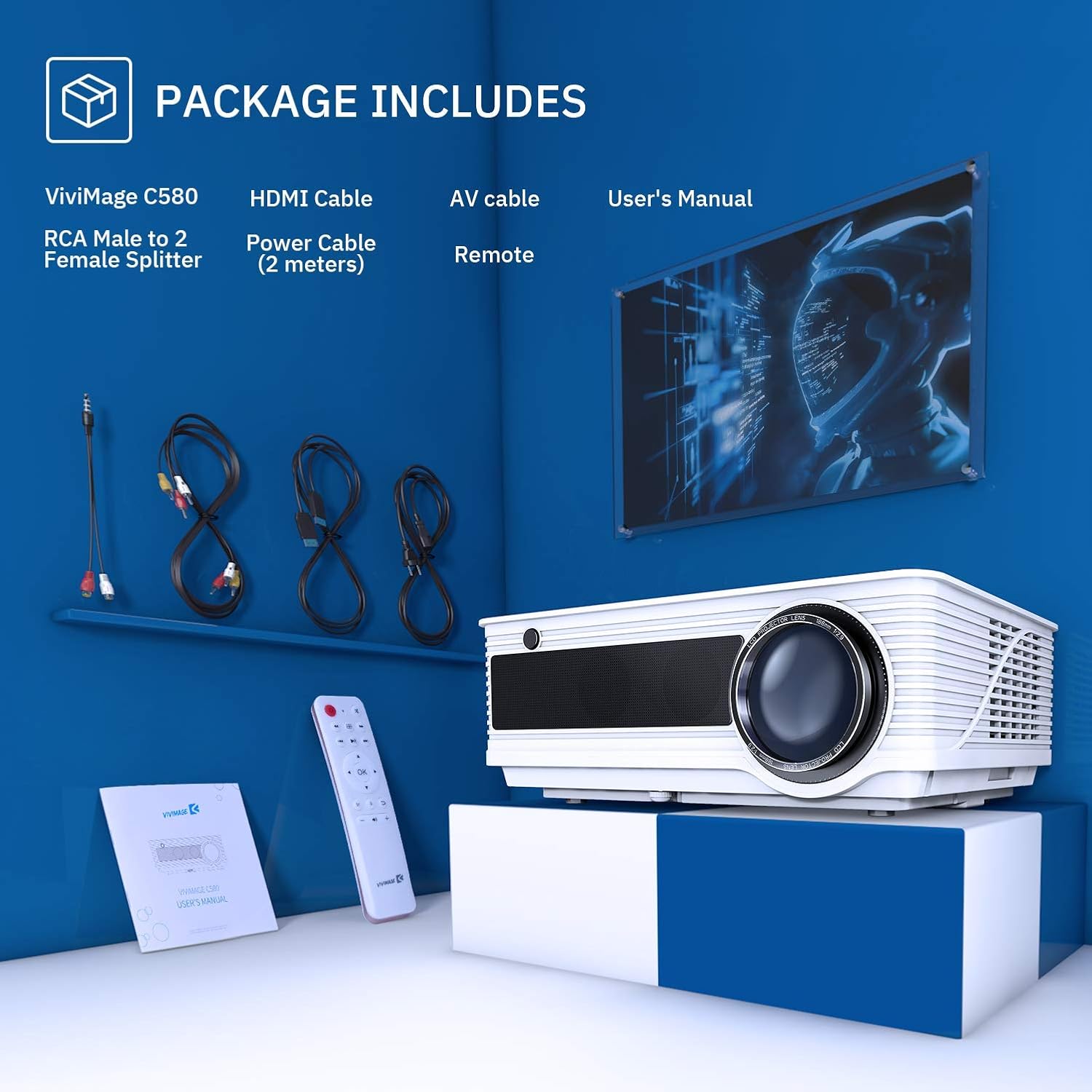
Image: The VIVIMAGE C580 projector and its included accessories, such as the HDMI cable, AV cable, power cable, remote control, and user manual.
3. Продукт бүтүп калдыview
The VIVIMAGE C580 is a home theater projector designed to deliver a clear visual experience. It features a native resolution of 1280 x 800 and a contrast ratio of 4000:1. The projector is equipped with various input ports for broad compatibility with multimedia devices.
Киргизүү/чыгыш порттору
- Кубат киргизүү: Электр кабелин туташтыруу үчүн.
- USB порт: For connecting USB drives.
- VGA порту: Компьютерлерге туташуу үчүн.
- TV Port: For TV signal input.
- HDMI порту: For connecting to various HDMI-enabled devices.
- Аудио порт: Тышкы аудио чыгаруу үчүн.

Image: The rear panel of the VIVIMAGE C580 projector showing its various input ports (USB, VGA, TV, HDMI, Audio) connected to devices like a laptop, Fire TV Stick, and game console.
4. Орнотуу
4.1 Орнотуу
Position the projector on a stable surface or mount it to the ceiling using the dedicated mount hole on the bottom. The projection distance can range from 1.5 meters to 5.6 meters, yielding a display size from 44 inches to 200 inches.

Image: A VIVIMAGE C580 projector mounted on a ceiling, projecting a large image onto a screen, illustrating the immersive experience and projection distance/size capabilities.
4.2 Кубат туташтыруу
Connect the provided power cable to the projector's power input port and then plug the other end into a wall outlet.
4.3 Түзмөктөрдү туташтыруу
The VIVIMAGE C580 projector is compatible with a wide range of multimedia devices. Use the appropriate cable (e.g., HDMI, AV, USB) to connect your device to the projector.
- HDMI: Connect to laptops, Amazon Fire TV Stick, PS4, Xbox, Blu-ray/DVD players.
- USB: Медиа ойнотуу үчүн USB дисктерди туташтырыңыз.
- VGA: Connect to desktop computers.
- OF: Connect to older devices using the RCA Male to 2 Female Splitter.
5. Проекторду иштетүү
5.1 Күйгүзүү/өчүрүү
Проектордун же пульттун кубат баскычын басып, блокту күйгүзүңүз же өчүрүңүз.
5.2 Фокусту тууралоо
To achieve a clear image, manually rotate the focus ring located on the projector lens until the image appears sharp.
5.3 Негизги таштарды оңдоо
If the projected image appears trapezoidal, adjust the ±15° keystone correction ring manually to square the image.

Сүрөт: Жакын план views of the projector's manual focus ring and keystone correction mechanism, demonstrating how to adjust them for a clear and properly shaped image.
5.4 Булакты тандоо
Use the 'Source' button on the remote control or projector to select the desired input source (e.g., HDMI1, HDMI2, USB, VGA, AV).
5.5 Аудио чыгаруу
The projector features dual stereo speakers for integrated audio. For external audio, connect speakers or a sound system to the audio output port.

Image: A VIVIMAGE C580 projector highlighting its built-in speakers, indicating its capability to produce sound directly.
6. Техникалык тейлөө
6.1 Линзаны тазалоо
Use a soft, lint-free cloth specifically designed for optical lenses to gently wipe the projector lens. Avoid touching the lens with bare hands.
6.2 Муздатуу системасы
The VIVIMAGE C580 features an upgraded cooling system designed to optimize heat dispersion. Regularly check and clean the air filter to ensure efficient cooling and prevent dust buildup.

Сүрөт: жарылган view diagram of the VIVIMAGE C580 projector's internal cooling system, showing the fan and heat sinks, with a close-up of the removable air filter.
6.3 Лamp Жашоо
Проектор лamp has an extended lifespan of up to 60,000 hours under normal operating conditions. Proper ventilation and maintenance contribute to maximizing lamp узак өмүр.

Image: A VIVIMAGE C580 projector lens with an overlay indicating an extended lamp жашоо 60,000 XNUMX саат.
7. Кыйынчылыктарды
If you encounter issues with your VIVIMAGE C580 projector, refer to the following common problems and solutions:
- Кубат жок: Электр кабелинин проекторго да, розеткага да бекем туташтырылганын текшериңиз. Башка розетканы колдонуп көрүңүз.
- Сүрөт жок: Check the input source selection. Ensure the connected device is powered on and outputting a signal. Verify all cables are securely connected.
- бүдөмүк сүрөт: Adjust the focus ring until the image is sharp. Ensure the projection distance is within the recommended range.
- Трапеция формасындагы сүрөт: Adjust the keystone correction ring to square the image.
- Үн жок: Check the projector's volume settings and the connected device's volume. Ensure external speakers are properly connected if used.
- Алыстан башкаруу иштебейт: Пульттагы батарейкаларды алмаштырыңыз. Пульт менен проектордун IR ресиверинин ортосунда эч кандай тоскоолдуктар жок экенин текшериңиз.
8. Техникалык шарттар
Key technical specifications for the VIVIMAGE C580 Projector:
| Өзгөчөлүк | Спецификация |
|---|---|
| Бренд | VIVIMAGE |
| Модель аты | C580 |
| Display Resolution | 1280 x 800 |
| Native Resolution | 1280 x 800 |
| Дисплей түрү | LCD |
| Сүрөттүн карама-катышы | 4000:1 |
| Lamp Жашоо | 60,000 саатка чейин |
| Проекциялык аралык | 1.5мден 5.6мге чейин |
| Проекциянын өлчөмү | 44-200" |

Image: A visual comparison demonstrating the brightness and contrast capabilities of the VIVIMAGE C580 projector, indicating 4000 Lux and a 4000:1 contrast ratio.
9. Кепилдик жана колдоо
Бул продукт Amazon Renewed буюму катары сунушталат. Amazon Renewed өнүмдөрү кесипкөй түрдө текшерилип, жаңыдай көрүнүшү үчүн сыналган. Эгер сиз сатып алганыңызга канааттанбасаңыз, алар Amazon Renewed кепилдиги боюнча алмаштырууга же акчаңызды кайтарып алууга укуктуу.
For further assistance, troubleshooting, or warranty claims, please refer to the Amazon Renewed Guarantee details or contact Amazon customer support directly.