
1. Киришүү
The BONTEC TV Stand Tripod (Model B08JLZL2M5) is a versatile and portable solution designed to securely hold flat and curved plasma, LCD, or LED screens ranging from 32 to 60 inches. This stand supports a maximum weight capacity of 45 kg (100 lbs) and features adjustable height, swivel, and tilt functions to optimize your viewing experience. This manual provides detailed instructions for safe assembly, operation, and maintenance of your TV stand.

Сүрөт 1: Бүттүview of the BONTEC TV Stand Tripod with a mounted television and included cable ties.
2. Коопсуздук маалыматы
- Салмак сыйымдуулугу: Do not exceed the maximum weight capacity of 45 kg (100 lbs). Exceeding this limit can result in instability and potential injury or damage.
- Экрандын өлчөмү: This stand is designed for screens between 32 and 60 inches. Using screens outside this range may compromise stability.
- Туруктуу бети: Always place the TV stand on a stable, level, and non-slip surface. Uneven surfaces can cause the stand to tip over.
- Коопсуз Ассамблея: Ensure all screws, bolts, and knobs are securely tightened before placing a TV on the stand and before each use.
- Балдар жана үй жаныбарлары: Keep children and pets away from the stand during assembly and adjustment to prevent accidents.
- Кыймыл: When moving the stand with a TV attached, do so slowly and carefully, preferably with assistance.
- Вентиляция: Ensure adequate ventilation around the TV when mounted.
3. Пакеттин мазмуну
Сураныч, монтаждоону баштоодон мурун бардык компоненттер бар экенин текшериңиз. Эгерде кандайдыр бир бөлүктөрү жок же бузулуп калса, кардарларды колдоо менен байланышыңыз.
- Штативдин негизинин жыйындысы
- Сыналгыга орнотуучу пластина
- VESA Brackets (2 pieces)
- Телевизорду орнотуу үчүн ар кандай бурамалар, шайбалар жана аралыктар
- ачкыч
- Аллен Wrench
- Рух деңгээли
- Кабель байламталары (3 даана)
- Instruction Manual
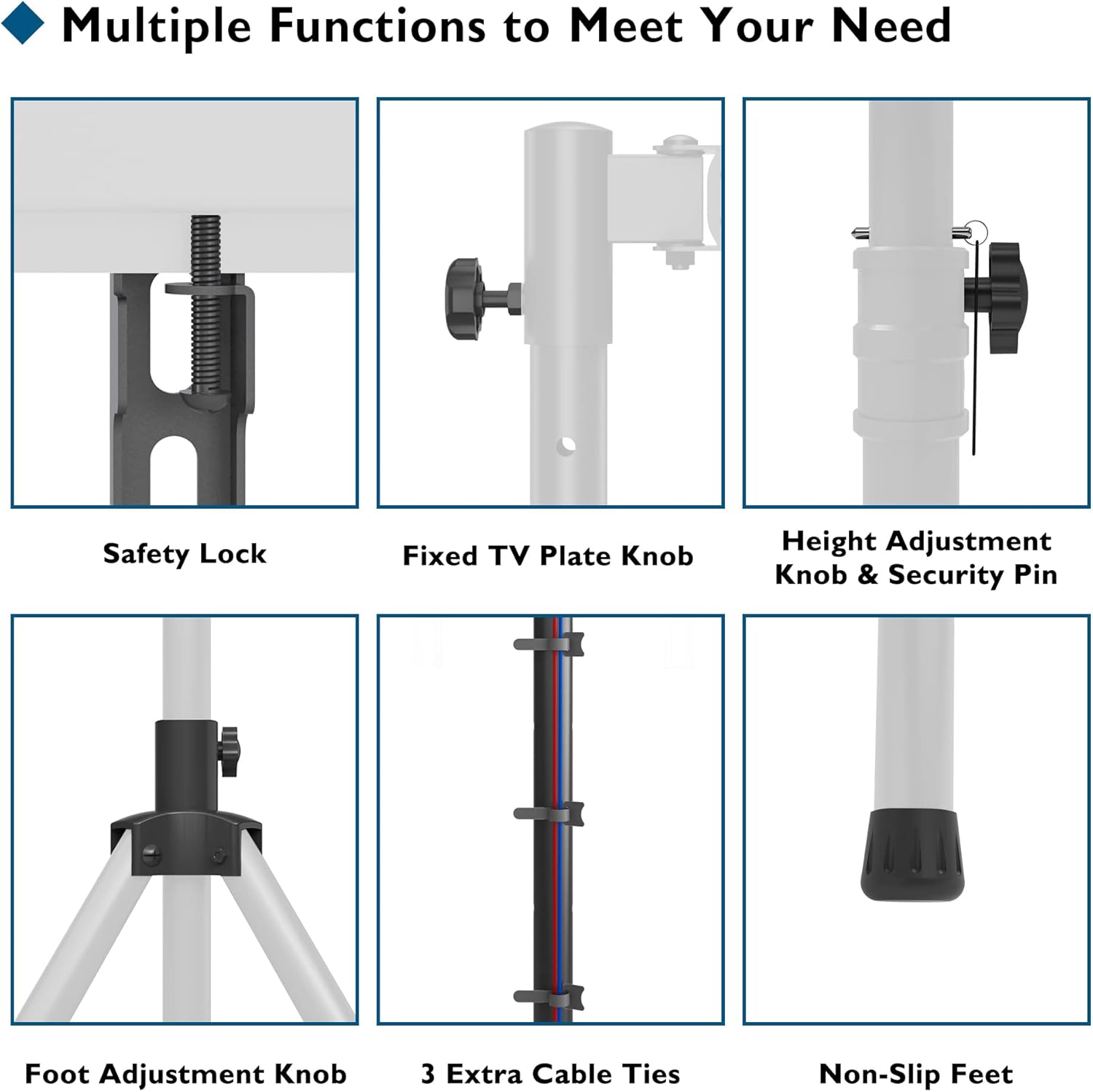
Сүрөт 2: Детальдуу view of key components including safety lock, adjustment knobs, cable ties, and non-slip feet.
4. Орнотуу жана чогултуу
Follow these steps carefully to assemble your BONTEC TV Stand Tripod.
- Prepare the Tripod Base: Extend the tripod legs to their full stable position. Ensure the distance between each foot is approximately 750mm for maximum stability. Adjust the height of the main pole to your desired initial level, insert the security pin through the appropriate hole, and fasten the height adjustment knob securely.
- Attach the TV Mounting Plate: Secure the TV mounting plate assembly to the top of the main pole. Ensure it is firmly seated and tighten the fixed TV plate knob to prevent rotation.
- Mount TV Brackets to TV: Identify the VESA mounting holes on the back of your television. Select the appropriate screws, washers, and spacers from the provided hardware kit that fit your TV's VESA pattern (e.g., 75x75mm, 100x100mm, up to 400x400mm). Attach the two VESA brackets to the back of your TV using a screwdriver. Ensure they are securely fastened.
- Hang TV on Stand: Carefully lift your TV and hook the VESA brackets onto the TV mounting plate on the stand. Ensure the TV is centered and level. Once hooked, tighten the security screws at the bottom of the VESA brackets to lock the TV onto the mounting plate.
- Кабелдик башкаруу: Use the provided cable ties to neatly route and secure any cables along the stand's pole, preventing tangles and improving safety.
- Акыркы түзөтүүлөр: Once the TV is securely mounted, you can adjust the tilt and swivel as needed. Refer to the 'Operating Instructions' section for details.

Image 3: Step-by-step assembly guide for the BONTEC TV Stand Tripod.

Image 4: VESA compatibility and weight capacity details.
5. Иштөө нускамалары
The BONTEC TV Stand Tripod offers several adjustment options for optimal viewing.
5.1 Бийиктигин тууралоо
The stand features four levels of height adjustment for the mounting plate, ranging from a minimum of 1085mm to a maximum of 1565mm. Each level adjusts by 160mm.
- To adjust the height, loosen the height adjustment knob and remove the security pin.
- Carefully raise or lower the pole to the desired height.
- Re-insert the security pin into the nearest hole and tighten the height adjustment knob firmly to secure the position.

Image 5: Height adjustment range and levels.
5.2 Swivel and Tilt Adjustment
The TV mounting plate allows for both swivel and tilt adjustments to achieve the perfect viewбурч.
- Айлануучу: The TV can be rotated horizontally up to ±180 degrees. Gently rotate the TV to the left or right as desired.
- Россия: The TV can be tilted vertically up to ±20 degrees. Loosen the tilt adjustment screws (typically located on the side of the mounting plate), adjust the angle, and then re-tighten the screws to secure the tilt.

Image 6: Swivel and tilt capabilities.
5.3 Көчүрүү
The tripod's design allows for easy folding and portability. To fold, remove the TV, collapse the tripod legs, and lower the main pole. This makes it suitable for various indoor and outdoor applications.

Сүрөт 7: Мисample of the TV stand in use, illustrating optimal viewбурчтар.
6. Техникалык тейлөө
- Үзгүлтүксүз текшерүү: Periodically check all screws, bolts, and connections to ensure they remain tight and secure. Re-tighten if necessary.
- Тазалоо: Clean the TV stand with a soft, dry cloth. Avoid using abrasive cleaners, solvents, or chemical sprays, as these may damage the finish.
- Сактагыч: If storing the stand for an extended period, ensure it is clean, dry, and stored in a safe place to prevent damage.
7. Кыйынчылыктарды
- Problem: Stand feels unstable.
- Чечим: Ensure the tripod legs are fully extended and spread to the recommended 750mm distance between feet. Verify that the height adjustment knob is tightened and the security pin is fully inserted. Check that the foot adjustment knobs are secure.
- Problem: TV is not level.
- Чечим: Use the included spirit level to check the TV's alignment. Adjust the VESA brackets on the back of the TV or the mounting plate on the stand as needed. Ensure all screws are tightened evenly.
- Problem: Cannot adjust height/tilt/swivel.
- Чечим: Ensure all relevant knobs and screws (height adjustment knob, security pin, tilt adjustment screws) are loosened before attempting to adjust. Do not force adjustments; if resistance is met, recheck the mechanism.
- Problem: TV does not fit the mounting plate.
- Чечим: Verify your TV's VESA pattern is within the supported range (75x75mm to 400x400mm). Ensure your TV's weight and size are within the specified limits (max 45 kg / 100 lbs, 32-60 inches).
8. Техникалык шарттар
| Модел | B08JLZL2M5 |
| Бренд | BONTEC |
| Шайкеш экран өлчөмдөрү | 32 - 60 дюйм |
| Максималдуу Салмак сыйымдуулугу | 45 кг (100 фунт) |
| VESA шайкештиги | 75x75mm, 100x100mm, 100x200mm, 200x100mm, 200x200mm, 300x200mm, 300x300mm, 400x300mm, 400x400mm |
| Бийиктигин тууралоо диапазону | 1085mm - 1565mm (4 levels, 160mm each) |
| Swivel Angle | ±180 градус |
| Тит бурч | ±20 градус |
| Материал | Металл |
| Түс | Кара |
| Элемент Салмагы | 13.16 фунт (болжол менен 5.97 кг) |
9. Кепилдик жана колдоо
For warranty information, technical support, or to inquire about replacement parts, please visit the official BONTEC website or contact the retailer from whom you purchased the product. Please have your model number (B08JLZL2M5) and purchase date available when contacting support.