
BLUEAIR Blue Pure F3MAX Genuine Filter (110037)
Blueair Blue Pure F3MAX Genuine Filter Instruction Manual
For Blue Pure 311i Max Air Purifier
Introduction
This manual provides essential information for the proper use and maintenance of your Blueair Blue Pure F3MAX Genuine Filter, designed specifically for the Blue Pure 311i Max Air Purifier. This filter is engineered for optimal performance in capturing airborne particles and odors.
Please note: This filter is туура келбейт with Blue Pure 311i+ Max or 311 Auto models.

Image: The Blueair Blue Pure F3MAX Genuine Filter, shown in its retail packaging, highlighting its design for optimal performance.
Техникалык шарттар
| Өзгөчөлүк | Деталь |
|---|---|
| Бренд | КӨК ЭЭР |
| Модель номери | 110037 |
| Шайкеш келген аба тазалоочу моделдер | Blue Pure 311i Макс |
| Чыпка түрү | Genuine Filter (F3MAX) |
| Материал | Полипропилен |
| Элемент Салмагы | 1.72 фунт |
| Продукциянын өлчөмдөрү | 3.7 x 17.7 x 11.4 дюйм |
| Келип чыккан өлкө | Кытай |
| Өзгөчөлүктөр | Кайра иштетүүгө болот |
| Сертификаттар | AHAM Verifide, Quiet Mark Certified, CARB (Zero Ozone Verified by Intertek Sustainability) |

Image: The Blueair Blue Pure 311i Max Air Purifier, for which this filter is designed, shown in a room setting with approximate dimensions.
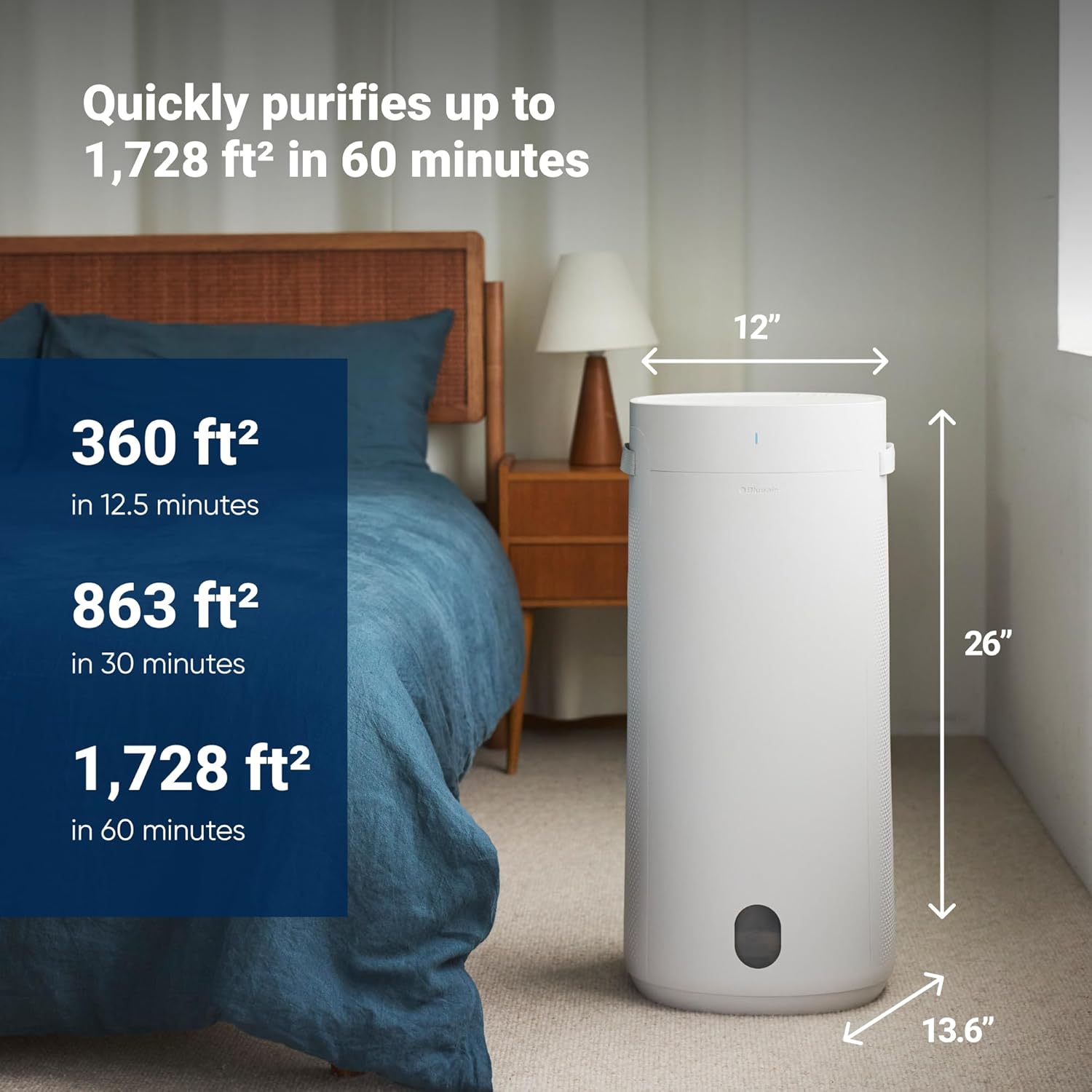
Image: The Blueair Blue Pure 311i Max Air Purifier demonstrating its capacity to purify large areas, with purification rates for different room sizes.
Жайгашуу
The Blueair Blue Pure F3MAX filter is designed for easy installation. Ensure your air purifier is unplugged before proceeding with filter replacement.
Баштапкы орнотуу
- Unpack the new Blueair F3MAX Genuine Filter from its protective wrapping.
- Refer to the "Maintenance" section for detailed steps on how to access the filter compartment of your Blue Pure 311i Max Air Purifier.
- Insert the new filter into the designated slot, ensuring it is seated correctly. The filter handles should face upwards for easy removal later.
- Reassemble the air purifier components according to the instructions in the "Maintenance" section.
- Plug in the air purifier and power it on.
- Reset the filter indicator as described in the "Maintenance" section.
Operating the Air Purifier with the Filter
Once the new filter is installed, your Blue Pure 311i Max Air Purifier is ready for operation. The filter works continuously to clean the air.
Негизги өзгөчөлүктөрү жана артыкчылыктары:
- HEPASilent Dual Filtration Technology: This filter, combined with the air purifier's technology, delivers clean air efficiently while operating quietly and consuming less energy compared to traditional HEPA filtration alone.
- Particle Removal: The filter removes at least 99.97% of tiny airborne particles, including viruses, smoke, pet dander, pollen, mold allergens, and dust, down to 0.1 microns.
- Odor Trapping: The integrated carbon filter effectively traps light household odors from sources such as smoking, pets, and cooking.
- RealTrack Algorithm: The air purifier's proprietary RealTrack algorithm calculates the filter's remaining lifetime based on actual usage and pollution levels, indicating when replacement is needed, typically within 9 months.

Image: A table illustrating the air changes per hour (ACH) for various room sizes, demonstrating the air purifier's efficiency in cleaning air quickly.

Image: A smartphone screen displaying the RealTrack filter lifetime status, providing an accurate indication of when the filter needs replacement.
Maintenance: Filter Replacement
Regular filter replacement is crucial for maintaining the optimal performance of your Blue Pure 311i Max Air Purifier. The filter indicator on your air purifier will turn red when it's time to replace the filter.
Фильтрди алмаштыруу процедурасы:
Video: This video demonstrates the step-by-step process of changing the filter in your Blueair Blue Pure 311i Max Air Purifier, including how to remove the old filter and install a new one.
- Өчүрүү жана өчүрүү: Алмаштыруу процессин баштоодон мурун, аба тазалагыч өчүрүлгөндүгүн жана розеткадан суурулгандыгын текшериңиз.
- Remove Top: Gently rotate the top section of the air purifier counter-clockwise to unlock and remove it.
- Remove Fabric Pre-filter: Carefully pull the fabric pre-filter downwards and off the main filter unit. This pre-filter can be cleaned by vacuuming or gentle washing.
- Remove Noise Shield: Lift off the grey noise shield located above the filter. Do not discard this component.
- Эски чыпканы алып салуу: Grasp the filter by its handles (if present) or by the top edge and lift it straight out of the air purifier. Dispose of the old filter responsibly.
- Жаңы чыпканы орнотуу: Unwrap the new Blueair F3MAX Genuine Filter. Place it into the air purifier, ensuring the filter handles (if applicable) face upwards.
- Replace Noise Shield: Place the noise shield back on top of the new filter.
- Replace Fabric Pre-filter: Slide the fabric pre-filter back onto the main filter unit, ensuring it fits snugly.
- Reattach Top: Align the top section of the air purifier and rotate it clockwise until it locks securely into place.
- Плагин жана күйгүзүү: Аба тазалагычты кайра розеткага сайып, аны күйгүзүңүз.
- Чыпка көрсөткүчүн баштапкы абалга келтирүү: To reset the filter indicator, press and hold the Fan button on the top panel for approximately 15 seconds until the red light turns off or changes color, indicating a successful reset.
Проблемаларды чечүү
If you encounter issues with your Blueair Blue Pure 311i Max Air Purifier after filter replacement, consider the following common solutions:
- Аба тазалагыч күйбөй жатат:
- Кубат шнуру аба тазалагычка да, иштеп жаткан электр розеткасына да бекем сайылганын текшериңиз.
- Check if the top section of the air purifier is correctly rotated and locked into place. The unit will not power on if it's not properly assembled.
- Filter Indicator Light Remains Red After Replacement:
- Confirm you held the Fan button for the full 15 seconds to reset the indicator.
- Unplug the unit for 30 seconds, then plug it back in and attempt the reset procedure again.
- Аба агымынын же жыттын туруктуулугунун азайышы:
- Verify that the new filter's protective wrapping has been completely removed.
- Ensure the filter is correctly seated and not obstructed.
- Check if the fabric pre-filter is clean. If dirty, clean it as per the instructions.
- адаттан тыш үндөр:
- Ensure all components, including the noise shield and top cover, are properly installed and secured.
- Check for any foreign objects that may have fallen into the unit during filter replacement.
For further assistance, please contact Blueair customer support.
Кепилдик жана колдоо
Blueair genuine filters are designed for durability and performance. For specific warranty information regarding your Blueair product and filter, please refer to the documentation included with your air purifier or visit the official Blueair webсайт.
For customer support, technical assistance, or to inquire about filter subscriptions, please visit the Blueair Store on Amazon or the official Blueair support channels.
Ask a question about this manual
Ask about setup, troubleshooting, compatibility, parts, safety, or missing instructions. Manuals+ will review the question and use this page’s manual context to help answer it.