
Introduction
The Fostex 6301DT is a compact and versatile 4-inch powered studio monitor, designed for broadcast, production facilities, mobile setups, project studios, and home recording environments. Building upon the legacy of the 6301-series, this model incorporates a D-class power amplifier and a new driver unit, featuring an energy-saving auto stand-by function. The 6301DT integrates Dante network audio capabilities, allowing playback of any two channels of Dante network audio signals, alongside traditional 1/4-inch TS analog inputs. Its ultra-rugged die-cast aluminum enclosure ensures durability for professional use.
Коопсуздук маалыматы
- Кубат булагы: Түзмөктү көрсөтүлгөн кубат булагына гана туташтырыңызtagд. Электр шнурунун бекем туташтырылганын текшериңиз.
- Вентиляция: Вентиляция тешиктерин жаап албаңыз. Ашыкча ысып кетүүнүн алдын алуу үчүн аппараттын айланасында адекваттуу аба агымын камсыз кылыңыз.
- Нымдуулук: Түзмөктү жамгырдын, нымдуулуктун же ашыкча нымдуулуктун таасирине дуушар кылбаңыз. Түзмөктүн үстүнө суюктук толтурулган нерселерди койбоңуз.
- Чет өлкөлүк объекттер: Түзмөктүн тешиктерине эч кандай буюмдарды салбаңыз.
- Тейлөө: Бардык тейлөөлөрдү квалификациялуу тейлөө кызматкерлерине тапшырыңыз. Агрегатты өзүңүз ачууга же оңдоого аракет кылбаңыз.
- Жайгашкан жери: Place the monitor on a stable surface. Avoid locations with excessive vibration, dust, or direct sunlight.
Пакеттин мазмуну
Пакетте бардык буюмдар бар экенин текшериңиз:
- Fostex 6301DT Active Monitor Speaker
- IEC Power Cord
Продукт бүттүview
Front Panel

Сүрөт 1: Алдыңкы панелдин башкаруу элементтери
- Кубат баскычы: Press to turn the unit ON or OFF. An LED indicator shows the power status.
- Үн баскычы: Adjusts the output level of the monitor.
Арткы панель
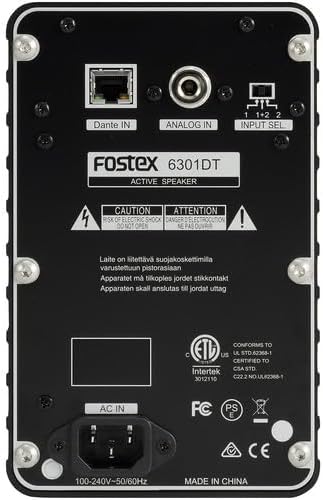
Сүрөт 2: Арткы панелдик байланыштар
- Dante IN (RJ45): Connects to a Dante network for digital audio input.
- Analog IN (1/4" TS): Connects to an analog audio source using a 1/4-inch TS cable.
- Киргизүүнү тандоо которгучу: Selects the audio input channel for monitoring (1, 2, or 1+2 mixed).
- AC IN: Connects the supplied IEC power cord.
Жайгашуу
Жайгаштыруу
Place the Fostex 6301DT on a stable, flat surface. For optimal sound reproduction, position the monitor at ear level and equidistant from your listening position. An optional EB-6301 mounting bracket (not included) allows for easy surface-mounting at various angles.

3-сүрөт: МисampКолдонмо орнотуу
Power Connection
- Ensure the monitor's power button is in the OFF position.
- Connect the supplied IEC power cord to the AC IN port on the rear panel of the monitor.
- Электр шнурунун экинчи учун ылайыктуу AC розеткага сайыңыз.
Аудио байланыштар
The 6301DT supports both analog and Dante network audio inputs.
- Аналогдук киргизүү: Connect your analog audio source (e.g., mixer, audio interface) to the 1/4" TS Analog IN port on the rear panel using a 1/4-inch TS cable.
- Dante Network Input: Connect an RJ45 Ethernet cable from your Dante network switch or device to the Dante IN port on the rear panel.
Иштеп жатат
Күйгүзүү/өчүрүү
Press the Power button on the front panel to turn the monitor ON. The power indicator LED will illuminate. Press the button again to turn the monitor OFF.
Үндү тууралоо
Rotate the Volume knob on the front panel clockwise to increase the output level and counter-clockwise to decrease it. Start with a low volume setting and gradually increase it to a comfortable listening level.
Киргизүүнү тандоо
Use the Input Select switch on the rear panel to choose the desired audio source:
- Аналогдук: Selects the 1/4" TS analog input.
- Dante Channel 1: Monitors the first Dante audio channel.
- Dante Channel 2: Monitors the second Dante audio channel.
- Dante Channel 1+2 (Mixed): Monitors a mix of both Dante channels.
Dante Network Configuration
For Dante network operation, you will need to use Audinate's Dante Controller software on a computer connected to the same Dante network. This software allows you to route audio signals to the Fostex 6301DT and configure its network settings. The 6301DT supports sampling frequencies of 44.1 kHz, 48 kHz, 88.2 kHz, and 96 kHz.
Техникалык тейлөө
- Тазалоо: Use a soft, dry cloth to clean the exterior of the monitor. Do not use abrasive cleaners, waxes, or solvents.
- Сактагыч: Аппаратты узак убакытка сактасаңыз, аны электр кубатынан ажыратып, күн тийбеген жана өтө температурадан алыс салкын, кургак жерде сактаңыз.
- Вентиляция: Ensure that the ventilation openings are kept clear of dust and debris.
Проблемаларды чечүү
| Көйгөй | Мүмкүн себеп | Чечим |
|---|---|---|
| Үн чыгышы жок |
|
|
| Бурмаланган үн |
|
|
| Dante connection issues |
|
|
Техникалык шарттар

Сүрөт 4: Продукциянын өлчөмдөрү
| Өзгөчөлүк | Спецификация |
|---|---|
| Модель номери | AMS-6301DT |
| Динамик түрү | Powered Studio Monitor |
| Динамик өлчөмү | 4 дюйм |
| Вуфердин диаметри | 4 дюйм |
| Ampжашоочу түрү | Класс-D |
| Максималдуу чыгаруу күчү | 20 Ватт |
| Аудио чыгаруу режими | Стерео |
| Аудио каналдардын саны | 2.0 |
| Байланыш технологиясы | RJ45 (Dante), 1/4" TS (Analog) |
| Connectivity Protocol | Данте |
| Колдогон Сampлинг жыштыктары | 44.1/48/88.2/96 кГц |
| Ызы-чуунун катышы | 85 дБ |
| Power Source | Электр зымдары |
| Коргоочу материал | Die Aluminium |
| Түс | Кара |
| Элементтин өлчөмдөрү (D x W x Y) | 4.7" x 7.5" x 4.7" |
| Элемент Салмагы | 5.1 фунт |
| Кошумча функциялар | Auto stand-by function, Recessed front-panel controls |
Кепилдик жана колдоо
Кепилдик маалымат
The Fostex 6301DT is covered by a 1 жылдык өндүрүүчүнүн чектелген кепилдик. Кепилдик дооматтары үчүн сатып алганыңыздын далилин сактап коюңуз.
Кардарларды колдоо
For technical assistance, troubleshooting, or warranty service, please contact American Music and Sound, the manufacturer, or your authorized Fostex dealer. Refer to the Fostex official webэң акыркы колдоо байланыш маалыматы үчүн сайт.


