
Introduction
This manual provides detailed instructions for the proper use and care of your CASIO G-Shock AWR-M100SDC-1A watch. This timepiece features a shock-resistant construction, 20 ATM water resistance, and Tough Solar power, combining analog and digital displays for versatile functionality.
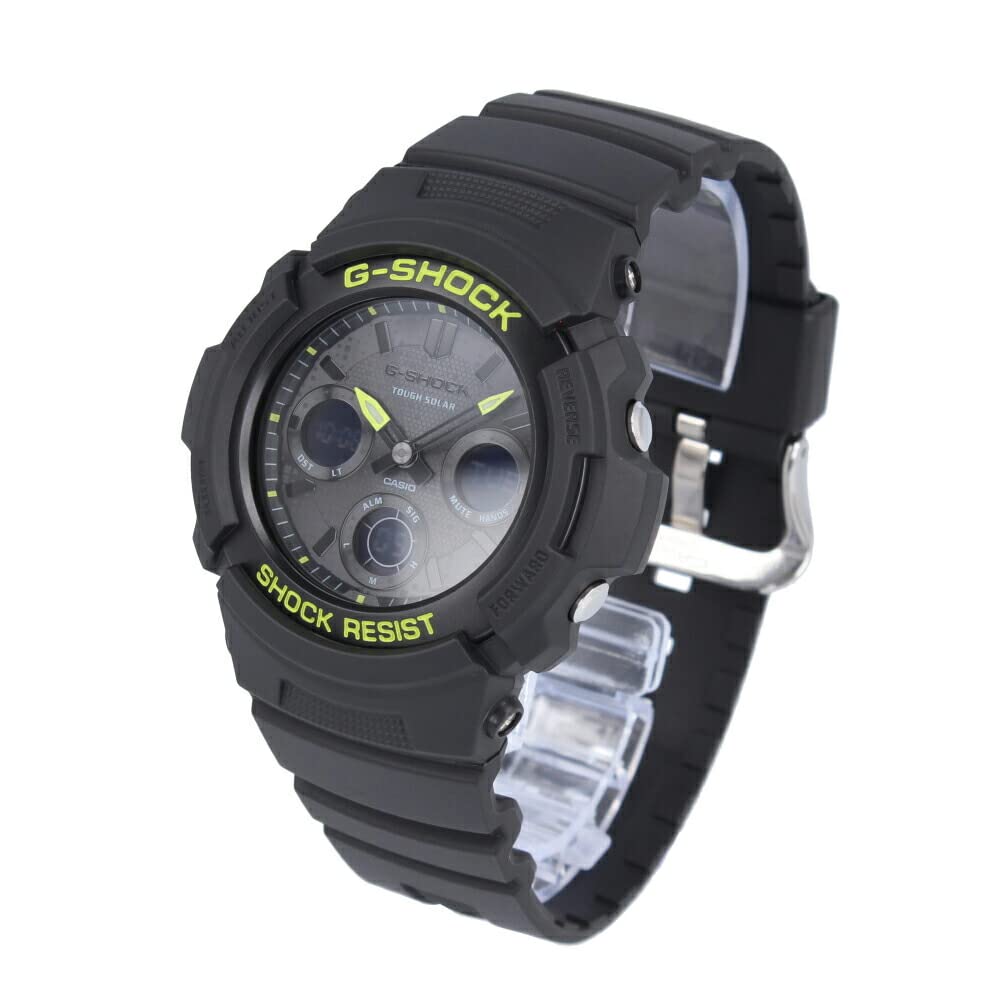
Сүрөт: алдыңкы view of the CASIO G-Shock AWR-M100SDC-1A watch, showcasing its black case, band, and dial with lime green accents and analog-digital display.
Жайгашуу
Баштапкы заряддоо
Your watch is equipped with Tough Solar technology, which converts light into power. Before initial use, expose the watch face to bright light for several hours to ensure a full charge. Avoid blocking the watch face from light for extended periods to maintain optimal performance.
Убакыт жана дата орнотуу
The watch automatically receives time calibration signals in certain regions. If manual adjustment is needed or if you are outside a signal reception area, refer to the 'Operating' section for detailed instructions on setting the home city, time, and date. Ensure your home city is correctly set for accurate timekeeping and world time functions.
Иштеп жатат

Сүрөт: каптал view of the CASIO G-Shock AWR-M100SDC-1A watch, highlighting the buttons on the left and right sides of the case, used for mode selection and adjustments.
Багыттоо режими
басыңыз РЕЖИМ button (typically bottom left) to cycle through the watch's various modes: Timekeeping, World Time, Stopwatch, Countdown Timer, and Alarm. The current mode will be indicated on the digital display.
Дүйнөлүк убакыт
Дүйнөлүк убакыт режиминде, сиз жасай аласыз view the current time in 31 time zones (48 cities + Coordinated Universal Time). Use the АЛГА жана REVERSE buttons (typically top right and bottom right) to scroll through cities. To swap your Home City and World Time City, press and hold the appropriate button as indicated in the watch's on-screen prompts.
Секундомер
The 1/100 second stopwatch measures elapsed time, split times, and two finishes. In Stopwatch mode, press the START/STOP button (usually top right) to begin and end timing. Press the RESET button (usually bottom right) to clear the measurement.
Артка эсептөө таймери
The countdown timer can be set for durations up to 24 hours. In Countdown Timer mode, use the adjustment buttons to set the desired countdown start time. Press the START/STOP button to begin and pause the countdown. An alarm will sound when the countdown reaches zero.
Ойготкучтар
Саатта 5 күнүмдүк ойготкуч жана бир хо барurly time signal. In Alarm mode, select an alarm number and use the adjustment buttons to set the alarm time. Activate or deactivate alarms as needed. The hourly time signal will beep every hour on the hour when enabled.
Full Auto LED Light
The full auto LED light illuminates the display for easy reading in low light conditions. The light activates automatically when the watch is tilted towards your face in dim environments. This feature can be enabled or disabled through the watch settings.
Hand Shift Function
If the analog hands obstruct the digital display, the hand shift function allows you to temporarily move them out of the way. Refer to the watch's on-screen prompts or specific button combinations to activate and deactivate this function.
Техникалык тейлөө
Сууга туруктуулук (20 банкомат)
Your watch is water resistant to 20 ATM (200 meters), suitable for swimming, showering, and snorkeling. Суу астында баскычтарды иштетпеңиз. Avoid exposing the watch to hot water or steam, as this can compromise the seals. After exposure to saltwater, rinse the watch with fresh water and wipe it dry.
Тазалоо
Кирди жана нымдуулукту кетирүү үчүн сааттын кутусун жана боосун жумшак, кургак чүпүрөк менен сүртүңүз. Кежир кир үчүн жумшак кездемени колдонуңуз dampened with a mild soap solution, then wipe dry. Avoid using chemical cleaners or solvents, as these can damage the resin materials.
Күн батареяларына кам көрүү
To ensure continuous operation, regularly expose the watch face to light. Avoid storing the watch in dark places for extended periods. If the charge level becomes low, the watch's functions may be limited. A full charge can take several hours under direct sunlight or longer under fluorescent light.
Сокку каршылык
While designed to be shock-resistant, avoid subjecting the watch to excessive impacts or vibrations, which could potentially damage internal components.
Проблемаларды чечүү
Убакыттын так эместиги
- Заряддын деңгээлин текшерүү: Ensure the watch is sufficiently charged by exposing it to light. Low charge can affect timekeeping accuracy.
- Үй шаарын жөндөө: Verify that your Home City is correctly set, especially if you rely on automatic time calibration.
- Кол менен тууралоо: If automatic calibration is unavailable or unsuccessful, manually adjust the time and date as described in the 'Operating' section.
Digital Display Blank or Dim
- This typically indicates a low battery charge. Expose the watch to bright light for an extended period to recharge.
- Ensure the Power Saving function (if enabled) is not causing the display to go blank in darkness.
Баскычтар жооп бербейт
- Саат кулпуланган режимде эмес экенин текшериңиз (эгер бар болсо).
- Check for any debris or foreign objects obstructing the buttons.
- If the watch has been exposed to water, ensure it is completely dry before attempting to operate buttons.
Техникалык шарттар

Сүрөт: Артка view of the CASIO G-Shock AWR-M100SDC-1A watch, showing the stainless steel case back with engraved model information and the resin band.
| Өзгөчөлүк | Деталь |
|---|---|
| Модель номери | AWR-M100SDC-1A |
| Кыймыл | Solar Analog-Digital |
| Суу каршылык | 20 банкомат (200 метр) |
| Курулуш | Шок туруктуу |
| Өлчөмдөрү (H x W x D) | 52 x 46.4 x 14.9 мм |
| Салмагы | Болжол менен 56 г |
| Жарык | Full Auto LED Light |
| Дүйнөлүк убакыт | 31 Time Zones (48 cities + UTC) |
| Секундомер | 1/100 секунд |
| Артка эсептөө таймери | Ооба |
| Ойготкучтар | 5 Күнүмдүк сигналдар, Хоurly Убакыт сигналы |
| Календар | Full Auto Calendar (up to 2099) |
| Убакыт форматы | 12/24 саат форматы |
| Тактык | Айына ±15 секунд (орточо) |
| Корпус/Банд материалы | чайыр |
| Кристалл | Минералдык айнек |
| Класс түрү | Buckle |
Кепилдик жана колдоо
For warranty information, service, or technical support, please refer to the warranty card included with your purchase or visit the official CASIO website. Contact details for customer service are typically provided on the manufacturer's support pages.