
Introduction
Thank you for choosing the iClever BK10 Bluetooth Wireless Keyboard. This manual provides detailed instructions on how to set up, operate, and maintain your keyboard to ensure optimal performance. Please read this manual carefully before use and retain it for future reference.
Пакеттин мазмуну
- iClever BK10 Bluetooth зымсыз баскычтоп
- USB заряддоо кабели
- User Manual
Техникалык шарттар
| Бренд | iClever |
| Модель номери | BK10 |
| Байланыш технологиясы | Bluetooth |
| Шайкеш түзмөктөр | Android 9+, ChromeOS (BT 4.0+), Windows 10/11, iPadOS 13.4+, macOS 10.15+ |
| Баскычтоптун жайгашуусу | AZERTY |
| Ачкычтардын саны | 78 |
| Которуу түрү | Scissor Switch |
| Power Source | Батарея менен иштейт |
| Продукциянын өлчөмдөрү | 43L x 14W x 2.5H сантиметр |
| Ички материал | Акрилонитрил бутадиен стирол, дат баспас болот |
Жайгашуу
1. Баштапкы заряддоо
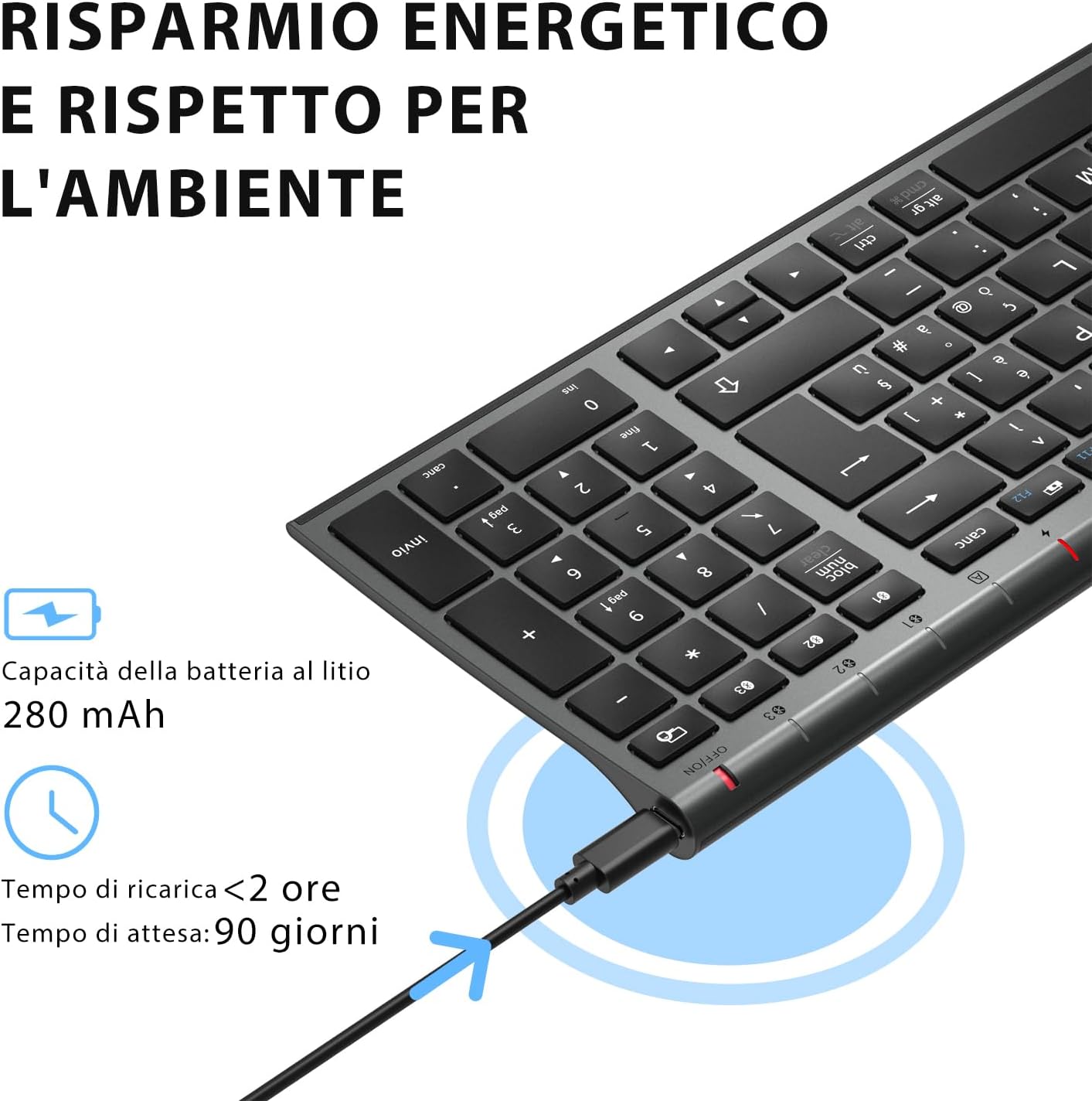
Before first use, fully charge the keyboard. Connect the provided USB charging cable to the keyboard's USB-C port and the other end to a USB power source (e.g., computer, wall adapter). The charging indicator light will show charging status and turn off when fully charged.

The iClever BK10 keyboard connected via USB-C for charging. This image details the 280 mAh lithium battery capacity, a charging time of less than 2 hours, and a standby time of 90 days.
2. Күйгүзүү/өчүрүү
Locate the power switch on the keyboard. Slide the switch to the 'ON' position to power on the keyboard. Slide it to the 'OFF' position when not in use to conserve battery.
3. Bluetooth Жупташтыруу
The iClever BK10 keyboard supports connection to up to three devices simultaneously.
- Кубат которгучу менен клавиатураны күйгүзүңүз.
- басыңыз Fn Bluetooth канал баскычтарынын бири менен бир убакта баскычты басыңыз (BT1, BT2, же BT3) каналды тандоо үчүн.
- Press and hold the selected Bluetooth channel key (e.g., BT1) for 3-5 seconds until the indicator light for that channel starts blinking rapidly. This indicates the keyboard is in pairing mode.
- Түзмөгүңүздө (компьютер, планшет, смартфон) Bluetooth'ду күйгүзүп, жеткиликтүү түзмөктөрдү издеңиз.
- Select "iClever BK10" (or similar name) from the list of found devices.
- Follow any on-screen prompts to complete the pairing process. The indicator light will stop blinking and remain solid for a few seconds, then turn off, indicating a successful connection.

The iClever BK10 keyboard demonstrating its ability to connect to an iPad, MacBook, and iPhone via three distinct Bluetooth channels. The image also illustrates key mapping for Windows/Android (Alt/Cmd) and iPad/Mac (Alt/Cmd) operating systems.
Баскычтопту иштетүү
1. Жупташкан түзмөктөрдүн ортосунда которулуу
To switch between your paired devices, simply press the Fn тиешелүү Bluetooth канал баскычы менен бирге баскычын (BT1, BT2, же BT3) that your device is paired to. The keyboard will automatically connect to the selected device.
2. Function Keys (Fn)
The keyboard features a row of function keys (F1-F12) that also serve as multimedia and shortcut keys. To use the secondary function of these keys, press and hold the Fn key while pressing the desired function key.
3. Операциялык системанын шайкештиги
The iClever BK10 keyboard is designed to be compatible with various operating systems. Key functions may adapt slightly depending on the connected OS. For optimal performance, ensure your device's Bluetooth version is 4.0 or higher.

Close-up of the iClever BK10 keyboard with a hand typing, highlighting the low-profile keys and scissor switch mechanism designed for quiet and comfortable typing.
Техникалык тейлөө
1. Тазалоо
Клавиатураңызды тазалоо үчүн, аны өчүрүп, башка түзмөктөрдөн ажыратыңыз. Жумшак, түксүз чүпүрөктү бир аз сүртүңүз.ampened with water or a mild cleaning solution. Avoid using harsh chemicals, abrasives, or excessive moisture. Do not spray cleaners directly onto the keyboard.
2. Батареяга кам көрүү
To prolong the battery life of your keyboard:
- Charge the keyboard fully before its first use.
- Батареяны бат-баттан толук түгөтүп коюудан алыс болуңуз.
- Клавиатураны узак убакыт бою колдонбогондо салкын, кургак жерде сактаңыз.
- Turn off the keyboard when transporting it or when not in use to prevent accidental key presses and battery drain.
Проблемаларды чечүү
1. Баскычтоп туташпай/жупташпай жатат
- Баскычтоптун күйгүзүлгөнүн жана толук заряддалганын текшериңиз.
- Түзмөгүңүздө Bluetooth иштетилгенин текшериңиз.
- Баскычтоп жупташтыруу режиминде экенин текшериңиз (индикатордун жарыгы күйүп-өчүп турат).
- Түзмөгүңүздүн Bluetooth жөндөөлөрүнөн клавиатураны ажыратып, кайра жупташтырып көрүңүз.
- Баскычтопту да, түзмөгүңүздү да өчүрүп күйгүзүңүз.
- Ensure your device's Bluetooth version is compatible (BT 4.0+ recommended).
2. Баскычтар жооп бербей жатат
- Check if the keyboard is connected to the correct device.
- Ensure the battery is not low. Charge the keyboard if necessary.
- Баскычтопту жана туташкан түзмөктү өчүрүп-күйгүзүңүз.
- Ачкычтардын айланасындагы калдыктарды тазалаңыз.
3. Connection Drops Frequently
- Ensure there are no strong interference sources (e.g., Wi-Fi routers, other Bluetooth devices) nearby.
- Keep the keyboard within the recommended operating range of your device.
- Баскычтоп толук кубатталганын текшериңиз.
Кепилдик жана колдоо
iClever products come with a standard warranty. For detailed warranty information, technical support, or customer service, please refer to the warranty card included with your product or visit the official iClever website. Please have your product model number (BK10) and purchase information ready when contacting support.
Продукт бүттүview Сүрөттөр

Жогортон ылдый view of the iClever BK10 Bluetooth Wireless Keyboard, showcasing анын толук жайгашуусу, анын ичинде сандык баскычтоп жана функция баскычтары.
А тарап view of the iClever BK10 keyboard, illustrating its ultra-thin profile with a thickness ranging from 0.16 inches to 0.45 inches.

The iClever BK10 keyboard positioned on a desk in an office environment, alongside a computer monitor, laptop, tablet, and smartphone, illustrating its versatile use in various professional and personal setups.