
1. Продукт бүтүп калдыview
The EVGA GeForce RTX 3070 FTW3 Ultra Gaming is a high-performance graphics card designed for advanced gaming and creative applications. It features 8GB of GDDR6 memory and is built with NVIDIA's Ampere architecture, offering real-time ray tracing and AI-powered DLSS for enhanced visual fidelity and performance.
This model incorporates EVGA's iCX3 Technology for superior cooling and quieter operation, along with an adjustable ARGB LED lighting system and a durable metal backplate.
Негизги өзгөчөлүктөрү
- Real Boost Clock: 1815 MHz; Memory Detail: 8192 MB GDDR6.
- Real-time ray tracing in games for cutting-edge, hyper-realistic graphics.
- Triple HDB Fans with iCX3 Technology offer higher performance cooling and much quieter acoustic noise.
- All-metal backplate & adjustable ARGB.

Figure 1: EVGA GeForce RTX 3070 FTW3 Ultra Gaming Graphics Card and its retail packaging.

Figure 2: The included EVGA GeForce GTX/RTX Installation Guide.
2. Орнотуу жана орнотуу
This section provides instructions for physically installing your EVGA GeForce RTX 3070 FTW3 Ultra Gaming graphics card and installing the necessary drivers.
2.1 Системалык талаптар
- PCI Express талаптарына жооп берген Motherboard бир эки туурасы x16 графикалык уячасы бар.
- Minimum 650W or greater power supply with two 8-pin PCIe power connectors.
- Минималдуу 8 ГБ тутум эстутуму (16 ГБ сунушталат).
- Microsoft Windows 10 64-бит (2018-жылдын апрель айындагы жаңыртуу же андан кийинки) же Linux 64-бит.
- Драйверлерди орнотуу жана жаңыртуу үчүн интернет байланышы.
2.2 Физикалык орнотуу
Графикалык картаңызды орнотуу үчүн төмөнкү кадамдарды аткарыңыз:
- Step 1: Prepare Your System
Turn off your computer and disconnect the power cable. Open your computer case. It is recommended to ground yourself to prevent electrostatic discharge (ESD) damage. - Step 2: Install the Graphics Card
Locate an available PCI Express x16 slot on your motherboard. Remove any expansion slot covers that obstruct the installation. Carefully align the graphics card with the PCIe slot and press down firmly until it is securely seated. Ensure the retention clip on the PCIe slot locks into place. - 3-кадам: Power туташтыруу
Connect two 8-pin PCIe power cables from your power supply to the corresponding power connectors on the top edge of the graphics card. Ensure a secure connection.

Сүрөт 3: Алдыңкы view графикалык картанын, шоуasing the triple fan design.
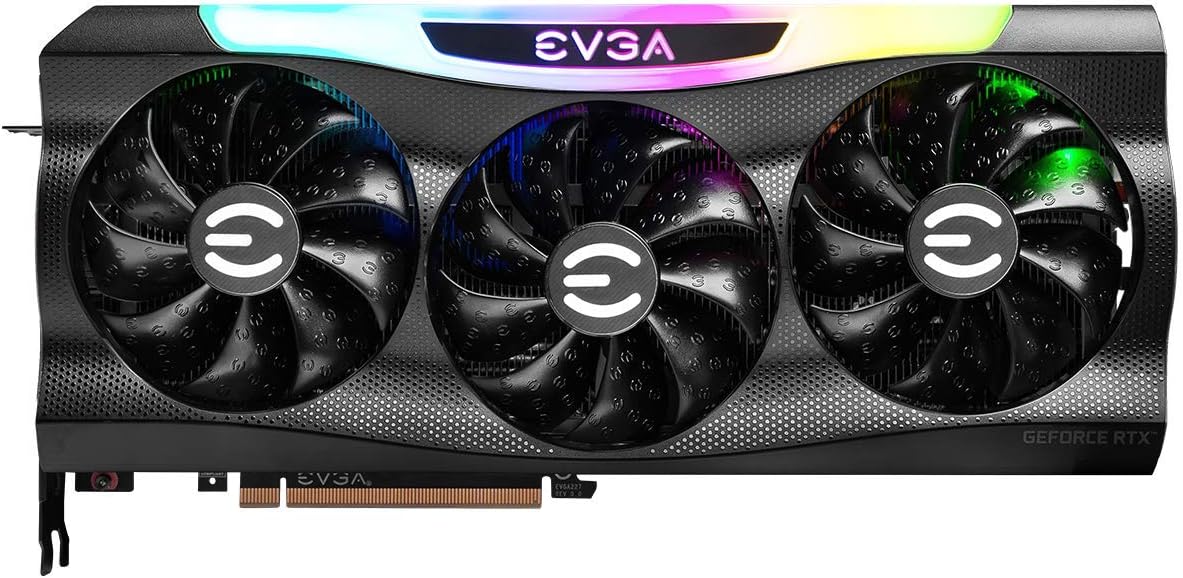
Сүрөт 4: Алдыңкы view with the customizable ARGB lighting illuminated.

5-сүрөт: Бурчтуу view highlighting the card's profile and cooling fins.

6-сүрөт: Бурчтуу view with the ARGB lighting active, showing the illuminated EVGA logo.
2.3 Драйверди орнотуу
After physical installation, close your computer case, reconnect the power cable, and turn on your computer. You will need to install the latest NVIDIA drivers for optimal performance.
- 1-кадам: драйверлерди жүктөп алыңыз
Расмий NVIDIAга барыңыз webсайт (www.nvidia.com/drivers) or the EVGA support page (www.evga.com/support/download/). Select your product (GeForce RTX 3070) and operating system to download the latest Game Ready Driver. - 2-кадам: драйверлерди орнотуу
Run the downloaded driver installer and follow the on-screen prompts. A custom installation is recommended to ensure all necessary components are installed. Restart your computer when prompted to complete the installation.
3. Графикалык картаңызды иштетүү
Once installed and drivers are up-to-date, your EVGA GeForce RTX 3070 FTW3 Ultra Gaming graphics card is ready for use. It is optimized for high-resolution gaming and demanding creative workloads.
3.1 iCX3 Technology
The iCX3 Technology features multiple thermal sensors and asynchronous fans to deliver precise cooling where it's needed most. This intelligent cooling system helps maintain optimal temperatures and reduces fan noise during operation.
3.2 ARGB LED Customization
The adjustable ARGB LED lighting on your graphics card can be customized using EVGA's Precision X1 software. This software allows you to control lighting effects, colors, and synchronize them with other compatible components in your system. Download Precision X1 from the EVGA webсайт.
4. Техникалык тейлөө жана кам көрүү
Туура тейлөө графикалык картаңыздын узак мөөнөттүү жана оптималдуу иштешин камсыз кылат.
4.1 Тазалоо
- Вентиляторлордон жана радиатордон чыккан чаңды кысылган аба менен үзгүлтүксүз тазалап туруңуз. Тазалоодон мурун компьютердин өчүрүлүп, розеткадан суурулуп турганын текшериңиз.
- Тазалоо учурунда подшипниктерге зыян келтириши мүмкүн болгон тез айланып кетпеши үчүн, желдеткичтин калактарын акырын кармаңыз.
- Avoid using liquid cleaners directly on the card.
4.2 Драйвер жаңыртуулары
Keep your graphics drivers updated to benefit from performance improvements, bug fixes, and compatibility with new games and applications. Check the NVIDIA website regularly for the latest driver releases.
5. Кыйынчылыктарды
Бул бөлүм сиз кабылышы мүмкүн болгон жалпы көйгөйлөрдү карайт.
5.1 Display Output жок
- Монитордун кабели графикалык картага жана мониторго бекем туташтырылганын текшериңиз.
- Графикалык карта PCIe уячасына толугу менен орнотулганын текшериңиз.
- Check that all PCIe power connectors are securely attached to the graphics card.
- Мүмкүн болсо, башка дисплей кабели же монитор менен сынап көрүңүз.
5.2 Poor Performance in Games/Applications
- Ensure you have the latest NVIDIA Game Ready Drivers installed.
- Оюндагы графиканын жөндөөлөрүн текшериңиз; эгерде аткаруу канааттандырарлык болбосо, жөндөөлөрдү азайтыңыз.
- Monitor GPU temperature to ensure it's not overheating, which can lead to throttling.
- Сиздин кубат менен камсыздооңуз минималдуу ватка жооп берерин текшериңизtage requirement for the card.
5.3 Ашыкча ысып кетүү
- Компьютериңиздин корпусунда жетиштүү аба айланышын камсыз кылыңыз.
- Видеокарта желдеткичтеринен жана радиаторунан чаңды тазалаңыз.
- Графикалык картадагы күйөрмандардын туура айланып жатканын текшериңиз.
6. Техникалык шарттар
| Өзгөчөлүк | Спецификация |
|---|---|
| Модель номери | 08G-P5-3767-KR |
| Графикалык сопроцессор | NVIDIA GeForce RTX 3070 |
| Memory Size | 8 ГБ GDDR6 |
| Memory Speed | 14000 МГц |
| Саатты күчөтүү | 1815 МГц |
| Max Screen Resolution | 7680x4320 |
| Видео чыгаруу интерфейси | DisplayPort (x3), HDMI (x1) |
| Элемент Салмагы | 3.96 фунт |
| Продукциянын өлчөмдөрү (LxWxH) | 11.81 x 2.19 x 5.48 дюйм |
| PCI Express | Gen 4 |
| DirectX колдоо | DirectX 12 Ultimate |

7-сүрөт: Арткы view of the graphics card, showing the metal backplate.

Figure 8: Display output ports, including three DisplayPort and one HDMI connector.
7. Кепилдик жана колдоо
7.1 Кепилдик маалыматы
EVGA products are covered by a limited warranty. The specific terms and duration of your warranty may vary based on your region and the product purchase date. Please retain your proof of purchase for warranty claims.
7.2 Колдоо кызматы менен байланышуу
For technical assistance, warranty claims, or product inquiries, please visit the official EVGA support webсайтка же кардарларды тейлөөгө кайрылыңыз:
- EVGA колдоосу Webсайт: www.evga.com/support/
- Driver Downloads: www.evga.com/support/download/