
Introduction
Thank you for choosing the Anivia Y-901B-M 7.1 Surround Sound Gaming Headset. This manual provides detailed instructions for setting up, operating, and maintaining your headset to ensure optimal performance and an immersive audio experience. Please read this manual thoroughly before using the product.

Сүрөт: алдыңкы view of the Anivia Y-901B-M Gaming Headset, showcasing its design with blue accents and the adjustable microphone.
Пакеттин мазмуну
Пакетиңизде бардык буюмдар бар экенин текшериңиз:
- Anivia Y-901B-M PC Gaming Headset
- User Manual
Продукт бүттүview
Гарнитуранын компоненттери
- Жөнгө салынуучу баш боосу: Ыңгайлуу жана коопсуз отуруу үчүн.
- Soft Memory Foam Earcups: Designed for extended wear and improved air permeability.
- Ызы-чууну жокко чыгаруучу микрофон: Flexible and adjustable for clear voice communication.
- In-line Controller: For volume adjustment, microphone on/off, and LED light control.
- USB туташтыргычы: For power and audio signal transmission.
- LED жарыктандыруу: Integrated blue LED lights on earcups for aesthetic appeal.
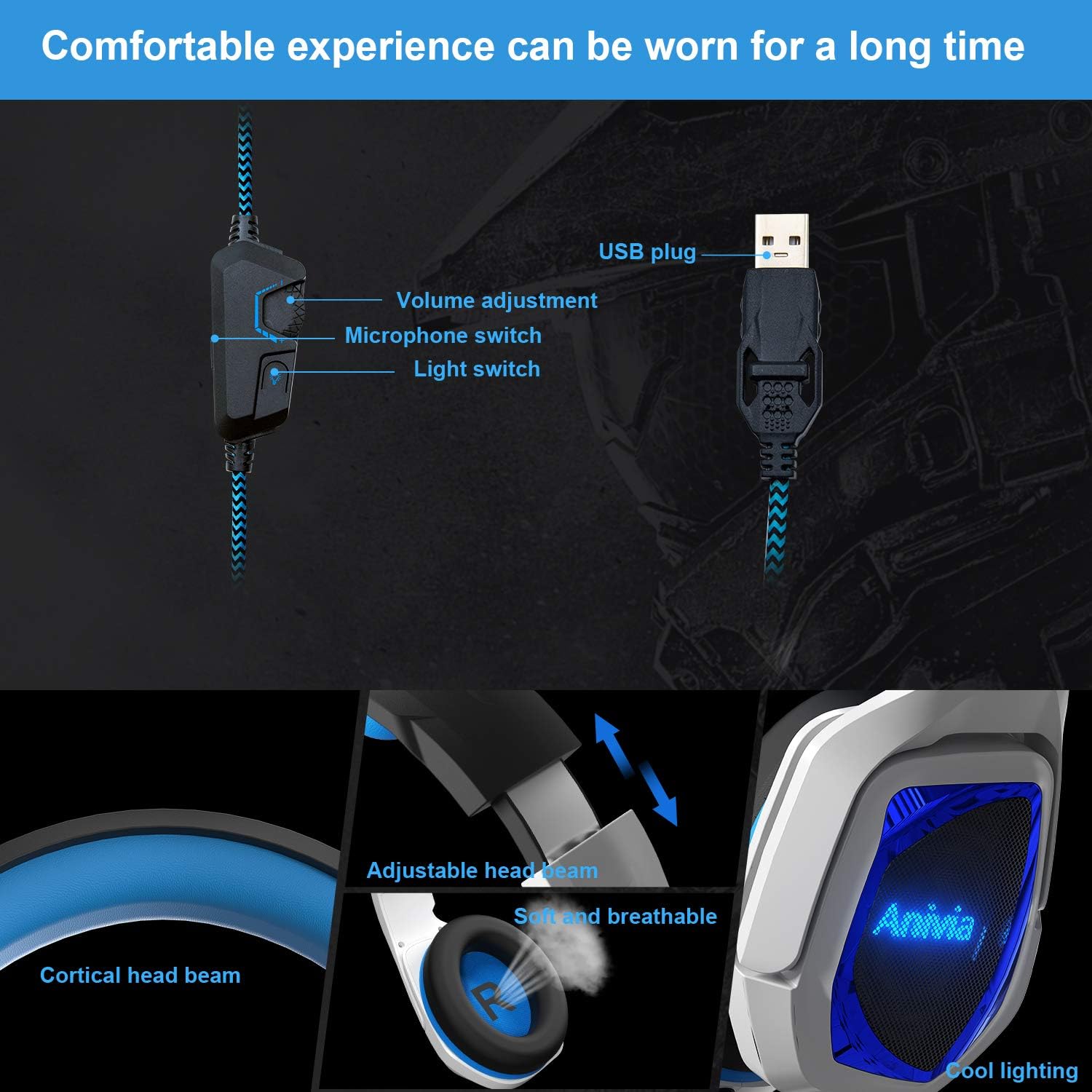
Сүрөт: деталдуу view of the headset's in-line controls, adjustable headband, soft earcups, and LED lighting.
Орнотуу нускамалары
Сиздин түзмөккө туташууда
- Locate an available USB port on your PC, laptop, or compatible gaming console (e.g., PS4/PS5).
- Insert the USB connector of the Anivia Y-901B-M headset firmly into the USB port.
- For most operating systems (Windows 7/8/8.1/10/XP), the headset will be recognized automatically, and necessary drivers will be installed.
- Once connected, the LED lights on the earcups should illuminate, indicating power.

Image: Illustration of connecting the USB headset to various devices including a PlayStation, laptop, and desktop PC.
Initial Configuration (PC/Laptop)
- Windows Sound Settings: Right-click the speaker icon in your system tray and select "Sound Settings" or "Playback devices."
- Set as Default: Ensure the Anivia Y-901B-M headset is selected as the default playback and recording device.
- Микрофондун деңгээли: Go to the "Recording" tab, select the headset microphone, click "Properties," and adjust the microphone level as needed.
- 7.1 Айлана үн: For 7.1 virtual surround sound, ensure your operating system's sound settings are configured for 7.1 audio output if applicable. Some games or applications may require specific in-game audio settings.
Иштөө нускамалары
Үндү көзөмөлдөө
Use the scroll wheel on the in-line controller to adjust the headset's volume. Scroll up to increase volume and down to decrease it.
Микрофонду колдонуу
The flexible microphone can be adjusted to your preferred position for clear voice pickup. Use the switch on the in-line controller to toggle the microphone on or off. When the microphone is off, the LED indicator on the microphone tip may change color or turn off (if applicable).
LED жарыктандыруу
The headset features integrated blue LED lights on the earcups. A dedicated switch on the in-line controller allows you to turn these lights on or off according to your preference.
7.1 Virtual Айлана-Саунд
The Anivia Y-901B-M headset delivers an immersive 7.1 virtual surround sound experience through its high-precision 50mm neodymium audio drivers. This feature enhances spatial awareness in games, allowing you to pinpoint sound sources like footsteps or gunshots from various directions.

Image: Visual representation of 7.1 channel audio, showing how different sound effects are perceived from various directions.
Комфорт жана ылайыктуу
The headset is designed for comfort during extended use. The headband is adjustable to fit various head sizes. Gently slide the earcups up or down along the headband until you achieve a snug yet comfortable fit. The soft memory foam earcups provide cushioning and breathability.

Image: Features emphasizing the headset's adjustable headband and soft, breathable earcups for comfortable wear.
Техникалык тейлөө
Тийиштүү кам көрүү гарнитураңыздын иштөө мөөнөтүн узартат.
- Тазалоо: Use a soft, dry cloth to wipe the earcups and headband. Do not use harsh chemicals or abrasive cleaners.
- Сактагыч: Гарнитураны күн нурунан жана экстремалдык температурадан алыс салкын, кургак жерде сактаңыз. Гарнитурага оор нерселерди коюудан алыс болуңуз.
- Кабельге кам көрүү: Зыяндын алдын алуу үчүн USB кабелин курч ийилүүдөн же ашыкча тартуудан алыс болуңуз.
Проблемаларды чечүү
| Маселе | Мүмкүн чечим |
|---|---|
| Гарнитурадан үн жок |
|
| Микрофон иштебей жатат |
|
| LED чырактары өчүк |
|
| Үн бурмаланган же түшүнүксүз |
|
Техникалык шарттар
| Өзгөчөлүк | Деталь |
|---|---|
| Модель номери | Y-901B-M |
| Байланыш технологиясы | Зымдуу (USB) |
| Наушник уясы | USB |
| Диаметри | 50мм |
| Динамик импедансы | 16Ω ± 15% |
| Спикер сезгичтиги | 100 ± 3dB (at 1kHz) |
| Динамиктин жыштыгына жооп | 20Hz ~ 20KHz |
| Микрофон | Ызы-чууну жокко чыгаруу, 360° жөнгө салынуучу |
| Башкаруу түрү | In-line Volume Control, Mic On/Off, Light Switch |
| Кабелдин узундугу | 2.2M |
| Элемент Салмагы | 1.06 фунт (болжол менен 480 г) |
| Продукциянын өлчөмдөрү | 7.87 x 3.94 x 6.3 дюйм |
| Шайкеш түзмөктөр | Desktops, Laptops, PC, PS4/PS5 Console |
| Материал | Plastic, Skin-friendly Leather (earpads) |
| Өзгөчөлүктөр | Lightweight, Microphone Included, Noise Cancellation, LED Lighting |
Кепилдик жана колдоо
Anivia products are manufactured to high quality standards. For warranty information or technical support, please refer to the documentation included with your purchase or contact Anivia customer service through their official webпродукт сатылып алынган сайт же сатуучу. Кепилдик дооматтары үчүн сатып алганыңыздын далилин сактап коюңуз.