
Introduction
Thank you for choosing the LIORQUE Digital Kitchen Timer. This device is designed to assist with precise time management for various activities such as cooking, studying, exercising, and more. It features both count-up and countdown functions, a large LCD display, adjustable alarm volume, and multiple placement options. Please read this manual carefully to ensure proper use and maintenance of your timer.
Продукт бүттүview

Фронт view of the LIORQUE Digital Kitchen Timer, showing the large LCD display and control buttons.

Image highlighting key features: Large LCD Screen, Delay reminder, 1min countdown reminder, Auto-restore set time, 12/24H Clock, Custom Setting, Adjustable Volume, Strong Magnet.
Негизги өзгөчөлүктөрү:
- Чоң LCD дисплей: Clear and easy to read from various angles (6.7 x 3.6 cm).
- Кош функционалдык: Operates as both a digital timer (count-up/countdown) and a clock (12/24H format).
- Shortcut Setting: Quick time input with 1H, 5M, 1M, 5S buttons. Long press to rapidly increase time.
- Ыңгайлаштырылган режим: Save frequently used countdown times for quick recall.
- Жөнгө салынуучу ойготкучтун үнү: Three levels (Loud, Soft, Mute) to suit different environments.
- Бир нече орнотуу параметрлери: Strong magnets for metal surfaces, a lanyard hole for hanging, and a stable stand for flat surfaces.
- Max Countdown Time: Up to 99 hours, 59 minutes, 59 seconds.
Компоненттери:
- LCD экран: Displays time and mode.
- Баскычтар: 1H, 5M, 1M, 5S (for time setting), CUSTOM, RESET, ST/SP (Start/Stop/Switch Mode).
- Үндү которуштуруу: Located on the side for adjusting alarm volume.
- Батарея бөлүмү: Located on the back, requires 2 AAA batteries (not included).
- Магниттик арткы: For attaching to magnetic surfaces.
- Бүктөлүүчү стенд: Үстөл үстүнө жайгаштыруу үчүн.
- Lanyard тешик: For hanging.
Жайгашуу
Батарея орнотуу:
- Таймердин арткы бетиндеги батарея капкагын табыңыз.
- Open the battery cover by sliding it down or lifting the tab.
- Туура полярдуулукту (+/-) камсыз кылуу менен эки AAA батарейкасын салыңыз.
- Батареянын капкагын бекем жабыңыз.
Video demonstrating battery installation, mode switching, and basic timer operation.
Иштөө нускамалары
Switching Between Timer and Clock Mode:
- көпкө басыңыз ST/SP button for 2 seconds to switch between Timer mode (showing 00:00:00) and Clock mode (showing current time).
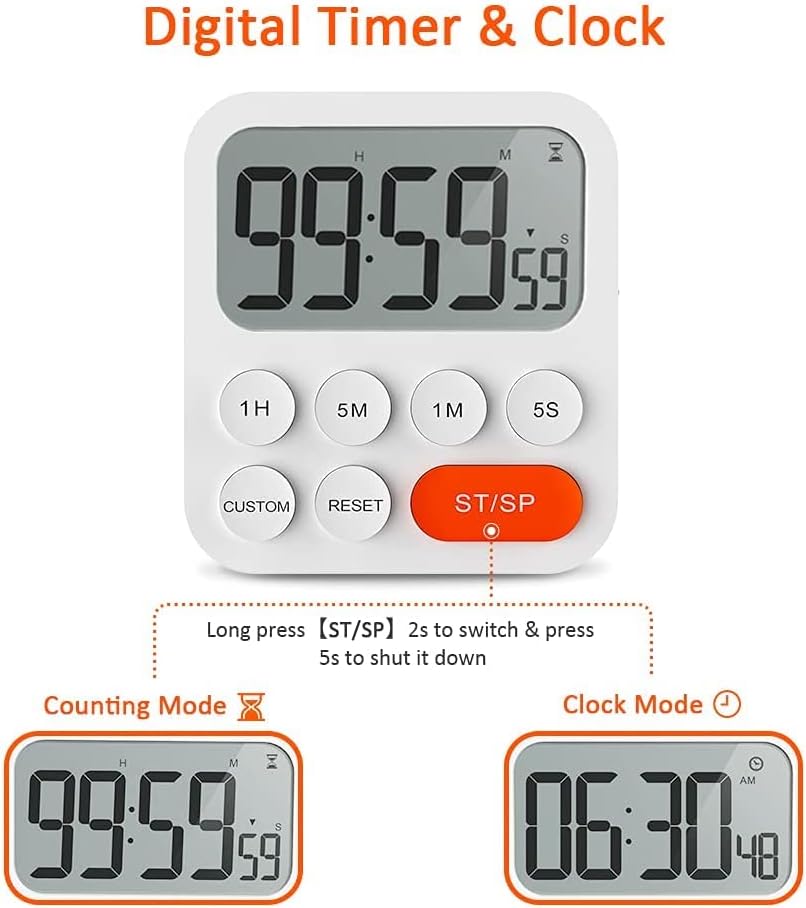
Illustration of long pressing the ST/SP button to toggle between Counting Mode and Clock Mode.
Setting the Clock (in Clock Mode):
- While in Clock mode, long press any of the 1H, 5M, 1M, же 5S buttons to enter time setting mode. The digits will flash.
- колдонуу 1H, 5M, 1M, 5S buttons to adjust the hours, minutes, and seconds. Short press to increment, long press to rapidly increase.
- Басыңыз ST/SP to confirm the setting and exit time setting mode.
Using the Timer (in Timer Mode):
The timer supports both count-up and countdown functions.

Visual representation of the timer in Count-up Mode and Countdown Mode.
Артка саноо таймери:
- Ensure the timer is in countdown mode (display shows 00:00:00). If not, press RESET.
- колдонуу 1H, 5M, 1M, 5S buttons to set the desired countdown time. Short press to add time, long press to add rapidly.
- Басыңыз ST/SP артка санаууну баштоо үчүн.
- Тыныгуу үчүн басыңыз ST/SP кайра. Улантуу үчүн кайра басыңыз.
- When the countdown reaches zero, the alarm will sound.
- Басыңыз RESET to clear the time and return to 00:00:00.

Illustration of using shortcut buttons (1H, 5M, 1M, 5S) to quickly set a countdown time.
Эсептөө таймери:
- Ensure the timer is in count-up mode (display shows 00:00:00). If not, press RESET.
- Басыңыз ST/SP to start counting up from zero.
- Тыныгуу үчүн басыңыз ST/SP кайра. Улантуу үчүн кайра басыңыз.
- Басыңыз RESET to clear the time and return to 00:00:00.
Ыңгайлаштырылган режим:
This feature allows you to save a frequently used countdown time for quick access.
- In countdown setting mode (before starting the timer), set your desired custom time using the 1H, 5M, 1M, 5S баскычтар.
- көпкө басыңыз CUSTOM button for 2 seconds to save this time. The timer will beep to confirm.
- To recall and start this custom time, simply short press the CUSTOM баскычы.

Illustration of saving a custom time by long pressing the CUSTOM button and recalling it with a short press.
Ойготкучтун үнүн тууралоо:
- On the side of the timer, locate the volume switch.
- Slide the switch to select between Loud, Soft, or Mute alarm settings.

Visual guide to adjusting the alarm volume to Loud, Soft, or Mute using the side switch.
Өчүрүү:
- көпкө басыңыз ST/SP button for 5 seconds to shut down the timer.
Монтаждоо параметрлери
The LIORQUE Digital Kitchen Timer offers versatile placement options:

Illustration of the timer's durable stand, powerful magnets with anti-slip pad, and lanyard hole for various placements.
- Магниттик тиркеме: The strong magnets on the back allow you to stick the timer to any magnetic or metal surface, such as a refrigerator door. An anti-slip pad protects surfaces from scratches.
- Бүктөлүүчү стенд: Use the integrated foldable stand to place the timer upright on any flat surface, like a countertop or desk.
- Lanyard тешик: A dedicated hole is provided for hanging the timer with a rope or hook (lanyard not included).
Проблемаларды чечүү
- Таймер күйбөй жатат: Батареялар туура салынганын жана түгөнбөгөнүн текшериңиз. Зарыл болсо, батарейкаларды алмаштырыңыз.
- Дисплей күңүрт же бүлбүлдөп жатат: Бул, адатта, батареянын кубаты аз экенин билдирет. Батареяларды алмаштырыңыз.
- Сигнал чыкпай жатат: Ensure the volume switch on the side is not set to 'Mute'. Adjust to 'Loud' or 'Soft'.
- Баскычтар жооп бербейт: Try removing and reinserting the batteries to perform a soft reset. If the issue persists, contact customer support.
- Incorrect time displayed in Clock Mode: Follow the instructions under "Setting the Clock" to adjust the time.
Техникалык шарттар
| Модель номери | YGH5249 |
| Бренд | ЛИОРК |
| Материал | Пластик |
| Түс | Ак |
| Продукциянын өлчөмдөрү (D x W x Y) | 3D x 9.4W x 9.8H Сантиметр |
| Элемент Салмагы | 250 грамм |
| Screen Size | 6.7 сантиметр |
| Power Source | 2 x AAA Батареялар (киргизилген эмес) |
Кепилдик жана колдоо
LIORQUE products are manufactured with quality and performance in mind. For any questions, concerns, or technical support regarding your Digital Kitchen Timer, please refer to the contact information provided with your purchase or visit the official LIORQUE webсайт. Кепилдик дооматтары үчүн сатып алганыңыздын далилин сактап коюңуз.