
Introduction
Thank you for choosing the TECNOSWITCH CR035WB Wi-Fi Touch Thermostat. This device is designed to provide precise and convenient control over your home's heating and cooling systems. With its intuitive touch interface and Wi-Fi connectivity, you can manage your climate settings locally or remotely via a dedicated smartphone application. Please read this manual carefully before installation and operation to ensure proper use and optimal performance.
Маанилүү коопсуздук маалыматы
ЭСКЕРТҮҮ: Electrical installation should only be performed by a qualified electrician. Disconnect power at the circuit breaker before installing or servicing the thermostat to prevent electrical shock or equipment damage.
- Ensure the power supply is 230VAC, 50-60Hz as specified.
- Термостатты сууга же ашыкча нымдуулукка дуушар кылбаңыз.
- Аппаратты өзүңүз оңдоого же өзгөртүүгө аракет кылбаңыз. Квалификациялуу тейлөө кызматкерлерине кайрылыңыз.
- Таңгактоочу материалдарды балдардан алыс кармаңыз.
Продукт бүттүview
The TECNOSWITCH CR035WB is a wall-mounted Wi-Fi touch thermostat featuring a backlit LCD display. It offers daily and weekly programming capabilities for both heating and cooling modes. Remote control is available via iOS and Android applications.
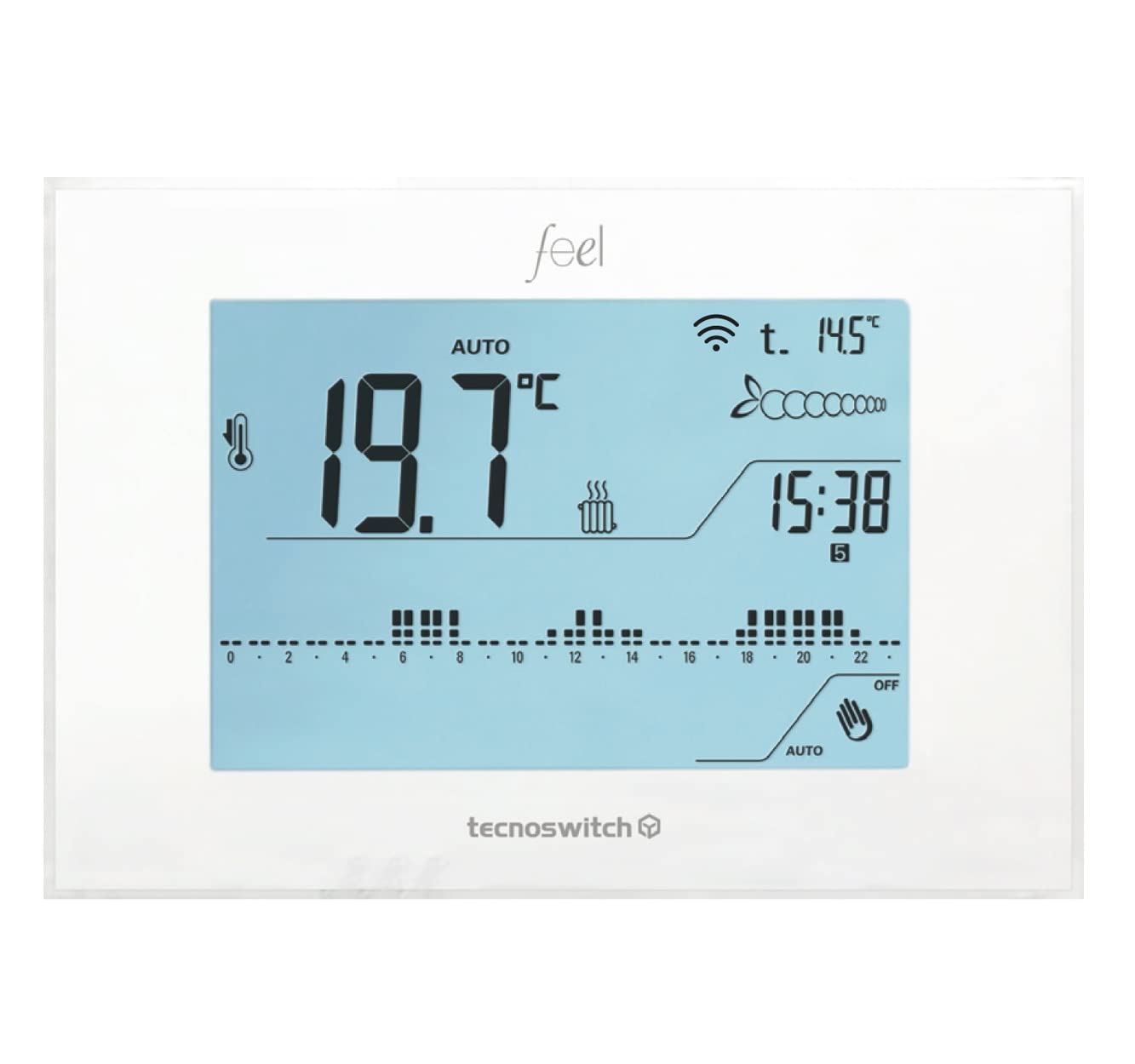
Сүрөт 1: Алдыңкы view of the TECNOSWITCH CR035WB Wi-Fi Touch Thermostat, showing its LCD display and touch interface.
Жайгашуу
1. Орнотуу
- Электр энергиясын өчүрүү: Орнотууну баштоодон мурун, жылытуу/муздатуу системаңыздын негизги электр кубатын автоматтык өчүргүчтөн өчүрүңүз.
- Монтаждоо: Mount the thermostat on a standard wall box. Ensure it is placed in an area free from direct sunlight, drafts, or heat sources that could affect temperature readings.
- Зымдар: Connect the power supply (230VAC, 50-60Hz) to the designated terminals. Connect the heating/cooling system wires to the appropriate relay terminals (6A 250VAC contact rating). Refer to the wiring diagram provided in the product packaging for specific connections.
- Optional External Probe: If using an external temperature probe (model SO001SE), connect it to the dedicated terminals.
- Коопсуз орнотуу: Secure the thermostat to the wall box using screws.
- Электр энергиясын калыбына келтирүү: Restore power to the system at the circuit breaker.
2. Баштапкы күйгүзүү жана негизги жөндөөлөр
- Upon first power-on, the LCD display will illuminate.
- Set the current date and time using the touch controls.
- Select the operating mode: Heating (Riscaldamento) or Cooling (Affrescamento).
- Adjust the temperature differential (from 0 to 1°C) if proportional temperature control is desired.
3. Wi-Fi жана тиркемелердин туташуусу
- Колдонмону жүктөп алуу: Download the official TECNOSWITCH app from the App Store (iOS) or Google Play Store (Android).
- Эсеп түзүү: Open the app and create a user account, or log in if you already have one.
- Түзмөк кошуу: Follow the in-app instructions to add your CR035WB thermostat. This typically involves putting the thermostat into pairing mode (refer to the on-screen instructions on the thermostat or the app) and connecting it to your home Wi-Fi network.
- Алыстан башкаруу: Once connected, you can control the thermostat remotely via the app.
Иштөө нускамалары
1. Basic Controls (Touch Interface)
The CR035WB features a touch-sensitive LCD display. Navigate menus and adjust settings by tapping the corresponding icons or areas on the screen.
2. Температураны жөндөө
- Кол менен тууралоо: In manual mode, you can directly set the desired temperature using the up/down arrows on the display. The thermostat will maintain this temperature until changed or until a programmed schedule takes over.
- Температура диапазону: The adjustable temperature range is +2°C to +35°C.
3. Иштөө режимдери
The thermostat supports two main operating modes:
- Heating (Riscaldamento): Activates the heating system when the ambient temperature falls below the setpoint.
- Cooling (Affrescamento): Activates the cooling system when the ambient temperature rises above the setpoint.
- Switch between modes via the thermostat's menu or the mobile app.
4. Programming (Daily/Weekly)
The CR035WB allows for daily and weekly programming to automate temperature control.
- Программанын менюсуна кирүү: Navigate to the programming section on the thermostat's display or through the app.
- Set Time Slots: Define specific time periods for each day of the week.
- Set Temperature Levels: Assign one of three customizable temperature levels (e.g., Comfort, Economy, Away) to each time slot.
- Сактоо программасы: Ensure you save your programmed schedule. The internal supercapacitor maintains programming in case of power loss.
5. App Control (iOS/Android)
The mobile application provides comprehensive control and monitoring features:
- Remote temperature adjustment and mode selection.
- Creation and modification of daily/weekly programs.
- Monitoring of current temperature and system status.
- Access to advanced functions and statistics.
6. Өркүндөтүлгөн функциялар
- Keyboard Lock (Password): Secure the thermostat's physical controls with a password to prevent unauthorized changes.
- Anti-seize Pump Function: Periodically activates the pump to prevent seizing during long periods of inactivity.
- Boiler Block Detection: Monitors the boiler status and can detect potential issues.
- Статистика: View usage statistics and temperature trends.
- Артка санауу: Timer function for temporary temperature changes.
Техникалык тейлөө
- Тазалоо: Gently wipe the thermostat's display and casing with a soft, dry cloth. Do not use abrasive cleaners, solvents, or spray cleaners directly onto the device.
- Колдонуучу тейлей турган бөлүктөр жок: The CR035WB does not contain user-serviceable parts. Do not attempt to open the casing.
- Суперконденсатор: The internal supercapacitor maintains programming settings during power outages, eliminating the need for battery replacement for this function.
Проблемаларды чечүү
| Көйгөй | Мүмкүн себеп | Чечим |
|---|---|---|
| Термостаттын дисплейи бош. | Электр энергиясы жок. | Check the circuit breaker and wiring connections. Ensure 230VAC power is supplied. |
| Жылытуу/Муздатуу системасы жооп бербейт. | Incorrect wiring; System mode incorrect; Temperature setpoint not reached. | Verify wiring connections. Ensure the thermostat is in the correct operating mode (Heating/Cooling). Adjust the setpoint to be above/below the ambient temperature to trigger the system. |
| Wi-Fi connection fails or disconnects. | Туура эмес Wi-Fi сырсөзү; Роутер өтө алыс; Тармак көйгөйлөрү. | Re-enter Wi-Fi password. Move router closer or use a Wi-Fi extender. Restart router and thermostat. Ensure your Wi-Fi network is 2.4GHz. |
| Колдонмону башкаруу иштебей жатат. | No internet connection; App not updated; Thermostat not connected to Wi-Fi. | Check phone's internet connection. Update the app to the latest version. Verify the thermostat's Wi-Fi connection status. |
| Температура көрсөткүчтөрү так эмес окшойт. | Термостат шамалга, түз күн нуруна же жылуулук булактарына дуушар болот. | Relocate the thermostat if possible, or shield it from external influences. If an external probe is connected, ensure it is correctly installed and functioning. |
Техникалык шарттар
| Модел | CR035WB |
| Бренд | TECNOSWITCH |
| Электр камсыздоо | 230VAC, 50-60Гц |
| Дисплей түрү | LCD, Backlit Blue |
| Температураны жөнгө салуу диапазону | +2°Cден +35°Cге чейин |
| Байланыш рейтинги | 6A 250VAC |
| Температураны көзөмөлдөө түрү | ON-OFF, Proportional |
| Adjustable Thermal Differential | 0дөн 1°Cге чейин |
| Иштөө режимдери | Жылытуу / Муздатуу |
| Байланыш | Wi-Fi |
| Башкаруу ыкмасы | App (iOS, Android), Touch Interface |
| Ички эс тутум | Supercapacitor for program retention |
| External Probe Support | Yes (SO001SE) |
Кепилдик маалымат
TECNOSWITCH products are manufactured to high-quality standards. This product is covered by a standard manufacturer's warranty against defects in materials and workmanship. The specific duration and terms of the warranty may vary by region and retailer. Please refer to your purchase documentation or contact TECNOSWITCH customer support for detailed warranty information applicable to your product.
Бардык кепилдик дооматтары үчүн сатып алуунун далили талап кылынат.
Кардарларды колдоо
If you encounter any issues or have questions regarding the installation, operation, or maintenance of your TECNOSWITCH CR035WB thermostat, please contact our customer support team.
- Webсайт: Visit the official TECNOSWITCH webКөп берилүүчү суроолор, колдоо булактары жана байланыш формалары үчүн сайт.
- Электрондук почта/Телефон: Refer to the contact information provided in your product packaging or on the official TECNOSWITCH webтүздөн-түз колдоо үчүн сайт.
Please have your product model (CR035WB) and purchase details ready when contacting support.