
Uten UTE-A06
Uten 2685A Electronic Sewing Machine User Manual
Model: UTE-A06
1. Киришүү
Welcome to the Uten 2685A Electronic Sewing Machine user manual. This guide provides detailed instructions for setting up, operating, maintaining, and troubleshooting your sewing machine. Please read this manual thoroughly before using the machine to ensure safe and efficient operation.
The Uten 2685A is a versatile computerized sewing machine designed for both beginners and experienced users, offering 200 utility and decorative stitches, including letter patterns, and an extension table for larger projects.
2. Маанилүү коопсуздук нускамалары
Электр шаймандарын колдонууда негизги коопсуздук чараларын дайыма сактоо керек, анын ичинде төмөнкүлөр:
- Колдонгондон кийин жана тазалоодон, капкактарды алуудан же колдонуучуга тейлөө боюнча кандайдыр бир жөндөөлөрдү жасоодон мурун, машинаны дароо электр розеткасынан сууруп алыңыз.
- оюнчук катары колдонууга жол бербеңиз. Бул машина балдар тарабынан же алардын жанында колдонулганда, кылдат көңүл буруу зарыл.
- Бул шайманды ушул колдонмодо сүрөттөлгөн максатта гана колдонуңуз. Бул колдонмодо камтылган өндүрүүчү тарабынан сунушталган тиркемелерди гана колдонуңуз.
- Эгерде бул машинанын шнуру же сайгычы бузулган болсо, туура иштебей жатса, түшүп кетсе же бузулуп калса же сууга түшүп кетсе, аны эч качан иштетпеңиз.
- Эч качан эч кандай тешикке эч кандай нерсени түшүрбөңүз же салбаңыз.
- Сыртта колдонбоңуз.
- Аэрозоль (спрей) продуктулары колдонулган же кычкылтек берилип жаткан жерде иштебеңиз.
- Өчүрүү үчүн бардык башкаруу элементтерин өчүрүү абалына буруңуз, андан соң сайгычты розеткадан чыгарыңыз.
3. Продукт компоненттери жана андан ашыкview
Familiarize yourself with the main parts of your Uten 2685A sewing machine.

3.1-сүрөт: Uten 2685A Electronic Sewing Machine with Extension Table. This image shows the overall view of the sewing machine, highlighting its compact design and the attached extension table for increased workspace.

3.2-сүрөт: Жогорку view of the Uten 2685A Sewing Machine, showing the bobbin winding area and thread path. This perspective helps in understanding the threading process from the top.
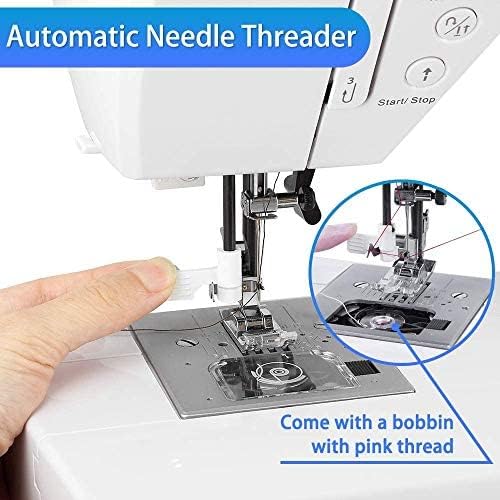
3.3-сүрөт: Жакын план view of the automatic needle threader mechanism. This feature simplifies the threading process, making it quicker and easier for users.

3.4-сүрөт: Example of embroidery work possible with the Uten 2685A. This image demonstrates the machine's capability for decorative stitching, though an embroidery presser foot may be required (not included).
4. Орнотуу жана баштапкы даярдоо
4.1 Пакеттен чыгаруу
Carefully remove the machine from its packaging. Retain all packing materials for future transport or storage. Ensure all accessories listed in the packing list are present.
4.2 Кубат туташтыруу
Connect the power cord to the machine's power input and then to a suitable electrical outlet. The machine operates on standard household electricity.
4.3 Кеңейтүү үстөлүн бекитүү
The Uten 2685A comes with an extension table. To attach it, slide the table onto the free arm of the machine until it clicks securely into place. This provides a larger, flat work surface, ideal for quilting or handling larger fabric pieces.

4.1-сүрөт: The Uten 2685A Sewing Machine with its extension table attached, shown in a sewing environment. The extension table significantly increases the work area, making it easier to manage larger sewing projects.
4.4 Машинага жип салуу
Proper threading is crucial for good stitch quality. Follow the numbered guides on the machine for upper thread path. For the bobbin, ensure it is correctly wound and inserted into the bobbin case.

4.2-сүрөт: Close-up of the LCD screen and control panel for stitch selection, length, and width adjustments. This display provides visual feedback on selected stitch patterns and settings.

4.3-сүрөт: A comprehensive diagram illustrating the 200 available stitch patterns, including utility, decorative, and letter stitches. This chart is typically found on the machine itself for quick reference.
5. Иштөө нускамалары
5.1 Тигиштерди тандоо
Use the stitch selection buttons (up/down arrows) to navigate through the 200 built-in stitches displayed on the LCD screen. The machine offers 100 utility and decorative stitches, and 100 letter patterns.
5.2 Тигиштин узундугун жана туурасын тууралоо
The stitch length can be adjusted from 0.5mm to 3.5mm, and stitch width from 0mm to 7mm using the dedicated '+' and '-' buttons. These adjustments allow for customization of stitches to suit different fabric types and project requirements.
5.3 Эркин кол менен тигүү
To use the free arm, remove the extension table. The free arm is ideal for sewing cylindrical items such as pant legs, sleeves, or cuffs.
5.4 Automatic Buttonholes
The machine features 8 different automatic buttonhole styles. Select the desired buttonhole pattern, attach the buttonhole foot, and follow the on-screen prompts for easy, consistent buttonholes.
5.5 Using Different Presser Feet
The Uten 2685A comes with various quick-change presser feet for different sewing tasks, including:
- General purpose foot
- Сыдырма бут
- Сатин тигилген бут
- Баскыч буту
- Сокур тигүү буту
- Баскыч тешиги


5.1-сүрөт: Examples of various presser feet included with the Uten 2685A, designed for specific sewing applications like zippers, satin stitches, and button attachment.
6. Техникалык тейлөө жана кам көрүү
Үзгүлтүксүз тейлөө тигүүчү машинаңыздын узак иштөөсүн жана оптималдуу иштешин камсыз кылат.
6.1 Тазалоо
Always unplug the machine before cleaning. Use a soft brush to remove lint and dust from the bobbin area, feed dogs, and needle plate. Do not use liquid cleaners or harsh chemicals.
6.2 Майлоо
Refer to the specific oiling points indicated in the full manual (if applicable). Use only high-quality sewing machine oil. Over-oiling can cause issues.
6.3 Ийне алмаштыруу
Replace the needle regularly, especially if it becomes bent, dull, or if you notice skipped stitches. Always use the correct needle type and size for your fabric and thread.
7. Көйгөйлөрдү чечүү боюнча колдонмо
Бул бөлүмдө сиз кабылышы мүмкүн болгон жалпы көйгөйлөр жана аларды чечүү жолдору каралат.
| Көйгөй | Мүмкүн себеп | Чечим |
|---|---|---|
| Өткөрүлгөн тигүү | Туура эмес ийне, ийилген ийне, жип туура эмес өткөрүлгөн, кездеменин ийне өлчөмү туура эмес. | Replace needle, re-thread machine, ensure correct needle type/size. |
| Thread Breaking | Туура эмес тартылуу, жиптин сапаты начар, ийне туура эмес сайылган, ийненин пластинкасында чырмалып калган. | Тартууну тууралаңыз, сапаттуу жипти колдонуңуз, ийнени кайра туура киргизиңиз, бырыштарды текшериңиз. |
| Кездеме азыктандырбайт | Feed dogs lowered, presser foot not down, lint accumulation. | Raise feed dogs, lower presser foot, clean feed dog area. |
| Машина иштебей жатат | Power cord not connected, power switch off, safety feature engaged. | Электр туташуусун текшериңиз, өчүргүчтү күйгүзүңүз, басуучу бут ылдый жакта экенин текшериңиз. |
8. Продукттун спецификациялары
| Өзгөчөлүк | Спецификация |
|---|---|
| Модель номери | UTE-A06 |
| Бренд | Uten |
| Тигүү программалары | 200 (100 utility/decorative + 100 letter patterns) |
| Баскычтар | 8 automatic styles |
| Тигүү узундугун жөндөө | 0.5 мм - 3.5 мм |
| Тигиштин туурасын тууралоо | 0 мм - 7 мм |
| Күч | 36 Ватт |
| Материал | Алюминий |
| Өлчөмдөрү (L x W x Y) | 46.2 x 34.59 x 29.9 см (18.2 x 13.6 x 11.8 дюйм) |
| Салмагы | 6 килограмм (13.2 фунт) |
| Өзгөчөлүктөрү | Automatic needle threader, LCD display, Free arm, Extension table |
9. Кепилдик жана колдоо
For warranty information and customer support, please refer to the documentation included with your purchase or contact Uten customer service directly. If you encounter any problems with your sewing machine, you can contact Uten via email for assistance.
The product has been tested before leaving the factory to ensure quality and functionality.
Ask a question about this manual
Ask about setup, troubleshooting, compatibility, parts, safety, or missing instructions. Manuals+ will review the question and use this page’s manual context to help answer it.