
Keychron K10-A3
Keychron K10 Full Size Mechanical Gaming Keyboard User Manual
Model: K10-A3 | Brand: Keychron
1. Киришүү
The Keychron K10 is a versatile 104-key full-size mechanical keyboard designed for enhanced productivity and gaming. It offers seamless connectivity across multiple operating systems, including Mac and Windows, through both Bluetooth wireless and USB Type-C wired modes. Featuring durable Gateron G Pro Brown switches and a white LED backlight, the K10 provides a comfortable and responsive typing experience for various uses.

Image: The Keychron K10 full-size mechanical keyboard, showcasing its complete layout and design.
2. Негизги өзгөчөлүктөрү
- Full-Size 104-Key Layout: Includes a dedicated number pad for maximum productivity, suitable for both work and gaming.
- Dual Connectivity Modes: Connects wirelessly via Broadcom Bluetooth 5.1 to up to three devices simultaneously, or use the reliable USB Type-C wired connection.
- Mac жана Windows шайкештиги: Designed with a unique Mac layout, it also includes all essential multimedia and function keys for Windows. Extra keycaps are provided for both operating systems, allowing for easy customization.
- Gateron G Pro Brown Switches: Offers a tactile typing experience with a gentle sound level, providing unrivaled responsiveness and a lifespan of up to 50 million keystrokes.
- Ак LED арткы жарыгы: Enhances visibility and aesthetics, especially in low-light conditions.
- Узак мөөнөттүү батарея: Equipped with a 4000 mAh battery, providing up to 240 hours of usage with the backlight off.
- Эргономикалык дизайн: Features two-level adjustable feet (6° and 9°) and an inclined bottom frame for comfortable, long-lasting typing.
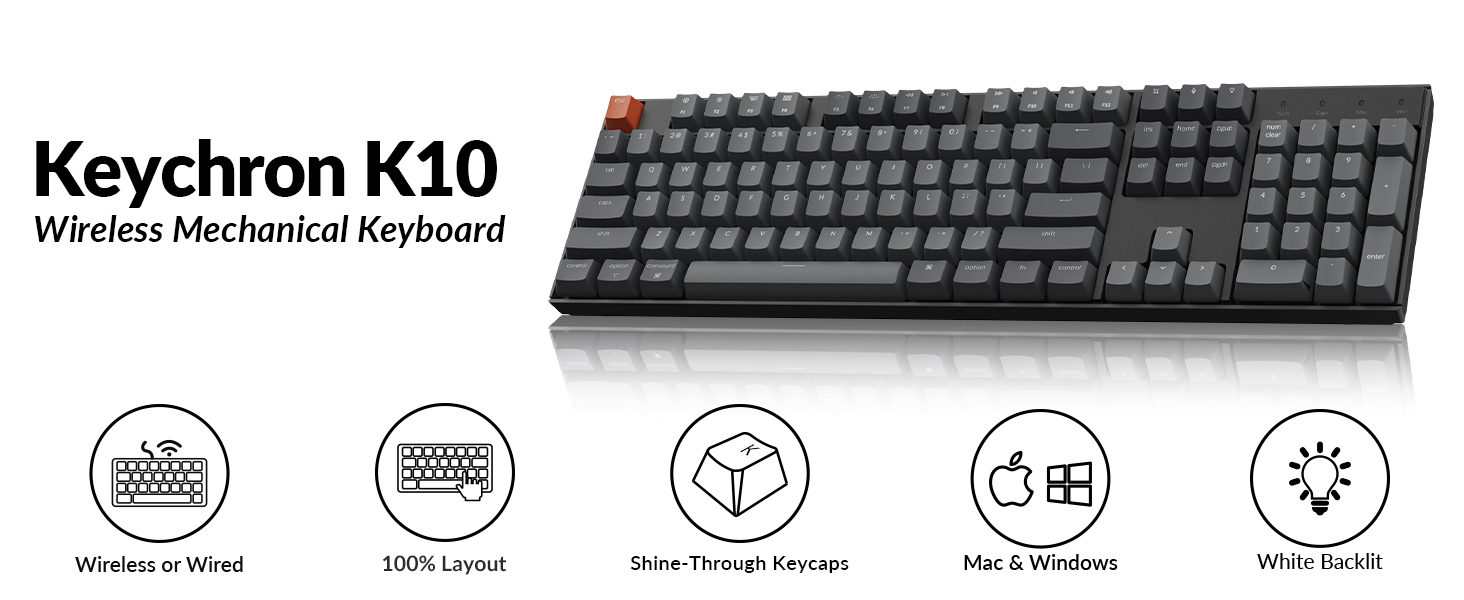
Image: Visual summary of Keychron K10 features, including wireless/wired, 100% layout, shine-through keycaps, Mac & Windows compatibility, and white backlight.
3. Орнотуу
3.1. Bluetooth туташуусу
- Locate the mode switch on the side of the keyboard.
- Slide the toggle switch to the Bluetooth позиция.
- кармаңыз fn+1 keys simultaneously until the Bluetooth indicator light flashes repeatedly. This indicates the keyboard is in pairing mode.
- On your device (smartphone, tablet, or laptop), enable Bluetooth.
- Издөө "Keychron K10" in the list of available Bluetooth devices and select it to connect.
- To switch between paired devices (up to 3), press fn+1, fn+2, же fn+3.

Image: Diagram illustrating the steps for connecting the Keychron K10 via Bluetooth to various devices.

Image: The Keychron K10 keyboard connected to a desktop monitor, tablet, and smartphone, demonstrating its multi-device connectivity.
3.2. Зымдуу туташуу
Түз жана туруктуу туташуу үчүн, берилген USB Type-C кабелин колдонуңуз.
- Locate the mode switch on the side of the keyboard.
- Slide the toggle switch to the Кабель позиция.
- Connect one end of the USB Type-C cable to the keyboard's USB-C port.
- Кабелдин экинчи учун компьютериңиздеги жеткиликтүү USB портуна туташтырыңыз.
- Баскычтоп автоматтык түрдө таанылып, колдонууга даяр болот.

Image: The Keychron K10 keyboard connected via USB-C cable to a computer, illustrating both wired and wireless connectivity options.
3.3. Операциялык системанын которгучу
The Keychron K10 supports both Mac and Windows operating systems. Use the dedicated OS switch located on the side of the keyboard to select the correct layout.
- Locate the OS switch next to the connectivity mode switch.
- Которуштургучту жылдырыңыз Mac for macOS devices or Windows for Windows devices.
- For optimal experience, replace keycaps (e.g., Alt/Command) using the provided keycap puller as needed.

Image: Close-up of the side of the Keychron K10 keyboard, showing the physical switch for selecting between Windows and macOS modes.
4. Баскычтопту иштетүү
4.1. Арткы жарыкты башкаруу
The Keychron K10 features a white LED backlight. Use the following key combinations to control it:
- Басыңыз Fn + F5 арткы жарыктын жарыктыгын азайтуу үчүн.
- Басыңыз Fn + F6 арткы жарыктын жарыктыгын жогорулатуу үчүн.
- Басыңыз Fn + лампочканын ачкычы (usually F12 or a dedicated key) to cycle through backlight effects.

Image: The Keychron K10 keyboard with its white LED backlight illuminated, showcasing the uniform lighting across all keys.
4.2. Мультимедиа жана функция баскычтары
The K10 includes dedicated multimedia and function keys for convenience. These keys are typically located on the F-row.
- F1-F12: Function as multimedia controls (e.g., volume, play/pause) or standard F-keys depending on the operating system and settings.
- Атайын ачкычтар: Includes a Screenshot Key, Siri (Cortana) Key, and Screen Lock Key for quick access to system functions.

Image: Close-up of the Keychron K10 keyboard's indicator lights for Num Lock, Caps Lock, Mac Layout, and Windows Layout, providing visual feedback on keyboard status.
4.3. Батареяны башкаруу
The keyboard is powered by a 4000 mAh Lithium Polymer battery. To charge, connect the keyboard via the USB Type-C cable to a power source (e.g., computer USB port, wall adapter).
- A red indicator light typically signifies charging.
- The light will turn off or change color when fully charged.
- Battery life can last up to 240 hours with the backlight off.

Image: The Keychron K10 keyboard with a prominent "4000 mAh" overlay, highlighting its large battery capacity.

Image: A graphic illustrating the Keychron K10's battery working time, indicating up to 240 hours with the backlight off.
5. Техникалык тейлөө
Proper maintenance ensures the longevity and optimal performance of your Keychron K10 keyboard.
- Тазалоо:
- Бир аз жумшак, түксүз кездемени колдонуңуз dampбаскычтоптун капкактарын жана алкагын суу же жумшак тазалоочу эритме менен сүртүңүз.
- For deeper cleaning, use the provided keycap puller to remove keycaps and clean dust or debris from underneath with compressed air or a small brush.
- Катуу химиялык заттарды же абразивдүү материалдарды колдонуудан алыс болуңуз.
- Сактагыч: Клавиатураны күн нурунан жана экстремалдык температурадан алыс, салкын, кургак жерде сактаңыз.
- Батареяга кам көрүү: For long-term storage, ensure the battery is charged to about 50% to prevent degradation.
6. Кыйынчылыктарды
If you encounter issues with your Keychron K10, refer to the following common solutions:
| Көйгөй | Мүмкүн чечим |
|---|---|
| Баскычтоп Bluetooth аркылуу туташпай жатат. |
|
| Keys not responding in wired mode. |
|
| Арткы жарык иштебейт же күңүрт. |
|
| Incorrect key functions (Mac/Windows). |
|
For further assistance, please refer to the official Keychron support resources or contact customer service.
7. Техникалык шарттар
| Өзгөчөлүк | Деталь |
|---|---|
| Модел | K10-A3 |
| Ачкычтардын саны | 104 |
| Которуу түрү | Gateron G Pro Brown Mechanical Switch |
| Байланыш | Bluetooth 5.1 & USB Type-C (Wired) |
| Арткы жарык | Ак LED |
| Батарея | 4000 mAh Lithium Polymer (rechargeable) |
| Батареянын иштөө мөөнөтү (арткы жарык өчүрүлгөн) | 240 саатка чейин |
| Өлчөмдөрү (L x W x Y) | 17.13 x 4.72 x 1.61 дюйм (435 x 120 x 41 мм) |
| Салмагы | 1.97 фунт (895 г) |
| Операциялык системанын шайкештиги | Mac, Windows |
| Өзгөчөлүктөр | Ergonomic, Backlit, Multi-device support |
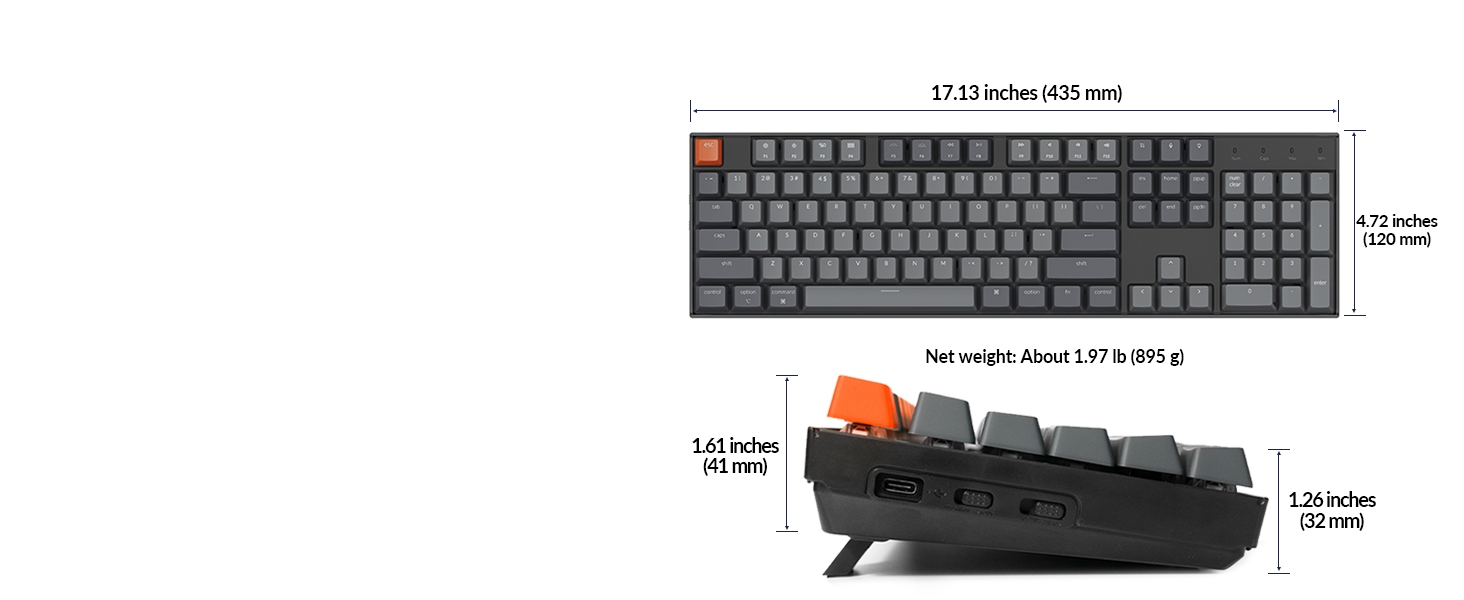
Image: Diagram showing the precise dimensions of the Keychron K10 keyboard in both inches and millimeters.

Сүрөт: Жакын план view of the Gateron G Pro Brown mechanical switch, detailing its operating force, pre-travel, behavior (tactile), sound level (gentle), and lifespan.

Image: Comparison of different Gateron switch types (Silent Red, Red, Brown) and their characteristics, including operating force, pre-travel, behavior, and sound level.
8. Пакеттин мазмуну
The Keychron K10 package includes the following items:
- 1x Keychron K10 Mechanical Keyboard
- 1x USB-A to USB Type-C Cable
- 1x Баскыч капкагын тарткыч
- Extra Keycaps for Mac and Windows operating systems

Image: Visual representation of the Keychron K10 keyboard and its included accessories: USB-A to USB Type-C cable and keycap puller.
9. Кепилдик жана колдоо
Keychron products typically come with a limited warranty. Please refer to the warranty card included in your package or visit the official Keychron webдеталдуу кепилдик шарттары жана шарттары үчүн сайт.
For technical support, troubleshooting, or product inquiries, you can contact Keychron customer service through their official webсайт же продукт документациясында көрсөтүлгөн байланыш маалыматы.
Расмий колдонуучу колдонмосу (PDF): Колдонуучунун колдонмосун жүктөп алыңыз
Көйгөйлөрдү чечүү боюнча колдонмо (PDF): Көйгөйлөрдү чечүү боюнча колдонмону жүктөп алыңыз
10. Расмий продукт Videos
Keychron K10 Full Size 104 Keys Bluetooth Wireless Mechanical Gaming Keyboard for Mac Windows
Video: An official product video from Keychron showcasing the K10 keyboard's features, including its Bluetooth and wired connectivity, Mac and Windows compatibility, and multi-device support. This video highlights the keyboard's versatility for various computing environments.
Ask a question about this manual
Ask about setup, troubleshooting, compatibility, parts, safety, or missing instructions. Manuals+ will review the question and use this page’s manual context to help answer it.