
1. Киришүү
This manual provides detailed instructions for the safe and proper installation, operation, and maintenance of your CFMOTO Front Box ATV. Please read this manual thoroughly before using the product to ensure optimal performance and longevity. Keep this manual for future reference.
2. Коопсуздук маалыматы
WARNING: Failure to follow these safety instructions may result in property damage or personal injury.
- Always ensure the box is securely mounted to the ATV rack before operation.
- Do not overload the box. Refer to the specifications for maximum capacity.
- Distribute weight evenly within the box to maintain ATV stability.
- Regularly inspect mounting hardware for tightness and wear.
- Keep hands and fingers clear of hinges and latches when opening or closing the box.
3. Пакеттин мазмуну
Verify that all components are present in the package. If any items are missing or damaged, contact customer support.
- CFMOTO Front Box (1 unit)
- Mounting Hardware Kit (bolts, washers, nuts, brackets)
- Көрсөтмө (бул документ)
4. Орнотуу жана орнотуу
Follow these steps to properly install the front box on your CFMOTO ATV (models 800/850xc/X8/X10).
4.1 Prepare the ATV
- Park the ATV on a level surface and engage the parking brake.
- Ensure the front rack is clean and free of debris.
4.2 Position the Front Box
Place the front box onto the ATV's front rack. Adjust its position to ensure it is centered and does not obstruct any essential ATV functions or lights.

Figure 4.2.1: The front box positioned on an ATV's front rack, demonstrating proper placement.
4.3 Secure the Box with Mounting Hardware
- Identify the mounting points on the bottom of the front box and align them with suitable attachment points on the ATV rack.
- Use the provided mounting hardware (bolts, washers, nuts, brackets) to secure the box to the rack. Insert bolts through the box and rack, then fasten with washers and nuts from underneath.
- Tighten all fasteners securely. Do not overtighten, as this may damage the box or rack.
- After initial tightening, gently attempt to move the box to ensure it is firmly attached and does not wobble.

4.3.1-сүрөт: Бурчтуу view of the CFMOTO Front Box, highlighting its design and potential mounting areas.
5. Иштөө нускамалары
5.1 Opening the Front Box
To open the front box, locate the latches on the front or sides of the box. Release the latches by pulling them outwards or upwards, depending on the latch mechanism. Once released, lift the lid upwards.

Figure 5.1.1: The front box shown with its lid open, illustrating the internal compartment.
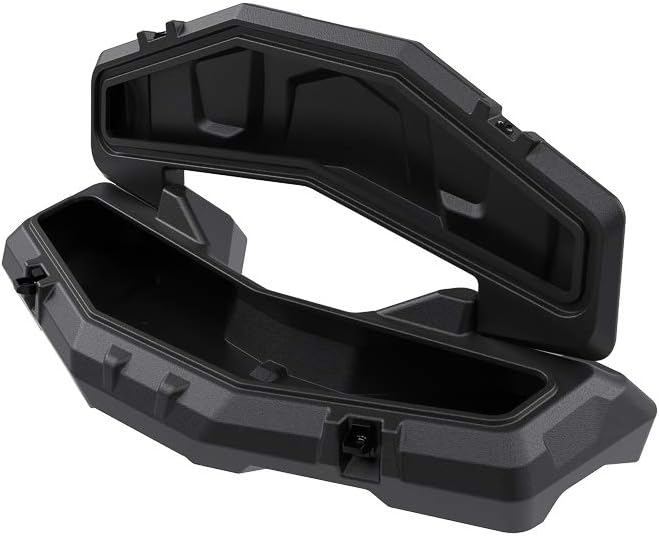
5.1.2-сүрөт: А view of the front box from above, with the lid fully open to display the interior.
5.2 Closing and Securing the Front Box
Lower the lid until it rests flush with the base of the box. Engage the latches by pushing them inwards or downwards until they click into place, ensuring the lid is securely fastened. Verify that all latches are engaged before operating the ATV.

Figure 5.2.1: The front box in its closed state, ready for use.
5.3 Loading the Box
- Place items inside the box, ensuring they are distributed evenly to prevent shifting during ATV operation.
- Do not exceed the maximum weight capacity of 3.5 kg (7.7 lbs) or 42 liters.
- Avoid placing sharp or abrasive objects directly against the interior walls without protection to prevent damage.
Video 5.3.1: A demonstration of the CFMOTO Front Box, showing its interior and how it opens and closes. This video provides a visual guide to the box's features and functionality.
6. Техникалык тейлөө
6.1 Тазалоо
- Clean the exterior of the box with mild soap and water. Use a soft cloth or sponge.
- Таза суу менен жакшылап жууп, абада кургатуу керек.
- Avoid using harsh chemicals, abrasive cleaners, or high-pressure washers, as these can damage the finish or seals.
6.2 Текшерүү
- Periodically inspect the box for any signs of damage, cracks, or loose components.
- Check all mounting hardware for tightness before each ride. Retighten if necessary.
- Inspect the latches and hinges for proper function and lubrication. Apply a silicone-based lubricant if they become stiff.
7. Кыйынчылыктарды
7.1 Box is Loose on ATV Rack
- Чечим: Inspect all mounting bolts and nuts. Tighten any loose fasteners. Ensure all brackets are correctly positioned.
7.2 Капкак бекем жабылбайт
- Чечим: Check for any obstructions preventing the lid from closing fully. Ensure latches are aligned and engaging properly. Clean any debris from the latch mechanisms.
7.3 Water Inside the Box
- Чечим: Inspect the rubber seal around the lid for damage or displacement. Ensure the lid is fully closed and all latches are securely fastened.
8. Техникалык шарттар
| Бренд | CFMOTO |
| Модель номери | 010-067-00 (850xc) |
| Түс | Кара/Боз |
| Өлчөмү | One Size |
| Элемент Салмагы | 3.5 килограмм (7.7 фунт) |
| Кубаттуулугу | 42 литр |
| Жабылуу түрү | Сыдырма (Note: Product images show latches, this might be a discrepancy in data or a feature not visible) |
| Монтаж түрү | Rack Mount |
| Унаанын шайкеш түрү | ATV (CFMOTO 800/850xc/X8/X10) |
| Shell түрү | Жумшак (Note: Product images suggest a rigid shell, this might be a discrepancy in data) |
| UPC | 787977016066 |
Эскертүү: Техникалык мүнөздөмөлөр алдын ала эскертүүсүз өзгөртүлүшү мүмкүн.
9. Кепилдик маалыматы
This CFMOTO product is covered by a limited warranty against manufacturing defects. The specific terms and duration of the warranty may vary by region and retailer. Please retain your proof of purchase for warranty claims. For detailed warranty information, refer to the warranty card included with your product or contact CFMOTO customer support.
10. Кардарларды колдоо кызматы
If you have any questions, require assistance with installation, or encounter issues not covered in this manual, please contact CFMOTO customer support. Contact details can typically be found on the official CFMOTO webсайтында же продуктунун таңгагында.
- Онлайн колдоо: Visit the official CFMOTO webКөп берилүүчү суроолор жана колдоо булактары үчүн сайт.
- Электрондук почта колдоо: Refer to your product documentation for the appropriate email address.
- Телефондук колдоо: Refer to your product documentation for the appropriate phone number.