1. Киришүү
Thank you for choosing the KESIEME TWS F-9 Wireless Bluetooth Earphones. These earphones are designed to provide a high-quality audio experience with true wireless stereo sound and advanced features for convenience and comfort. This manual will guide you through the setup, operation, and maintenance of your new earphones.

Image: The KESIEME TWS F-9 Wireless Bluetooth Earphones, showcasing both earbuds securely placed within their sleek charging case. The case features a digital display indicating battery level, and a smartphone is shown in the background, demonstrating the case's ability to act as a power bank.
Негизги өзгөчөлүктөрү:
- Автоматтык жупташтыруу: Seamless connection upon removal from the charging case.
- Чыныгы зымсыз стерео (TWS): Enjoy high-fidelity (HIFI) sound without tangled wires.
- Ар тараптуу колдонуу: Earbuds can be used individually or as a pair.
- Bluetooth 5.0: Ensures stable connection and ultra-low power consumption.
- Узартылган батареянын иштөө мөөнөтү: Up to 4-5 hours of listening time per charge, with the charging case providing up to 25 additional charges.
- CVC8.0 ызы-чууну азайтуу: Фондук ызы-чууну азайтуу аркылуу чалуу тактыгын жакшыртат.
- Water-Repellent Design: Suitable for various activities, including sports and travel.
2. Орнотуу жана биринчи колдонуу
Follow these steps to set up your KESIEME TWS F-9 earphones for the first time.
Жупташуу көрсөтмөлөрү:
- Ишти заряддоо: Before first use, ensure the charging case is fully charged. Connect the provided USB cable to the charging port on the case and a power source. The digital display will indicate the charging status.
- Remove Earbuds: Open the charging case and remove both the left (L) and right (R) earbuds. They will automatically power on and attempt to connect to each other.
- Bluetooth иштетүү: On your mobile device (smartphone, tablet, etc.), go to the Bluetooth settings and turn on Bluetooth.
- Түзмөктү тандоо: In the list of available Bluetooth devices, locate and select the name of your earphones (e.g., "TWS F-9" or similar).
- Байланышты ырастоо: Once selected, the earphones will pair with your device. A voice prompt or indicator light on the earbuds may confirm the successful connection.
- Автоматтык кайра туташуу: After the initial pairing, the earphones will automatically connect to your device when removed from the charging case, provided Bluetooth is enabled on your device.
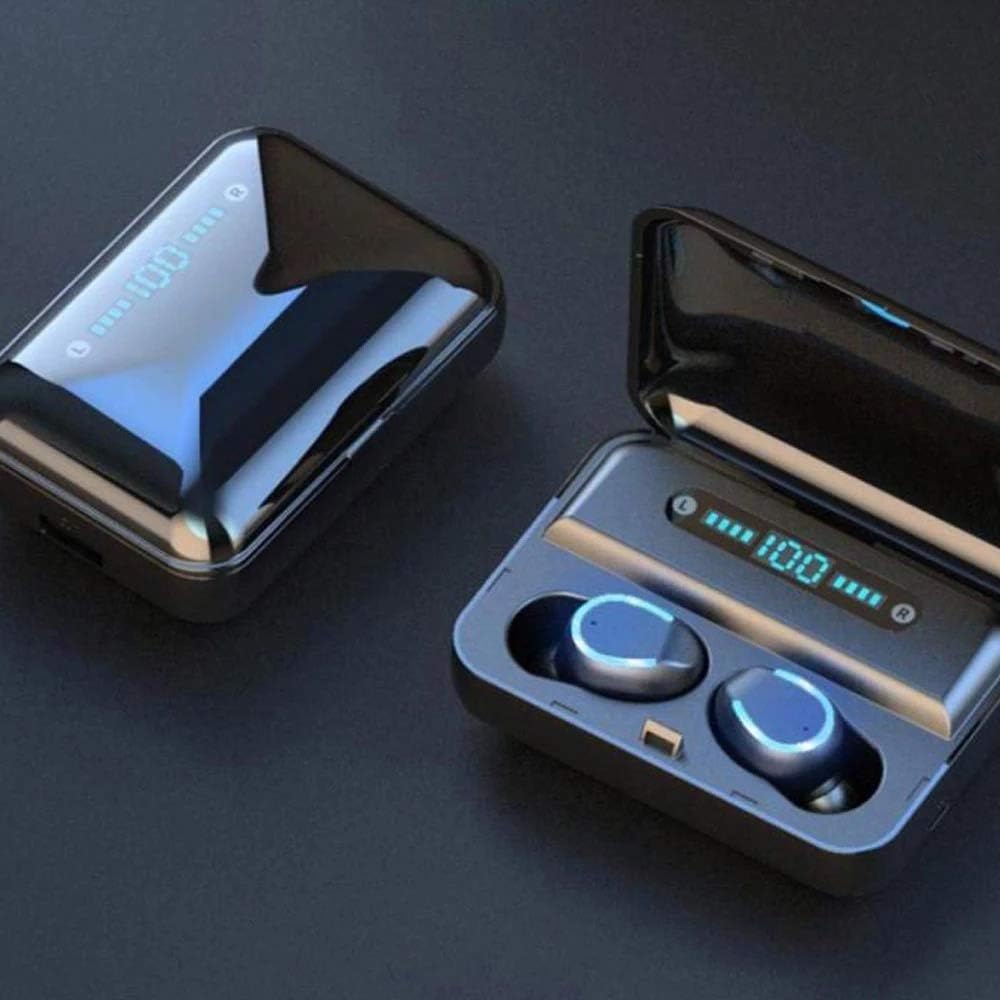
Сүрөт: жакын план view of the TWS F-9 earbuds resting in their open charging case, displaying a digital battery percentage. This illustrates the ready-to-pair state of the earphones.
3. Кулакчындарды иштетүү
The KESIEME TWS F-9 earphones feature intuitive touch controls for easy management of your audio and calls.
Сенсордук башкаруу каражаттары:
| Акция | Функция |
|---|---|
| Бир таптоо (Сол/Оң гарнитура) | Музыканы ойнотуу/тындыруу, Чалууга жооп берүү/Аяктоо |
| Эки жолу таптаңыз (Сол кулакчын) | Мурунку трек |
| Эки жолу таптаңыз (оң кулакчын) | Кийинки трек |
| Үч жолу таптап (сол/оң кулакчын) | Үн Жардамчысын жандырыңыз (Siri, Google Жардамчы) |
| Узун басуу (Сол/Оң кулакчын) | Чакырууну четке кагуу |
| Узун басуу (сол кулакчын) | Үндү азайтуу |
| Узун басуу (оң кулакчын) | Үнүн жогорулатуу |
Наушник тагынуу:
For optimal sound quality and comfort, ensure the earbuds are properly seated in your ears. The TWS F-9 features a design for a secure and comfortable fit.

Image: A diagram illustrating the ergonomic design of the earbud for a secure fit, highlighting the "Upper snap-in style," "Three-point support," and "Lateral rear fit" for enhanced comfort and stability during use.
Кулакчындарды жана кутуну кубаттоо:
- Кулакчын кубаттоо: Place the earbuds back into the charging case. They will automatically begin charging. The indicator lights on the earbuds will show their charging status.
- Ишти кубаттоо: Connect the USB charging cable to the charging port on the case and a 5V/1A power adapter. The digital display on the case will show the current battery percentage during charging. A full charge for the case takes approximately 5 hours.
- Power Bank функциясы: The charging case can also be used as a power bank to charge your smartphone or other small devices. Connect your device to the USB output port on the charging case.
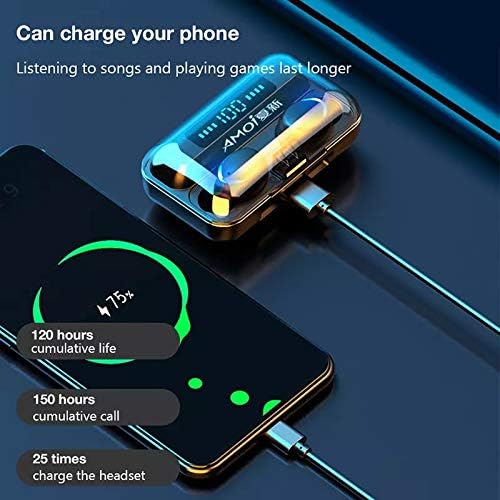
Image: The KESIEME TWS F-9 charging case connected via a USB cable to a smartphone, demonstrating its power bank capability. The phone screen shows a charging indicator, and text highlights the cumulative life and charging capacity of the case.
4. Техникалык тейлөө жана кам көрүү
Proper maintenance will extend the lifespan of your KESIEME TWS F-9 earphones.
- Тазалоо: Кулакчындарды жана кубаттоочу кутучаны жумшак, кургак, мамыксыз чүпүрөк менен үзгүлтүксүз тазалап туруңуз. Абразивдүү тазалоочу каражаттарды же эриткичтерди колдонбоңуз. Кулак мому топтолуп калса, кулакчындын торчосун кичинекей, жумшак щетка менен акырын тазалаңыз.
- Суу каршылык: The earphones are water-repellent. This means they can withstand splashes and light rain, making them suitable for sports. However, they are not designed for submersion in water or use during swimming. Avoid exposing them to excessive moisture.
- Сактагыч: When not in use, always store the earbuds in their charging case to protect them and keep them charged. Store the case in a cool, dry place away from direct sunlight and extreme temperatures.
- Батареяга кам көрүү: To preserve battery health, avoid fully discharging the case and earbuds frequently. Charge them regularly, even if not in constant use.
5. Кыйынчылыктарды
If you encounter any issues with your earphones, refer to the following common problems and solutions.
- Earbuds not pairing with each other or with the device:
- Эки кулакчындын тең кубатталганын текшериңиз.
- Place both earbuds back into the charging case, close the lid, wait a few seconds, then remove them again. This often resets the pairing.
- On your device, forget or unpair the earphones from the Bluetooth list, then repeat the pairing process from Section 2.
- Ensure no other Bluetooth devices are interfering nearby.
- Бир кулакчындан үн чыкпайт:
- Эки кулакчындын тең кубатталганын текшериңиз.
- Place both earbuds back in the case and remove them to force re-sync.
- Наушниктеги жана корпустун ичиндеги заряддоо контакттарын тазалаңыз.
- Кулакчындар кубатталбай жатат:
- Заряддоо кутусунун өзү заряддалганын текшериңиз.
- Verify that the earbuds are correctly seated in the charging slots.
- Наушниктеги жана корпустун ичиндеги заряддоо контакттарын тазалаңыз.
- Башка кубаттоочу кабелди жана кубат адаптерин колдонуп көрүңүз.
- Үн сапатынын начардыгы же байланыш үзүлүшү:
- Түзмөгүңүз 10 метрлик Bluetooth диапазонунда экенин текшериңиз.
- Reduce obstacles between your device and the earphones.
- Башка зымсыз аппараттардын кийлигишүүсүн текшериңиз.
- Кулакчын динамиктериндеги калдыктарды тазалаңыз.
6. Техникалык шарттар
| Өзгөчөлүк | Деталь |
|---|---|
| Бренд | KESIEME |
| Модель аты | TWS f 9 |
| Байланыш технологиясы | Зымсыз Bluetooth |
| Bluetooth версиясы | 5.0 |
| Зымсыз диапазон | 10 метрге чейин (тоскоолдуктарсыз) |
| Earbud Playtime | Approx. 4-5 hours (listening) |
| Заряддоо кутусунун кубаттуулугу | 2000 мАч |
| Earbud Charges from Case | 25 эсеге чейин |
| Күтүү убактысы | Болжол менен 120 саат |
| Ызы-чууну азайтуу технологиясы | CVC8.0 |
| Башкаруу ыкмасы | Touch Control |
| Сууга туруктуулук деңгээли | Суу сактагыч |
| Материал | Пластик |
| Элемент Салмагы | 110 грамм |
| Жыштык диапазону | 20 Гц - 20 000 Гц |
| Заряддоо убактысы (капка) | Болжол менен 5 саат |
7. Кепилдик жана колдоо
For any questions, technical support, or warranty inquiries regarding your KESIEME TWS F-9 Wireless Bluetooth Earphones, please refer to the retailer or manufacturer's official support channels. Keep your purchase receipt as proof of purchase for warranty claims.
Эскертүү: Кепилдиктин конкреттүү шарттары жана шарттары аймакка жана сатуучуга жараша өзгөрүшү мүмкүн.


