
1. Киришүү
This manual provides detailed instructions for the setup, operation, and maintenance of the Ikan Lite-Puter CX-804 8-Channel DMX Lighting Console. The CX-804 is designed for controlling DMX512 compatible lighting fixtures, offering 8 dimming channels, 8 scene memory slots, and a chaser function for dynamic lighting effects. Please read this manual thoroughly before using the device to ensure proper and safe operation.
2. Коопсуздук маалыматы
- электр менен жабдууну камсыз кылуу voltage бирдикте көрсөтүлгөн талаптарга дал келет.
- Өрт же электр тогуна урунуп калбаш үчүн аппаратты жамгырга же нымга тийгизбеңиз.
- в ачпагылаasinг. Ичинде колдонуучу тейлей турган бөлүктөр жок. Бардык тейлөөлөрдү квалификациялуу кызматкерлерге тапшырыңыз.
- Place the console on a stable, flat surface.
- Keep the unit away from excessive heat sources, direct sunlight, and strong vibrations.
- Тазалоодон мурун же узак убакыт бою колдонбогондо электр кубатынан ажыратыңыз.
3. Пакеттин мазмуну
Пакетте бардык буюмдар бар экенин текшериңиз:
- Lite-Puter CX-804 DMX Lighting Console
- Кубат адаптери (DC 12V)
- Колдонуучунун Колдонмосу (бул документ)
4. Продукт бүтүп калдыview
4.1 Алдыңкы панелдин башкаруу элементтери
The front panel provides access to all primary control functions for DMX channels, scenes, and chaser operations.
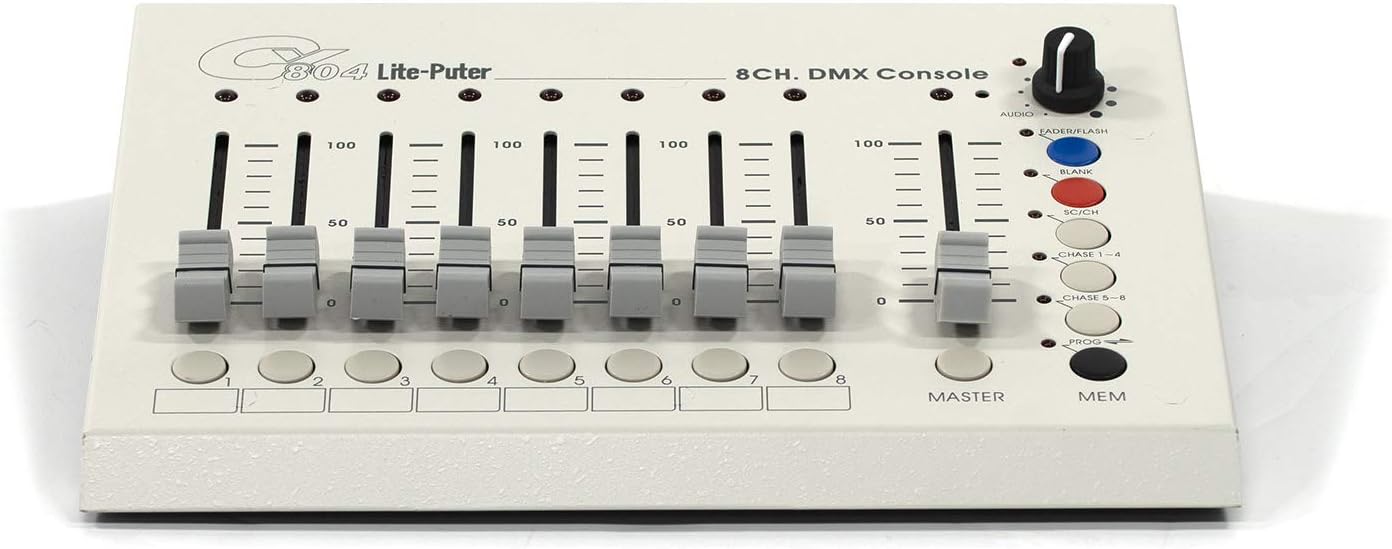
Figure 4.1: Front Panel Layout of the CX-804 Console.
- Channel Faders (1-8): Eight individual sliders to control the DMX output level (0-100%) for each of the 8 channels.
- Channel Buttons (1-8): Buttons corresponding to each channel, typically used for scene programming or selection.
- Master Fader: Controls the overall output level of all active DMX channels.
- MEM баскычы: Used to save or recall programmed scenes.
- PROG баскычы: Activates programming mode for scenes or chasers.
- CHASE 1-4 / CHASE 5-8 Buttons: Selects between different chaser patterns.
- SC/CH Button: Toggles between Scene and Channel mode.
- BLANK Button: Instantly blacks out all DMX output.
- FADERFLASH Button: Momentarily activates the current fader settings.
- AUDIO Knob: Adjusts the sensitivity of the audio input for sound-to-light functions.
4.2 Арткы панелдин туташуулары
The rear panel houses all input and output connections for power, audio, and DMX signals.

Figure 4.2: Rear Panel Connections of the CX-804 Console.
- DC 12V IN: Power input jack for the included DC 12V power adapter.
- ON/OFF которуу: Main power switch for the console.
- AUDIO IN: 1/4-inch (6.35mm) jack for connecting an audio source for sound-to-light synchronization.
- SENSES: Sensitivity adjustment for the audio input.
- DMX OUT: DMX512 output ports (XLR 3-pin and 5-pin, and RJ45) for connecting to DMX lighting fixtures.
5. Орнотуу
5.1 Кубат туташтыруу
- Ensure the console's ON/OFF switch is in the OFF position.
- Connect the provided DC 12V power adapter to the 'DC 12V IN' jack on the rear panel.
- Кубат адаптерин ылайыктуу электр розеткасына сайыңыз.
5.2 DMX туташуу
- Connect a DMX cable (3-pin XLR, 5-pin XLR, or RJ45, depending on your fixtures) from one of the 'DMX OUT' ports on the CX-804 to the DMX IN port of your first DMX lighting fixture.
- Бир нече арматура үчүн, биринчи арматуранын DMX OUT уячасын кийинкисинин DMX IN уячасына туташтырып, аларды чынжыр менен туташтырыңыз.
- Ensure the last fixture in the chain has a DMX terminator installed to prevent signal reflection.
5.3 Audio Input Connection (Optional)
- If using sound-to-light functions, connect an audio source (e.g., mixer output) to the 'AUDIO IN' jack using a 1/4-inch (6.35mm) audio cable.
- Adjust the 'SENSES' knob to fine-tune the audio input sensitivity.
6. Иштөө нускамалары
6.1 Basic DMX Control
- Turn on the console using the ON/OFF switch.
- Ensure the SC/CH button is in Channel mode (LED off).
- жылдырыңыз Мастер Фадер to the desired overall output level.
- Adjust individual Channel Faders (1-8) to control the intensity or specific parameters of your DMX fixtures assigned to those channels.
- басыңыз БАНК button to momentarily black out all output. Release to restore.
- колдонуу FADERFLASH button to momentarily activate the current fader settings.
6.2 Programming and Recalling Scenes
The CX-804 allows you to store up to 8 scenes.
6.2.1 Programming a Scene
- басыңыз ПРОГ button to enter programming mode (PROG LED will illuminate).
- Set the desired lighting levels using the Channel Faders (1-8) жана Мастер Фадер.
- басыңыз MEM баскычы.
- Бирин басыңыз Channel Buttons (1-8) to save the current lighting state to that scene number. The PROG LED will flash to confirm.
- Басыңыз ПРОГ программалоо режиминен чыгуу үчүн кайрадан басыңыз.
6.2.2 Recalling a Scene
- Ensure the console is not in programming mode (PROG LED off).
- басыңыз SC/CH button to switch to Scene mode (SC/CH LED will illuminate).
- Каалаганды басыңыз Channel Button (1-8) to recall the corresponding saved scene.
- тууралаңыз Мастер Фадер to control the overall intensity of the recalled scene.
6.3 Chaser Function
The chaser function allows for dynamic, automated lighting sequences.
- Ensure the console is not in programming mode.
- басыңыз CHASE 1-4 or CHASE 5-8 button to activate a chaser pattern.
- The speed and pattern of the chaser can often be adjusted via internal settings or by the AUDIO knob if in sound-to-light mode. Refer to specific chaser programming details if available in advanced documentation.
- To deactivate the chaser, press the active CHASE button again or select a scene/channel mode.
6.4 Audio Input Control
When an audio source is connected to the 'AUDIO IN' jack, the console can synchronize lighting effects with music.
- Ensure an audio source is connected to the 'AUDIO IN' jack.
- тууралаңыз AUDIO knob to set the sensitivity of the audio input. Higher sensitivity will make the lights react to quieter sounds.
- The chaser function or other programmed effects may respond to the audio input, creating sound-activated lighting.
7. Техникалык тейлөө
7.1 Тазалоо
- Тазалоодон мурун кубат адаптерин ажыратыңыз.
- Use a soft, dry cloth to wipe the exterior of the console.
- Абразивдүү тазалоочу каражаттарды, эриткичтерди же химиялык чачыраткычтарды колдонбоңуз, анткени алар жасалгасына жана ички компоненттерине зыян келтириши мүмкүн.
7.2 Сактоо
- Консолду салкын, кургак жерде, күндүн түз тийген нурларынан жана өтө жогорку температурадан алыс сактаңыз.
- If storing for an extended period, it is recommended to place the unit in its original packaging or a protective case.
8. Кыйынчылыктарды
| Көйгөй | Мүмкүн себеп | Чечим |
|---|---|---|
| Консол күйбөйт. | Power adapter not connected or faulty. Power switch off. | Ensure power adapter is securely connected and plugged into a live outlet. Verify ON/OFF switch is in the ON position. Test with another compatible power adapter if available. |
| No DMX output to fixtures. | Incorrect DMX cabling. Fixtures not addressed correctly. Master fader at zero. BLANK button active. | Check DMX cable connections. Ensure fixtures are set to correct DMX addresses. Raise the Master Fader. Ensure BLANK button is not active. |
| Scenes not recalling or saving. | Incorrect mode (not in Scene mode for recall, not in PROG mode for saving). | For recall, ensure SC/CH LED is illuminated. For saving, ensure PROG LED is illuminated and follow the save procedure correctly. |
| Audio-to-light function not working. | Audio cable not connected. AUDIO knob set too low. No audio signal. | Verify audio cable connection. Increase the AUDIO knob sensitivity. Check the audio source for output. |
9. Техникалык шарттар
| Өзгөчөлүк | Деталь |
|---|---|
| Модел | CX-804 |
| Бренд | Ikan (Manufactured by Lite-Puter) |
| Контролдоо протоколу | Стандарттык DMX 512 |
| DMX каналдары | 8 Dimming Control Sliders |
| Сахналар | 8 Сахналар |
| Функциялар | Chaser function, Audio input |
| Аудио киргизүү | Yes (1/4-inch jack) |
| Power Input | DC 12V |
| Элемент Салмагы | 3.3 фунт |
| ASIN | B08NKC5L5J |
10. Кепилдик жана колдоо
Кепилдик жөнүндө маалымат жана техникалык колдоо алуу үчүн, сатып алууңуз менен кошо берилген документтерди караңыз же сатуучуга же өндүрүүчүгө түздөн-түз кайрылыңыз. Кепилдик боюнча дооматтар үчүн сатып алууну тастыктаган документти сактап коюңуз.