
Introduction
This manual provides detailed instructions for the safe and efficient operation of your KORAD KWR103 Programmable DC Power Supply. Please read this manual thoroughly before using the device to ensure proper functionality and to prevent damage or injury. The KWR103 is a versatile programmable DC power supply offering a wide range of voltage and current outputs, including 60V/15A/300W, designed for various testing and application needs.
Маанилүү коопсуздук маалыматы
Электр тогуна урунууну, жаракат алууну же шайманга зыян келтирүүнү алдын алуу үчүн ар дайым төмөнкү коопсуздук чараларын сактаңыз:
- Ensure the power supply is connected to a grounded AC outlet with the correct voltage.
- Аппаратты нымдуу жерде иштетпеңиз же damp шарттар.
- в ачпагылаasing; ичинде колдонуучу тейлей турган тетиктер жок. Тейлөөнү квалификациялуу адистерге тапшырыңыз.
- Verify correct polarity and voltage/current settings before connecting to any load.
- Чыгуу терминалдарын кыска туташуудан сактаңыз.
- Туташтырууларды жасоодон же алмаштыруудан мурун электр кубатынан ажыратыңыз.
- Ашыкча ысып кетүүнүн алдын алуу үчүн аппараттын айланасында жетиштүү желдетүүнү камсыз кылыңыз.
Продукт бүттүview
The KORAD KWR103 is a high-precision programmable DC power supply. Familiarize yourself with its components:
Front Panel

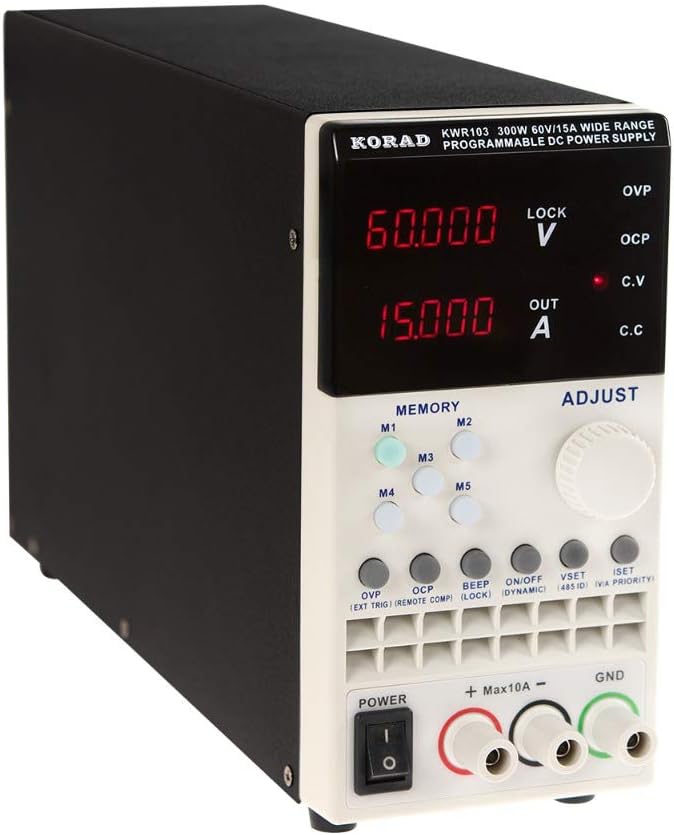
1-сүрөт: Front panel of the KORAD KWR103, showing the display, control buttons, adjustment knob, and output terminals.
- Дисплей: Digital readouts for voltage (V) жана ток (A).
- Memory Buttons (M1-M5): For saving and recalling preset voltage жана учурдагы маанилер.
- Тууралоо баскычы: Rotary encoder for precise adjustment of voltage жана ток.
- Функция баскычтары: OVP, OCP, BEEP, ON/OFF, VSET, ISET, V/A PRIORITY for various settings and controls.
- Чыгуу терминалдары: Positive (+), Negative (-), and Ground (GND) connections. Max 10A output directly from front terminals.
- Кубат которгучу: Түзмөктүн негизги кубаттуулугун башкаруу.
Арткы панель

2-сүрөт: Rear panel of the KORAD KWR103, featuring power input, communication ports, and sense terminals.
- AC кубаттуулугун киргизүү: For connecting the main power cord.
- Страховка кармагыч: Коргоочу сактагычты камтыйт.
- Sense Terminals (SENSE TRIG IN+): For remote sensing to compensate for voltage drop across load wires.
- RS485 Terminals: For RS485 communication.
- USB порт: For computer control and communication.
- RS232 порт: Сериялык байланыш үчүн.
- LAN порту: For network communication and control.
Камтылган аксессуарлар
3-сүрөт: The KORAD KWR103 power supply shown with its standard accessories, including power cord, output cables, USB cable, RS232 cable, and software CD.
Your KWR103 package typically includes:
- KORAD KWR103 Programmable DC Power Supply Unit
- AC Power Cord
- Output Test Leads (Red/Black)
- USB байланыш кабели
- RS232 байланыш кабели
- Software CD (for PC control)
- Колдонуучунун Колдонмосу (бул документ)
Жайгашуу
- Пакеттен чыгаруу: Кубат булагын жана бардык аксессуарларды таңгактан этияттык менен алып салыңыз. Бузулган жерлерин текшериңиз.
- Жайгашкан жери: Place the unit on a stable, level surface with adequate ventilation. Ensure no vents are obstructed.
- Кубат туташуу:
- Алдыңкы панелдеги кубат которгучу ӨЧҮРҮҮ абалында экенин текшериңиз.
- Connect the supplied AC power cord to the AC power input on the rear panel.
- Plug the other end of the AC power cord into a grounded electrical outlet.
- Туташуу жүктөө:
- Connect the red output test lead to the positive (+) terminal and the black output test lead to the negative (-) terminal on the front panel.
- Connect the other ends of the test leads to your load, ensuring correct polarity. For currents exceeding 10A, use the rear output terminals (if available on your specific model) or thicker gauge wires directly to the internal terminals, following safety guidelines.
- Так көлөм үчүнtage regulation at the load, especially with long cables or high currents, connect the remote sense wires (SENSE TRIG IN+) from the rear panel directly across your load.
- Communication Interface Connection (Optional):
- USB: Connect the USB cable from the rear panel to your computer.
- 232: Connect the RS232 cable from the rear panel to your computer's serial port or a USB-to-serial adapter.
- LAN: Connect an Ethernet cable from the rear panel to your network router or switch.
- Install the provided software drivers and control application from the included CD or manufacturer's webсайт.
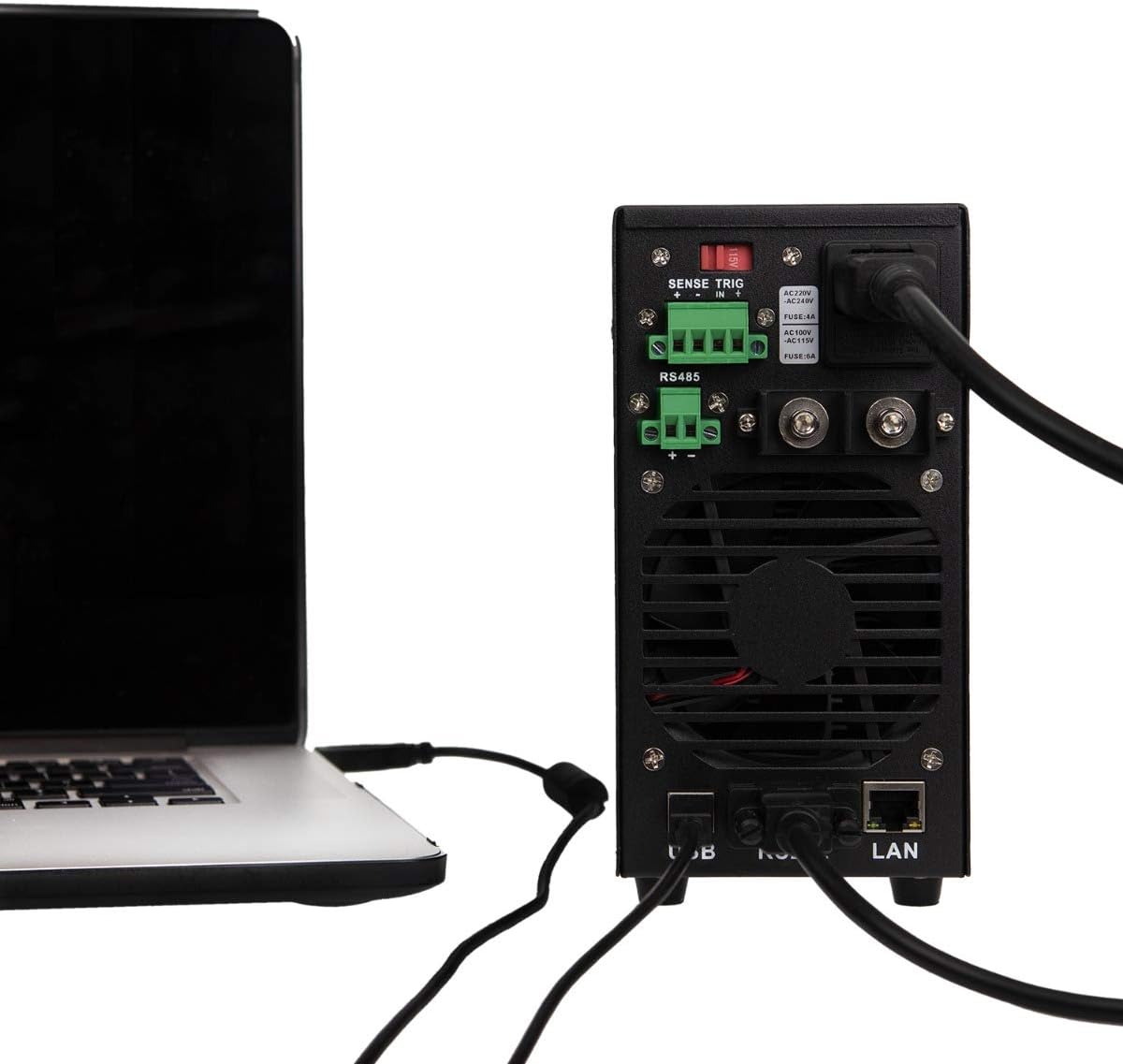
4-сүрөт: Example of the KORAD KWR103 rear panel connected to a laptop, illustrating USB and LAN connections for remote control.
Иштөө нускамалары
- Күйгүзүү: Flip the power switch on the front panel to the ON position. The display will illuminate.
- Setting Voltage жана Учурдагы:
- басыңыз VSET том киргизүү үчүн баскычtage жөндөө режими.tage display will flash.
- айлантыңыз Тууралоо баскычы каалаган үн көлөмүн орнотуу үчүнtage. Press the knob to move between digits for fine adjustment.
- басыңыз ISET button to enter current setting mode. The current display will flash.
- айлантыңыз Тууралоо баскычы to set the desired current limit. Press the knob to move between digits.
- Басыңыз VSET or ISET again to exit setting mode, or wait a few seconds for it to exit automatically.
- Чыгууну башкаруу:
- Тtage and current, press the КҮЙГҮЗҮҮ/ӨЧҮРҮҮ button to enable the output. The "OUT" indicator will light up.
- Басыңыз КҮЙГҮЗҮҮ/ӨЧҮРҮҮ again to disable the output.
- Memory Functions (M1-M5):
- Сактоо орнотуулары: Каалаган томду коюңузtage and current. Press and hold one of the M1-M5 buttons until a beep sounds, indicating the settings are saved.
- Жөндөөлөрдү кайра чакыртуу: баскычтарынын бирин кыскача басыңыз M1-M5 buttons to recall the saved settings.
- Voltage Protection (OVP) and Over Current Protection (OCP):
- басыңыз OVP button to set the over-voltage protection limit. Use the Тууралоо баскычы.
- басыңыз OCP button to set the over-current protection limit. Use the Тууралоо баскычы.
- These functions automatically shut down the output if the set limits are exceeded, protecting the load and the power supply.
- Алыстан башкаруу:
- Once the communication drivers and software are installed, you can control the power supply via USB, RS232, or LAN.
- Refer to the software manual for detailed instructions on using the PC control application.
Техникалык тейлөө
- Тазалоо: Тазалоодон мурун электр кубатын розеткадан сууруп алыңыз. Сыртын сүртүү үчүн жумшак, кургак чүпүрөктү колдонуңуз. Абразивдүү тазалоочу каражаттарды же эриткичтерди колдонбоңуз.
- Вентиляция: Ensure the ventilation openings are clear of dust and debris. Periodically clean the fan intake/exhaust areas.
- Сактагычты алмаштыруу: If the unit does not power on, the fuse may need replacement.
- AC кубат шнурын ажыратыңыз.
- Арткы панелдеги сактагыч кармагычты табыңыз.
- Carefully remove the fuse holder and replace the fuse with one of the same type and rating (e.g., FUSE: 4A for AC220V, FUSE: 6A for AC110V).
- Reinsert the fuse holder and reconnect the AC power.
Проблемаларды чечүү
| Көйгөй | Мүмкүн себеп | Чечим |
|---|---|---|
| Түзмөк күйбөйт. | AC кубаты жок; Сактагыч күйүп кеткен; Кубат өчүк. | Check AC power connection; Replace fuse (see Maintenance); Ensure power switch is ON. |
| Чыгаруунун көлөмү жокtagе/ток. | Output disabled; OVP/OCP triggered; Incorrect settings; Loose connections. | Press ON/OFF button; Check OVP/OCP settings; Verify voltage/current settings; Secure output connections. |
| Тtage/Current unstable. | Poor load connection; Remote sense not used or incorrectly connected; Overheating. | Check load connections; Use remote sense for critical applications; Ensure adequate ventilation. |
| Пульт иштебей жатат. | Incorrect cable; Driver not installed; Software configuration error. | Verify correct USB/RS232/LAN cable; Install drivers; Check software settings and communication parameters. |
Техникалык шарттар
| Параметр | Нарк |
|---|---|
| Модел | KWR103 |
| Output Voltage | 0-60V |
| Output Current | 0-15A |
| Чыгуу күчү | 300 Вт |
| Тtage Resolution | 1мВ |
| Учурдагы токтом | 1мА |
| Interfaces | LAN, USB, RS232, RS485 |
| Коргоо функциялары | OVP (Ашыкча томtage Protection), OCP (Over Current Protection), OTP (Over Temperature Protection) |
| Элемент Салмагы | 11.29 фунт (болжол менен 5.12 кг) |
| Пакеттин өлчөмдөрү | 16.14 x 11.22 x 7.68 дюйм (болжол менен 41 x 28.5 x 19.5 см) |
| Муздатуу ыкмасы | Аба |
Кепилдик жана колдоо
For warranty information and technical support, please refer to the documentation included with your purchase or contact KORAD customer service. Keep your purchase receipt as proof of purchase for warranty claims.
For the latest drivers, software, and additional support resources, please visit the official KORAD webсайт.