
1. Киришүү
The Carrera RC Mario Kart Yoshi Quad (Model 370200997X) is a remote-controlled vehicle designed for users aged 6 and up. This manual provides essential information for the safe and optimal use of your RC Yoshi Quad, ensuring an enjoyable experience. Please read all instructions carefully before operating the product.
2. Кутуда эмне бар
Бардык компоненттерди кылдаттык менен ачып, төмөнкү нерселердин камтылганын текшериңиз:
- Carrera RC Yoshi Quad Vehicle
- Алыстан башкаруу
- 3.2V 700 mAh LiFePo4 Battery (for vehicle)
- USB заряддоо кабели
- Instruction Manual

Image: The Carrera RC Mario Kart Yoshi Quad shown in its original retail packaging, indicating included components.
3. Орнотуу
3.1. Унаанын аккумуляторун заряддоо
Before first use, fully charge the vehicle's 3.2V 700 mAh LiFePo4 battery. The charging process typically takes approximately 50 minutes.
- USB заряддоо кабелин унаанын заряддоо портуна туташтырыңыз.
- USB кабелинин экинчи учун шайкеш келген USB кубат булагына (мисалы, компьютер, USB адаптери, кубат банкы) сайыңыз.
- The charging indicator light on the vehicle or cable will show the charging status (refer to specific indicator behavior in the quick start guide if available).
- Once charging is complete, disconnect the cable.

Image: The Yoshi Quad vehicle, ready for battery charging via its USB cable.
3.2. Алыстан башкаруунун батареясын орнотуу
The remote control requires batteries for operation. Please ensure you use the correct type and polarity.
- Пульттун артындагы батарея отсегин табыңыз.
- Батарея уясынын капкагын ачыңыз.
- Insert the required batteries (e.g., AA or AAA, typically 2x) according to the polarity markings (+/-).
- Батарея уясынын капкагын бекем жабыңыз.
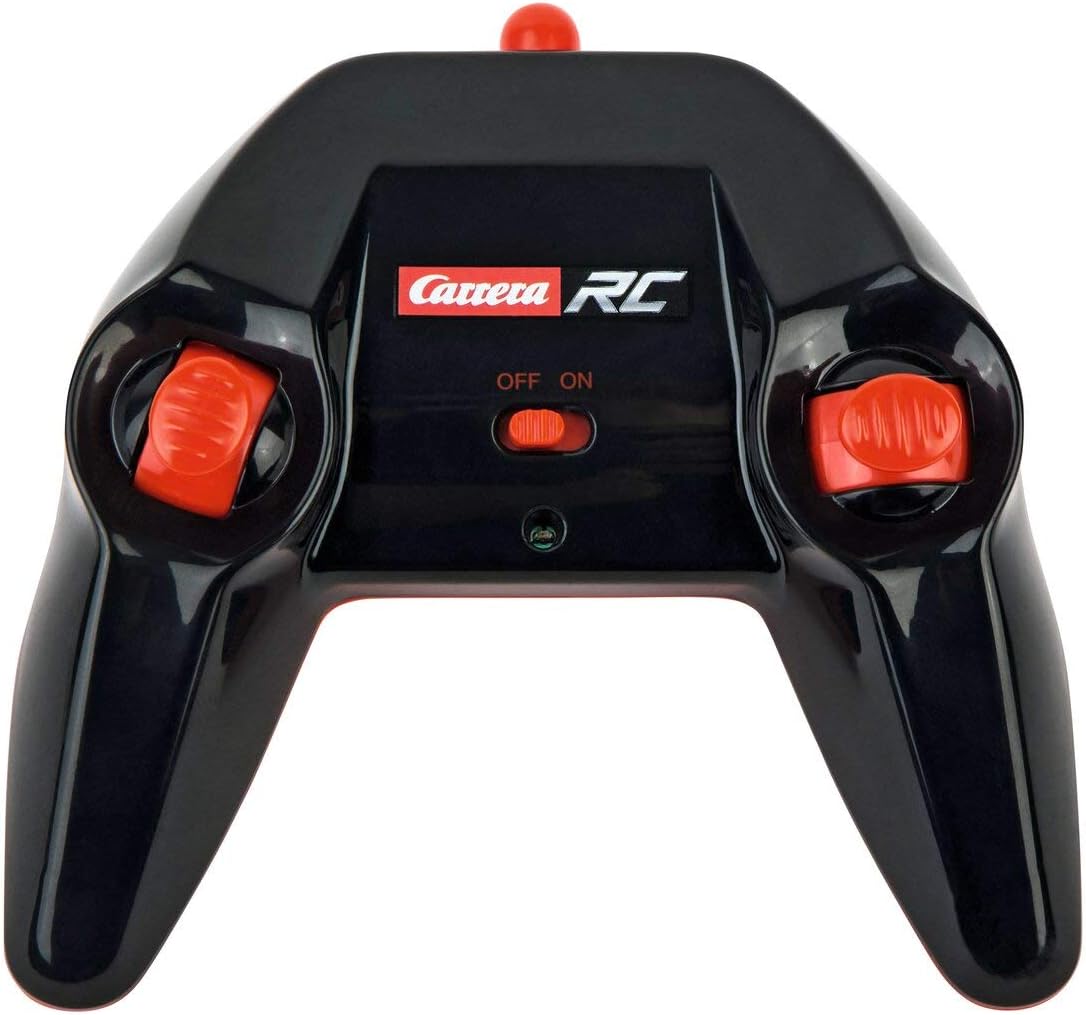
Image: The Carrera RC remote control, showing its design and controls.
3.3. Pairing the Vehicle and Remote Control
To establish a connection between the vehicle and the remote control, follow these steps:
- Ensure both the vehicle and the remote control have fresh or fully charged batteries.
- Turn on the vehicle using its power switch.
- Алыстан башкаруу пультун анын кубат баскычын колдонуп күйгүзүңүз.
- The vehicle and remote control should automatically pair. A successful connection is usually indicated by a solid light on both devices (refer to your quick start guide for specific light indicators).
Video: This video demonstrates the unboxing, battery installation, and initial pairing process for the Carrera RC Mario Kart Yoshi Quad.
4. Иштөө нускамалары
Once paired, you can begin operating your Carrera RC Yoshi Quad.
- Алдыга артка: Use the throttle trigger or joystick on the remote control to move the vehicle forward or backward.
- Башкаруу: Use the steering wheel or directional controls on the remote control to turn the vehicle left or right.
- Ылдамдыгы: The Yoshi Quad can reach speeds of up to 9 km/h. Adjust your control input for desired speed.
- Диапазон: Operate the vehicle within the specified range of the remote control to maintain connection and avoid loss of control.
Коопсуздук чаралары:
- Always operate in open areas, away from people, pets, and obstacles.
- Суунун жанында же нымдуу шарттарда иштебеңиз.
- Avoid operating on public roads or near traffic.
- Supervise younger children during operation.
5. Техникалык тейлөө
5.1. Тазалоо
To maintain the appearance and functionality of your RC Yoshi Quad:
- Wipe the vehicle and remote control with a soft, dry cloth after each use.
- Do not use harsh chemicals or solvents, as these can damage the plastic.
- Avoid getting water into electronic components.
5.2. Батареяга кам көрүү жана сактоо
- Эгерде алыстан башкаруу пульту көпкө чейин колдонулбаса, ар дайым батареяларды алып салыңыз.
- Store the vehicle's LiFePo4 battery in a cool, dry place, away from direct sunlight and extreme temperatures.
- Батареяны ашыкча заряддабаңыз же толугу менен бошотпоңуз.
6. Кыйынчылыктарды
If you encounter issues with your RC Yoshi Quad, refer to the following common problems and solutions:
| Көйгөй | Мүмкүн себеп | Чечим |
|---|---|---|
| Унаа кыймылдабайт. | Low or uncharged vehicle battery. Алыстан башкаруу пультунун батареялары түгөнгөн же туура эмес орнотулган. Унаа жана пульт жупташтырылган эмес. | Унаанын аккумуляторун заряддоо. Replace/install remote control batteries correctly. Re-pair vehicle and remote control. |
| Poor control range or intermittent connection. | Башка RC түзмөктөрүнөн же электроникадан келген тоскоолдуктар. Натыйжалуу диапазондон тышкары иштөө. Батареялары аз. | Башка жерге көчүңүз. Operate closer to the vehicle. Батареяларды толтуруңуз/алмаштырыңыз. |
| Унаа жай же туруксуз кыймылдайт. | Унаанын аккумулятору аз. Дөңгөлөктөрдөгү/октордогу тоскоолдуктар. | Унаанын аккумуляторун заряддоо. Check and clear any obstructions. |
7. Техникалык шарттар
| Бренд | Carrera |
| Модель аты | 370200997X |
| Каарман | Yoshi |
| Унаа түрү | төрт |
| Материал | Пластик |
| Түс | Multicolor (predominantly Green) |
| Жаш аралыгы (сүрөттөө) | 6+ жыл |
| Максималдуу ылдамдык | Саатына 9 километр |
| Power Source | Батарея менен иштейт |
| Vehicle Battery Type | 1 Lithium-ion (3.2V 700 mAh LiFePo4) - included |
| Заряддоо убактысы | Болжол менен 50 мүнөт |
| Иштөө убактысы | 30 мүнөткө чейин |
| Алыстан башкаруу түрү | Radio Control (2.4 GHz) |
| Өлчөмдөрү (пункт) | 36.5 x 20.5 x 23 сантиметр |
| Салмагы (пункт) | 1.06 килограмм |
| Өзгөчө өзгөчөлүк | Жаркылдаган жарык |
| Келип чыккан өлкө | Кытай |
8. Кепилдик жана колдоо
8.1. Өндүрүүчүнүн Кепилдиги
This Carrera RC product is covered by a 2 жылдык өндүрүүчүнүн кепилдиги. Сураныч, кепилдик дооматтар үчүн сатып алуу далилиңизди сактап коюңуз. Кепилдик нормалдуу колдонуудагы материалдардагы жана жасалгадагы кемчиликтерди камтыйт.
8.2. Кардарларды колдоо кызматы
For technical assistance, spare parts, or warranty inquiries, please contact Carrera customer support. Refer to the contact information provided on the product packaging or the official Carrera webсайт.