
1. Продукт бүтүп калдыview
The Optoma X400LVe is a professional XGA projector designed for classrooms, meeting rooms, and training spaces. It delivers bright, clear images with 4,000 ANSI lumens and a 25,000:1 contrast ratio. Key features include flexible installation options, an integrated speaker, and a long lamp жашоо.
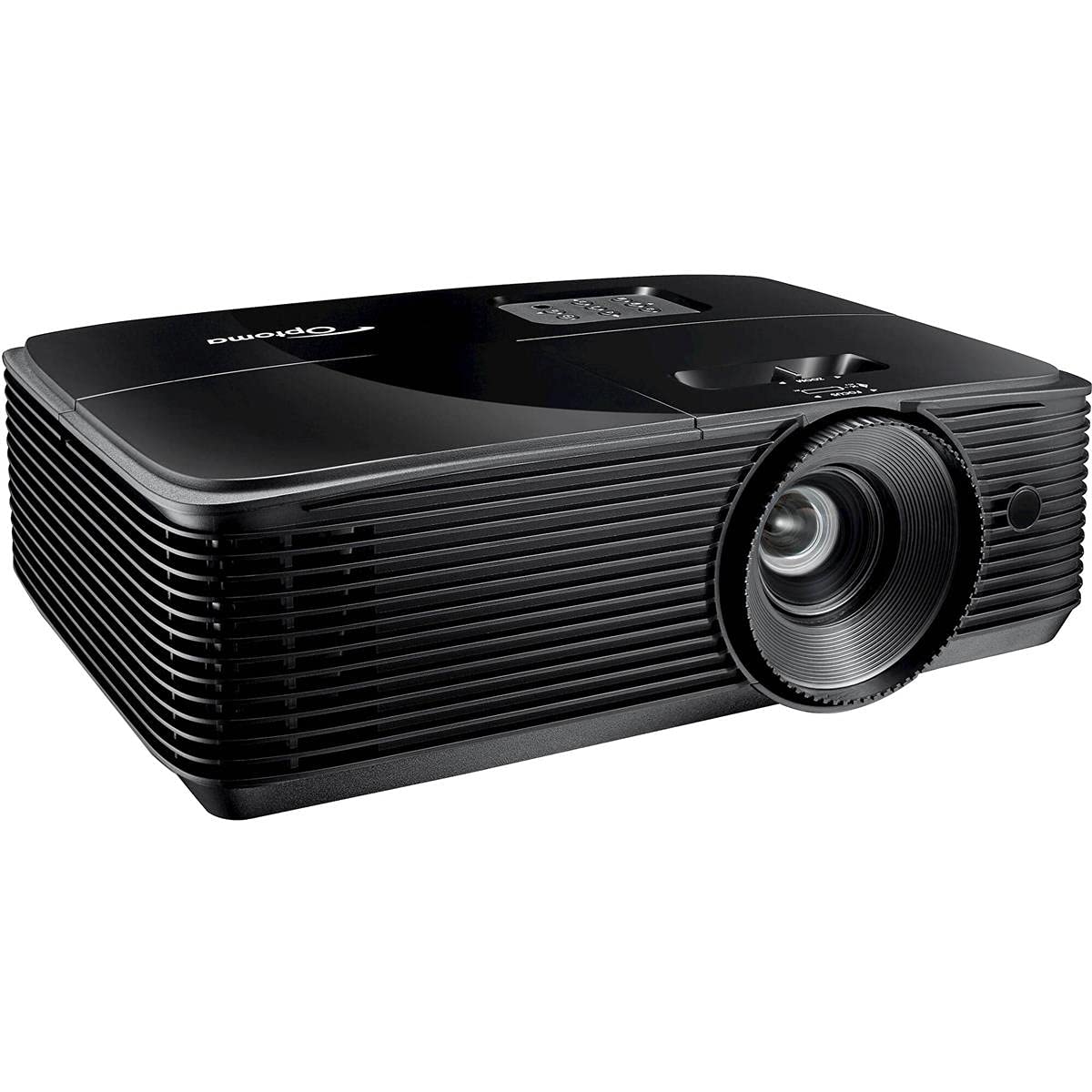
Сүрөт 1: Алдыңкы view of the Optoma X400LVe Projector.
Негизги өзгөчөлүктөрү:
- Жогорку жарыктык: 4,000 ANSI lumens for clear images in well-lit environments.
- XGA токтому: Native 1024 x 768 resolution for sharp text and graphics.
- Жогорку контраст катышы: 25,000:1 for vibrant colors and deep blacks.
- Ийкемдүү туташуу: HDMI v1.4a, VGA, Composite, Audio-in/out, USB-A, RS232.
- Узун Лamp Жашоо: Up to 15,000 hours in Eco+ mode.
- Интегралдык спикер: 10-watt speaker for audio without external equipment.
- Оңой орнотуу: Vertical keystone correction (±40°) and 1.1x zoom for flexible placement.
2. Орнотуу жана орнотуу
2.1 Проекторду ачуу
Carefully remove the projector and all accessories from the packaging. Ensure all components listed in the packing list are present.
2.2 Проекторду жайгаштыруу
The Optoma X400LVe can be placed on a tabletop, mounted on the ceiling (front or rear projection), or used for front or rear projection. Consider the projection distance and screen size for optimal viewing.
- Проекциялык аралык: 3.9 feet to 46.9 feet.
- Проекциялык экрандын өлчөмү: 27.7 дюймдан 304.4 дюймга чейин.

Figure 2: Optoma X400LVe dimensions and connectivity ports.
2.3 Түзмөктөрдү туташтыруу
Connect your source devices (laptops, media players, gaming consoles) to the projector using the appropriate ports. The projector offers a variety of input options:
- HDMI v1.4a: Санариптик видео жана аудио үчүн.
- VGA (Input & Output): Аналогдук видео үчүн.
- Композиттик видео: Стандарттык сапаттагы видео үчүн.
- Аудио кирүү (3.5 мм): Тышкы аудио киргизүү үчүн.
- Аудио чыгуу (3.5 мм): For connecting to external speakers.
- USB-A (5V / 1.0 Amp): For powering devices like streaming sticks.
- 232: Компьютер же башкаруу системасы аркылуу проекторду башкаруу үчүн.

Figure 3: Rear panel with connectivity ports.
2.4 Кубат туташтыруу
Connect the power cord to the projector's AC input and then to a power outlet (AC input 100-240V, 50-60Hz).
3. Проекторду иштетүү
3.1 Күйгүзүү/өчүрүү
- Күйгүзүү: Press the power button on the projector's control panel or the remote control.
- Өчүрүү: Press the power button twice. The projector will enter cooling mode before shutting down completely.

Figure 4: Projector control panel and lens adjustments.
3.2 Сүрөттү тууралоо
- Фокус: Объективдеги фокус шакекти сүрөт курч болгонго чейин айлантыңыз.
- Чоңойтуу: Сүрөттүн өлчөмүн өзгөртүү үчүн линзанын масштабдуу шакегин тууралаңыз.
- Негизги ташты оңдоо: Use the 'Keystone+' and 'Keystone-' buttons on the remote control or the projector's control panel to correct vertical image distortion (±40°).
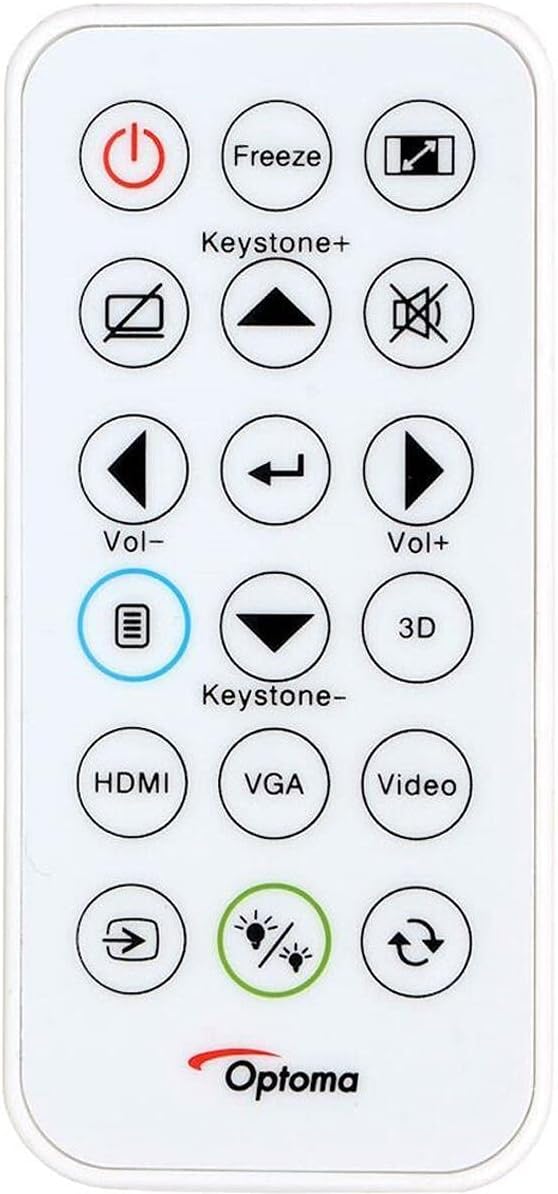
Figure 5: Remote control for the Optoma X400LVe Projector.
3.3 Киргизүү булагын тандоо
Press the 'Source' button on the remote control or projector to cycle through available input sources (HDMI, VGA, Composite). Dedicated input buttons may also be available on the remote.
3.4 Аудио башкаруу
Adjust the volume using the 'Vol+' and 'Vol-' buttons on the remote control. The integrated 10-watt speaker provides sufficient audio for most environments.
4. Техникалык тейлөө
4.1 Лamp Жашоо
Проектор лamp has an estimated life of up to 15,000 hours in Eco+ mode. Actual lamp life may vary depending on usage and environmental conditions. Replace the lamp when its brightness significantly diminishes or if the lamp индикатор жарыгы күйөт.

Figure 6: Eco+ mode for extended lamp жашоо.
4.2 Тазалоо
- Объектив: Use a soft, lint-free cloth and lens cleaning solution. Avoid abrasive materials.
- Casing: Проекторду сүртүңүз casing жумшак менен, гamp кездеме. Катуу химиялык заттарды колдонбоңуз.
- Аба желдеткичтери: Regularly clean the air vents to ensure proper airflow and prevent overheating.
5. Кыйынчылыктарды
5.1 Сүрөт көрсөтүлгөн жок
- Проектордун күйгүзүлгөнүн жана lamp күйүп турат.
- Киргизүү булагы туура тандалганын жана булак түзмөгү активдүү экенин текшериңиз.
- Проектор менен баштапкы аппараттын ортосундагы бардык кабелдик байланыштарды текшериңиз.
- Adjust focus and zoom settings.
5.2 Сүрөт бурмаланган же бүдөмүк
- Линзанын фокус шакегин тууралаңыз.
- Use keystone correction to fix trapezoidal distortion.
- Ensure the projector is placed on a stable, flat surface or securely mounted.
5.3 Проектордун ысып кетиши
- Аба желдеткич тешиктери ачык жана тыгылып калбаганын текшериңиз.
- Проекторду жакшы желдетилген жерде иштетиңиз.
- If operating above 5,000 feet, manually switch to high-altitude mode (refer to the on-screen display menu).
5.4 Аудио жок
- Проектордогу жана булак түзмөгүндөгү үн деңгээлин текшериңиз.
- Ensure audio cables are correctly connected (if using analog audio-in).
- If using HDMI, verify the source device is sending audio through HDMI.
6. Техникалык шарттар
| Өзгөчөлүк | Спецификация |
|---|---|
| Бренд | Optoma |
| Модель аты | X400LVe |
| Дисплей технологиясы | DLP |
| Native Resolution | XGA (1024 x 768) |
| Maximum Resolution | UXGA (1600 x 1200) |
| Жарыктык | 4000 ANSI челинин |
| Контраст катышы | 25,000:1 |
| Аспект катышы | 4:3 (Native), 16:9 Compatible |
| Жарык булагы түрү | 203 Вт Лamp |
| Жарык булагы Life | 15,000/12,000/10,000/6,000 hours (Eco+/Dynamic/Eco/Bright) |
| Ыргытуу катышы | 1.94 – 2.15:1 |
| Чоңойтуу | 1.1x Кол |
| Keystone Correction | ±40° Вертикал |
| Integrated Speaker | 10 Вт |
| Байланыш | HDMI v1.4a, VGA (in/out), Composite, Audio-in/out, USB-A (5V/1A), RS232 |
| Ызы-чуу деңгээли | 27дБ |
| Өлчөмдөрү (W x Y x D) | 12.4″ x 3.9″ x 9.6″ |
| Салмагы | 6.7 фунт |
| Электр камсыздоо | AC input 100-240V, 50-60Hz |
| Коопсуздук өзгөчөлүктөрү | Коопсуздук тилкеси, Кенсингтон кулпусу, паролду коргоо, баскычтоп кулпусу |
7. Кепилдик жана колдоо
7.1 Кепилдик маалыматы
The Optoma X400LVe projector comes with a 1 жылдык чектелген тетиктер жана жумушчу күчү кепилдиги. The projector lamp is covered by a separate 90-day lamp кепилдик. Кепилдик дооматтары үчүн сатып алганыңыздын далилин сактап коюңуз.
7.2 Кардарларды колдоо
For technical assistance, troubleshooting, or warranty inquiries, please contact Optoma customer support. Visit the official Optoma webбайланыш маалыматы жана кошумча ресурстар үчүн сайт.