
Introduction
Thank you for choosing the BONTEC GDM01 Single Monitor Arm. This manual provides essential information for the safe and correct installation, operation, and maintenance of your monitor arm. Please read these instructions carefully before assembly and keep them for future reference.
The BONTEC GDM01 is designed to support LCD LED screens ranging from 13 to 27 inches, with a maximum weight capacity of 6.5 kg (14.3 lbs). It features a gas spring for smooth height adjustment and offers full motion flexibility, including tilt, swivel, and rotation, to achieve an ergonomic viewпозиция.
Коопсуздук маалыматы
- Монтаждоодон мурун бардык компоненттер бар экенин жана бузулбаганын текшериңиз. Бузулган тетиктерди колдонбоңуз.
- 6.5 кг (14.3 фунт) максималдуу салмактан ашпаңыз.
- Монтаждоо бети (үстөл) монитордун колу менен мониторуңуздун биргелешкен салмагын көтөрө тургандай бекем болушун текшериңиз.
- Tighten all screws firmly but do not overtighten. Overtightening can damage the product.
- Always use two people for heavy lifting or when attaching the monitor to the arm.
- Keep children away from small parts that could be swallowed.
- If you have any questions or encounter difficulties, contact customer support.
Пакеттин мазмуну
Сураныч, бардык бөлүктөрү пакетиңизге камтылганын текшериңиз:
- Монитор курал ассамблеясы
- Desk Clamp Компонент
- Grommet Mount Component
- VESA плитасы
- Аппараттык комплект (бурамалар, шайбалар, алты бурчтуу ачкычтар)
- Instruction Manual
Орнотуу жана орнотуу
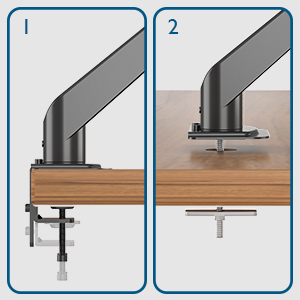
The BONTEC GDM01 monitor arm offers two installation methods: desk clamp жана тешикчелерди бекитүүчү бекиткич.
Method 1: Desk Clamp Орнотуу
- Cl тиркеңизamp Негизги: C-clamp to the edge of your desk. Ensure the desk thickness is between 10mm and 83mm. Tighten the clamp screw until the base is firmly attached to the desk.
- Колду бекитүү: Slide the monitor arm assembly onto the pole of the clamp base. Secure it with the provided screws or locking mechanism.
- Монитор үчүн VESA пластинкасын тиркөө: Align the VESA plate with the mounting holes on the back of your monitor (75x75mm or 100x100mm). Use the appropriate screws from the hardware kit to secure the plate to the monitor.
- Мониторду куралга орнотуу: Carefully slide the monitor (with VESA plate attached) onto the arm's mounting head. The open top slots on the VESA plate make this process easier. Ensure it clicks into place or is secured with the locking screw.


2-ыкма: Сапты орнотуу
- Prepare Grommet Hole: Ensure your desk has a grommet hole. If not, you may need to drill one (consult a professional if unsure).
- Insert Grommet Base: Place the grommet base through the hole. Secure it from underneath the desk with the provided plate and nut.
- Колду бекитүү: Slide the monitor arm assembly onto the pole of the grommet base. Secure it with the provided screws or locking mechanism.
- Монитор үчүн VESA пластинкасын тиркөө: Align the VESA plate with the mounting holes on the back of your monitor (75x75mm or 100x100mm). Use the appropriate screws from the hardware kit to secure the plate to the monitor.
- Мониторду куралга орнотуу: Carefully slide the monitor (with VESA plate attached) onto the arm's mounting head. Ensure it clicks into place or is secured with the locking screw.
Монитор рычагын иштетүү жана жөндөө
The BONTEC GDM01 monitor arm offers extensive adjustability for optimal viewing comfort and ergonomics.
Tension Adjustment (Gas Spring)
The built-in gas spring allows for smooth and effortless height adjustment. The tension needs to be adjusted according to the weight of your monitor.
- If the monitor arm sags or cannot hold the monitor's weight, turn the bolt clockwise to increase gas spring tension.
- If the monitor arm is too stiff or difficult to move downwards, turn the bolt counter-clockwise to decrease tension.

Бийиктигин тууралоо
Once the gas spring tension is correctly set, you can easily raise or lower your monitor to the desired height. The arm allows for a height adjustment range from 155mm to 400mm.

Эңкейтүү, айлануу жана айлануу
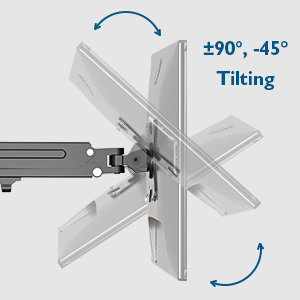
- Россия: Adjust the monitor tilt from -45° to +90° to reduce glare and find your preferred viewбурч.
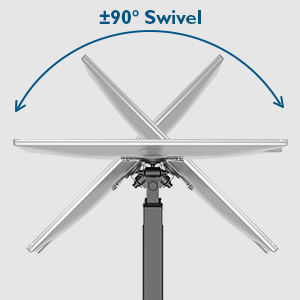
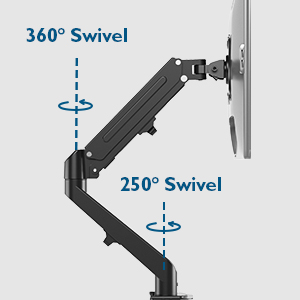
- Айлануучу: The arm allows for 180° swivel at the base and 250° swivel at the joint, enabling you to share your screen or change viewбагыт.
- Айлануу: Rotate your monitor 360° for landscape or portrait orientation.
Кабель башкаруу
The integrated cable management system helps keep your workspace tidy. Route your monitor cables along the arm and through the designated clips or channels to conceal them.

Техникалык тейлөө
- Бардык бурамалар менен байланыштарды дайыма текшерип, алар бекем бойдон калууда.
- Монитордун колун жумшак менен тазалаңыз, damp кездеме. Абразивдүү тазалагычтардан же эриткичтерден качыңыз.
- Do not attempt to disassemble the gas spring mechanism.
Проблемаларды чечүү
| Көйгөй | Мүмкүн себеп | Чечим |
|---|---|---|
| Монитордун колу салбырап кетет же өйдө турбайт. | Газ пружинанын чыңалуусу монитордун салмагы үчүн өтө төмөн. | Increase gas spring tension by turning the adjustment bolt clockwise with the provided Allen key. |
| Монитордун колу кыймылдоо үчүн өтө катуу. | Газ пружинасы өтө жогору тартылып жатат. | Decrease gas spring tension by turning the adjustment bolt counter-clockwise with the provided Allen key. |
| Колуңуздун термелүүсүн байкаңыз. | VESA plate screws or arm connection screws are loose. | Ensure all VESA plate screws and arm connection screws are securely tightened. |
| Үстөл clamp туруктуу эмес. | Clamp not tightened sufficiently or desk surface is uneven. | Үстөлдү кайра бекемдеңизamp. Ensure the desk surface is flat and stable. Consider using the grommet mount if the clamp жараксыз. |
Техникалык шарттар
- Модел: GDM01
- Материал: Эритме болот
- Экрандын өлчөмү шайкештиги: 13 - 27 дюйм
- Салмак сыйымдуулугу: 6.5 кг (14.3 фунт)
- VESA шайкештиги: 75x75мм, 100x100мм
- Бийиктикти жөндөө диапазону: 155 мм - 400 мм
- Колду узартуу: 525 мм чейин
- Жантайма диапазону: -45°тан +90°ка чейин
- Айлануу диапазону: 180° (base), 250° (joint)
- Айлануу: 360°
- Desk Clamp Калыңдыгы: 10 мм - 83 мм
Кепилдик жана колдоо
BONTEC products are designed for durability and performance. For warranty information or technical support, please refer to the contact details provided with your purchase or visit the official BONTEC website. Please have your model number (GDM01) and purchase details ready when contacting support.
Өндүрүүчү: BONTEC