
1. Киришүү
The Tycon TPSC2440NMPPT is an advanced Maximum Power Point Tracking (MPPT) solar charge controller designed for efficient battery charging from solar panels. It automatically adjusts to 12V or 24V battery systems and supports various battery types including Flooded, AGM, GEL, and Lithium, with a customizable USER setting. This controller features an integral LCD display for monitoring key system parameters.
2. Коопсуздук нускамалары
Please read and understand all instructions before installation and operation. Failure to follow these instructions may result in electric shock, fire, or severe injury.
- Бардык зымдар туура поляризацияланганын жана бекем туташтырылганын текшериңиз.
- Do not disassemble or attempt to repair the controller. Refer to qualified service personnel.
- Контроллерди күйүүчү материалдардан жана жегич газдардан алыс, жакшы желдетилген жерге орнотуңуз.
- Always disconnect the battery and solar panel before installing or moving the controller.
- Орнотуу учурунда тиешелүү жеке коргонуу шаймандарын (ЖКК) кийиңиз.
- The controller is designed for indoor use or protected outdoor environments (IP32 rating). Avoid direct exposure to water.
3. Продукт бүтүп калдыview
The TPSC2440NMPPT controller is equipped with several features to optimize solar charging and battery management:
- MPPT технологиясы: Maximizes power harvest from solar panels.
- Auto-Ranging Voltage: Compatible with 12V or 24V battery arrays.
- Көп режимдүү жүктөө операциясы: Offers 5 selectable modes for load control.
- Soft Start Load Output: Powers high capacitive loads safely.
- Automatic Battery Equalization: Performs 30-day equalization for optimal battery health.
- Conformal Coated Electronics: Provides environmental protection.
- TVS Lightning Protection: Enhances durability against electrical surges.
- Integral LCD Display: Батареянын көлөмүн көрсөтөтtage, Capacity, Charging Capacity, Temperature, Load Current, and Solar Current.
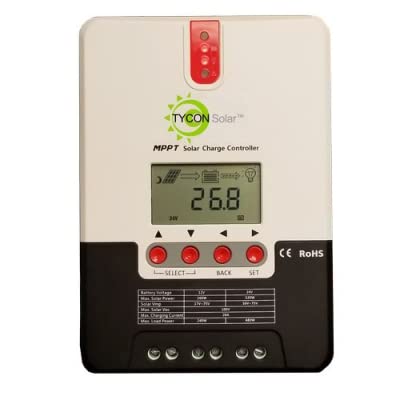
Сүрөт 1: Алдыңкы view of the Tycon TPSC2440NMPPT Solar MPPT Battery Charging Controller, showing the LCD display and connection terminals.
4. Орнотуу жана орнотуу
Туура орнотуу үчүн бул кадамдарды аткарыңыз:
- Монтаждоо: Choose a suitable location for mounting the controller. Ensure good ventilation and protection from direct sunlight and moisture.
- Батарея туташуу: Connect the battery to the controller's battery terminals first. Ensure correct polarity (+ to + and - to -). The controller will automatically detect the battery voltage (12V же 24V).
- Күн панелинин туташуу: Connect the solar panel array to the controller's solar input terminals. Observe correct polarity. Ensure the open-circuit voltage of the solar array does not exceed the controller's maximum input voltage (110V at 25°C).
- Туташуу жүктөө (милдеттүү эмес): If using the load output, connect your DC loads to the controller's load terminals. Do not exceed the rated load current (20A Max).
- Температура сенсору: Connect the included battery temperature probe cable to the designated port on the controller. Place the sensor near the battery for accurate temperature compensation.
- Күйгүзүү: Once all connections are secure, the controller will power on and begin operation.
5. Иштөө нускамалары
The integral LCD display provides real-time information about your solar charging system. Use the buttons (if present, assuming standard UP/DOWN/SET) to navigate through the display menus and adjust settings.
5.1 ЖК дисплей маалымат
- Батарея Voltage: Учурдагы томtage туташкан батарея.
- Батарея сыйымдуулугу: Estimated state of charge.
- Заряддоо кубаттуулугу: Current power being delivered to the battery.
- Батареянын температурасы: Temperature measured by the external probe.
- Учурдагы жүктөө: Current being drawn by connected DC loads.
- Solar Current: Current being generated by the solar panels.
5.2 Батарея түрү жөндөөлөрү
The controller supports Flooded, AGM, GEL, and Lithium battery types. A USER setting allows for custom charge parameters. Refer to the on-screen menu for selecting and configuring the battery type.
5.3 Load Operation Modes
The controller offers 5 selectable load operation modes. Consult the device's menu for details on each mode and how to select them, typically involving timed operation or dusk-to-dawn control.
6. Техникалык тейлөө
Regular maintenance ensures optimal performance and longevity of your solar charge controller.
- Байланыштарды текшерүү: Мезгил-мезгили менен бардык зымдарды туташтыргычтын бекемдигин жана коррозиясын текшерип туруңуз.
- Таза контроллер: Keep the controller clean and free of dust. Use a dry cloth for cleaning. Do not use liquids.
- Батареянын ден соолугу: Монитор батареянын көлөмүtage and capacity on the LCD. Ensure batteries are properly maintained according to their manufacturer's guidelines.
- Вентиляция: Ensure the installation area remains well-ventilated to prevent overheating.
7. Кыйынчылыктарды
| Көйгөй | Мүмкүн себеп | Чечим |
|---|---|---|
| Дисплей жок/Кубат жок | Loose battery connection; Battery voltage too low; Blown fuse (external, if applicable). | Check battery connections and polarity. Charge battery if voltage is below operating threshold. Check and replace any external fuses. |
| Күн заряды жок | Solar panel not connected; Incorrect polarity; Insufficient sunlight; Damaged solar panel/wiring. | Verify solar panel connections and polarity. Ensure panels are receiving adequate sunlight. Inspect panels and wiring for damage. |
| Жүк иштебейт | Load disconnected; Overload; Short circuit; Battery voltage өтө төмөн. | Check load connections. Reduce load if exceeding 20A. Check for short circuits. Ensure battery is sufficiently charged. |
| Так эмес окуулар | Loose connections; Faulty sensor. | Check all wiring connections. Ensure temperature sensor is properly connected and placed. |
8. Техникалык шарттар
- Модел: TPSC2440NMPPT
- Auto Voltage: 12V/24V (System)
- Ampбул жерде: 40A
- Номиналдуу жүктөө агымы: 20А Макс
- Максималдуу сыйымдуулук жүк: 10,000 uF
- Max Solar Input Voltage: 110V (25°C), 90V (25°C)
- Max Power Point Range: 2VDC to 75VDC (Battery Volts)
- Конверсиянын эффективдүүлүгү: 96% Тип.
- MPPT Tracking Efficiency: 99%
- Өзүн-өзү керектөө: 1W
- Температураны компенсациялоо: -3.0mV/°C/Cell
- Максималдуу зым өлчөмү: 8 AWG
- Тtage and Current Accuracy: +/-2%
- Негиздөө: Негативдүү жер
- Курчап турган чөйрөнү коргоо: IP32
- Продукциянын өлчөмдөрү: 12 x 9 x 6 дюйм
- Элемент Салмагы: 5.16 фунт
- Дисплей түрү: LCD