
FoMaKo FMK20UH NDI
FoMaKo NDI PTZ Camera FMK20UH NDI User Manual
Модел: FMK20UH NDI | Бренд: FoMaKo
1. Киришүү
This manual provides comprehensive instructions for the setup, operation, and maintenance of your FoMaKo NDI PTZ Camera FMK20UH NDI. This AI auto-tracking PTZ camera is designed for professional video production and live streaming, offering high-quality video output and versatile connectivity options.

Figure 1: FoMaKo NDI PTZ Camera FMK20UH NDI, showcasing the camera unit, remote control, and included mounting brackets.
2. Кутуда эмне бар
Таңгакта бардык компоненттер бар экенин текшериңиз:
- FoMaKo AI Tracking NDI PTZ Camera (20x optical zoom)
- IR Remote контроллер
- Дубалга орнотуу, шыпка кронштейн
- USB кабели
- Кубаттуу адаптер 12V 2A
- Колдонуучунун Колдонмосу (бул документ)
3. Продукциянын өзгөчөлүктөрү
The FoMaKo NDI PTZ Camera FMK20UH NDI is equipped with advanced features for versatile use:
- AI Auto Tracking Gen 3: Advanced algorithms for customized tracking, including real-time and regional tracking.
- Official NDI 6 & NDI HX3 Certified: Ensures stable and high-quality video transmission over network, compatible with major streaming software like vMix, OBS, Zoom.
- 20x оптикалык масштаб: Provides clear, detailed images even from a distance.
- Бир нече видео чыгаруу интерфейстери: Simultaneous HDMI, LAN/Ethernet, USB3.0, and NDI Live Streaming. Supports SRT, RTMP, VISCA protocols.
- PoE колдоосу: Power over Ethernet simplifies setup with a single cable for power, control, and video/audio.
- H.264/H.265 Коддоо: Ensures fluid motion video under low bandwidth conditions.
- High SNR CMOS: Combined with 2D & 3D noise reduction for high performance in low light.
- Алдыңкы автофокус (AF) технологиясы: Fast, accurate, and stable auto-focus with Auto/Manual/One Push Focus modes.
- Алыстан башкаруу жана алдын ала орнотуулар: IR remote control with up to 255 presets (10 via remote).
- Колдонууга оңой: Web browser control (default password 'admin'), built-in Gravity Sensor for auto-flip, adjustable Pan/Tilt/Zoom speed.

Figure 2: Visual representation of key product features.
4. Орнотуу
4.1 Баштапкы туташуу
Connect the camera to your network and power source using the provided cables. For PoE (Power over Ethernet) functionality, ensure your network switch supports 802.3AF 48V PoE. The camera can be controlled via a web browser by entering its IP address (default password is 'admin').
4.2 Монтаждоо параметрлери
The camera supports various installation methods:
- иш-такта: Камераны жалпак, туруктуу жерге коюңуз.
- Tripod орнотуу: Attach the camera to a standard tripod using the integrated mounting screw hole.
- Дубалга орнотуу: Use the provided wall mount bracket to secure the camera to a vertical surface.
- Шыпка орнотуу: Use the provided ceiling bracket for inverted installation. The built-in gravity sensor supports auto-flip function for correct image orientation.

Figure 3: Depiction of the three primary installation methods for the camera.
5. Иштөө нускамалары
5.1 AI Auto-Tracking
The camera's third-generation AI tracking allows for precise subject following. You can adjust tracking modes, sensitivity, figure size, character position, and lost target actions. Real-time tracking and regional tracking are available.
- To turn on automatic tracking, simply press F2 пультта.
- To switch tracking targets, press F4.
Video 1: Demonstration of the FoMaKo NDI PTZ camera's AI auto-tracking capabilities, showing the camera following a moving subject smoothly.

Figure 4: The camera's AI auto-tracking feature in action, highlighting its ability to follow subjects.
5.2 Алыстан башкаруу
The included IR remote controller allows for quick adjustments to the camera's movement speed, including pan/tilt speed, preset speed, and zoom speed, providing seamless control and flexibility. You can set and recall up to 255 presets, with 10 directly accessible via the remote.

Figure 5: The camera's remote control, detailing its various function buttons for precise adjustments.
5.3 NDI Connection with OBS
The FoMaKo NDI PTZ Camera is NDI 6 & NDI HX3 Certified, allowing for seamless integration with live streaming software like OBS Studio. This enables high-quality video transmission with low latency over your network.
- Ensure the NDI Tools and NDI plugin for OBS are installed on your PC.
- OBS Studio ачыңыз.
- In the 'Sources' panel, click the '+' icon.
- Select 'NDI™ Source' from the list. (If not present, ensure the NDI plugin is correctly installed).
- Create a new source and name it (e.g., "FOMAKO PTZ").
- In the properties window, select your camera's NDI stream from the 'Source name' dropdown.
- Adjust bandwidth and other settings as needed, then click 'OK'.
- Your camera's feed should now appear in OBS.
Video 2: Step-by-step guide on connecting the FoMaKo NDI PTZ camera to OBS Studio via NDI, demonstrating the process and live feed.

Figure 6: The camera's NDI output displayed within a live production software interface.
6. Колдонуу сценарийлери
The FoMaKo NDI PTZ Camera is designed for a wide range of professional AV applications, including:
- Church worship live services
- Educational institutions (universities, training classrooms)
- Видеоконференция
- Live streaming and broadcasting (e.g., sports, concerts, events)
- Studio production
- Large conferences and summits
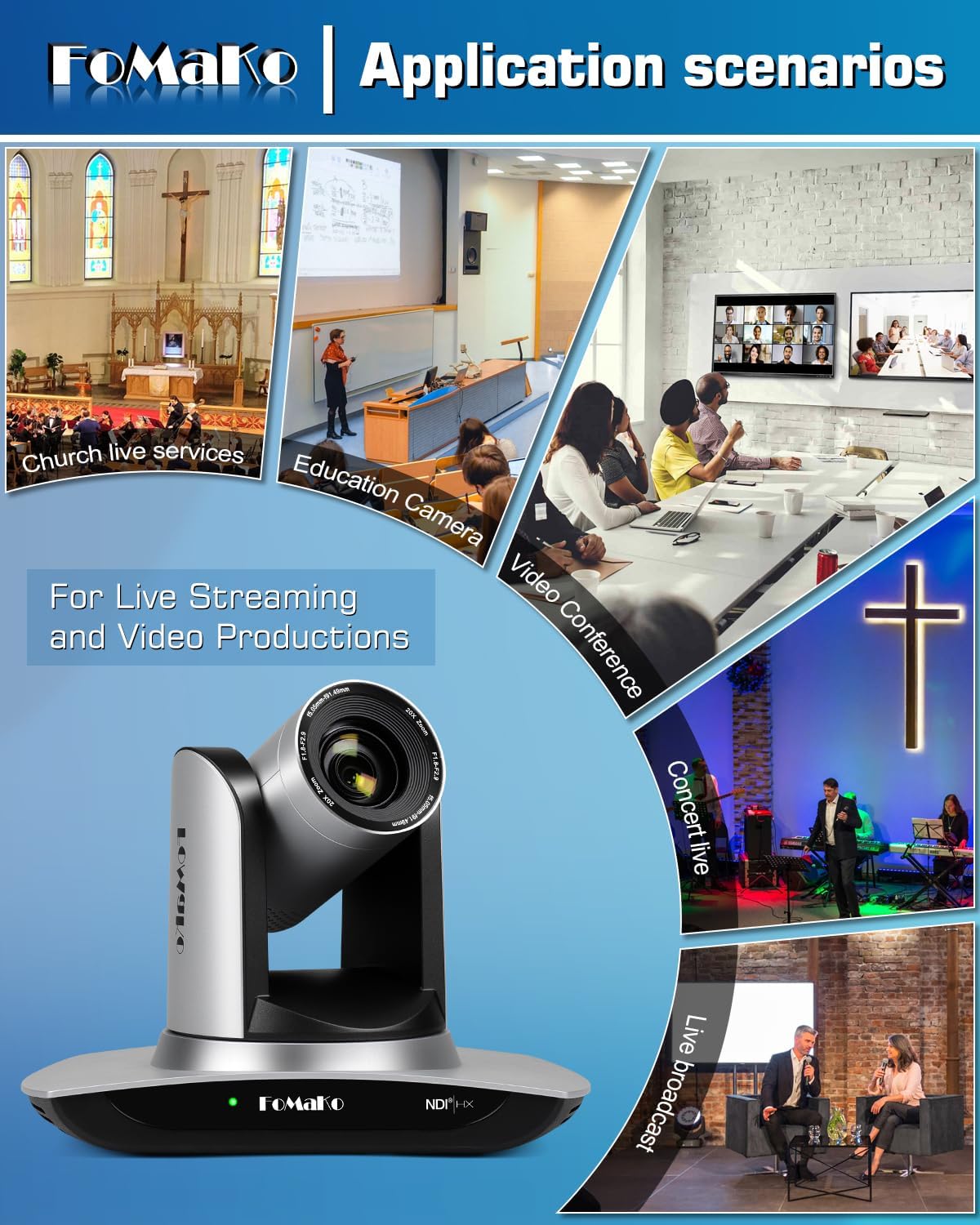
Figure 7: Diverse environments where the camera can be effectively utilized.
7. Техникалык тейлөө
To ensure the longevity and optimal performance of your FoMaKo NDI PTZ Camera, follow these maintenance guidelines:
- Тазалоо: Use a soft, dry cloth to clean the camera body. For the lens, use a specialized lens cleaning cloth and solution. Avoid abrasive cleaners or solvents.
- Сактагыч: When not in use for extended periods, store the camera in a cool, dry place away from direct sunlight and excessive dust.
- Колдонуу: Handle the camera with care to prevent physical damage. Avoid sudden impacts or dropping the unit.
- Программалык камсыздоонун жаңыртуулары: Periodically check the official FoMaKo webкамераңызда эң акыркы функциялар жана иштин жакшырышы бар экенине ынануу үчүн микропрограммалык камсыздоону жаңыртуу сайты.

Figure 8: The camera lens, which requires careful cleaning.
8. Кыйынчылыктарды
Эгерде сиз камераңыз менен көйгөйлөргө туш болсоңуз, төмөнкү жалпы көйгөйлөрдү чечүү кадамдарын караңыз:
- Видео чыгаруу жок:
- Check all cable connections (HDMI, USB, LAN) to ensure they are secure.
- Verify the power adapter is correctly connected and the camera is powered on.
- Ensure the correct input source is selected on your display or streaming software.
- Сүрөттүн сапаты начар:
- Жарыктандыруу шарттарын текшериңиз; жетиштүү жана бирдей жарыктандырууну камсыз кылыңыз.
- Камера линзасын жумшак, түксүз чүпүрөк менен тазалаңыз.
- Verify focus settings (Auto/Manual) and adjust if necessary.
- For NDI streams, ensure sufficient network bandwidth.
- Жасалма интеллектти көзөмөлдөө көйгөйлөрү:
- Объекттин даана көрүнүп турганын жана караңгыланбаганын текшериңиз.
- Adjust tracking sensitivity and mode settings via the web интерфейс.
- Avoid rapid, erratic movements that may exceed tracking capabilities.
- Алыстан башкаруу жооп бербейт:
- Пульттун батареяларын текшериңиз.
- Ensure there are no obstructions between the remote and the camera's IR receiver.
- Verify the camera is powered on.
For more detailed troubleshooting or persistent issues, please consult the full User Manual PDF available on the product's Amazon page or contact FoMaKo customer support.
9. Техникалык шарттар
| Өзгөчөлүк | Деталь |
|---|---|
| Бренд | FoMaKo |
| Модель номери | FMK20UH NDI |
| Элемент Салмагы | 3.04 фунт |
| Продукциянын өлчөмдөрү | 5.67 x 9.98 x 6.65 дюйм |
| Түс аты | Silvery |
| Өзгөчөлүктөр | AI tracking NDI PTZ Camera |
| Фото сенсор технологиясы | CMOS |
| Видео тартуунун резолюциясы | 1080p |
| Максималдуу фокус узундугу | 91.49 миллиметр |
| Максималдуу диафрагма | 2.9 f |
| Видео тартуу форматы | MP4 |
| Колдоого алынган аудио формат | AAC/MP3/G.711A |
| Screen Size | 1 дюйм |
| Байланыш технологиясы | NDI, LAN/Ethernet, HDMI, 3G-SDI, USB3.0, PoE, Infrared |

Figure 9: Rear panel of the camera detailing its multiple video output interfaces.
10. Кепилдик жана колдоо
FoMaKo is committed to providing excellent customer service and support for your product:
- 3 жылдык Чектелген Кепилдик: Your purchase is covered by a 3-year limited warranty.
- 30 күндүк акчаны кайтарып берүү кепилдиги: Enjoy a 30-day no-questions-asked money-back guarantee for a risk-free purchase.
- Акысыз онлайн тренинг: Resources are available to help you get started easily.
- 24/7 эксперттик жардам: Expect responses within 24 hours for any inquiries (please include your Order ID).
- Алыстан жардам: Remote assistance can be provided for setup if necessary.
- Өмүр бою техникалык колдоо: Benefit from lifetime customer technical support.
Your satisfaction is our priority. For support, please refer to the contact information provided in your product packaging or on the official FoMaKo webсайт.

Figure 10: FoMaKo's commitment to customer satisfaction and support.
Ask a question about this manual
Ask about setup, troubleshooting, compatibility, parts, safety, or missing instructions. Manuals+ will review the question and use this page’s manual context to help answer it.