
Introduction
Сатып алганыңыз үчүн рахматasing the HANNLOMAX HX-111CR Alarm Clock Radio. This manual provides detailed instructions for setting up, operating, and maintaining your device. Please read this manual thoroughly before use to ensure proper function and to maximize your user experience.
Маанилүү коопсуздук нускамалары
- Бул көрсөтмөлөрдү кунт коюп окуп чыгып, келечектеги маалымат үчүн сактап коюңуз.
- Бул аппаратты суунун жанында колдонбоңуз.
- Кургак чүпүрөк менен гана тазалаңыз.
- Эч кандай желдетүүчү тешиктерди жаап албаңыз. Өндүрүүчүнүн көрсөтмөлөрүнө ылайык орнотуу.
- Радиаторлор, жылуулук регистрлери, мештер же башка аппараттар (анын ичинде) сыяктуу жылуулук булактарынын жанына орнотпоңуз ampкөтөргүчтөр) жылуулукту пайда кылуучу.
- Электр шнурунун басылып кетүүсүнөн же кысып калуудан сактаңыз, өзгөчө сайгычтарда, розеткаларда жана алар аппараттан чыга турган жеринде.
- Өндүрүүчү тарабынан көрсөтүлгөн тиркемелерди/аксессуарларды гана колдонуңуз.
- Бул аппаратты чагылгандуу бороондордо же узак убакыт бою колдонбогондо электр розеткасынан ажыратыңыз.
- Бардык тейлөөлөрдү квалификациялуу тейлөө кызматкерлерине тапшырыңыз. Аппарат кандайдыр бир зыянга учураганда, мисалы, кубат берүүчү шнур же сайгыч бузулганда, суюктук төгүлгөндө же аппараттын ичине нерселер түшкөндө, аппарат жамгырга же нымдуулукка дуушар болгондо, нормалдуу иштебей калганда тейлөө талап кылынат. , же түшүрүлгөн.
- The battery (CR2032) should not be exposed to excessive heat such as sunshine, fire or the like.
Продукт бүттүview
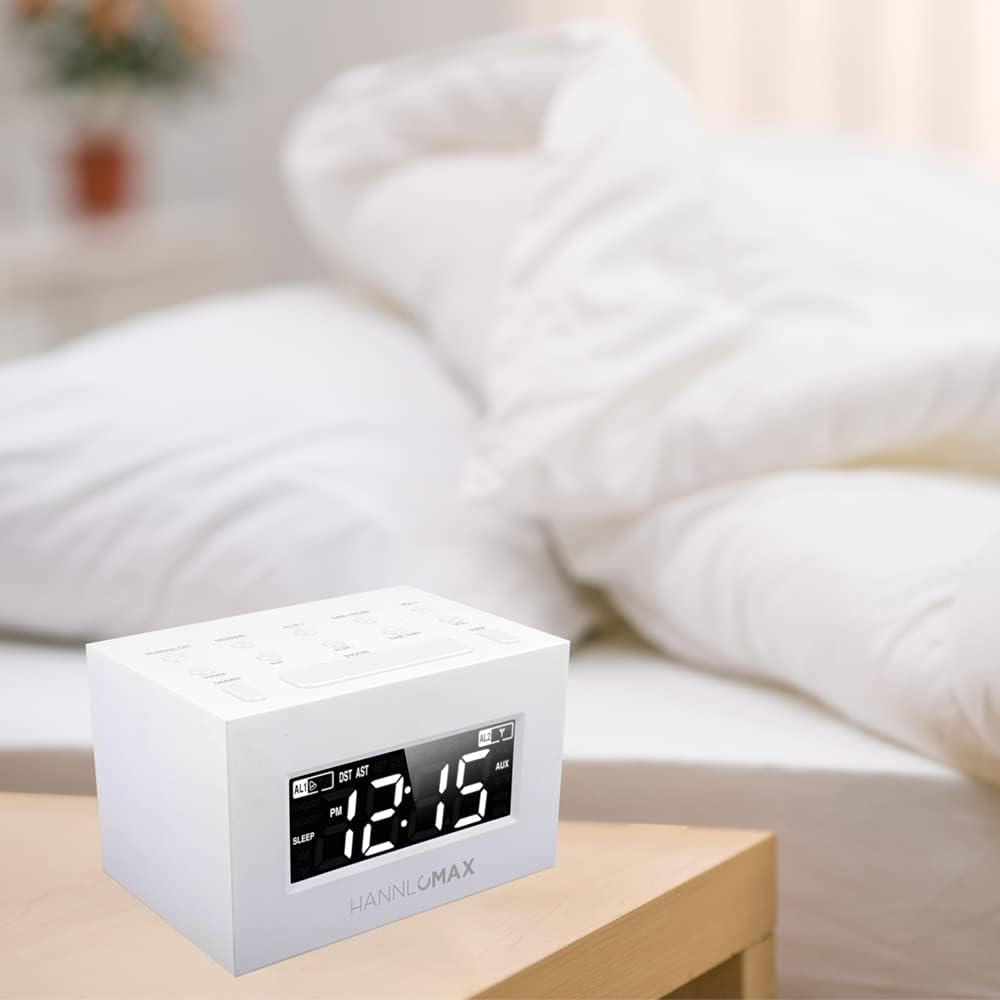
The HANNLOMAX HX-111CR is a compact alarm clock radio featuring a 1.2-inch white LED display, dual alarms, PLL AM/FM radio, and an Aux-in jack for external audio devices. It also includes an automatic Daylight Saving Time (DST) adjustment system.
Фронт View жана Өлчөмдөр

Сүрөт 1: Фронт view of the HANNLOMAX HX-111CR Alarm Clock Radio, showing the 1.2-inch white LED display and overall dimensions (approximately 123mm width, 83mm height, 94mm depth).
Key Features and Connections

Сүрөт 2: Бурчтуу view of the HANNLOMAX HX-111CR, illustrating key features such as Dual Alarms, Auto Time Set, USA Time Zone compatibility, and the Aux-in jack.
Арткы View
Сүрөт 3: Арткы view of the HANNLOMAX HX-111CR, showing the power input and external FM antenna connection.
Орнотуу колдонмосу
1. Power Connection
Connect the provided power adapter to the DC IN jack on the back of the unit and then plug it into a standard AC wall outlet. The unit is designed to operate primarily on corded electric power.
2. Батареянын камдык көчүрмөсүн орнотуу (милдеттүү эмес, бирок сунушталат)
For time and alarm settings backup during power outages, install one CR2032 battery (not included) into the battery compartment located on the bottom of the unit. Ensure correct polarity (+/-) when inserting the battery. The battery only provides backup for settings and does not power the display or functions during a power outage.
3. Баштапкы убакытты орнотуу
Upon first power-up or after a prolonged power interruption without battery backup, the display may flash. The unit features an automatic DST system which may assist in setting the correct time. If manual adjustment is needed, refer to the "Setting Time and Date" section in the Operating Instructions.
Иштөө нускамалары
Убакыт жана дата орнотуу
- басып, кармап туруңуз УБАКЫТТЫ ОРНОТУУ баскычы. Саат цифралары жарк этет.
- колдонуу HOUR жана MINUTE убакытты тууралоо үчүн баскычтар.
- Басыңыз УБАКЫТТЫ ОРНОТУУ ырастоо жана убакыт орнотуу режиминен чыгуу үчүн кайра.
- The unit may automatically adjust for Daylight Saving Time (DST). If manual adjustment is required, consult the specific button for DST (if available, otherwise it's automatic).
Radio Operation (AM/FM PLL Radio)
- басыңыз РАДИО КҮЙГҮЗҮҮ/ӨЧҮРҮҮ радиону күйгүзүү үчүн баскыч.
- басыңыз БАНД AM жана FM диапазондорунун ортосунда которулуу үчүн баскычты басыңыз.
- Кол менен жөндөө: басыңыз TUNE + or ОЮН - баскычтары жыштыгын этап-этабы менен тууралоо үчүн.
- Авто сканерлөө: басып, кармап туруңуз TUNE + or ОЮН - кийинки жеткиликтүү станцияны автоматтык түрдө издөө үчүн баскычтар.
- Алдын ала орнотууларды орнотуу: To save a station, tune to your desired frequency. Press and hold the АЛДЫН АЛА баскычты алдын ала коюлган сан жарк этмейинче басыңыз. Колдонуу PRESET + or АЛДЫН АЛА ОРНОТУЛГАН - алдын ала коюлган номерди тандоо үчүн, андан кийин баскычын басыңыз АЛДЫН АЛА сактап калуу үчүн дагы.
- Алдын ала орнотууларды эстөө: Радио режиминде, басыңыз PRESET + or АЛДЫН АЛА ОРНОТУЛГАН - Сакталган станцияларды аралап өтүү үчүн баскычтарды басыңыз.
- Антенна: Extend the external FM antenna for optimal FM reception. For AM reception, rotate the unit for best signal.
Setting and Using Alarms (Dual Alarms)
The HX-111CR features two independent alarms (AL1 and AL2).
- Ойготкучтун убактысын коюу: басып, кармап туруңуз 1-ДАБЛ or 2-ДАБЛ button. The alarm hour digits will flash. Use the HOUR жана MINUTE каалаган ойготкуч убактысын коюу үчүн баскычтарды басыңыз.
- Selecting Alarm Source: Убакытты койгондон кийин басыңыз 1-ДАБЛ or 2-ДАБЛ button again to cycle through alarm modes: Buzzer, Radio, or OFF. The corresponding indicator will light up.
- Ойготкучту иштетүү/өчүрүү: Once set, the alarm is active. To deactivate, press the respective АЛАРМ button until "OFF" is displayed or the alarm indicator turns off.
- Чырым Function: Ойготкуч чыкканда, басыңыз СОЮЗ баскычын басып, болжол менен 9 мүнөткө убактылуу өчүрүп коюңуз.
- Ойготкучту токтотуу: Ойготкучту кийинки күнгө чейин толугу менен өчүрүү үчүн, баскычын басыңыз КҮЙГҮЗҮҮ / КҮЧҮРҮҮ баскычы же РАДИО КҮЙГҮЗҮҮ/ӨЧҮРҮҮ баскычы.
Уйку таймери функциясы
Уйку таймери сизге радио менен уктап калууга мүмкүндүк берет, ал белгиленген убакыттан кийин автоматтык түрдө өчөт.
- Радио ойноп жатканда, баскычын басыңыз УЙКУ жеткиликтүү уйку убакыттары (мисалы, 90, 60, 30, 15 мүнөт, ӨЧҮРҮҮ) аркылуу айлануу үчүн баскычты кайра-кайра басыңыз.
- Радио тандалган убакыт бою ойнотулуп, андан кийин автоматтык түрдө өчөт.
Aux-in Jack Usage
Connect an external audio device (e.g., smartphone, tablet) to the AUX-IN jack on the back of the unit using a 3.5mm audio cable (not included). The unit will automatically switch to AUX mode, allowing you to play audio from your connected device through the clock radio's speaker.
Дисплей жарыктыгы
Эгер мүмкүн болсо, баскычын басыңыз DIMMER button (or similar) to adjust the brightness level of the LED display. Cycle through available brightness settings to find your preferred level.
Техникалык тейлөө
- Тазалоо: Агрегатты жумшак, кургак чүпүрөк менен сүртүңүз. Абразивдүү тазалагычтарды, момдорду же эриткичтерди колдонбоңуз.
- Батареяны алмаштыруу: Replace the CR2032 backup battery annually or when the time settings are lost during brief power interruptions.
- Сактагыч: If storing the unit for an extended period, disconnect it from the power outlet and remove the backup battery.
Проблемаларды чечүү
| Көйгөй | Мүмкүн себеп | Чечим |
|---|---|---|
| Түзмөк күйбөйт. | Электр шнуру туура эмес туташтырылган. Розеткадан кубат жок. | Ensure the power cord is securely plugged into both the unit and a working wall outlet. Test the outlet with another device. |
| Time/Alarm settings are lost after a power outage. | Резервдик батарея түгөндү же орнотулган эмес. | Install a new CR2032 battery or replace the existing one. Ensure correct polarity. |
| Радио кабыл алуу начар. | FM antenna not extended. Unit position for AM. Interference. | Fully extend the FM wire antenna. For AM, rotate the unit to find the best signal. Move away from other electronic devices that may cause interference. |
| Ойготкуч угулбайт. | Alarm not set or deactivated. Volume too low (for radio alarm). | Verify that the alarm time is set correctly and the alarm is activated (AL1/AL2 indicator is on). Ensure the volume is audible if using radio alarm. |
| Дисплей өтө жарык же өтө күңүрт. | Дисплейдин жарыктыгын тууралоо керек. | басыңыз DIMMER button (if available) to cycle through brightness levels. |
| No sound from Aux-in. | Cable not connected properly. External device volume too low. | Ensure the 3.5mm audio cable is fully inserted into both the clock radio and the external device. Increase the volume on the external device. |
Техникалык шарттар
- Модел: HX-111CR
- Бренд: Hannlomax
- Дисплей түрү: Digital LED (1.2" White)
- Радио: PLL AM/FM Radio with Presets
- Ойготкучтар: Dual Alarms (Buzzer or Radio)
- Байланыш: Aux-in Jack (3.5mm)
- Кубат булагы: Электр зымдары
- Камдык батарея: 1 x CR2032 (кошулбайт)
- Продукциянын өлчөмдөрү: 4.84" W x 2.95" H (approx. 123mm W x 83mm H x 94mm D)
- Материал: Acrylonitrile бутадиен Styrene
- Элемент Салмагы: 1.5 фунт
Кепилдик жана колдоо
For warranty information or technical support, please refer to the documentation included with your purchase or contact HANNLOMAX customer service directly. Keep your purchase receipt as proof of purchase.