
K-Snake KS-BM600-B
K-Snake Rechargeable Lightweight Gaming Mouse
User Manual
Model: KS-BM600-B | Brand: K-Snake
1. Киришүү
Thank you for choosing the K-Snake Rechargeable Lightweight Gaming Mouse. This manual provides essential information for setting up, operating, and maintaining your new gaming mouse. Designed for optimal performance, this wireless mouse features advanced 2.4GHz wireless transmission technology, a lightweight honeycomb shell, and customizable RGB backlighting, ensuring a stable connection and an enhanced gaming experience.

Image 1.1: The K-Snake Rechargeable Lightweight Gaming Mouse, showcasing its ergonomic design and included USB receiver.
2. Пакеттин мазмуну
Пакетиңизде бардык буюмдар бар экенин текшериңиз:
- 1 x K-Snake Wireless Gaming Mouse
- 1 x USB Receiver (located in the bottom slot of the mouse)
- 1 x заряддоо кабели
3. Продукциянын өзгөчөлүктөрү
- Lightweight Honeycomb Design: Ergonomic hollow perforated shell for reduced weight and improved heat dissipation, ensuring comfort during extended use.
- Жөнгө салынуучу DPI: Three adjustable DPI levels (1200/1800/2400) for precise control, with a response rate of up to 1000Hz.
- RGB LED арткы жарыгы: Multiple lighting patterns and side flow effects, controllable via a dedicated button on the mouse bottom.
- 2.4 ГГц зымсыз технология: Stable and flexible wireless connection up to 10 meters. Supports wired mode for charging and simultaneous use.
- Кайра заряддалуучу батарея: Built-in 400mAh lithium polymer battery for long-term standby and automatic power-saving sleep mode.
- Жалпы шайкештик: Plug-and-play USB receiver, compatible with Windows 2000/XP/Vista/7/8/10/11 and MAC OS.

Image 3.1: The mouse's lightweight design and vibrant RGB lighting effects.

Image 3.2: Illustration of the mouse's internal professional game-grade IC chip.
4. Орнотуу нускамалары
- Чычканды заряддоо: Before first use, connect the provided charging cable to the mouse and a USB power source (e.g., computer USB port, USB wall adapter). The mouse can be used while charging.

Image 4.1: The mouse connected for charging.
- USB кабылдагычты табыңыз: The nano USB receiver is stored in a slot on the bottom of the mouse. Gently remove it.
- USB кабылдагычты туташтыруу: USB ресиверди компьютериңиздеги жеткиликтүү USB портуна сайыңыз.
- Чычканды күйгүзүү: Locate the power switch on the bottom of the mouse. Slide it to the "ON" position. The mouse will automatically connect to your computer.
- Драйверди орнотуу: No additional software or drivers are required. The mouse is plug-and-play.
5. Чычканыңызды башкаруу
5.1 DPI жөндөө
The mouse features three adjustable DPI levels: 1200, 1800, and 2400. To change the DPI, press the dedicated DPI button, usually located behind the scroll wheel. Each press will cycle through the available DPI settings.
5.2 RGB арткы жарыкты башкаруу
The RGB backlight can be customized. A dedicated light adjustment button is located on the bottom of the mouse. Press this button to cycle through different lighting patterns and effects. To turn off the backlight, adjust the power switch on the bottom of the mouse to the appropriate position (often labeled "OFF" or a specific backlight off setting if available, otherwise turn off the mouse completely).
5.3 Кубатты үнөмдөө режими
To conserve battery life, the mouse will automatically enter sleep mode if not used for 5 minutes. To wake the mouse, simply press any button.
6. Техникалык тейлөө
- Тазалоо: Чычкандын бетин тазалоо үчүн жумшак, кургак чүпүрөктү колдонуңуз. Өжөр кир үчүн бир аз сүртүңүзamp cloth can be used, ensuring no moisture enters the internal components. Avoid harsh chemicals or abrasive cleaners.
- Батареяга кам көрүү: The mouse has a built-in rechargeable battery. For optimal battery life, avoid fully discharging the mouse frequently. Recharge when the mouse's response becomes slow or erratic.
- Сактагыч: When not in use for extended periods, turn off the mouse to conserve battery. Store in a cool, dry place.
7. Кыйынчылыктарды
- Mouse response is slow or not working properly:
This often indicates a low battery. Connect the mouse to a power source using the charging cable. The issue should resolve after charging.
- Mouse not connecting to computer:
- Ensure the mouse is turned "ON" using the power switch on its bottom.
- USB кабыл алгыч компьютериңиздеги иштеген USB портуна бекем сайылганын текшериңиз.
- USB ресиверди башка USB портуна сайып көрүңүз.
- Чычкандын кабыл алгычтан 10 метрлик зымсыз аралыкта экенин текшериңиз.
- RGB жарыгы иштебейт:
Check if the mouse is powered on. Press the light adjustment button on the bottom of the mouse to cycle through lighting modes. Ensure the battery is sufficiently charged.
8. Техникалык шарттар
| Өзгөчөлүк | Деталь |
|---|---|
| Бренд | K-Snake |
| Модел | KS-BM600-B |
| Туташуу түрү | 2.4G Wireless, USB (for charging/wired use) |
| баскычтардын саны | 6 buttons + 1 power switch + 1 RGB control switch |
| DPI орнотуулары | 1200 / 1800 / 2400 |
| Кыймылды аныктоо технологиясы | Оптикалык |
| Батарея түрү | Rechargeable Lithium Polymer (400mAh) |
| Power Source | Электр зымы менен кубаттоо (USB аркылуу) |
| Иштетүү системалары колдоого алынат | Windows 98/2000/ME/NT/XP/VISTA/7/8/10/11, MAC OS |
| Өзгөчөлүктөр | Ergonomic Design, Lightweight Honeycomb Shell, RGB Backlight, Auto Sleep Mode |
| Колдун багыты | Эки тараптуу |
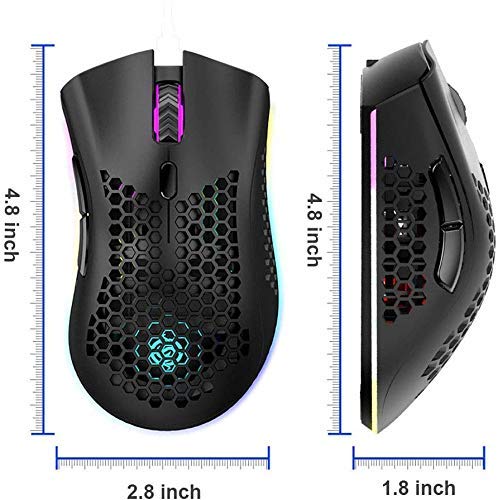
Image 8.1: Physical dimensions of the K-Snake Gaming Mouse.
9. Кепилдик жана колдоо
K-Snake products are manufactured to high-quality standards. For information regarding warranty coverage, please refer to the warranty card included with your purchase or visit the official K-Snake webсайт.
If you encounter any issues or have questions not covered in this manual, please contact K-Snake customer support through the retailer where the product was purchased or via the contact information provided on the official K-Snake webсайт.
Ask a question about this manual
Ask about setup, troubleshooting, compatibility, parts, safety, or missing instructions. Manuals+ will review the question and use this page’s manual context to help answer it.