
Introduction
This manual provides instructions for the proper use and care of your ProCase Kids Case, designed for specific Lenovo tablet models. Please read this manual thoroughly to ensure optimal performance and protection for your device.
Шайкештик
This ProCase Kids Case is specifically designed for the following 10.1-inch Lenovo tablet models:
- Lenovo Tab M10 HD (2nd Gen) 2020 Version (Model: TB-X306F)
- Lenovo Smart Tab M10 HD (2nd Gen) 2020 Version (Model: TB-X306X)
This case is NOT compatible with any other tablet models, including the 10.3-inch Lenovo Tab M10 FHD Plus (TB-X606) or the Lenovo Tab M10 HD (TB-X505F/TB-X505L).

Image: Compatibility chart illustrating the correct 10.1-inch Lenovo Tab M10 HD (2nd Gen) and Smart Tab M10 HD (2nd Gen) models, and incompatible 10.3-inch models.
Confirming Your Tablet Model
To ensure proper fit, please confirm your tablet's model number before attempting installation. Follow these steps:
- барыңыз Орнотуулар планшетиңизде.
- Тандоо Система.
- Басыңыз Планшет жөнүндө.
- табыңыз Модел information. It should display 'TB-X306X' or 'TB-X306F'.

Image: Screenshot demonstrating the navigation path (Settings > System > About Tablet > Model) to verify the tablet's model number.
Орнотуу
To install your Lenovo Tab M10 HD 2nd Gen into the ProCase Kids Case, follow these steps:
- Gently stretch the corners of the case to widen the opening.
- Align your tablet with the case, ensuring the camera and ports match the case's cutouts.
- Carefully push the tablet into the case, starting from one side and working your way around until all edges are securely seated within the case's frame.
- Ensure all corners of the tablet are fully protected by the case's thick silicone padding.

Image: A Lenovo tablet being carefully placed into the ProCase Kids Case, highlighting the snug fit.
Once installed, the case provides full protection against drops, bumps, and scratches due to its impact-resistant EVA foam material and double-thick silicone corners.

Image: The ProCase Kids Case fully encasing a tablet, demonstrating its protective design and anti-shock features.
Иштөө нускамалары
Rotatable Grip Handle
The case features a 180-degree rotatable grip handle, designed for easy carrying and versatile viewing. The handle can be used to securely hold the tablet, making it ideal for children's hands.

Image: The rotatable grip handle in various positions, demonstrating its 180-degree rotation for carrying and stand modes.
Dual-Angle Stand Function
The rotatable handle also functions as a dual-angle stand. To activate the stand, simply fold the handle back. This allows for two distinct viewбурчтар:
- 65 градус Viewбурч: Ideal for watching videos or engaging in interactive activities.
- 30-degree Typing Angle: Suitable for typing, drawing, or other tabletop activities.
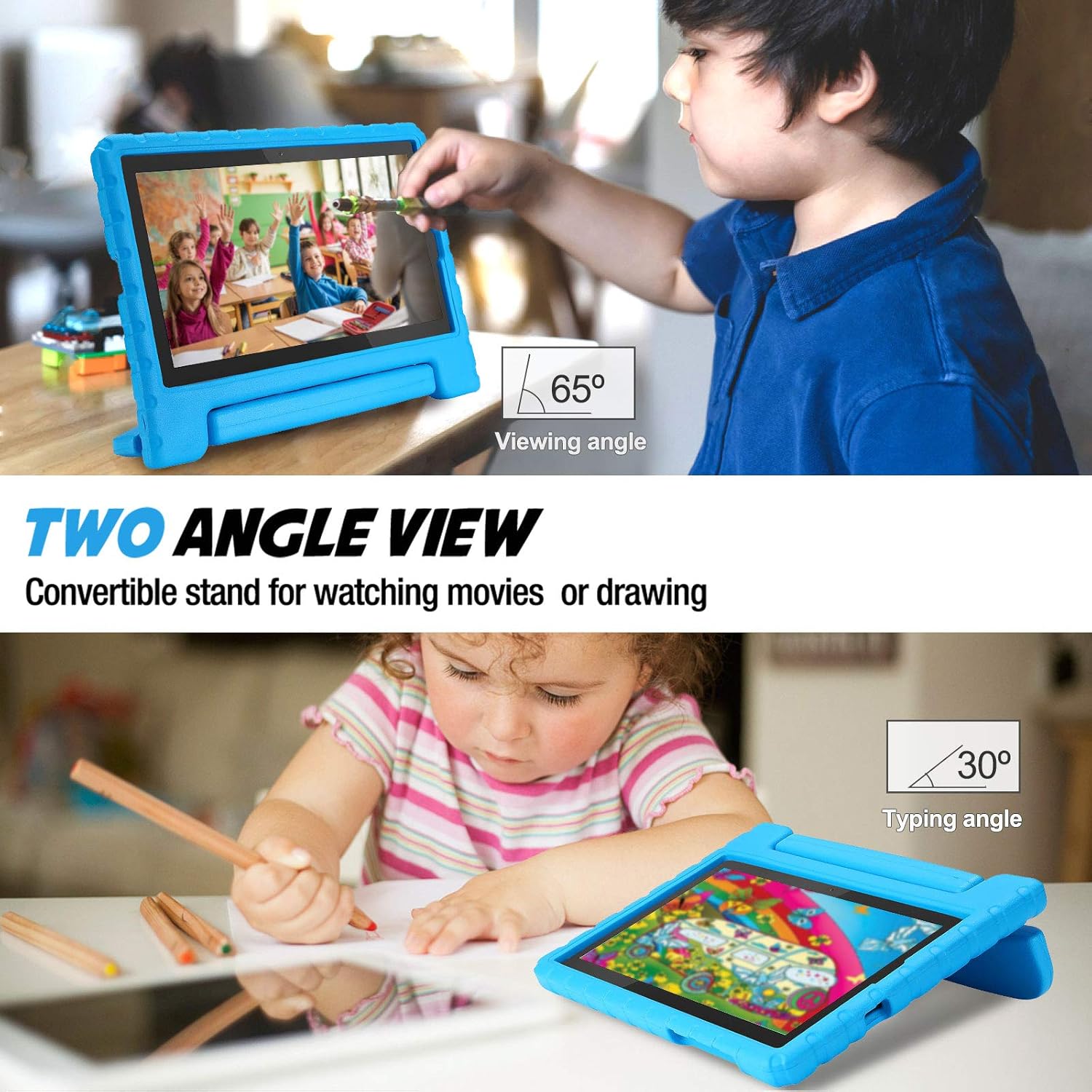
Image: A child using the tablet in the 65-degree viewing angle for watching, and another child using it in the 30-degree typing angle for drawing.
Access to Features
The case is designed with precise cutouts to ensure full access to all tablet features without needing to remove the case. This includes:
- Камералар
- Баяндамачы
- Заряддоо порту
- Наушник уясы
- Buttons (Power, Volume)

Сүрөт: деталдуу views of the case's precise cutouts for the camera, charging port, and buttons, ensuring full accessibility.
Техникалык тейлөө
To keep your ProCase Kids Case clean and in good condition:
- Ишти дайыма жумшак менен сүртүп туруңуз, гamp чаңды жана кирди тазалоо үчүн кездеме.
- For stubborn stains, use a mild soap solution and rinse thoroughly.
- Allow the case to air dry completely before reinserting your tablet.
- Avoid using harsh chemicals or abrasive cleaners, as these may damage the EVA foam material.
Проблемаларды чечүү
Case Does Not Fit
If the case does not fit your tablet, please re-verify your tablet's model number using the instructions in the Шайкештик section. This case is specifically designed for Lenovo Tab M10 HD (2nd Gen) / Smart Tab M10 HD (2nd Gen) 10.1-inch models (TB-X306F TB-X306X). Incorrect model numbers are the most common reason for fit issues.
Difficulty Accessing Ports/Buttons
Ensure the tablet is fully and correctly seated within the case. Sometimes, if the tablet is not pushed in completely, the cutouts may not align perfectly. Gently adjust the tablet's position within the case until all ports and buttons are easily accessible.
Техникалык шарттар
| Бренд | ProCase |
| Модель номери | PC-08362836 |
| Шайкеш түзмөктөр | Lenovo Tab M10 HD (2nd Gen) / Lenovo Smart Tab M10 HD (2nd Gen) 10.1-Inch 2020 (Model: TB-X306F TB-X306X) |
| Материал | Impact-resistant EVA foam |
| Түс | Көк |
| Элемент Салмагы | 9.5 унция |
| Продукциянын өлчөмдөрү (LxWxH) | 9.8 x 6.22 x 0.91 дюйм |
Кепилдик жана колдоо
ProCase products are manufactured with quality and durability in mind. For specific warranty information or technical support, please refer to the product packaging or visit the official ProCase webсайт. Кепилдик дооматтары үчүн сатып алуу дүмүрчөгүңүздү сактаңыз.