
1. Киришүү
Thank you for choosing the Selvim WiFi Mini Projector. This portable movie projector offers 1080P compatibility, a large 200-inch display, Bluetooth audio, and a 60,000-hour LED lamp life. It is designed for versatile connectivity with devices such as TV sticks, HDMI, USB, laptops, PS4, and iOS/Android smartphones. This manual provides detailed instructions for setup, operation, and maintenance to ensure you get the best experience from your projector.
2. Пакеттин мазмуну
Сураныч, төмөнкү нерселер үчүн кутучаны белгилеңиз:
- Selvim WiFi Mini Projector
- Алыстан башкаруу (батареялар камтылган эмес)
- Электр кабели
- HDMI кабели
- AV Cable (3-in-1 RCA to 3.5mm jack)
- Линзаны тазалоочу кездеме
- Жөнгө салынуучу Бут
- User Manual
3. Продукт бүтүп калдыview
The Selvim Mini Projector features a compact design with multiple connectivity options and user-friendly controls.
3.1 Алдыңкы жана арткы View
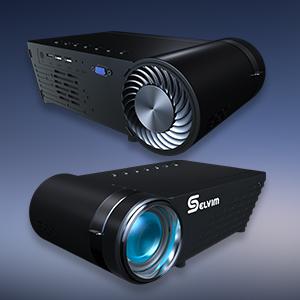
Сүрөт: алдыңкы жана арткы view of the Selvim Mini Projector, highlighting its compact design and various ports.
3.2 Порттор жана башкаруу каражаттары
- IR алуучу: Алыстан башкаруу сигналдары үчүн.
- HDMI порту: Connect to HDMI-enabled devices (laptops, game consoles, TV sticks).
- USB1/USB2 Ports: Connect USB storage devices or power compatible streaming sticks.
- AV/AUX Input: Connect devices using the included AV cable.
- VGA порту: Connect to computers with VGA output.
- Аудио чыгышы (3.5 мм): Тышкы динамиктерди же гарнитураны туташтырыңыз.
- Кубат киргизүү: Электр кабелин туташтырыңыз.
- Фокус шакеги: Adjust for image clarity.
- Негизги ташты оңдоо: Adjust image shape (±15 degrees).
- On-device Control Buttons: Navigate menus and adjust settings directly on the projector.

Image: The rear panel of the Selvim Mini Projector, clearly showing the HDMI, USB, AV, AUX, and VGA ports for multi-device connectivity.
4. Орнотуу
4.1 Жайгаштыруу жана экрандын өлчөмү
Position the projector on a stable surface or mount it using a tripod or ceiling mount. The recommended projection distance is 2-5 meters (approximately 6.5-16.4 feet) for a screen size of 50-200 inches.
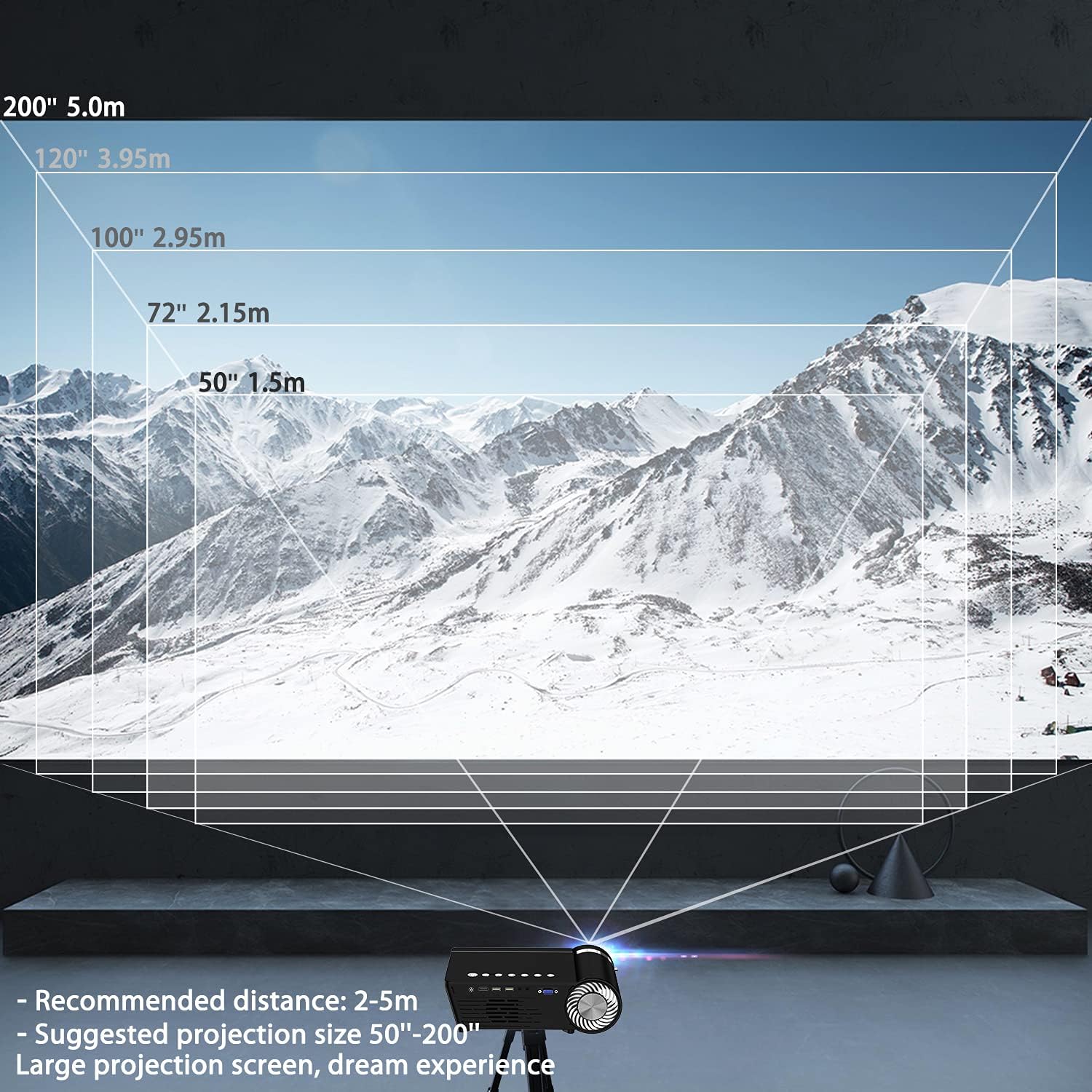
Image: A diagram illustrating recommended projection distances (1.5m for 50", 2.15m for 72", 2.95m for 100", 3.95m for 120", 5.0m for 200") for various screen sizes.
4.2 Кубат туташтыруу
Кубат кабелин проектордун кубат киргизүү булагына, андан кийин розеткага туташтырыңыз.
4.3 Фокусту жана Keystone жөндөөсүн
After powering on, adjust the focus ring on the lens until the image is clear. Use the keystone correction dial to correct any trapezoidal distortion, ensuring the projected image is rectangular.

Image: A visual representation of how focus and keystone adjustments affect the projected image, showing a blurry image being sharpened by focus and a trapezoidal image being corrected to a rectangle by keystone.
4.4 Байланыш параметрлери
The projector supports various wired and wireless connections:
- HDMI: Connect your laptop, game console, or streaming device via an HDMI cable.
- USB: Медиа ойнотуу үчүн USB флеш-дискти салыңыз fileтүздөн-түз с.
- AV/VGA: Use the provided AV cable or a VGA cable for older devices.
- Bluetooth 5.0: Жакшыртылган аудио үчүн тышкы Bluetooth динамиктерин же гарнитураны туташтырыңыз.
- WiFi туташуусу: For screen mirroring from iOS and Android devices.

Image: The Selvim Mini Projector connected wirelessly to Bluetooth 5.0 headphones and earbuds, illustrating stable signal transmission and a superior stereo experience.
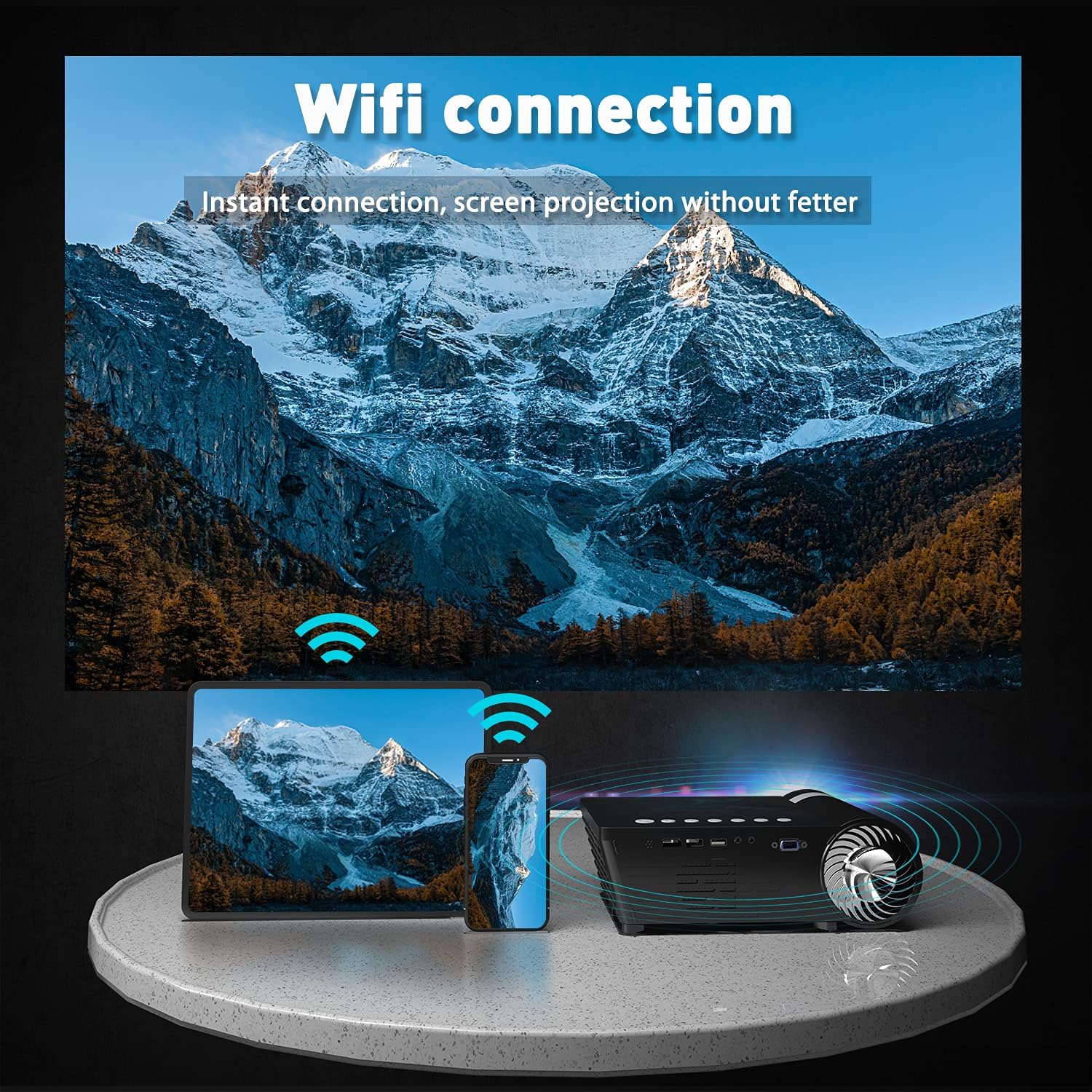
Image: The Selvim Mini Projector demonstrating WiFi connection for instant screen projection from a smartphone and tablet.
5. Иштөө нускамалары
5.1 Негизги башкаруу каражаттары
Use the included remote control or the buttons on top of the projector to navigate the menu, select input sources, and adjust settings.

Image: A four-panel image showing the projector's main menu, remote control interaction, and options for iOS and Android screen mirroring.
5.2 Киргизүү булагын тандоо
From the main menu, select the desired input source (HDMI, USB, AV, VGA, or Miracast for screen mirroring) using the remote or projector buttons.
5.3 Зымсыз экранды чагылдыруу (iOS/Android)
To mirror your smartphone or tablet screen:
- Select 'Miracast' or 'iOS Display' / 'Android Display' from the projector's main menu.
- On your mobile device, go to WiFi settings and connect to the projector's WiFi network (e.g., 'PROJECTOR-XXXX').
- ачуу а web browser on your mobile device and enter the IP address displayed on the projector screen (e.g., 192.168.49.1).
- боюнча webpage, select 'WiFi AP' and then 'Scan' to find your home WiFi network.
- Connect your mobile device to your home WiFi network.
- Мобилдик түзмөгүңүз проектор менен бир эле WiFi тармагына туташкандыгын текшериңиз.
- For iOS, activate 'Screen Mirroring' from your Control Center and select the projector. For Android, use the 'Screen Cast' or 'Wireless Display' function.
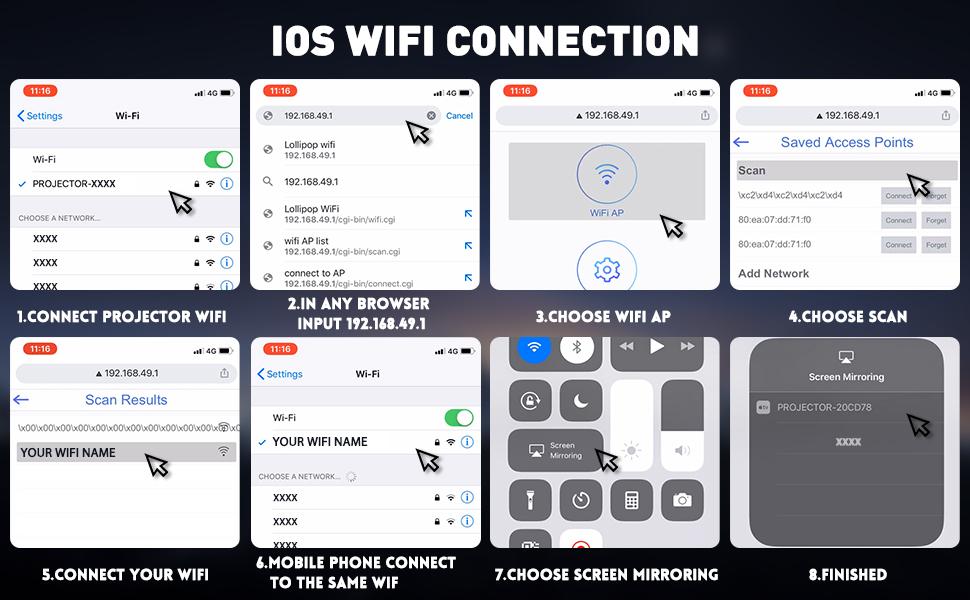
Image: A detailed eight-step visual guide demonstrating how to connect an iOS device to the Selvim Mini Projector for screen mirroring via WiFi.
5.4 Bluetooth Audio Pairing
To pair with a Bluetooth audio device:
- Bluetooth динамигиңиз же кулакчыныңыз жупташтыруу режиминде экенин текшериңиз.
- On the projector, navigate to the 'Sound' settings menu.
- Select 'Bluetooth On' and then 'Scan Device'.
- Choose your Bluetooth device from the list to pair.
6. Техникалык тейлөө
6.1 Линзаны тазалоо
Regularly clean the projector lens using the provided cleaning cloth or a soft, lint-free cloth. Avoid abrasive materials that could scratch the lens.

Image: A cutaway diagram showing the multi-layer glass lens of the Selvim Mini Projector, emphasizing its optical quality.
6.2 Муздатуу системасы
The projector features an efficient cooling system with multiple fans to dissipate heat and ensure a long lamp life. Ensure the ventilation vents are not blocked during operation.
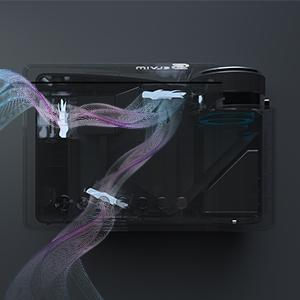
Image: An internal diagram of the Selvim Mini Projector showing the airflow and cooling system, designed to maintain optimal operating temperature.
6.3 LED Lamp Жашоо
Проектор LED жарыгын колдонотamp with an impressive lifespan of up to 60,000 hours, providing years of reliable use.
7. Кыйынчылыктарды
- Сүрөт жок: Check power connection, input source selection, and cable connections. Ensure the lens cap is removed.
- бүдөмүк сүрөт: Adjust the focus ring. If edges are blurry, adjust keystone correction. Ensure the projection distance is within the recommended range.
- Үн жок: Check volume settings on both the projector and the source device. Ensure external speakers are properly connected or Bluetooth is paired correctly.
- Экранды чагылдыруудагы көйгөйлөр: Ensure both the projector and your mobile device are connected to the same WiFi network. For iOS, verify Screen Mirroring is active. For Android, check 'Screen Cast' or 'Wireless Display' settings. Some apps or content may be protected and not allow mirroring.
- Ашыкча ысып кетүү: Ensure ventilation vents are clear and not obstructed. Operate the projector in a well-ventilated area.
8. Техникалык шарттар
| Бренд | Selvim |
| Модел | B08RYTXVY8 |
| Дисплейдин максималдуу чечилиши | 1920 x 1080 (1080P Compatible) |
| Байланыш технологиясы | Bluetooth, HDMI, USB, VGA |
| Өзгөчөлүктөр | Built-In Wi-Fi, Portable, Wireless |
| Элемент Салмагы | 3.91 фунт |
| Пакеттин өлчөмдөрү | 12.76 x 8.86 x 5 дюйм |
| LED Lamp Жашоо | 60,000 саат |
| Keystone Correction | ±15 градус |
9. Кепилдик жана колдоо
For warranty information or technical support, please refer to the contact details provided with your purchase or visit the official Selvim webсайт. Сатып алуу квитанциясын кепилдик дооматтары үчүн сатып алуунун далили катары сактаңыз.